Desk Gadgets for Realistic Productivity Mornings
As an Amazon Associate, I earn from qualifying purchases. This article may contain affiliate links, which means we may receive a commission at no extra cost to you.
As mornings become the most valuable stretch of the day for getting work done, the right desk gadgets can make the difference between scattered effort and a focused, satisfying routine. Whether you need gentle structure for ADHD, a visual weekly plan, or a tactile timer to block distractions, a few well-chosen tools can simplify how you start your day.
As an Amazon Associate, I earn from qualifying purchases. This article may contain affiliate links, which means we may receive a commission at no extra cost to you.
This guide pulls together research, common user feedback, and practical observations to recommend five desk tools that reliably show up in real-life productivity setups. I’ll explain how each gadget is used in realistic morning scenarios, who benefits most, what to watch for when buying, and clear pros and cons based on typical experiences.
Buying Guide
A short, practical buying guide for morning productivity gadgets
1) Know your goal: Are you trying to build focus blocks, capture tasks quickly, or keep a visual plan in sight? Timers (digital or mechanical), notepads, and desktop whiteboards serve different roles. Match the tool to the immediate problem: distraction, unclear priorities, or scattered materials.
2) Simplicity beats complexity: Many people who struggle with morning routines benefit from devices with few buttons and obvious functions. Look for pre-set timers, single-sheet planners, or a clear dry-erase surface. Gadgets that demand a long learning curve will underdeliver during rushed mornings.
3) Size and footprint: A compact desk cube timer stays in your peripheral vision without crowding a laptop. Conversely, a glass whiteboard with built-in storage replaces sticky notes and corrals pens. Measure your desk and prioritize tools that reduce clutter rather than add it.
4) Noise and vibration options: If you share space, choose timers with mute, vibration, or adjustable volume. Many cube timers offer low/high/disabled audio modes and vibration so alerts won’t derail roommates or family members.
5) Paper vs. digital planning: Notepads with tear-off sheets or hourly layouts encourage quick capture and a sense of accomplishment when sheets are removed. If you prefer digital calendars, use a physical planner for top-of-morning brain dump and time-blocking.
6) Build a micro-routine: Combine one timing tool, one planning pad, and one visual surface. For example: 5–10 minute brain dump on a to-do pad, a 25-minute focus block with a rotating timer, then a quick check of your glass whiteboard for weekly priorities.
7) Durability and replacement parts: For devices used daily, check warranty, battery type (replaceable vs. rechargeable), and whether the whiteboard surface resists staining. For paper pads, look for page count and paper weight.
This guide focuses on realistic, testable choices that suit morning use—tools that make forming consistent habits easier, not harder.
Rotating Pomodoro Timer 5, 25, 10 50 Minutes Preset, Desk Productivity Flip Timer, ADHD Tool Cube Countdown Stopwatch, Vibration/High/Low Volume/Custom Modes, for Work, Study, Back to School, Kitchen

Best For:
People who want tactile, low-friction timing for focus sprints—students, remote workers, and anyone seeking a simple Pomodoro tool.
If you want a low-friction way to start structured focus blocks in the morning, a rotating Pomodoro-style cube timer is one of the most straightforward solutions. This model comes with preset durations—5, 25, 10 and 50 minutes—which align with common micro-routines: quick warm-ups, Pomodoro sessions, short breaks, and longer deep-focus periods. The cube format is tactile and intuitive: rotate to the face that shows the amount of time you want, and the countdown begins. For people who get overwhelmed by screens or need a physical cue to begin, that simple motion is surprisingly effective.
This version includes multiple alert modes: vibration for quiet environments, high or low volume for louder spaces, and a customizable option for people who want a different tone or intensity. That flexibility helps if you share a kitchen or an apartment; you can keep things silent during early mornings or opt for a stronger signal when you’re farther from the desk. The cube also lists itself as an ADHD-friendly tool—its design prioritizes immediate engagement and reduces the “which button?” friction that can derail starting a focus session.
Practical morning use-cases: start your day with a five-minute planning sprint on the to-do pad, rotate to 25 minutes for the first deep task, then flip to 10 minutes for a tidy-up or email check. For parents, the vibrate mode lets you run focused household tasks without waking a sleeping child. For students, the timer simplifies study sprints and helps structure short review intervals before classes.
Compared to standard digital phone timers, this cube keeps your phone out of reach and removes notifications. Compared with mechanical sand timers, it offers adjustable volumes and longer intervals. Observations from customer feedback suggest that the cube’s build is compact and sits well on small desks—but check whether batteries are included or if it’s rechargeable when ordering. If your morning routine needs a simple physical nudge to begin work, this rotating Pomodoro cube does exactly that with minimal fuss.
Who it’s best for: people who want simple tactile cues to start focus sessions, those with ADHD who prefer physical prompts, students, and anyone trying to reduce phone use in the morning.
Who may not need it: users who prefer digital-only ecosystems, people who don’t use time-blocking, or those who need integrated app tracking for long-term analytics.
Pros: tactile and intuitive control, multiple alert modes (vibration/high/low/custom), preset useful intervals.
Cons: may require batteries or charging not included, limited logging features.
Check the latest price on Amazon.
Pros
- Intuitive rotating cube design for instant focus blocks
- Multiple alert modes: vibration, low, high, and custom
- Useful preset intervals aligned with common routines
Cons
- May require batteries or separate charging
- No long-term session logging or app integration
If a tactile, no-friction timer sounds like what you need for morning focus blocks, check this Pomodoro cube on Amazon. Check the latest price on Amazon.
Rotating Productivity Timer 5, 25, 10, 50 Minutes Preset, Desk Cube w/Gravity Sensor for ADHD, Mute Functions, Ideal for Work, Study, Kitchen, Back to School (1, Wood Grain Finish)

Best For:
Users who want a discreet, aesthetically pleasing timer with mute/vibration options—good for shared homes and style-conscious desks.
A close cousin to the previous cube, this rotating productivity timer emphasizes discreet operation and a subtle aesthetic—this listing’s wood grain finish is intentionally designed to blend with home office decor. The gravity sensor simplifies interaction: orient the cube and it activates the chosen interval without fiddly buttons. For many people, that means fewer decisions at the start of the morning: pick an interval and go.
The timer includes a true mute option as well as vibration and audible alerts, which is handy for shared households. The mute mode is especially useful for early mornings when you want to work without waking others. The preset durations (5, 25, 10, 50 minutes) cover typical micro-routine needs and reduce cognitive load: you don’t have to set a time manually every morning. Compared to standard phone timers, the cube removes screen temptation and gives a physical ritual—rotate, place, work—that reinforces habit-building.
Realistic morning scenarios: someone preparing for a presentation might use a 50-minute block for focused slides, then a 10-minute break for stretching and coffee. A parent shuffling between breakfast tasks and remote calls can set 5-minute tidy sprints to clear counters between obligations. Students on tight morning schedules can block review sessions in the 25-minute range before classes begin.
What to consider before buying: check the device’s power source and confirm whether it includes a low-battery indicator. If you like matching your desk to a particular style, the wood grain finish is pleasant but inspect product photos and measurements to ensure it fits your workspace. Customer reports commonly praise the cube’s quiet reliability and clear rotation action, though a minority mention wanting slightly longer preset choices.
Who it’s best for: people who want a stylish, subtle timer that blends with home decor, and those who need a silent or vibration option for shared spaces.
Who may not need it: heavy data-tracking users who rely on app histories or people who prefer touchscreen-only tools.
Pros: elegant wood grain option, gravity sensor for easy activation, true mute function.
Cons: limited preset range for very long sessions, no app logging.
If you want a tasteful, low-noise cube to anchor morning focus, take a closer look on Amazon. Check the latest price on Amazon.
Pros
- Attractive wood grain finish fits home decor
- Gravity sensor enables easy orientation-based activation
- Mute function for quiet mornings
Cons
- Preset durations may not include very long focus periods
- No integration with tracking apps
For a stylish, low-profile cube timer that supports quiet mornings, view this model on Amazon. Check the latest price on Amazon.
Taja To Do List Notepad – To Do List Notebook for Work with 52 Sheets, 9.8" x 6.5", Undated Daily Planner Perfect for Daily Tasks and Goal Setting, Notepad Suitable for Office, Home & School – Greenery Sway

Best For:
Analog planners who prefer a compact daily to-do layout—ideal for pairing with timers or using as a morning brain dump.
A simple, well-organized notepad still ranks among the most practical desk tools for morning productivity. This Taja To Do List notepad offers 52 undated sheets in a compact 9.8" x 6.5" format—large enough for a meaningful brain dump but small enough to sit next to your laptop. The layout is intended for daily use: quick task capture, priority markers, and small goal-setting prompts that give direction without wasting time.
Paper planners remain popular because they support rapid capture and a satisfying tactile closure when you tear off a completed page. This notepad is particularly helpful for people who like to write a morning list and then work through it in timed blocks—pair it with one of the cube timers above to form a short, effective morning routine. The greenery-themed design is pleasant without being distracting, and the undated format means you won’t feel guilty about skipping a day.
Real-life morning use cases: perform a five-minute brain dump as soon as you sit down, marking three top priorities and one “do-if-time” task. After each focus block, jot a brief status note or migrate unfinished items to the next sheet. Parents and remote workers often place the pad on the counter during breakfast to keep chores and work tasks visible and manageable.
Buying considerations: check paper weight for pen bleed-through if you prefer fountain pens or heavier markers. 52 sheets provide roughly two months of weekday planning for many users, which is a reasonable cadence for a small home office. Some users report that the tear-off glue is firm—use the top sheet as your daily control and keep a spare copy nearby if you like to archive old lists.
Who it’s best for: people who prefer analog capture, those who want a focused daily to-do layout, and anyone pairing paper planning with time blocking.
Who may not need it: fully digital planners who sync across devices or people who prefer larger multi-section planners.
Pros: compact, undated daily layout, good for quick brain dumps and priority setting.
Cons: only 52 sheets (may need replenishing), potential for pen bleed with heavy inks.
If a focused, analog daily to-do pad would help streamline your mornings, check this Taja notepad on Amazon. Check the latest price on Amazon.
Pros
- Compact size fits most desks
- Undated format removes pressure to use it daily
- Clear layout for quick priority capture
Cons
- Limited to 52 sheets per pad
- May show bleed-through with heavy inks
For straightforward daily planning in a compact pad, view this Taja To Do List notepad on Amazon. Check the latest price on Amazon.
Task Planner & Activity Log Notepad – 60 Page Undated Daily & Hourly Planning Pad, To-Do List, Checklist, Track Time & Tasks, ADHD Tracker – Organize Workday, Boost Productivity – 8.5 x 11 Tear Sheets Life Charge

Best For:
People who need hourly planning and activity logging—freelancers, teachers, and those tracking focus patterns.
When mornings require a more structured hourly plan or a place to log activities throughout the day, a larger undated planning pad can be a helpful anchor. This Task Planner & Activity Log offers 60 full-size tear sheets (8.5 x 11), with sections for hourly planning, checklists, time tracking, and brief notes—features that mirror common productivity frameworks without forcing a rigid system.
This pad is especially practical for people who want to pair time-blocking with running notes. The hourly columns let you sketch a realistic schedule for the morning (for example, 7:00–7:30 breakfast and family time, 7:30–8:00 review email and quick replies, 8:00–8:50 focused writing). The activity log makes it easier to see where time actually went—a useful insight if you’re trying to eliminate low-value interruptions. The undated format means you can skip days without losing templates.
Morning use cases: freelancers building billable blocks will appreciate logging tasks against time; teachers planning back-to-back lessons can pre-fill a morning with clear transitions; people tracking ADHD-related patterns can use the tracker sections to record when focus was good or fragmented. Compared to a small to-do pad, this larger sheet supports more detailed planning and short-term retrospection.
Buying considerations: full-size sheets are bulkier and take more desk space—ideal when you have room but not for tight setups. Check the paper weight if you like fountain pens or markers. The tear-sheet format is convenient for archiving or sharing a daily plan with teammates or family members.
Who it’s best for: people who need hourly structure, freelancers tracking billable tasks, and those who want an activity log to analyze morning routines.
Who may not need it: users who prefer a minimalist single-line to-do, or those who rely 100% on digital calendars.
Pros: large format with hourly layout, 60 tear sheets for ongoing use, built-in activity tracking for reflection.
Cons: larger footprint on the desk, may be overkill for minimal task lists.
If detailed hourly planning and activity tracking suit your morning needs, check this Task Planner pad on Amazon. Check the latest price on Amazon.
Pros
- Full-size hourly layout for detailed planning
- 60 tear sheets allow regular archiving
- Activity log supports reflection and pattern spotting
Cons
- Takes up more desk space
- May be more structure than casual users need
For larger-format daily planning and time tracking, view this Task Planner & Activity Log pad on Amazon. Check the latest price on Amazon.
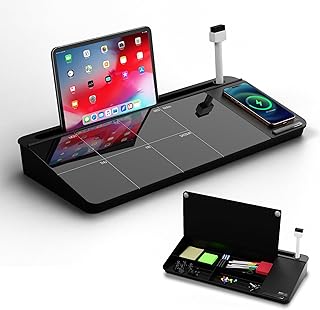
NEXTLUXE Glass Desk Whiteboard with Wireless Charger – Desktop Whiteboard with Storage, Weekly Planner, Dry Erase Pad, Organizer Drawer for Home, School, Office Gadgets – Black (Black)
Best For:
Home-office users who want a visible weekly planner with built-in wireless charging and storage—good for staying on top of priorities.
A glass desktop whiteboard with wireless charging and storage elevates the morning routine by combining a visual planning surface with practical organization. The NEXTLUXE model includes a weekly planner layout on a glossy glass surface that resists staining better than cheaper melamine boards. It also integrates a small organizer drawer for pens and small gadgets and offers a wireless charging pad—turning the unit into a single hub for weekly priorities, quick notes, and device power.
Visually mapping your week on a glass planner changes how mornings feel: instead of scrambling through apps or sticky notes, you have a single, visible plan that sits above your workspace. The glass surface is easy to wipe clean and maintains a premium look that fits well in modern home offices. The built-in wireless charger reduces cable clutter and keeps your phone topped up during long morning focus blocks. Users who like a tidy, intentional desk will appreciate the storage for markers and small accessories.
Real-life morning routines: use the weekly grid to highlight your three top outcomes for the day, then reference it as you move through timed blocks. Pair with a Pomodoro cube and a daily to-do pad to move tasks from the glass planner to action. If you work from home and host calls, place the whiteboard where you can glance quickly between meetings to confirm priorities. The glass surface works well with vibrant dry-erase markers and can double as a quick sketchpad for brainstorming.
Buying considerations: confirm the charger’s output and compatibility with your device, as wireless chargers vary in speed. Check the size to ensure it fits your desk and that the drawer offers enough space for your regular tools. Glass is durable but heavier than plastic—ensure your desk can support the weight and that you have room to position it safely. Customers commonly praise the aesthetics and functionality but advise checking marker compatibility (some markers leave light residue if left too long).
Who it’s best for: people who want a central visual planner with integrated charging and storage—ideal for home office setups, teachers, and professionals who prefer an always-visible weekly overview.
Who may not need it: minimalists with tiny desks, or users who prefer fully digital planning with cross-device sync.
Pros: premium glass surface, built-in wireless charging and organizer drawer, weekly planner layout for at-a-glance priorities.
Cons: heavier footprint, requires desk space and charger compatibility checks.
If a combined visual planner and charging station would streamline your mornings, see this NEXTLUXE glass desk whiteboard on Amazon. Check the latest price on Amazon.
Pros
- Premium glass surface resists staining
- Built-in wireless charger reduces cable clutter
- Organizer drawer and weekly layout keep priorities visible
Cons
- Heavier and requires more desk space
- Wireless charger speeds vary by device
To centralize your morning planning with style and function, view this NEXTLUXE glass desk whiteboard on Amazon. Check the latest price on Amazon.
Final Verdict
Morning productivity is rarely about a single miracle tool; it’s about a few consistent habits supported by the right gadgets. The rotating cube timers are excellent for people who need tactile, immediate cues to start and stop work—especially those reducing phone use or managing ADHD-related focus challenges. The compact Taja To Do List notepad is an ideal partner for quick brain dumps and daily priorities, while the larger Task Planner & Activity Log is suited to people who want to map hourly schedules and analyze how their time is spent. For a polished visual anchor, the NEXTLUXE glass desk whiteboard doubles as a weekly planner and wireless charging station that reduces clutter and keeps priorities in sight.
How to combine them for realistic mornings: start with a brain dump on the Taja pad, pick the top three tasks and transfer them to the glass whiteboard if they fit into your weekly goals. Use the cube timer for a 25-minute focus session, log what you accomplished on the larger activity pad if helpful, then take a short break. Repeat another timed sprint and use the whiteboard to track progress across the week. This kind of simple, repeatable structure mirrors what many users report as effective: a visible plan, an easy capture method, and reliable timing.
Buying considerations recap: choose a timer based on audio/vibration needs and power type; pick a notepad size that matches the level of detail you want to plan; and confirm wireless charging compatibility and desk space before investing in a glass whiteboard. If you’re building one morning routine tool at a time, start with a simple timer and a to-do pad—those two alone will change how you begin each workday.
As an Amazon Associate, I earn from qualifying purchases. This article may contain affiliate links, which means we may receive a commission at no extra cost to you.
Check the latest price on Amazon.
Conclusion
These Desk gadgets people use during realistic productivity mornings picks are trending now and offer great value and variety. Check the links above for latest prices and reviews.
As an Amazon Associate, I earn from qualifying purchases.
Tags:
morning productivity gadgets, desk timers, Pomodoro timer, daily planner notepad, glass desk whiteboard, ADHD productivity tools, time blocking, home office organization
