Trending Focus Gadgets for Work & ADHD
As an Amazon Associate, I earn from qualifying purchases. This article may contain affiliate links, which means we may receive a commission at no extra cost to you.
As an Amazon Associate, I earn from qualifying purchases. This article may contain affiliate links, which means we may receive a commission at no extra cost to you.
Staying focused during long work sessions, meetings, or study blocks is a universal struggle—made harder if you have ADHD, anxiety, or simply a busy schedule. Over the last few years, purpose-built focus tools have moved beyond gimmicks and into genuinely helpful everyday solutions: structured planners, Pomodoro timers, tactile fidgets, and multi-mode cube timers that fit a variety of workflows. This guide walks through five trending gadgets that many people use to carve out productive time, reduce distraction, and build momentum.
I compiled these recommendations based on product features, common real-world use cases, and what users tend to praise or point out as limitations. This is not personal hands-on testing, but an evidence-informed buyer guide to help you decide which tools suit your routine and sensory preferences.
Buying Guide
Buying guide: what to consider when choosing focus tools
1) Your attention profile: Are you easily distracted by visual clutter, sound, or lack of structure? People who respond well to clear timeboxes benefit most from timers and planners. Those who need sensory input to stay grounded may prefer tactile fidgets or vibration-enabled timers.
2) Mode of use: Desk-only tools (notepad, keyboard fidget) differ from portable gadgets (cube timers, keychain clickers). Pick devices that match where you concentrate—office, home desk, coffee shop, or classroom.
3) Customization and feedback: Timers with multiple presets, vibration, mute options, or custom intervals let you tune the tool to tasks (deep work vs. admin). Planners with modular sections and a low-friction layout help maintain momentum for people with executive function challenges.
4) Sensory considerations: If loud alarms are distracting or embarrassing, choose vibration or mute modes. Visual timers with clear displays help those who want a persistent time cue. Fidgets with satisfying tactile feedback can reduce restless energy without drawing attention.
5) Build habits, not dependencies: Tools help structure time and reduce friction for starting tasks. Consider pairing a planner + timer combo for best results: the planner captures priorities and the timer enforces small wins.
6) Battery and durability: For timers, check battery life and whether they require frequent charging or replaceable batteries. Look for well-built edges and a non-slip base for desk use, especially if you’ll flip or rotate a cube timer often.
7) Value vs features: Simple devices are often more reliable. If you only need a basic Pomodoro, a single-purpose timer can be cheaper and less distracting than a feature-rich model with many modes you’ll never use.
Use these criteria to match the right gadget to your schedule, sensory needs, and work environment.
ADHD Daily Planner Notepad for Neurodivergent Adults – Productivity Daily Planner Desk Pad & Task Management to Stay Organized and Focused Note Pad (Rainbow, A4 Portrait)

Best For:
Adults with ADHD or executive-function challenges, remote workers who want a low-friction desk planner, students and parents who need visible daily structure.
A purpose-built desk pad designed for adults who want a simple, low-friction way to plan, prioritize, and track daily tasks. The ADHD Daily Planner Notepad presents a single-page layout—usually in an A4 portrait format—with sections for top priorities, time-blocking, small steps, and a visible checklist column. The rainbow header and color accents provide visual separation between sections without being overwhelming. This pad leans into the idea that executive-function-friendly design reduces the friction of starting and staying on task.
Main benefits
The desk-pad size gives you a visible, always-on instruction set: nothing to open on a device and no extra apps to configure. The layout helps break large tasks into manageable subtasks and encourages short, time-limited sprints—especially useful when combined with a Pomodoro or cube timer. Sticky transitional tasks (email, admin, small chores) have their own area so they aren’t allowed to dominate your list.
Real-life use cases
Place the pad under your keyboard at your home desk so the top three priorities are in sight all morning. Use it to plan one-hour focused blocks and transfer items to tomorrow’s sheet to avoid overload. For hybrid workers, tear off a page at the end of a workday and bring it home—your next-day plan is already waiting.
Who this helps
Anyone who benefits from external structure: folks with ADHD, busy parents juggling tasks, students who need to break projects into steps, and remote workers who struggle to switch from shallow to deep work. It’s especially useful for people who want a tactile, analog solution to reduce screen-based distractions.
Why it’s valuable
Compared with digital planners and phone reminders, an analog desk pad removes notification friction and keeps priorities visible. The simple layout focuses on execution over perfection—users often report that the act of writing makes tasks feel more achievable. Buyers who prefer a minimal, routine-driven approach will find this pad complements timers and fidget tools well.
Buying considerations
Look at page count and paper thickness if you use heavy ink or highlighters; a larger pad can last weeks but should be easy to tear cleanly. If you work in shared spaces, a subdued colorway may be better than bright rainbow tones. Finally, check whether the pad has dated or undated pages; undated pads are more flexible for irregular schedules.
Pros: keeps priorities visible, low friction, encourages micro-steps
Cons: paper runs out and needs replacing; not helpful for complex project planning
Best for: people with ADHD, remote workers, students, and anyone who wants a visible, tactile planning surface to reduce digital clutter.
Check the latest price on Amazon.
Pros
- Large, always-visible desk layout keeps top priorities in sight
- Simple sections encourage micro-steps and time-blocking
- Analog format reduces screen-time distractions
Cons
- Paper supply needs regular replacement
- Not suited for detailed multi-project planning
Ready to add a visible daily plan to your desk? Check the latest price on Amazon.
Rotating Pomodoro Timer 5, 25, 10 50 Minutes Preset, Desk Productivity Flip Timer, ADHD Tool Cube Countdown Stopwatch, Vibration/High/Low Volume/Custom Modes, for Work, Study, Back to School, Kitchen

Best For:
Students, writers, and anyone who prefers a tactile, no-fuss Pomodoro experience; especially helpful for those with ADHD or who dislike phone timers.
This rotating Pomodoro-style cube timer combines tactile interaction with multiple preset intervals (commonly 5, 10, 25, 50 minutes) and an orientation-based activation: flip the cube to select a preset and the countdown starts. It usually offers vibration and adjustable sound levels (high/low/mute) and sometimes allows custom times for more control. The rotating form factor makes it intuitive—no buttons to fumble with if you want to jump into a short focus sprint.
Main benefits
The strongest advantage of a rotating Pomodoro cube is its simplicity. For people with low tolerance for setup, flipping a cube is frictionless. The vibration option helps those who prefer silent cues, while audible alarms are useful in solo workspaces. When paired with a short desk planner, the cube timer enforces micro-goals and provides the recurring success cues that help form habit loops.
Real-life use cases
Use a 25-minute preset for deep writing sprints, flip to a 5- or 10-minute setting for quick inbox or tidying tasks, and choose a 50-minute focus block for teaching prep or coding sessions. Students can place it beside a laptop during study sessions; parents can use the vibration mode to signal transition times for kids without startling them.
Why people like it
Compared to phone-based timers, the cube eliminates notification overload and the temptation to check other apps. Its tactile action helps signal an intentional start—an important psychological cue for people who struggle to begin tasks. Many users highlight the satisfying physical motion of flipping as part of an accountability ritual.
Buying considerations
Check the battery type and whether the device uses replaceable batteries or internal rechargeable cells. If you frequently work in shared offices or classrooms, prefer the vibration or mute modes. Confirm the preset intervals match your workflow or whether a custom mode is available.
Pros: intuitive flip-to-start interface, multiple presets, silent vibration option
Cons: presets may not match every workflow; some models use non-replaceable batteries
Best for: people who need a fast, tactile start to timed work sessions—students, writers, developers, and people with ADHD who benefit from short, structured sprints.
Check the latest price on Amazon.
Pros
- Flip-to-start design eliminates setup friction
- Multiple presets and vibration mode for flexible cues
- Reduces screen distraction compared with phone timers
Cons
- Preset intervals might not suit every workflow
- Battery type varies; check replaceable vs rechargeable
Want a tactile Pomodoro option? Check the latest price on Amazon.
4-Key Keyboard Clicker Fidget Gadget with LED Lights, Stress Relief Tool for Office Desk & Focus, Satisfying Tactile Feedback Keychain for Adults (Black & White 2-Pack)

Best For:
People who want a subtle tactile outlet—office professionals, students, and anyone who benefits from discreet fidgeting.
This 4-key keyboard-style clicker fidget combines tactile mechanical keys with subtle LED feedback and compact portability. Designed as a keychain or small desk gadget, it provides quiet, satisfying clicks and a compact surface for repetitive finger movement. Because it mimics keyboard taps, it feels natural for many office workers and creatives who want a focused, silent outlet for restless energy.
Main benefits
A small tactile tool like this offers sensory input without being disruptive. The mechanical feedback can reduce the urge to check a phone or fidget with bigger, noisier toys. LEDs add a low-key visual anchor for attention without being overpowering. In a pinch, the clicker can serve as a low-volume stress reliever during meetings or as a discreet tool while brainstorming.
Real-life use cases
Keep one on your keyring for hands-on cueing between tasks—tap for 30–60 seconds before starting a timed focus sprint. Place one beside your laptop when you need to keep hands busy during long calls. They’re good for writers who need to channel nervous energy and for people who find repetitive finger movements calming. Pairs well with a planner or timer: click to settle, then flip a cube timer to start a work block.
Why people choose this over alternatives
Compared to larger fidget devices (spinners, cubes with many sides), the keyboard clicker is subtle and pocketable. It won’t roll off a desk or distract colleagues, and the mechanical action tends to feel more deliberate than spinner-style fidgets. Users who like a tactile, typing-like sensation usually prefer this style.
Buying considerations
Noise levels vary by model—if you work in a quiet office, opt for the quieter variant. Durability and key wobble are common user concerns; choose a product with sturdy key caps and a solid frame if you expect heavy daily use. If you want stronger visual feedback, check LED brightness and battery life.
Pros: compact and discreet, satisfying tactile feedback, portable keychain design
Cons: may still create minor noise in very quiet settings; LEDs require battery power
Best for: office workers, remote employees, students, and anyone who needs a discreet, tactile outlet to channel restless hands.
Check the latest price on Amazon.
Pros
- Pocketable and discreet keychain design
- Satisfying mechanical clicking similar to typing
- LEDs provide a subtle visual anchor
Cons
- Not completely silent—may be noticeable in very quiet rooms
- LEDs add battery dependence
Need a discreet fidget for meetings or long calls? Check the latest price on Amazon.
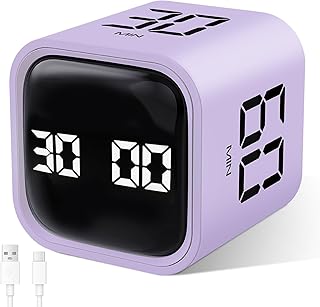
GuDoQi Multi-Function Cube Timer, 5/10/30/60 Min & Custom Count Down, Included Pause & Resume Feature, Silent, Vibrate & Adjustable Sound Alarm for Productivity in Tasks, Study & Kitchen, Purple
Best For:
People who want a versatile timer for work, study, kitchen tasks, and family routines; ideal for those who appreciate pause/resume and customizable alerts.
The GuDoQi multi-function cube timer is a flexible, orientation-activated timer with multiple presets and a custom countdown option. It typically includes 5, 10, 30, and 60-minute presets, and some models add the ability to program a custom interval. Silent, vibration, and adjustable volume alarms provide unobtrusive signaling across different environments. The cube’s pause and resume features are useful when interruptions occur and you want to pick up where you left off.
Main benefits
This cube’s combination of presets, custom intervals, and pause/resume capability makes it versatile for many tasks—beyond classic Pomodoro work sessions. The vibration mode is especially handy for shared spaces or for people who respond better to tactile alerts. Pause/resume is a practical addition that helps when meetings or unexpected phone calls interrupt your flow.
Real-life use cases
Use the 30-minute setting for project review blocks, 10 minutes for quick email triage, and 60 minutes for longer planning sessions. The custom timer works well for exercise sets, cooking, or time-limited family activities. Students use it to structure study sessions and short breaks, and parents like the vibration option to manage transitions for kids without alarms going off loudly.
Why it’s valuable
Compared with single-purpose timers, this multi-function cube covers more scenarios—study, kitchen, exercise, and focused work—making it a higher-value pick for people who want a single gadget for several contexts. Reviews often note the convenience of choosing pause/resume over restarting an interval after interruptions.
Buying considerations
Confirm how the cube saves custom settings (some require holding a button to program) and whether the unit uses replaceable batteries or an internal rechargeable cell. If you need extended vibration strength or a louder alarm, compare models by audio and vibration specs. Color options matter if you want a device that fits your desk aesthetic.
Pros: multi-mode presets and custom timing, pause/resume, vibration and sound options
Cons: more features mean a slightly steeper learning curve; check power source
Best for: multitaskers, families, students, and anyone who appreciates a versatile timer that adapts across home and work contexts.
Check the latest price on Amazon.
Pros
- Versatile presets plus custom interval option
- Pause/resume feature handles interruptions well
- Vibration and adjustable sound for quiet environments
Cons
- Slightly more complex to program than single-purpose timers
- Confirm power type—replaceable vs rechargeable
Looking for a multi-use cube timer? Check the latest price on Amazon.
Productivity Timer 1, 5, 10, 30, 60 Minutes Preset, Desk Cube Timer with Gravity Sensor/Mute/Vibration for ADHD, Work, Study, Kitchen, Back to School (Wood Grain)

Best For:
Users who want an attractive, low-profile timer that fits a home office or minimalist desk—professionals, students, and decor-conscious buyers.
A wood-grain aesthetic cube timer that blends into home or office décor while delivering practical time-management features. Preset intervals commonly include 1, 5, 10, 30, and 60 minutes, and the unit usually supports a gravity sensor that starts the countdown when you set a side down. Sound, vibration, and mute modes offer flexible alerts for offices, study rooms, or family spaces. The natural-looking finish makes this timer a popular choice for people who care about how productivity tools look alongside other desk items.
Main benefits
This timer’s combination of discrete looks and practical presets makes it a low-profile productivity helper. The gravity-sensor activation is a smart, tactile way to select intervals without hunting for controls. The aesthetic wood-grain finish is helpful for users who want a calming, minimal desk environment rather than bright plastic colors.
Real-life use cases
Use the one-minute preset for quick break micro-exercises or breathing resets between tasks. Five- or ten-minute presets are useful for email triage or short chores; 30 and 60 minutes support longer deep work or study segments. Parents appreciate the mute/vibration option for timing children’s activities, while remote workers like the subtle design for visible but unobtrusive reminders.
Why it stands out
Compared with brightly colored cube timers, the wood-grain version is less visually distracting and fits more naturally into a professional or home setting. For buyers who want tools that contribute to a calmer workspace, the neutral finish and simple operation make this an attractive option.
Buying considerations
Check how stable the cube is when placed on edge; some gravity sensors require precise placement. Verify whether the wood-grain finish is real veneer or printed plastic if tactile feel matters. As always, consider the battery type and whether you prefer replaceable or rechargeable power.
Pros: attractive wood-grain finish, gravity-sensor activation, multiple presets
Cons: aesthetic models may cost slightly more; gravity sensor requires precise placement
Best for: professionals, students, and anyone who appreciates a low-profile, attractive timer that blends with home or office décor.
Check the latest price on Amazon.
Pros
- Wood-grain aesthetic fits home and office decor
- Gravity-sensor activation is intuitive and tactile
- Multiple practical presets for varied tasks
Cons
- Gravity sensor may need precise placement
- May be pricier than basic plastic models
Prefer a stylish, subtle timer for your desk? Check the latest price on Amazon.
Final Verdict
Putting it together: which focus tools to choose
If you want a single, low-effort switch to reduce distraction, start with a desk pad planner and one simple timer (the rotating Pomodoro cube or the wood-grain gravity timer). The planner gives visible priorities while the timer enforces start-stop boundaries that many people with attention challenges find essential. For those who need discreet sensory input, add the 4-key keyboard clicker—its tactile, typing-like feedback is perfect for channeling restless hands during meetings or creative sessions.
If you frequently switch contexts—home, kitchen, family routines—the GuDoQi multi-function cube or the productivity cube with vibration offers more utility thanks to custom intervals and pause/resume features. These are solid picks for parents, students, and multitaskers who use one device across different rooms and responsibilities.
Who should buy what
– Buy the ADHD Daily Planner Notepad if you need visible, day-by-day structure and prefer analog tools.
– Choose the Rotating Pomodoro Timer if you want an intuitive flip-to-start experience for short focus sprints.
– Grab the Keyboard Clicker if you need a discreet tactile outlet that won’t draw attention in meetings.
– Opt for the GuDoQi cube if you want programmable flexibility plus pause/resume for interruptions.
– Select the Wood-Grain Productivity Timer if desk aesthetics and subtlety matter as much as functionality.
Final considerations
Try pairing tools: a planner plus a timer and a small fidget often form a trifecta that addresses starting, sustaining, and sensory needs. Focus tools support better habits, but they don’t replace broader time-management or clinical strategies when attention challenges are severe. If you’re managing ADHD symptoms that significantly impair daily life, consider professional guidance alongside environmental supports.
Check the latest price on Amazon.
Conclusion
These Trending gadgets helping people focus while working picks are trending now and offer great value and variety. Check the links above for latest prices and reviews.
As an Amazon Associate, I earn from qualifying purchases.
Tags:
focus gadgets, ADHD tools, Pomodoro timer, productivity timer, desk planner, fidget gadget, study tools
