Top Streaming Accessories Creators Use for Realistic Setups
As an Amazon Associate, I earn from qualifying purchases. This article may contain affiliate links, which means we may receive a commission at no extra cost to you.
Streaming and content creation have quietly shifted from hobbyist setups to polished mini-productions, and the right accessories make the difference between a forgettable stream and a show that keeps viewers coming back. Whether you’re a solo gamer trying to build a consistent brand, a small team producing podcast-style streams, or an educator hosting live webinars with demonstrations, the peripherals you choose shape both the look and the workflow of your broadcasts. This guide focuses on five widely used accessories that creators rely on to bring realistic, professional-feeling setups to life: studio lighting, macro keypads, multi-purpose production consoles, broadcast-grade USB microphones, and compact Stream Deck solutions.
Before we dive into each product, a quick note on purpose: I’ve compiled this guide from product specifications, manufacturer information, and common real-world usage patterns reported by creators and reviewers—aiming to help you decide which items address specific workflow problems and production goals without overcomplicating your rig.
Buying Guide
What to look for when choosing gear for a realistic streaming setup
1) Workflow integration and software support: The biggest productivity gains come from devices that easily integrate with your streaming software (OBS, Streamlabs, Twitch Studio) and system (Mac/PC). Look for official plugins, SDK support, or simple keyboard-mapped controls. A controller that can trigger scenes, adjust audio, or fire macros will save time and reduce live mistakes.
2) Build quality and ergonomics: You’ll be touching these accessories for hours. Durable buttons, responsive dials, and an adjustable light mount matter. For lighting, consider color accuracy and diffusion; for controllers and keyboards, tactile feedback and layout determine speed and comfort.
3) Signal quality for audio and video: USB mics should offer clear capture modes (cardioid vs. omnidirectional), low-latency monitoring, and easy gain control. Lighting should be flicker-free and adjustable for color temperature to match room lighting and camera white balance.
4) Size and desk footprint: Not everyone has an expansive desk. Mini Stream Decks or compact macro keypads give you essential control without stealing surface area. Think about cable management and whether items mount to arms or sit on a desktop pad.
5) Customizability and macros: For creators who juggle overlays, scene transitions, and chat interactions, the ability to program multiple actions behind a single key is invaluable. Devices with onboard profiles or cloud-save features can move with you between setups.
6) Budget vs longevity: Entry-level accessories are great for learning, but if you plan to scale production quality, prioritize devices with firmware support and community-driven integrations. Often you’ll trade a few dollars for years of convenience.
7) Compatibility and platform limits: Confirm Mac/PC compatibility, especially for advanced features like RGB, app-based controls, or integrated audio mixing.
In the sections that follow, each product is broken down for who it suits best, realistic use-case scenarios, practical advantages and downsides, and the everyday problems each device solves. These are framed so you can match the tool to the task rather than buying features you won’t use.
Logitech for Creators Litra Glow Premium LED Streaming Light with TrueSoft- Computer lighting for video conferencing, Zoom meetings, with adjustable mount and desktop app control for PC/Mac – Graphite

Best For:
Streamers, video presenters, and remote professionals who need small-footprint, flattering on-camera lighting with adjustable color temperature and easy mounting.
Professional-looking video often starts with lighting, and the Logitech Litra Glow is built to bring soft, flattering illumination to creators who want to improve on-camera appearance without a complex studio setup. This LED desktop light is designed to sit on a monitor or a desk mount and offers diffused output that reduces harsh shadows and minimizes hot spots on faces. The TrueSoft diffuser and built-in color temperature adjustments help you match ambient room lighting or create a specific aesthetic—warmer tones for a cozy ‘let’s chat’ stream, or cooler tones for product demos and technical tutorials.
Practical benefits include a compact footprint and a flexible mounting system that clips onto monitors or sits on included stands. That makes it a realistic pick for creators who share desk space or stream from compact home offices. The companion desktop app allows for precise control over brightness and color temperature, helpful for creators who switch scenes or move around during a session. Where standard ring lights and bare LED panels can create unattractive specular highlights, the Litra Glow’s TrueSoft technology prioritizes even, natural-looking skin tones—something viewers subconsciously appreciate.
Real-life use cases: solo streamers who primarily present on camera and need to balance face lighting with their RGB backlighting; work-from-home professionals doing recurring video meetings; creators who record short-form content and need consistent skin tones for editing. Compared with typical ring lights or large softboxes, the Litra Glow is less intrusive and faster to set up, though it won’t replace a full softbox when you need multi-point studio lighting for larger scenes.
Who it’s best for: streamers and video presenters who want a compact, high-quality on-camera light that’s easy to adjust and won’t dominate a small workspace. Who may not need it: creators with an already-optimized multi-light studio or those on a very tight budget who prefer simpler DIY diffusion methods.
Pros: compact and easy to mount; TrueSoft diffusion yields natural skin tones; desktop app controls for fine-tuning; adjustable color temperature and brightness. Cons: limited coverage compared with multi-light setups; relies on software for advanced controls (may add complexity); not a substitute for full three-point lighting when filming larger groups.
Check the latest price on Amazon.
Pros
- TrueSoft diffusion for natural skin tones
- Compact clip and desk mount, easy setup
- App control for brightness and color temperature
- Minimal desk footprint compared with larger panels
Cons
- Less coverage than multi-light studio setups
- Advanced controls require desktop app (adds setup step)
- Not ideal for lighting multiple people in a scene
Check the latest price on Amazon.
FIFINE AmpliGame Stream Controller with 15 Macro Keys, Streaming Keyboard with Trigger Actions in OBS/Twitch/YouTube/Streamlabs, Shortcut Buttons Keypad Works with Mac and PC-D6

Best For:
Streamers and content creators seeking a compact, budget-friendly macro keypad for OBS/Streamlabs/Twitch/YouTube controls and quick hotkeys.
Macro keypads have become a go-to for creators who want tactile control without investing in a large Stream Deck. The FIFINE AmpliGame Stream Controller brings 15 programmable macro keys in a compact, angled chassis that sits comfortably on a desktop or attaches to an adaptable mounting system. Each key can be mapped to OBS scene changes, hotkeys in editing apps, chat commands, or multimedia controls, shrinking multi-step actions into a single tap. For creators who regularly swap overlays, trigger sound effects, or jump between audio sources, this kind of stream-specific keypad improves reaction time and reduces reliance on multi-window mouse navigation.
A practical advantage here is the device’s compatibility with both Mac and PC and its plug-and-play design for many default functions. It’s a budget-friendly alternative to higher-end controllers for creators who value physical keys and steady, mechanical-like feedback but don’t need a full controller with LCD keys. The keypad’s layout encourages muscle memory for recurring actions—once you’ve assigned common tasks to specific keys, you’ll find your live workflow noticeably smoother.
Real-life usage: a gaming creator who triggers a “clip” macro and overlay switch at the same time; a solo streamer controlling mute/unmute and lighting presets without alt-tabbing; an editor who uses the keypad for timeline navigation and frequently used shortcuts during review sessions. Compared to standard alternatives—generic macro keyboards or keyboard hotkey layers—the FIFINE unit is purpose-built for stream control, with a smaller footprint and keys optimized for repeated live use.
Who it’s best for: budget-conscious streamers and creators who want physical macro control and straightforward mapping across streaming software. Who may not need it: creators who already own a full Stream Deck ecosystem or those who prefer on-screen visual feedback from programmable LCD keys.
Pros: compact 15-key layout; straightforward compatibility with streaming software; tactile keys encourage fast, reliable input; more affordable than premium multi-button controllers. Cons: lacks LCD key feedback so remembering mappings takes time; fewer advanced integrations than premium controllers; physical labeling or custom keycaps may be needed for larger macro sets.
Check the latest price on Amazon.
Pros
- 15 programmable macro keys in a compact form
- Plug-and-play compatibility with Mac and PC
- Affordable alternative to premium stream controllers
- Tactile keys improve reaction time on live shows
Cons
- No LCD keys—no visual button labels
- Fewer advanced integrations than premium devices
- May require custom labeling for complex macro setups
Check the latest price on Amazon.
Elgato Stream Deck +, Audio Mixer, Production Console and Studio Controller for Content Creators, Streaming, Gaming, with customizable touch strip dials and LCD keys, works with Mac and PC

Best For:
Semi-pro streamers, small production teams, and creators who need on-device audio mixing and visual feedback for complex workflows.
For creators who need a powerful, integrated control surface, the Elgato Stream Deck + combines tactile controls, an audio mixer surface, and programmable LCD keys into one production console. This hybrid approach is aimed at content makers who juggle multiple inputs—scene switching, audio mixing, sound effects, and macro chains—and want a single surface to manage it all. The LCD keys provide visual feedback that’s particularly valuable during live broadcasts: you’ll see current scenes, timer states, and active audio channels at a glance. The touch strip dials and customizable faders add fine-grained control over levels, letting you tweak mic gain, music volume, or SFX without opening a software mixer.
Unlike plain macro pads, the Stream Deck + prioritizes a cohesive production workflow. It integrates deeply with OBS, Streamlabs, Elgato’s own ecosystem, and many popular apps for streaming and editing. The ability to nest folders and set multi-action macros means complex sequences—like switching scenes, toggling an audio track, and starting a recording—can be handled with a single press. For multi-camera streams or shows with frequent music cues, the on-device controls drastically reduce the cognitive load of managing multiple apps.
Real-world scenarios: a live variety streamer switching between gameplay, facecam, and guest feeds; a small production running music intros and layered audio beds where quick gain adjustments are necessary; a podcast host who needs one-touch recording, ad stingers, and voice effects. Compared to older Stream Deck models and generic controllers, this console adds hardware faders and dials that make audio handling more intuitive and responsive.
Who it’s best for: semi-professional creators and small teams who manage multi-source productions and want a consolidated, visual control surface. Who may not need it: absolute beginners who may find the feature set excessive or very budget-limited creators for whom a mini Stream Deck or simple macro pad suffices.
Pros: customizable LCD keys with clear visual feedback; integrated audio controls and touch strip dials; deep software integrations and multi-action macros; reduces app switching and simplifies live workflows. Cons: larger footprint than compact macro pads; premium price compared with basic controllers; may have overlapping features if you already own separate mixers or controllers.
Check the latest price on Amazon.
Pros
- Programmable LCD keys for instant visual feedback
- Integrated audio controls including touch strip dials and faders
- Deep integration with OBS, Elgato apps, and common streaming tools
- Supports nested actions and multi-step macros
Cons
- Larger desk footprint than mini controllers
- Higher cost than basic macro pads
- Some features redundant if you already own a separate audio mixer
Check the latest price on Amazon.
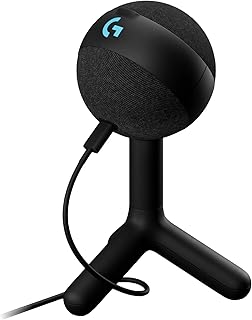
Logitech G Yeti Orb Condenser RGB Gaming Microphone with LIGHTSYNC, USB Mic for Streaming, Cardioid, USB Plug and Play for PC/Mac – Black
Best For:
Solo streamers, podcasters, and content creators who want plug-and-play USB audio with clear voice capture and easy on-device controls.
Audio quality is one of the most immediate ways a stream feels professional, and the Logitech G Yeti Orb condenser USB microphone aims to deliver broadcast-ready sound with minimal fuss. Built as a plug-and-play USB solution, this mic targets creators who want crisp voice capture without the complexity of an XLR chain or an external audio interface. The Yeti Orb’s cardioid pattern is optimized for single-host streaming, focusing on the speaker’s voice while minimizing room noise—handy for creators without dedicated sound-treated rooms.
Beyond the core capture quality, the Yeti Orb brings LIGHTSYNC RGB and approachable controls to the desktop: onboard gain knobs, mute buttons, and monitoring capabilities reduce the need to dive into software menus mid-session. The RGB element is an aesthetic plus for gaming-focused setups, letting streamers match mic lighting to their brand colors or scene themes. In terms of sound character, USB condensers like this tend to offer a bright, present vocal tone that sits well in streams, podcasts, and voiceover work.
Real-life use cases: solo gamers and streamers who want quick setup and consistent voice levels; podcasters recording at home with one or two hosts; creators who rotate between streaming and recorded videos and want a single mic that’s easy to position and monitor. Compared with entry-level headset mics, the Yeti Orb provides fuller and more natural-sounding audio. Versus professional XLR condensers, USB mics trade some flexibility and upgrade path for convenience and simplicity.
Who it’s best for: creators who prioritize easy, high-quality USB audio without investing in mixers and interfaces. Who may not need it: studios seeking the highest-end XLR microphones, or multi-person podcasters who need multiple mic inputs and physical echo-free rooms.
Pros: plug-and-play USB convenience; cardioid pickup optimized for solo voice capture; onboard controls for gain and mute; attractive RGB integration for themed setups. Cons: less flexible than XLR microphones with external preamps; may pick up room reflections in untreated spaces; USB connection limits some advanced routing options.
Check the latest price on Amazon.
Pros
- Easy USB setup with onboard gain and mute controls
- Cardioid pattern reduces off-axis noise for single-host use
- RGB LIGHTSYNC adds aesthetic customization
- Good vocal clarity without an audio interface
Cons
- Not as flexible as XLR setups with dedicated preamps
- May capture room reflections in untreated spaces
- USB connection limits complex routing and multi-mic setups
Check the latest price on Amazon.
Elgato Stream Deck Mini – Control Zoom, Teams, PowerPoint, MS Office and Boost Productivity with Seamless Integration for Daily Apps, Set Up Shortcuts Easily, USB, Compatible with Mac and PC

Best For:
Beginners, hybrid workers, and streamers who need a small, visual controller for scene changes, app shortcuts, and easy workflow triggers.
The Elgato Stream Deck Mini is a compact, four- to six-button (depending on model versions) programmable controller designed for creators who want the convenience of an on-hand control surface without occupying much desk space. It’s popular because it packs Elgato’s familiar visual key system into a budget-friendly, portable package that works outside streaming too—think Zoom, Teams, PowerPoint, or productivity shortcuts when you’re not live. The Stream Deck Mini shines for users who want instant scene switching, application shortcuts, or multi-action sequences in a package small enough to tuck beside a keyboard.
Its greatest strength is usability: the LCD keys provide icon-based feedback so you always know what each button will do, which is ideal for people running complex overlays or for those who swap between streaming and productivity tasks. While it lacks the faders and dials of larger consoles, the Stream Deck Mini is an excellent entry point into visual, programmable controls and often pairs well with macro keypads or audio mixers for a complete setup.
Real-world scenarios: a streamer who wants a neat, labeled set of keys for quick scene changes; a hybrid worker who uses the same hardware to trigger presentation slides and mute/unmute during calls; a creator building a multi-profile workflow where each app has its own button layout. Compared with larger Stream Deck options, the Mini trades fewer physical keys for a much smaller footprint and more approachable price point.
Who it’s best for: beginners and hybrid users who want visual key feedback in a compact device or streamers who need a few essential controls without extra desk clutter. Who may not need it: creators who already require extensive channel mixing and multi-action control on the same surface—those users may prefer the full Stream Deck + console.
Pros: compact and portable; LCD keys with visual icons; excellent for both streaming and productivity; simple profile switching for app-specific layouts. Cons: limited number of physical keys compared to larger decks; lacks built-in faders and dials; advanced streamers may outgrow it as production needs expand.
Check the latest price on Amazon.
Pros
- Small footprint with visual LCD keys
- Great for both streaming and productivity use cases
- Affordable entry point into programmable controllers
- Profiles and icons simplify multi-app workflows
Cons
- Very limited number of keys versus full decks
- No integrated audio controls or faders
- May be outgrown by advanced multi-source productions
Check the latest price on Amazon.
Final Verdict
Putting together a realistic streaming setup is as much about workflow as it is about presentation. The five accessories covered here each solve specific pain points common in creator rigs: consistent, flattering lighting (Logitech Litra Glow); compact macro control for budget-minded creators (FIFINE AmpliGame); an all-in-one production surface with visual feedback and audio mixing (Elgato Stream Deck +); easy, high-quality USB audio (Logitech G Yeti Orb); and a pocket-sized programmable controller for essential shortcuts (Elgato Stream Deck Mini). If you’re just starting, prioritize one or two upgrades that address your weakest link—audio and lighting usually create the biggest perceived quality jump. If you’re scaling up to multi-source streams and tighter production schedules, invest in deeper integrations and devices that centralize control to reduce on-the-fly juggling.
Ultimately, match the tool to the task: the Litra Glow is a smart pick for improving on-camera appearance without a full studio; the FIFINE keypad is a good step for streamers who want tactile control on a budget; the Stream Deck + suits semi-pros who prize visual feedback and audio controls; the Logitech G Yeti Orb gives approachable USB audio for quick setup; and the Stream Deck Mini fits hybrid users who need a lightweight, visual controller. Consider desk space, software compatibility, and whether you prefer tactile or visual feedback when choosing. If you use affiliate links in your shopping, this list offers a balanced range of price and capability to help you gradually build a realistic, reliable streaming setup.
Conclusion
These Gaming accessories creators use during realistic streaming setups picks are trending now and offer great value and variety. Check the links above for latest prices and reviews.
As an Amazon Associate, I earn from qualifying purchases.
Tags:
streaming accessories, stream deck, streaming microphone, streaming light, macro keypad, content creator gear, streaming setup
