Top Portable Monitors for Remote Traders (15.6" FHD Picks)
As an Amazon Associate, I earn from qualifying purchases. This article may contain affiliate links, which means we may receive a commission at no extra cost to you.
As a remote trader, you know screen space is not a luxury — it’s a productivity tool. Juggling multiple charts, a newsfeed, order tickets and communication apps on a single laptop screen slows reaction time and increases the risk of missing key moves. Lightweight, plug-and-play 15.6-inch portable monitors bridge the gap: they give you a second (or third) display that travels with your laptop, boosts visibility, and helps you keep trade setups visible no matter where you work.
Affiliate disclosure: As an Amazon Associate, I earn from qualifying purchases. This article may contain affiliate links, which means we may receive a commission at no extra cost to you.
This guide focuses on five popular 15.6" FHD portable monitors that frequently appear in searches for traders who work remotely. I’ve organized this piece to help you match a model to your workflow — whether you need long battery life, wireless mirroring, HDR-bright visuals, or the most compact carry profile. Each product section synthesizes features, real-world use cases reported by buyers, and practical buying considerations to help you choose the right second screen for a trading setup.
Buying Guide
Key considerations for traders choosing a portable monitor
Screen size and resolution: 15.6 inches with 1920 x 1080 (FHD) is a common sweet spot for traders who want sharper charts than a laptop can show without increasing weight. The FHD resolution provides enough pixel density for candlestick detail, small indicator text, and side-by-side windows.
Panel type and color/contrast: IPS panels lead for wide viewing angles and accurate colors — useful when you share your screen during video calls or glance at color-coded indicators. Look for higher contrast or HDR support if you often trade in bright environments.
Connectivity: USB-C video delivery (DisplayPort Alt Mode) simplifies cabling: one cable can provide picture and power from many modern laptops. HDMI preserves compatibility with older laptops, trading boxes, and consoles if you occasionally use the monitor for other tasks. If your laptop lacks USB-C video, check for an included adapter or the monitor’s support for USB-C charging-only vs. video.
Refresh rate and latency: Most portable monitors run at 60Hz; that’s fine for charting and basic platform interaction. If you do high-frequency trading or fast-paced order entry, prioritize lower latency and a responsive panel.
Portability and build: A smart cover, magnetic folio, or foldable stand makes daily setup fast. Consider thickness, weight, and whether the included case or stand supports the viewing angles you prefer for extended sessions.
Battery and wireless: Battery-built monitors and those with AirPlay/Miracast support remove cable clutter and work well in cafés or meeting rooms. Keep in mind battery monitors add weight; battery life varies with brightness and wireless use.
Speakers and extras: Built-in speakers are handy for alerts and video calls but rarely replace a headset for detailed audio. HDR, screen protectors, and factory calibration are nice-to-have features for visual fidelity.
Who should buy a portable monitor? If you trade on the go, need a second screen for multi-timeframe analysis, or frequently present charts from a laptop, a 15.6" portable monitor is a practical upgrade. Who may not need one: traders who already use a full desktop multi-monitor setup at a permanent desk and never move their workstation.
Realistic buying considerations
– Compatibility: Verify your laptop supports USB-C video or has an HDMI output. Some docks and adapters can fill gaps.
– Power options: If you expect long stretches away from outlets, consider battery-equipped models. If you mostly work near a power source, lighter, bus-powered monitors are preferable.
– Case and stand: A folio or magnetic stand makes the difference between a usable portable setup and one you avoid using. Make sure the included accessories match how you’ll place the screen on a coffee table or hotel desk.
Below are five well-reviewed options that cover different remote-trading priorities: affordability, battery freedom, travel-ready stands, and plug-and-play simplicity.
MNN Portable Monitor 15.6inch FHD 1080P USB C HDMI Gaming Ultra-Slim IPS Display w/Smart Cover & Speakers,HDR Plug&Play, External Monitor for Laptop PC Phone Mac (15.6” 1080P)

Best For:
Traders who need a slim, plug-and-play second screen for on-the-road setups and compatibility with both modern and older laptops.
The MNN 15.6-inch portable monitor targets traders who want crisp FHD visuals in a slim, travel-friendly package. With an IPS panel, 1080p resolution, USB-C and HDMI inputs, and built-in speakers, this model is designed for straightforward plug-and-play use with laptops, phones and compact trading boxes. HDR support is an attention-grabbing spec that boosts perceived contrast and can make chart colors pop under brighter lighting. Its smart cover acts as a protective folio and creates a stable viewing angle on uneven surfaces — a practical feature for traders who set up in cafés, co-working spaces, or hotel rooms.
Main benefits and how this helps traders
Traders benefit from the MNN’s combination of portability and connectivity. The USB-C input simplifies a one-cable connection for many modern laptops, carrying video and power if your laptop supports it. HDMI keeps the monitor compatible with older machines and external video devices. Built-in speakers allow audible alerts for trade executions and news updates without carrying a separate speaker, while HDR enhances contrast on compatible content so color-coded alerts and heatmap overlays are easier to read.
Real-life use cases
– On-the-go day traders who need an extra chart or order ticket beside their laptop while traveling for work.
– Swing traders who want to monitor multiple timeframes on a second screen while keeping their primary laptop tidy.
– Retail traders joining video calls: the IPS panel provides wide viewing angles so you can share the screen with a colleague.
Practical observations and considerations
Buyers often praise the monitor’s slimness and the convenience of a smart cover that doubles as a stand. HDR is useful for charts with strong contrast, but HDR experiences vary across content and platform support — it’s not a substitute for professional color calibration. If you rely on battery power extensively, note this model is primarily bus-powered; verify your laptop can supply sufficient USB-C power or plan to use an external adapter.
Who should buy this product
Choose the MNN if you want a lightweight, versatile second screen with broad compatibility and a handy folio stand. It’s a strong option for traders who prioritize portability, easy setup and occasional travel use.
Who may not need it
If you want a battery-powered monitor or require professional-grade color accuracy for charting across multiple lighting conditions, consider a model with an integrated battery or higher-end calibration.
Pros: compact FHD IPS display, USB-C + HDMI flexibility, built-in speakers, smart cover included
Cons: bus-powered (depends on host power), HDR benefits vary by content
Check the latest price on Amazon.
Pros
- Slim 15.6" FHD IPS panel for clear charts
- USB-C and HDMI inputs for wide compatibility
- Smart cover doubles as a stand; built-in speakers for alerts
Cons
- Relies on host power via USB-C (no large internal battery)
- HDR experience can be limited depending on source content
Check the latest price on Amazon.
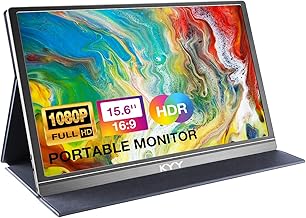
KYY Portable Monitor 15.6inch 1080P FHD USB-C, HDMI Computer Display HDR IPS Gaming Monitor w/Premium Smart Cover & Screen Protector, Speakers, for Laptop PC MAC Phone PS4 Xbox Switch
Best For:
Traders who want a protected, travel-ready display bundle with quick setup accessories and solid connectivity.
The KYY 15.6-inch portable monitor delivers a familiar FHD IPS viewing experience with multiple inputs and a premium accessory bundle. KYY often includes a smart cover and a screen protector, which protects the display during travel and reduces glare during outdoor trading sessions. The dual USB-C and HDMI ports make it straightforward to connect to a MacBook, Windows laptop, tablet or even a console if you switch from charts to downtime gaming. Built-in speakers and HDR support round out the media-ready feature list.
Main benefits and how this helps traders
KYY’s accessory-focused approach makes this model appealing to traders who prioritize out-of-the-box protection and setup speed. The included screen protector addresses reflections and smudges — helpful when you’re glancing at rapid price movements under varying lighting. The smart cover reduces setup time and offers stable viewing angles for extended chart-watching sessions.
Real-life use cases
– Day traders commuting between home and office who need to set up quickly at a café or shared desk.
– Traders who use multiple devices: connect a phone to view alerts, a laptop for your main platform, and an external console for ergonomics testing.
– On-the-road analysts who appreciate the screen protector’s glare reduction during outdoor chart review.
Practical observations and considerations
KYY is often chosen by buyers who value accessories and durability. The protective extras may save you from purchasing separate screen guards and stands. Like many portable monitors in this class, image quality is excellent for charts and textual details, but if you need accelerated refresh rates or deep professional color accuracy, look at specialized monitors. Also confirm your laptop supports DisplayPort Alt Mode over USB-C if you want single-cable video and power.
Who should buy this product
The KYY is for traders who want a complete travel kit: a clear FHD screen, protective accessories, and flexible connections that simplify multi-device setups.
Who may not need it
If you already own a premium case and screen protector or require a battery-powered solution, another model might suit you better.
Pros: includes screen protector and premium smart cover, USB-C + HDMI, good for glare reduction
Cons: not battery-powered, HDR and speaker quality are typical for class but not premium
Check the latest price on Amazon.
Pros
- Accessory bundle (screen protector + smart cover) for travel
- USB-C and HDMI inputs for broad device compatibility
- IPS panel for accurate viewing angles
Cons
- No internal battery option
- Speakers are basic and not a replacement for headsets
Check the latest price on Amazon.
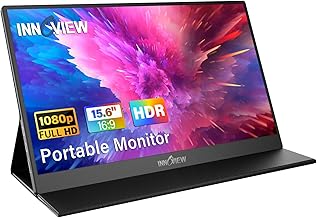
InnoView Portable Monitor, 15.6 Inch FHD 1080P HDMI USB C Second External Monitor for Laptop, Desktop, MacBook, Phones, Tablet, PS5/4, Xbox, Switch, Built-in Speaker with Protective Case
Best For:
Traders who value a dependable, well-built portable monitor with a sturdy case-stand for multi-hour remote sessions.
InnoView’s 15.6-inch FHD portable monitor is a well-known choice among remote professionals, including traders who want dependable performance and sensible extras. It features a 1080p IPS panel, USB-C and HDMI inputs, built-in speakers and a protective case that converts into a stand. InnoView models are often highlighted for their consistent image quality and reliable fit-and-finish, which can matter when you’re setting up in tight hotel-desk scenarios or at a temporary workstation.
Main benefits and how this helps traders
The InnoView strikes a balance between portability and stability. The protective case is solid and provides stable viewing angles for multi-hour trading sessions. The image clarity and color consistency are suited for chart detail, and the dual-input setup allows simultaneous compatibility with a laptop and a secondary device. Many traders report the InnoView as a dependable second screen that integrates seamlessly with trading platforms and charting tools.
Real-life use cases
– Multimonitor traders who want a lightweight, reliable external screen for a second monitor when traveling.
– Traders attending off-site meetings who need to pull up charts and share them in person.
– Users who alternate between devices: connect a laptop for trading and a phone or tablet for messaging and alerts.
Practical observations and considerations
InnoView is commonly recommended when you want a dependable portable monitor without the complications of wireless casting or an internal battery. The tradeoff is you must manage cabling and power. Buyers appreciate the case/stand quality; it reduces wobble and makes sustained sessions more comfortable. If you require extended battery operation, look at battery-equipped alternatives.
Who should buy this product
Pick InnoView if you prioritize reliable build quality, consistent FHD visuals, and a sturdy protective case for frequent travel.
Who may not need it
If you want a wireless or battery-powered screen to cut the cord, consider a different model. Professional color-critical traders may look for higher-end calibrated panels.
Pros: reliable build and case-stand, consistent FHD IPS image, wide device compatibility
Cons: no built-in battery, basic speakers
Check the latest price on Amazon.
Pros
- Sturdy protective case that converts to a stand
- Reliable FHD IPS picture quality
- USB-C and HDMI connections for flexible use
Cons
- No internal battery for cordless use
- Speakers adequate but not high-fidelity
Check the latest price on Amazon.
Dopesplay Portable Monitor, 15.6" FHD 1080P IPS Travel Monitor for Laptop, Foldable Magnetic Stand & Carry Case Included, USB-C Screen Extender for Laptop Mac PC Phone Xbox PS4/5 Switch

Best For:
Traders who prioritize fastest possible setup and a stable magnetic foldable stand for on-the-go trading.
The Dopesplay 15.6" portable monitor focuses on travel ergonomics: its foldable magnetic stand and included carry case make it a very practical daily companion for traders who move between workspaces. The 1080p IPS panel provides the clarity needed for chart lines and indicator text, while USB-C and HDMI connectivity ensures compatibility with a wide range of trading devices and consoles.
Main benefits and how this helps traders
What sets the Dopesplay apart is how quickly you can go from bag to trading-ready. The magnetic foldable stand offers precise angles and stable placement on café tables or slanted hotel desks. For traders, this reduces the setup friction that otherwise discourages using a second screen. The monitor’s FHD resolution keeps multiple chart windows readable without excessive zooming, and the IPS panel means colors remain consistent from off-axis viewing positions — useful when you’re sharing a screen during a meeting.
Real-life use cases
– Frequent business travelers who need a nearly instantaneous second screen for market hours across time zones.
– Traders who prefer minimal setup time between check-ins and execution windows.
– Users who switch between platforms: laptop-based trading at a desk and console devices for entertainment during off-hours.
Practical observations and considerations
Buyers often call out the convenience of the magnetic stand: it’s faster to set up than multi-piece stands and more stable than flimsy folios. The monitor is designed for portability rather than long battery life, so again confirm power expectations — most setups rely on laptop-provided bus power or a small external USB-C power bank if you need extended unplugged operation.
Who should buy this product
Choose the Dopesplay if rapid setup, excellent carry ergonomics and a reliable stand are top priorities for your remote trading routine.
Who may not need it
If you want an integrated battery for true cordless operation, consider a battery-enabled model instead.
Pros: fast magnetic foldable stand and carry case, travel-friendly, crisp FHD IPS display
Cons: no built-in battery, depends on host/device power
Check the latest price on Amazon.
Pros
- Foldable magnetic stand for quick, stable setup
- Carry case included for safe transport
- Clear 1080p IPS display suited for charts
Cons
- No internal battery — reliant on host power
- Stand may not suit very tall or adjustable desk setups
Check the latest price on Amazon.
ZSCMALLS Battery Wireless Portable Monitor, 8000mAh 15.6" 1080P IPS USB-C/HDMI Second Screen, Built-in Speakers, Support AirPlay/Miracast for Laptop/Phone/Tablet/Switch/Xbox, Carry Bag Included

Best For:
Remote traders who require cordless operation and wireless mirroring in addition to wired low-latency connections.
The ZSCMALLS 15.6" portable monitor stands out in this group because it includes an 8000mAh internal battery and wireless casting support (AirPlay and Miracast). For traders who need the freedom to work away from power outlets — think trading from a park bench, a long transatlantic flight pre-landing check, or a rented office with limited outlets — a battery-backed, wireless-capable monitor can be a game-changer.
Main benefits and how this helps traders
Battery power eliminates dependence on a laptop’s bus power or nearby outlets, which is particularly valuable during long sessions or while moving between locations. Integrated AirPlay/Miracast support enables wireless screen mirroring from phones and some laptops, giving you a quick way to extend your workspace without cables. The monitor also keeps the standard USB-C and HDMI ports for wired, low-latency connections during active trading.
Real-life use cases
– Traders who need a portable, cordless second screen for quick setup away from power.
– Professionals who prefer to mirror phone-based alert apps or tablet charts wirelessly to a larger display.
– Those who travel frequently and want a single device that supports wired trading at a desk and wireless use in cafés or airport lounges.
Practical observations and considerations
Battery life will vary with brightness and whether you use wireless casting; expect shorter runtimes at high brightness and when mirroring video streams. Wireless casting adds convenience but introduces slight latency compared with a wired HDMI or USB-C connection — for active, millisecond-sensitive order entry, wired mode remains best. The built-in speakers are handy for alerts but pair a headset for detailed audio analysis or private calls.
Who should buy this product
The ZSCMALLS is for traders who need genuine cordless flexibility and the option to cast screens wirelessly while keeping wired connections for low-latency trading.
Who may not need it
If you always work close to power outlets and prefer the absolute lowest latency, a bus-powered monitor may be lighter and simpler.
Pros: 8000mAh battery for cordless use, AirPlay/Miracast wireless casting, USB-C + HDMI wired support
Cons: wireless casting can introduce latency; battery increases weight compared to bus-powered models
Check the latest price on Amazon.
Pros
- Built-in 8000mAh battery for cordless use
- Supports AirPlay and Miracast for wireless mirroring
- USB-C and HDMI for wired, low-latency trading
Cons
- Wireless casting has some latency vs. wired connections
- Battery adds extra weight compared to bus-powered monitors
Check the latest price on Amazon.
Final Verdict
Choosing the right portable monitor for remote trading comes down to a balance of portability, connectivity, power and practical setup. For traders who want the lightest, simplest option with a protective folio, the MNN and InnoView models offer dependable FHD IPS panels and sensible accessory support. If you value an accessory bundle and glare protection, KYY is a practical pick. Dopesplay is ideal for those who want the fastest setup with a magnetic foldable stand, while the ZSCMALLS model is the top choice when cordless operation and wireless mirroring are essential to your workflow.
Before you buy, check your laptop’s video-over-USB-C support (DisplayPort Alt Mode) and decide whether you need an internal battery or prefer the lightest, bus-powered option. Also factor in how you’ll use the monitor day-to-day: frequent travel and quick setups call for durable cases and fast stands, while serious low-latency trading favors wired HDMI or USB-C connections.
Ultimately, a 15.6" portable monitor can dramatically improve your situational awareness and speed of execution by letting you see more charts and windows at once. Whether you choose a battery-backed wireless model or a slim folio-style screen, these options will help you configure a reliable, mobile trading station.
Check the latest price on Amazon.
Conclusion
These Portable monitor for traders working remotely picks are trending now and offer great value and variety. Check the links above for latest prices and reviews.
As an Amazon Associate, I earn from qualifying purchases.
Tags:
portable monitor for trading, 15.6 inch portable monitor, portable monitor USB-C, battery portable monitor, portable monitor HDR, travel monitor for traders, wireless portable monitor
