Top Phone Stands for Video Calls — Best Picks
As an Amazon Associate, I earn from qualifying purchases. This article may contain affiliate links, which means we may receive a commission at no extra cost to you.
Video calls have become a daily task for work, family catch-ups, telehealth, and content creation. The right phone stand turns shaky, neck-craning sessions into comfortable, professional-looking calls. Whether you need a compact desktop holder for Zoom meetings, a tall tripod that follows you while you demonstrate something on camera, or a heavy-duty desk mount that can hold a phone with a thick case — there’s a stand that fits. Below you’ll find a curated selection of reliable stands across styles and price points, plus a practical buying guide to help you pick the right one for your setup.
Affiliate disclosure: As an Amazon Associate, I earn from qualifying purchases. This article may contain affiliate links, which means we may receive a commission at no extra cost to you.
Buying Guide
Before you buy a phone stand for video calls, consider these core factors to avoid common pitfalls:
1. Stability and build: Cheap plastic stands can wobble and transmit desk vibration into your video. Look for aluminum, reinforced plastic, or tripod legs with rubber feet. If you plan to type while on a call, a heavy base or clamp-style mount prevents tipping.
2. Adjustability: Does the stand offer height, tilt, and rotation? For one-on-one calls, a small desktop stand angled at eye level is usually enough. For livestreaming, a tripod with variable height and 360° rotation or a follow-tracking mount is better.
3. Compatibility: Confirm the stand fits your phone width and works with any protective case you use. Some holders advertise compatibility with phones up to 6.8" or list specific models.
4. Portability vs. permanence: Foldable stands are great for remote work and travel, while heavier desk stands give a more stable home-office experience. Consider whether you need quick setup or a permanent fixture.
5. Special features: Remote shutter, Bluetooth follow/tracking, phone clamps that double as ring lights, or cable routing for chargers can be useful. Evaluate which extras you’ll actually use.
6. Use-case focus: Content creators may prioritize height range and rotation; remote workers need a compact, neat footprint that aligns with webcams; telehealth users want a steady, eye-level view. Reading product Q&A and customer feedback helps identify real-world strengths and weaknesses.
7. Price vs. durability: A mid-range stand often outperforms the cheapest options in longevity. If you’re buying for long-term daily use, prioritize build quality and warranty over a bargain.
Keep these considerations in mind as you review each option. The products below were selected to cover common needs from compact desk stands to AI-following tripods.
DIMONCOAT Phone Stand for Desk, Angle Height Adjustable Phone Holder for Desk, Aluminum Alloy Universal iPhone Holder, Retractable Cell Phone Stand Recording Office for iPhone 17 16 15 Pro Max S26

Best For:
Remote workers and students who need a stable, stylish desk stand for daily Zoom/Teams calls and occasional desk recording.
The DIMONCOAT Phone Stand is a compact aluminum-alloy desk companion built for everyday video calls and casual recording. Its solid-metal construction gives it a noticeably sturdier feel than many plastic stands, and the retractable hinge design lets you adjust viewing angle and height in small increments. The holder cradles phones securely and includes soft padding to prevent scratches and reduce slipping — useful when you occasionally rest your finger on-screen while navigating content during a call.
Main benefits include dependable stability for sitting at a desk, a slim footprint that won’t clutter your workspace, and a modern metal finish that pairs well with laptops and other desk gear. Compared to basic foldable plastic stands, the DIMONCOAT model feels more premium and resists wobble when you tap your screen. It’s not a tall tripod, so if you need full standing height or dramatic angle shifts for filming, a tripod-style mount will suit you better. But for seated video calls, watch parties, or quick product demonstrations at your desk, this stand hits a reliable sweet spot.
Real-life usage scenarios: remote employees who join multiple daily Zoom or Teams calls will appreciate the eye-level tilt options and steady platform. Teachers hosting small remote lessons can prop a phone horizontally for group viewing or vertically for close-up demonstrations. Content creators who film short tutorials on a desk (e.g., crafts, makeup, unboxing) will find it convenient as a secondary camera angle paired with a webcam.
Practical observations from user feedback and product specs: the aluminum build resists long-term sagging better than thin plastics, and the retractable mechanism locks into place securely for most phone weights. A few buyers note that extremely heavy phones with battery packs or chunky cases may reduce adjustment range slightly — so check compatibility if you use an oversized case. Cable routing is minimal, so if you run a charger simultaneously a small cable clip may be helpful.
Who should buy this: Professionals and students who want a reliable, attractive desk stand for daily video calls without the bulk of a tripod. It’s also a good pick as a portable desk stand you can move between home and office.
Who may not need it: Vloggers or creators needing tall tripods, or anyone requiring motorized tracking or significant vertical height. If you mostly film standing or need follow-tracking, consider a tripod or AI-follow mount instead.
Buying considerations: Confirm phone width and case thickness fit comfortably. For heavier phones, double-check that the angle lock holds under weight. If you need a light or microphone mount, this stand doesn’t offer accessory threads.
Check the latest price on Amazon.
Pros
- Sturdy aluminum construction
- Adjustable angle and retractable hinge
- Sleek, compact footprint fits most desks
Cons
- Not suitable for standing-height filming
- May have limited range with very heavy phones
Interested in a durable desk stand that looks good on camera? Check the latest price on Amazon.
UBeesize 67” Auto Face Tracking Phone Tripod, 360° AI Follow Selfie Stick with Remote, Adjustable Tripod Stand for iPhone 17/16/15/14/13 & Android, for TikTok, Vlogging & Video Recording

Best For:
Vloggers, fitness coaches, and creators who need AI tracking and full-height tripod functionality for dynamic video recording.
The UBeesize 67" Auto Face Tracking Phone Tripod is built for creators and presenters who need hands-free movement during recording. Its standout feature is AI-powered 360° face tracking that keeps you centered as you move, which is a big convenience for solo creators, instructors, and fitness coaches who need mobility without a camera operator. The tripod extends to roughly 67 inches, making it useful for full-body shots and multi-angle demonstrations.
Unlike a fixed desktop stand, this unit combines a tall tripod, a selfie stick, and an auto-tracking mount — making it versatile for vloggers, TikTok creators, and anyone who livestreams while moving. The included Bluetooth remote lets you start/stop recording from a distance, and the foldable legs convert it easily for travel. Rubber feet and a secure phone clamp help reduce wobble, though extremely windy outdoor shoots will still be better served by heavier pro tripods.
Real-life use cases include a fitness instructor filming a home workout where they need to move around the room, a chef demonstrating recipes while moving between counter and stove, or a tutor who wants to step back and show full-page views on a whiteboard. The tracking makes solo production feel more professional because it reduces manual reframing.
Practical observations from the user community show the AI-follow feature works well in well-lit indoor environments but can struggle in low light or when multiple moving subjects are nearby. Extension locks are convenient, though some power users find them less refined than high-end photographic tripods. The tripod’s phone clamp fits most modern phones, but very large cases or add-on lenses may require removal for a secure fit.
Who should buy this: Content creators, instructors, and active livestreamers who benefit from hands-free tracking and tall height. Also useful for families who want a simple way to capture events without a dedicated cameraman.
Who may not need it: Office workers who only need a low-profile desk stand for Zoom calls; buyers who want professional-grade stability for outdoor filming in wind-heavy locations.
Buying considerations: Expect best performance in indoor, well-lit spaces. If audio quality is important, pair this with an external microphone. For bulky cases or phone rigs, test clamp fit before committing.
Check the latest price on Amazon.
Pros
- AI-powered 360° face tracking
- Extends up to 67" for full-body shots
- Includes Bluetooth remote and foldable design
Cons
- Tracking less reliable in low light
- Not as windproof as heavy pro tripods
Want a tall, follow-tracking tripod for solo recording? Check the latest price on Amazon.
COOPER ChatStand, Adjustable Cell Phone Stand for Desk, Phone Stand for Recording, iPhone Holder for Filming, Small iPhone Tripod, Soporte para Celular, Fits Samsung, Android, (Night Black)

Best For:
Hybrid workers and hobby creators who need a portable, stable desk stand for frequent video calls and light recording.
The COOPER ChatStand is a compact, adjustable phone stand designed specifically for desk recording and video calls. It bridges the gap between ultra-portable foldable holders and larger tripods by offering a small footprint with thoughtful tilt adjustment and a modest height advantage. The Night Black finish makes it unobtrusive on a shared desk, and its rubberized contact points protect phones while preventing slippage during calls.
Where many compact stands sacrifice sturdiness for portability, the ChatStand prioritizes a balance of both. It’s light enough to toss into a bag yet substantial enough to remain stable when you adjust touch input on-screen during meetings. The tilt range suits both portrait and landscape orientation, which is handy for switching between a standard video call and a horizontal recording session for social videos.
Real-world examples: remote customer support reps can angle the phone for a clear view of a product demo while keeping notes on their computer; a recruiter conducting back-to-back interviews will appreciate the small footprint and quick angle adjustments between calls; social-media hobbyists can use it as a secondary camera to capture over-the-desk shots while editing on a laptop.
Based on user feedback, the stand performs reliably for most consumer phones and fits with thin to moderate cases. It lacks advanced features like accessory mounts or height extension, so it won’t replace a full tripod for elaborate shoots. Some buyers note that while the tilt mechanism is secure, it requires a small bit of force to move — intentional for preventing accidental shifts during calls.
Who should buy this: People who want a dependable, travel-friendly desk stand for frequent video conferencing and occasional recording. Great for hybrid workers who carry a minimal gear set between home and office.
Who may not need it: Those who require tall tripods, motorized gimbals, or accessory mounts. If you prefer a stand that raises the phone to true eye level without propping your laptop, opt for a taller adjustable model.
Buying considerations: Check compatibility with any thick protective cases and note that cable routing is limited. If you expect heavy-handed adjustment, look for stands with stronger locking mechanisms.
Check the latest price on Amazon.
Pros
- Compact and travel-friendly
- Secure tilt for portrait and landscape
- Rubberized grips prevent slipping
Cons
- No height extension for true eye-level
- No accessory mounts for lights/mics
Looking for a small, reliable desk stand to take between home and office? Check the latest price on Amazon.
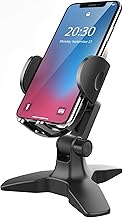
APPS2Car Heavy Duty Phone Stand – Adjustable Desktop Holder for Video Calls, Compatible with 4.7-6.8" Smartphones & Thick Cases, Perfect for Home Office
Best For:
Users with large phones or thick cases who need a heavy-duty, stable desktop holder for prolonged video calls and demonstrations.
The APPS2Car Heavy Duty Phone Stand is aimed at users who need a no-nonsense, high-stability desktop mount that accommodates large phones and thick protective cases. Its wide clamp and reinforced base reduce tipping — a common annoyance during hands-on demonstrations or when propping the phone while jotting notes. The stand’s industrial look emphasizes function: robust hinges, a weighted base, and wide cradle arms that keep heavier devices secure.
This stand solves the problem of flimsy holders that fail once you add a MagSafe battery, thick case, or clip-on lens. For people who use their phones as a primary video device for long calls, the APPS2Car model minimizes slippage, provides consistent viewing angles, and allows you to type or interact with the phone without worrying about it toppling.
Real-life usage includes customer service reps who reference documents on a phone while typing, product reviewers filming heavy phones with add-on lenses, and telehealth professionals who need stable, repeated camera placement for sessions. The stand’s broad compatibility (4.7–6.8") makes it future-proof for most current and near-future smartphones.
Practical observations from buyer feedback indicate that while the stand’s bulk is a strength for stability, it’s less convenient to travel with than slim foldable options. The clamps and hinge locks are durable but take space on a desk. Some users recommend pairing it with a small desk cable organizer since the cradle does not include integrated cable management.
Who should buy this: Users with larger phones, thick protective cases, or heavy accessories who need a rock-solid desktop presence. Ideal for professionals who rely on their phone during long video calls or repeated filming sessions.
Who may not need it: Travelers or minimalists who prioritize portability and compact storage. If you rarely use add-on accessories and prefer a lighter stand, consider a foldable or aluminum model instead.
Buying considerations: Ensure your phone’s width falls within the 4.7–6.8" range and test fit if you use an oversized case. If desk space is at a premium, measure the footprint to confirm it fits alongside your laptop and other essentials.
Check the latest price on Amazon.
Pros
- Wide compatibility with thick cases
- Very stable weighted base
- Strong hinge and clamp design
Cons
- Bulky — not ideal for travel
- Minimal cable management features
Need a heavy-duty desktop stand that holds chunky phones securely? Check the latest price on Amazon.
Lamicall Cell Phone Stand for Desk – [Height Adjustable] Foldable Mobile Phone Holder, Portable Stand for iPhone 17 16 15 14 13 12 11 Pro Max Plus Air, Galaxy S25, Office Gift Mothers Day Accessories
![Lamicall Cell Phone Stand for Desk - [Height Adjustable] Foldable Mobile Phone Holder, Portable Stand for iPhone 17 16 15 14 13 12 11 Pro Max Plus Air, Galaxy S25, Office Gift Mothers Day Accessories](https://m.media-amazon.com/images/I/61cHbjMo7IL._AC_UY218_.jpg)
Best For:
Hybrid workers and commuters who want a portable, height-adjustable stand with solid ergonomics for video calls.
The Lamicall Cell Phone Stand offers a practical, height-adjustable solution for people who want a balance of portability and desk ergonomics. It folds flat for storage, but when opened, provides a cleaner range of height adjustment than many slim stands. The design focuses on thoughtful ergonomics — raise your phone to reduce neck strain, tilt it for an optimal camera angle, and keep a tidy desk since the base is compact.
Compared with ultra-cheap plastic stands, Lamicall feels more engineered: rubber feet, a well-placed cable gap, and a multi-angle hinge that holds firm during calls. While not as heavy as industrial options, it’s stable enough for most home office setups and offers a small but important boost in adjustability for users who prefer a higher line of sight than a flat desk mount.
Use-case scenarios include remote managers who juggle long video meetings and want to keep the phone upright for reference material; content creators who use a phone as a secondary camera to capture overhead or desk angles; and anyone working from cafes or coworking spaces who needs a collapsible stand that fits into a laptop sleeve.
From customer reports and product details, the stand reliably supports phones with typical cases but may feel less rigid with very heavy accessories attached. The fold-flat form factor is a clear advantage for commuters and frequent travelers. It also offers a discreet, stylish appearance that blends well with modern desks.
Who should buy this: People seeking a balance of portability and adjustability — ideal for hybrid workers, students, and creators who move between locations.
Who may not need it: Those who require the absolute stability of a heavy-duty desktop stand or a full-height tripod for standing shoots.
Buying considerations: If you often use add-on lenses or battery packs, verify fit and stability. The cable gap helps with charging during calls but isn’t a full cable management system.
Check the latest price on Amazon.
Pros
- Height-adjustable and foldable
- Compact footprint and cable gap
- Good balance of portability and stability
Cons
- Less ideal for very heavy accessories
- Not as heavy-duty as dedicated desktop mounts
Want a portable, adjustable stand for hybrid work and travel? Check the latest price on Amazon.
Final Verdict
Choosing the right phone stand for video calls depends on how you use your phone: if you’re stationary and want an elegant desk presence, the DIMONCOAT and Lamicall models offer attractive, stable options. For creators who move a lot or need full-body framing, the UBeesize 67" Auto Face Tracking Tripod adds valuable hands-free mobility. If your priority is maximum stability for large phones or thick cases, the APPS2Car heavy-duty stand is the most robust option here, while the COOPER ChatStand balances portability with a confident desk presence.
Think about whether you need height range, tracking, portability, or a heavy base — each of these picks targets a different trade-off between those factors. If you’re often on back-to-back calls and need something unobtrusive, prioritize a low-profile stand. If you create video content or teach while moving, prioritize tripods with tracking or tall extensions. In every case, check compatibility with your phone model and case thickness, and pair your setup with simple cable organization and, if needed, an external microphone for better audio.
No single stand is perfect for every scenario, but the five options above cover the core needs most people face: stable desk use, portable travel-friendly stands, heavy-duty support for large phones, and dynamic tripod solutions for creators. Use the product sections above to match features to your daily routine and equipment. As an Amazon Associate, I earn from qualifying purchases. This article may contain affiliate links, which means we may receive a commission at no extra cost to you.
Check the latest price on Amazon.
Conclusion
These Top Phone Stands for Video Calls picks are trending now and offer great value and variety. Check the links above for latest prices and reviews.
As an Amazon Associate, I earn from qualifying purchases.
Tags:
phone stand, video call stand, phone tripod, desk phone holder, iPhone stand, vlogging tripod, adjustable phone holder
