Top Office Organizers Trending After Setup Videos
As an Amazon Associate, I earn from qualifying purchases. This article may contain affiliate links, which means we may receive a commission at no extra cost to you.
Setup videos have turned simple office gear into instant must-haves: a tidy cable clip, a sleek riser, or a compact file rack suddenly looks indispensable once you see it in action. If you’ve watched those satisfying before-and-after clips and want to recreate the calm on your own desk, this guide collects the office organizers people keep buying after setup videos. I researched product listings, user feedback trends, and common setup routines to highlight items that repeatedly show up in popular desk transformation reels.
This article focuses on practical, affordable organizers that make visible improvements fast—especially useful if you work from home, share a small workspace, or maintain a busy study area. Below you’ll find what each product does, who it’s best for, realistic use cases, and common buying considerations so you can choose the right pieces for your space.
Buying Guide
What to look for after you’ve watched a setup video and want to buy: materials, footprint, and adaptability. Setup creators often favor items that are inexpensive, easy to install, and universally useful. Think about cable management that adheres cleanly without leaving residue, monitor risers with stable platforms and optional storage, and tiered letter trays that stack with minimal wobble. Avoid organizers that promise modularity but require many add-ons—simplicity is the appeal in most setup reels.
Measure your workspace before you buy. A monitor riser that looks great in a video may be too deep or too shallow for your desk. For cable clips, check adhesive type and whether they’re silicone or plastic—silicone clips tend to be gentler on cords. If you prefer metal aesthetics, look for powder-coated steel trays or rose gold accents; if you want lightweight and portable, plastic is often fine.
Consider your workflow: Do you handle paper daily or mostly digital files? If paperwork is frequent, a multi-tier file sorter or letter tray will reduce desktop chaos. For creatives and multi-monitor users, a riser with drawer space and pen holders keeps tools within reach and raises screens to ergonomic height. Buyers who like frequent rearranging should prioritize organizers that don’t require permanent mounting. Finally, balance cost with durability—cheaper items can work well for light use, but invest a bit more for daily-heavy setups.
This guide covers five products commonly repurchased after people see them in setup videos. Each section explains who benefits most, practical examples of use, how the product compares to standard alternatives, and the obvious pros and cons to help you decide.
INCHOR Cord Organizer, Cable Clips Cord Holder, Cable Management USB Cable Power Wire Cord Clips, 2 Packs Cable Organizers for Car Home and Office (5, 3 Slots)

Best For:
People who want quick, low-cost cable control at the desk edge, renters, students, and mobile creators who change configurations often.
Small cable clips are one of the quickest ways to replicate a setup-video desk: they tidy messy charging cables, prevent cords from falling behind desks, and make daily cable routing predictable. The INCHOR Cord Organizer comes in two packs with multiple slots per clip, offering a compact solution for phones, earbuds, chargers, and short USB cords. These clips typically use adhesive pads—inspect product details for surface compatibility—and are low-profile enough to sit on the edge of a desk, the side of a monitor stand, or inside a car.
What makes this style popular in online desk makeovers is the immediate visual payoff. You move from a pile of cables to a row of neatly separated cords that stay where you place them. The INCHOR clips are usually made of soft rubber or silicone to grip cables without squeezing or damaging them. Compared to bulky cable chains or under-desk trays, these clips are inexpensive and don’t require tools to install, so they’re ideal for renters and folks who redecorate frequently.
Real-life use cases include: keeping your phone charging cable accessible while you work, organizing headphone and microphone cables around a streaming setup, and preventing power cords from sliding off a bedside table. They also work well inside cars to prevent phone chargers from tangling with other items.
Who should buy this: anyone who has horizontal edge space on a desk or nightstand and wants immediate, low-commitment cable control—students, remote workers, and content creators who frequently swap devices. Who may not need it: users who already have a fully integrated cable channel system or under-desk cable trays that conceal and secure long runs of wire.
A realistic buying consideration: adhesive strength varies. Adhesive-backed clips are extremely convenient, but if you plan to move them often, consider buying reusable or gel-based adhesive pads. For thicker cables or irregular cable bundles, one large cable holder or a dedicated under-desk tray might be a better alternative. Still, for targeted, visible cable control, these clips are one of the fastest and cheapest changes to make to your setup. Check the latest price on Amazon.
Pros
- Very affordable and provides instant visual improvement
- Easy, tool-free installation with adhesive backing
- Low-profile design keeps cables accessible without clutter
Cons
- Adhesive strength and residue can vary by surface
- Not ideal for managing large bundles or heavy power bricks
Check the latest price on Amazon.
OPNICE Desk Organizer and Accessories, 2-Tier Computer Monitor Stand Riser with Drawer and 2 Pen Holders, Laptop Stand, Office Desk Accessories for Office Supplies, Black

Best For:
Remote workers and students who want ergonomic screen height plus tidy storage for small office essentials.
Monitor risers are a staple in many setup videos because they solve two problems at once: elevating your screen to a better ergonomic height and creating usable storage underneath. The OPNICE 2-Tier Computer Monitor Stand Riser combines a solid platform with a shallow slide-out drawer and two built-in pen holders—features frequently highlighted in desk transformation clips. The result is a cleaner surface and a more comfortable viewing angle, particularly for laptop users who need a quick lift for video calls.
This type of riser often uses sturdy plastic or engineered wood and is designed to fit a single monitor or a laptop up to typical screen widths. Underneath, you can store a keyboard, notebooks, or a compact docking station. The included drawer is perfect for keeping sticky notes, spare cables, and small tech tools out of sight but within reach. Compared to simple blocks or single-plane stands, this riser is more purposeful: it’s about storage plus ergonomics.
Real-life scenarios: A hybrid worker uses the riser to lift a laptop camera for better video-call framing while keeping a wireless keyboard stored beneath. A student organizes index cards, pens, and USB sticks in the drawer while maintaining a clear desktop for note-taking. A home office user places a pair of speakers on either side and uses the pen holders for styluses and highlighters.
Who should buy this: those needing an immediate ergonomic fix with added small-item storage—particularly remote workers, video creators, and students. Who may not need it: people with very large monitors that exceed the stand’s surface or users who prefer a full adjustable monitor arm for more flexibility.
Buying considerations: check the riser’s width and weight capacity if you have a wide monitor or a heavy all-in-one. Drawer depth is shallow—good for small accessories but not long-term storage of bulkier items. Compared to minimalist laptop stands, this OPNICE riser is a better choice when extra, accessible storage is a priority. Check the latest price on Amazon.
Pros
- Improves ergonomics while adding accessible under-monitor storage
- Built-in pen holders and drawer keep small items organized
- Tool-free setup and clean, compact footprint
Cons
- Not suitable for very large or heavy monitors
- Drawer space is shallow—meant for small items only
Check the latest price on Amazon.
MDOZQ Office Desk Accessories 2pcs Computer Monitor Memo Board Message Board Supplies for Women Men Sticky Note Holder Home Desktop Decor

Best For:
Productivity-focused users who like physical reminders—students, salespeople, and busy professionals with short-term task lists.
Sticky-note and memo boards are small but effective visual reminders that appear frequently in setup clips—placed near a monitor or angled toward a planner. The MDOZQ 2-piece memo board set is designed to keep quick notes, reminder sticky pads, and small memos in a tidy, visible place. Instead of loose pages stuck haphazardly to a monitor bezel, a dedicated memo surface organizes your short-term notes and helps prioritize daily tasks.
These memo boards usually attach with adhesive or stand with a small base, offering flexibility in placement. Because they’re made for sticky notes and small papers, they’re intuitive for people who work in sprints, manage quick call notes, or keep multiple micro-tasks in view. Compared to full-sized bulletin boards, this compact set is unobtrusive and better suited to small desks or shared spaces.
Common uses: a salesperson keeps a short list of daily call targets visible; a creative professional pins color swatches or short inspirational quotes near their screen; a student lists deadlines and quick formulas for easy reference during study sessions. Their compact size also makes them a neat addition to side-by-side monitor setups where space is limited.
Who should buy this: people who rely on visual reminders, sticky notes, and short-term lists—productivity enthusiasts, students preparing for exams, and professionals juggling multiple small tasks. Who may not need it: those who use purely digital task managers and avoid physical notes, or users with large wall-mounted planning systems already in use.
Buying considerations: check mounting options and note-holding strength—if you prefer repositioning notes frequently, look for boards with reusable adhesive or non-permanent stands. While practical, these boards don’t replace a full whiteboard or wall planner for larger project tracking. For immediate, desk-level reminders, however, they do exactly what they promise. Check the latest price on Amazon.
Pros
- Keeps quick notes visible and organized
- Compact size fits small desks and dual-monitor setups
- Flexible placement options for desk or monitor edge
Cons
- Not a substitute for large project planning boards
- Adhesive or stand quality can affect repositioning
Check the latest price on Amazon.
Simple Trending 7 Tier Desk File Organizer, Letter Tray Paper Organizer with Pen Holder and Metal Hanging Basket, Black

Best For:
Users with heavy paper traffic who need vertical storage—administrative roles, freelancers, and small-business owners.
When setup videos show a before-and-after of a paper-strewn desk, a multi-tier file organizer is often the hero. The Simple Trending 7 Tier Desk File Organizer provides vertical filing capacity with several tiers to separate incoming mail, current projects, reference documents, and outgoing paperwork. It typically includes a pen holder and a hanging basket for odd-sized items—features that reduce desktop piles without sacrificing access.
Vertical organizers like this are an excellent alternative to flat letter trays because they use height rather than width, which is ideal for small desks. Built from metal, these units tend to be more durable than thin plastic trays and have a cleaner, more modern look that works in many office aesthetics. Compared to closed filing cabinets, a tiered organizer keeps active documents in plain sight so you’re less likely to forget tasks.
Real-world usage includes: a small-business owner sorting invoices by week across the tiers, a graphic designer separating print proofs from finished projects, or a home office user who needs a dedicated spot for bills, warranties, and user manuals. The hanging basket is useful for catalogs or magazines that don’t fit neatly on a tray.
Who should buy this: people with frequent paper handling who need a compact vertical solution—administrative assistants, freelancers, and anyone juggling multiple active documents. Who may not need it: fully paperless households or those who already use an extensive filing cabinet system.
Buying notes: measure the organizer’s footprint and tier spacing—if you store thick manuals, ensure the gaps will accommodate them. The metal build offers durability, but check for sharp edges or heavy weight if you plan to move it often. Compared to simple 2-3 tier trays, the seven-tier design is best for users who manage many ongoing categories at once. Check the latest price on Amazon.
Pros
- High capacity in a small footprint
- Durable metal construction with multiple sorting tiers
- Includes pen holder and hanging basket for odd items
Cons
- May be overkill for light paper users
- Heavier metal construction can be cumbersome to move
Check the latest price on Amazon.
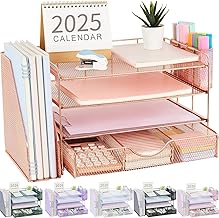
gianotter Desk Organizers and Accessories with File Holder, 4-Tier Desk Accessories & Workspace Organizers with Drawer and 2 Pen Holder, Paper Organizer for Office Supplies (Rose Gold)
Best For:
Style-conscious users who want practical sorting with decorative appeal—creatives, students, and modern home-office owners.
A combination of style and function often drives purchases after setup videos, and the gianotter 4-Tier Desk Organizer pairs an attractive rose-gold finish with practical sorting features. This unit typically blends open file slots for papers and notebooks with a small drawer for accessories and dual pen holders for frequent writing tools. The aesthetic appeal makes it a popular pick for desks featured in social media setups where style matters as much as order.
Compared to purely utilitarian organizers, this one leans into decor while remaining useful. The four tiers are ideal for actively used folders and in-progress projects, while the drawer tucks away smaller items like flash drives, staplers, and correction tape. The design often uses lightweight metal or coated wire material, allowing airflow and visibility of contents—helpful when you don’t want to fish through opaque stacks.
Use cases: a content creator uses it to hold script printouts, shot lists, and props; a student separates class notes and homework assignments by subject; a stylish home office owner keeps incoming mail, coupons, and receipts sorted without sacrificing desk aesthetics. The rose-gold finish pairs well with modern and feminine desk setups, and because it’s not overly deep, it fits narrow desks and vanity-style workstations.
Who should buy this: buyers who want organization plus decorative flair—creative professionals, students who value style, and anyone outfitting a small home office. Who may not need it: those who prefer heavy-duty, closed storage or industrial aesthetics.
Buying considerations: finishes can scratch over time so handle with care; check weight capacity for heavy binders. If your priority is maximum capacity, a plain metal seven-tier may carry more volume, but this gianotter unit hits a sweet spot for practical organization with a curated look. Check the latest price on Amazon.
Pros
- Attractive finish that doubles as decor
- Balanced mix of open tiers and a small drawer
- Compact footprint fits narrow desks
Cons
- Finish may scratch with heavy use
- Less capacity than larger, purely functional file systems
Check the latest price on Amazon.
Final Verdict
Setup videos make organization look immediate and effortless, and many of the organizers showcased are worth the attention. Small purchases—like cable clips and memo boards—deliver fast visual payoff and are low-risk for anyone experimenting with desk layouts. For more substantive change, consider monitor risers with storage or multi-tier file organizers to remove daily friction and reclaim surface area.
Choose cable clips for targeted tidiness, memo boards for visible task reminders, and tiered organizers for active paper management. If aesthetics matter, the rose-gold gianotter gives style without sacrificing function; if capacity is the priority, the seven-tier metal organizer offers serious sorting power. For hybrid and remote workers, the OPNICE riser doubles as an ergonomic solution and a clutter reducer. Always check footprint, material, and mounting style to make sure the product fits your workflow.
If you’re recreating a setup-video desk, blend immediate, low-commitment items (clips, memo boards) with a couple of sturdier pieces (riser, file organizer) to get both quick impact and long-term organization. Think of these purchases as modular steps: start with what bothers you most—fallen cables or a stack of papers—and expand from there. With a few targeted organizers, you’ll go from chaotic to curated without a full office overhaul.
Happy organizing—and remember to pick products that match how you work.
Conclusion
These Office organizers people keep buying after setup videos picks are trending now and offer great value and variety. Check the links above for latest prices and reviews.
As an Amazon Associate, I earn from qualifying purchases.
Tags:
office organizers, desk organization, monitor riser, cable management, file organizer, desk accessories, home office
