Top Office Focus Timers for Deep Work Sessions
As an Amazon Associate, I earn from qualifying purchases. This article may contain affiliate links, which means we may receive a commission at no extra cost to you.
If you’re a writer, designer, developer or content creator, staying deeply focused for a stretch of time can feel like both an art and a science. Many creators have turned to physical timers and desk gadgets to anchor sessions, reduce digital distractions, and protect creative energy. This guide walks through five widely used office focus timers and visual countdowns that help structure work blocks, support ADHD-friendly routines, or simply make concentrated work feel more manageable.
Affiliate disclosure: As an Amazon Associate, I earn from qualifying purchases. This article may contain affiliate links, which means we may receive a commission at no extra cost to you.
Below you’ll find a practical buying guide, five detailed product breakdowns (who each is best for, real-life scenarios, pros and cons), and final recommendations to help you pick the right tool for your desk.
Buying Guide
Why choose a physical timer over an app? For many creators a dedicated timer reduces the temptation to check notifications or open a browser tab. Physical timers are visible, tactile, and often provide visual cues (like a disappearing color wedge) or haptic alerts that are easier to obey than a phone buzz.
Key features to consider:
– Presets and custom timing: If you live by the Pomodoro method, look for 25/5 presets, but also consider devices with multiple preset options (3/10/30/60 minutes) or a custom countdown for flexibility.
– Sound vs. vibration vs. silent visuals: Offices and shared spaces benefit from silent or vibration alerts; studios or home offices might welcome audible chimes. Visual timers are helpful for anyone who responds to a clear diminishing visual indicator.
– Build quality and desk presence: A matte, compact cube fits minimalist desks; a larger visual timer works well for shared meeting spaces or standing desks where it can be seen across the room.
– Power and battery life: Consider whether the device uses rechargeable batteries, AAs, or a built-in battery. Frequent travelers might prefer a simple battery-powered cube.
– Accessibility for ADHD and neurodiversity: Devices with tactile buttons, haptic alerts, and clear presets can reduce friction for starting and stopping focus sessions.
Alternative options: smartphone apps and browser extensions are inexpensive and feature-rich, but they don’t remove the phone-from-hand problem. Kitchen timers and cheap digital timers are adequate for basic use but often lack polished presets, vibration, or quiet operation.
Buying considerations: match the device to how you work (solo vs. team), how you prefer to be alerted (visual vs. audio), and the range of session lengths you need. If aesthetics matter, pick a color or finish that complements your workspace.
Mindsight Focused Activity Timer & Tracker | Promotes Work Life Balance & Productivity | Pomodoro ‘Plus’ w/ 5 Fixed timers + 5 curated Wellness Activities | Office Desk Accessory | Mindfulness | ADHD

Best For:
Creators and knowledge workers who want a Pomodoro-style timer plus short guided wellness prompts—good for people who forget breaks or who want to protect mental energy during long workdays.
The Mindsight Focused Activity Timer is a modern take on the Pomodoro timer aimed at creators who want structure plus wellness built into their work rhythms. Rather than being a bare-bones countdown, this device advertises five fixed work timers alongside five brief wellness activities—short guided breaks that encourage movement, breathing, or digital rest. The form factor is compact and designed to sit on a desk without drawing excess attention, making it suitable for shared home offices or studio desks.
What stands out about this timer is its dual approach: it not only schedules intense focus blocks but also prompts small restorative rituals. If you struggle to leave the desk during breaks—or, conversely, if you find breaks derail your flow—Mindsight aims to normalize short restorative pauses that protect long-term productivity and reduce burnout. The device includes tactile buttons for selecting timers and a clear numeric readout that’s easy to scan from a seated position.
Real-life use cases are straightforward: content creators can set 25-minute focused writing sessions followed by a 5-minute guided stretch; designers can use 60-minute deep-focus windows when working through sprint tasks, then flip to a mindfulness prompt to reset. One practical advantage over smartphone apps is the physical presence. The timer becomes a desk anchor—the visual cue helps collaborators know when you’re in a focus block and less available for quick interruptions.
Compared with standard cheap timers, Mindsight’s curated wellness prompts are a meaningful differentiator. Unlike generic digital timers that only count down, this device nudges healthier patterns and supports users who find it hard to remember to take purposeful breaks. If you prefer full control, note that some creators who want infinite customizability may find fixed timers limiting; however, the simplicity is also a benefit if decision fatigue is a problem.
Best for: Creators who want a structured focus system with built-in wellness reminders—especially helpful for those balancing heavy desk time and mental health needs.
Buying considerations: check how alerts are delivered (visual, vibration, or sound) to make sure they suit your environment. If you share space, the quieter settings will be most practical.
Pros: Enhanced wellbeing prompts, tactile controls, desk-friendly design
Cons: Fixed timers may feel limiting for power-users who want full custom presets
Check the latest price on Amazon.
Pros
- Built-in wellness activities encourage healthier breaks
- Compact, desk-friendly design with tactile controls
- Clear visual readout anchors focus sessions
Cons
- Fixed timers may not suit users who want unlimited custom lengths
- May lack advanced tracking or app sync features
Check the latest price on Amazon.
Printers ack Pomodoro Timer – Productivity Cube, Visual Focus Timer, Mute & Vibration & Adjustable Sound Alert, for Office, ADHD, Study, Work, 3/5/10/25/30/60min & Custom Countdown – Silver

Best For:
People who want a tactile, portable Pomodoro cube with vibration and quiet modes—great for shared workspaces, ADHD-friendly routines, and flexible session lengths.
The Printers ack Pomodoro Timer looks like a simple cube but packs a lot of practical features creators appreciate: multiple preset options (3/5/10/25/30/60 minutes), a custom countdown mode, and both mute/vibration settings alongside adjustable sound alerts. It’s essentially a pocket-sized time manager designed for people who prefer tactile, physical controls and a tool that’s always visible on the desk.
What makes this cube appealing is the immediate clarity of use—flip or press to start the preset you need and the device begins a countdown. For many creators, the tactile act of pressing a real button and seeing a timer physically running reduces the impulse to check a phone and helps embed a habit. The vibration mode is particularly valuable in shared workspaces or co-working environments where audible alarms would be disruptive.
Real-life examples include coders who use 60-minute deep-focus sprints for uninterrupted debugging, then switch to 10-minute review windows; students or writers who rely on the 25/5 Pomodoro structure to move through drafts; and people with ADHD who find strong tactile feedback and a visible timer far more effective than a silent app. Its compact, silver finish fits a range of desk aesthetics without stealing attention.
Compared with phone apps and many budget kitchen timers, this cube’s combination of vibration, mute, and adjustable sound provides flexibility that suits different office norms. Unlike some visual-only timers, this one’s multiple alarm types let you choose discreet notifications (vibrate) or clear tones for home use.
Best for: Folks who want a durable, portable Pomodoro cube with versatile alert modes—ideal for shared spaces and neurodiverse users.
Buying considerations: confirm battery type and how long the device runs between charges; if you prefer elaborate analytics or app sync, a smart timer might be a better fit.
Pros: Multiple presets and custom mode, vibration and mute options, compact and portable
Cons: Limited to local use—no app syncing or long-term session tracking
Check the latest price on Amazon.
Pros
- Versatile presets including custom countdown
- Mute and vibration modes for discreet alerts
- Small, portable cube that suits any desk
Cons
- No app sync or cloud tracking
- Build quality varies across similar cube-style timers
Check the latest price on Amazon.
TIME TIMER Home MOD – 60-Minute Visual Timer, Home Edition, Silent Operation, for Homeschool Supplies, Study, Office & Meetings (Fern Green)

Best For:
People who want a large, silent visual timer for studios, classrooms, or shared rooms—best when visibility is more important than preset complexity.
The TIME TIMER Home MOD is a contemporary visual timer that emphasizes a large, easy-to-read visual wedge to indicate remaining time. With up to 60 minutes, silent operation, and a clean design in a fern green finish, this model is built for clarity: the disappearing colored disk is an intuitive visual cue for focus sessions without relying on sounds or complex settings.
This timer is especially useful for creatives who prefer a clear, non-verbal indication of time left—graphic designers laying out a sprint, musicians tracking practice segments, or parents coordinating homeschool blocks and household routines. The visual element is excellent for group settings because it can be seen from across a room; meeting facilitators and team leads often appreciate how quickly a visible countdown communicates time boundaries to everyone in the space.
Compared to many digital timers, the TIME TIMER is deliberately simple: there are no presets, extensive menus, or phone apps to pair. That’s the point—the fewer the options, the lower the friction to start. If you find yourself interrupting your focus to fiddle with settings, a minimalist solution like this keeps you on task.
Users who need discreet, silent operation will like the silent mechanism that eliminates audible chimes. However, if you rely on haptic feedback or require preset Pomodoro timings, the MOD’s simplicity might feel restrictive.
Best for: Creators and teachers who prefer a visual, silent countdown for solo work, group sessions, or family routines.
Buying considerations: choose this if you value a large visual display and quiet operation; choose another option if you need multiple presets or vibration alerts.
Pros: Large visual countdown, silent operation, ideal for group visibility
Cons: Lacks preset Pomodoro modes and haptic alerts
Check the latest price on Amazon.
Pros
- Clear, intuitive visual wedge for time remaining
- Silent operation—no disruptive alarms
- Stylish, unobtrusive design
Cons
- No built-in Pomodoro presets
- Not ideal if you need vibration alerts or complex timers
Check the latest price on Amazon.
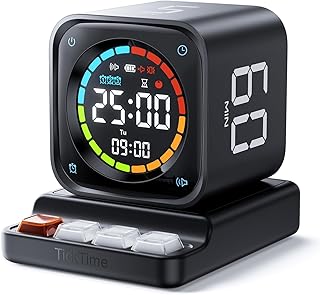
TK3 Pomodoro Timer Cube, Desk Productivity Timer with 5/10/30/60 Min Presets, Custom Countdown, Stopwatch, Clock, 3 Alarm, Silent, Vibrate & Sound Alert, for Task, ADHD, Study, Kitchen, Black
Best For:
Flexible workers who want an all-in-one cube with presets, stopwatch, and vibration—good for freelancers, students, and neurodiverse users.
The TK3 Pomodoro Timer Cube is a multi-purpose desk gadget aimed at creators who want versatility in one small device. It offers five common presets (5/10/30/60 minutes plus a 5-minute option often used for breaks), a custom countdown mode, stopwatch, clock, and three types of alarms including silent and vibration modes. The black finish reads as minimal and professional on a studio desk.
This timer is particularly useful for people who switch between short bursts and longer deep-focus sessions throughout the day. For instance, a freelance copywriter might use 10-minute blocks for email triage, 30-minute blocks for focused editing, and a 60-minute block for concentrated drafting. The stopwatch and clock functions are handy extras for non-Pomodoro tasks—recording time on client work, tracking practice segments, or timing kitchen tasks when you’re juggling household life with studio time.
Compared to single-function visual timers, the TK3’s range of modes provides a “one tool does many jobs” advantage. It competes favorably with smartphone apps because it eliminates the distraction of a connected device while still offering flexible timing options. The tactile cube interface makes starting a session easy and low-friction.
However, if you prefer a large visual display or highly stylized design, a MOD-style visual timer may be more suitable. Additionally, creators who want integrated analytics or app-based logging should consider a smart device that syncs to a phone or desktop.
Best for: Versatile creators who need multiple timing modes and prefer a discreet, tactile desktop tool.
Buying considerations: check alarm volume levels and battery type; verify that vibration mode is strong enough for your environment if you rely on haptics.
Pros: Multiple timing modes including stopwatch and clock, tactile cube interface, silent/vibrate options
Cons: Smaller display than visual-only timers, no app integration
Check the latest price on Amazon.
Pros
- Wide range of timing modes and presets
- Silent and vibration alerts for discreet use
- Useful extras like stopwatch and clock
Cons
- Smaller visual display than large timers
- No app syncing or detailed analytics
Check the latest price on Amazon.
Time Timer MOD – Home Edition – Individual Sized 60 Minute Visual Countdown Timer for ADHD, Adults, Students, and Pomodoro with Silent Operation (Metallic Midnight)

Best For:
People who prefer a small, attractive visual timer for personal use—excellent for students, individuals with ADHD, and anyone who favors silent, visible countdowns.
The Time Timer MOD Home Edition refines the classic visual timer into an individual-sized, 60-minute device designed for personal desks and bedside tables. Its metallic midnight finish gives it a modern look, and like other Time Timer models, it emphasizes a colored disk that visibly shrinks as the session progresses. The device’s silent operation is ideal for creators who work in quiet studios or shared apartments.
This model is especially suited to individuals managing ADHD, students timing study intervals, or anyone who benefits from an easily interpreted visual cue rather than numeric countdowns. Because it’s compact, the MOD fits neatly on crowded desks where a larger visual timer might not. The tactile dial makes starting a session simple—just rotate to the desired duration and the visual disk appears.
Comparing the MOD to phone-based timers, the biggest advantage is the physical separation from your screen. Where a phone timer can tempt you into apps, the MOD sits silently and unobtrusively on the desk as a reminder of your commitment to a session. Against cube timers, it offers a larger visual cue though fewer preset bells and whistles like vibration or stopwatch modes.
If you prefer an aesthetically pleasing object that communicates remaining time at a glance, the MOD is a great pick. If you need multiple audio/haptic alert types or long-term session logging, consider a cube with richer modes or a connected device instead.
Best for: Individuals who want a stylish, compact visual countdown for personal focus sessions—especially helpful for ADHD support, study blocks, and quiet environments.
Buying considerations: ensure the size fits your desk and that silent operation is acceptable for your alerting needs.
Pros: Attractive metallic design, compact size, silent visual countdown ideal for ADHD support
Cons: Lacks multiple alarm types and advanced timing modes
Check the latest price on Amazon.
Pros
- Compact and stylish metallic finish
- Large visual wedge for easy time awareness
- Silent operation suited to quiet spaces
Cons
- No vibration or advanced alarm modes
- Limited to a 60-minute maximum and no multi-mode features
Check the latest price on Amazon.
Final Verdict
Choosing the right office focus gadget comes down to how you like to be alerted and how much flexibility you need. If you want a gentle nudge toward healthier work patterns, the Mindsight Focused Activity Timer blends Pomodoro-style blocks with wellness prompts. For portable tactile control with vibration and mute options, the Printers ack Pomodoro Timer cube and the TK3 Pomodoro Timer Cube are reliable multi-mode choices, especially in shared spaces or for neurodiverse users. If a large, silent visual cue is your priority, the TIME TIMER Home MOD or the Time Timer MOD Home Edition give you an intuitive, non-verbal countdown that’s ideal for group visibility or quiet solo work.
Think about where you’ll use the device (shared office vs. private studio), how you prefer to be alerted (visual, sound, vibration), and whether you want extra features like stopwatch, clock, or wellness prompts. If you want a no-fuss visual anchor, pick a Time Timer MOD. If you need versatility and tactile feedback, a cube-style timer is the practical choice. For creators who want to balance productivity with intentional rest, Mindsight’s wellness prompts are worth considering.
Whichever device you choose, these physical timers solve the common problem of digital distraction by making focus visible and actionable. They’re not magic—good habits still matter—but they make it easier to start, maintain, and respect focused work blocks.
Check the latest price on Amazon.
Conclusion
These Office gadgets creators use during focused work sessions picks are trending now and offer great value and variety. Check the links above for latest prices and reviews.
As an Amazon Associate, I earn from qualifying purchases.
Tags:
Pomodoro timer, focus timer, office productivity, visual timer, ADHD tools, desk gadgets, time management
