Top Office Accessories for Hybrid Work Routines
As an Amazon Associate, I earn from qualifying purchases. This article may contain affiliate links, which means we may receive a commission at no extra cost to you.
Switching between home and office work can scatter tasks, reminders, and ideas. The right low-cost accessories help you stay organized, visible, and efficient across both environments. Below are five practical items—sticky easel pads, daily and weekly notepads, and monitor memo holders—that make hybrid schedules easier to manage without overcomplicating your setup.
Buying Guide
When choosing hybrid-work accessories, prioritize portability, visibility, and durability. Look for pads with strong adhesive if you stick notes to monitors, larger-format paper for team sessions, and undated planners that flex with variable schedules. Consider size to fit your monitor or desk, paper quality for pens and markers, and whether an accessory replaces digital reminders or complements them. If you alternate locations, choose lightweight items or thin pads that fit in a laptop bag.
Post-it Super Sticky Easel Pad, 25 x 30 Inches, 30 Sheets/Pad, 6 Pads, Large White Premium Self Stick Flip Chart Paper, Super Sticking Power (559VAD6PK)

Best For:
Team leads, project planners, teachers, and hybrid meeting hosts who need a portable, high-visibility writing surface.
If your hybrid routine includes team brainstorming, quick training sessions, or visible daily priorities, a large easel pad is a reliable analog tool. This Post-it Super Sticky Easel Pad delivers big, clean sheets (25 x 30 inches) that adhere to walls, whiteboards, and many surfaces without additional tape. The large format makes it ideal for mapping workflows during in-person days, capturing meeting notes that remote teammates can photograph, or creating a quick Kanban board for home office days. Compared with standard legal pads or small sticky notes, the easel pad’s size prevents ideas from being cramped and keeps group thinking visible to everyone.
In day-to-day hybrid use you can stick a fresh sheet on an office wall for sprint-planning, tear off pages to archive decisions, or stick a goals sheet near your home desk as a visual cue. The heavier paper stands up to markers and moderate erasing, so it outperforms thin flip-chart alternatives that ghost or tear. Who should buy it? Team leads, project managers, teachers, and anyone who runs frequent in-person or hybrid workshops. Who may not need it? Solo workers who never host meetings or who prefer fully digital whiteboarding tools. Practical considerations: check wall compatibility for the adhesive, and pair with medium-tip markers for best legibility. Friendly tip: photograph pages to share with remote attendees before removing them.
Pros
- Large, high-visibility sheets
- Strong adhesive for many surfaces
- Durable paper for markers
Cons
- Takes wall space
- Heavier to transport than small pads
Want clear, team-ready pages for brainstorming? View this easel pad on Amazon.
Taja To Do List Notepad – To Do List Notebook for Work with 52 Sheets, 9.8" x 6.5", Undated Daily Planner Perfect for Daily Tasks and Goal Setting, Notepad Suitable for Office, Home & School – Greenery Sway

Best For:
Individuals who prefer analog daily planning, commuters, and workers with shifting schedules who want a portable task list.
Small, undated daily planners like the Taja To Do List Notepad are ideal for hybrid workers who need a simple, portable task manager without app friction. At roughly 9.8 x 6.5 inches and 52 sheets, this notepad fits a bag, sits beside a laptop, and gives you a clear daily layout to list priorities, time-block tasks, and track progress. Its undated format is perfect for irregular schedules—if you skip a day in the office, you don’t waste pre-printed dates. Compared to a digital to-do app, this notepad reduces screen switching and provides tactile satisfaction when crossing off items.
Practical uses include planning your at-office tasks the night before, keeping a running task list you can reference during short remote meetings, and jotting quick follow-ups you want to add to your email later. The compact size also makes it a good choice for commuting professionals who like to review priorities on the way to the office. Who should buy it? People who prefer pen-and-paper planning, those with variable daily schedules, and anyone wanting a distraction-free task list. Who might skip it? Heavy-duty project managers who need integrated digital task tracking or calendar-linked reminders. Buying considerations: choose a pen that won’t bleed through and look for a notepad that lies flat for easy writing.
Pros
- Portable, pocketable size
- Undated flexible format
- Clear daily layout
Cons
- Limited sheets for heavy daily users
- No digital sync
Like a simple daily planner you can carry everywhere? Check it out on Amazon.
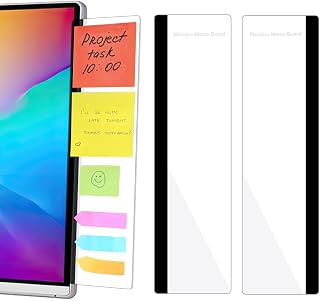
2 Pack Computer Monitor Memo Board, Acrylic Computer Monitor Sticky Note Holder, Transparent Side Panel Office Desk Organizer,Home Office Desk Accessories, Office Supplies for Women Men Computer
Best For:
Desk workers who need visible reminders on their monitor without adhesive residue or clutter.
Sticky-note clutter is a common hybrid-work frustration—important reminders get buried, and small notes fall off curved monitors. An acrylic monitor memo board gives a tidy, visible place for notes and quick lists. This 2-pack of transparent side panels clips or sits beside your screen to hold sticky notes, index cards, and small memos without covering the main display. It’s a minimalist alternative to taping notes directly to the bezel or adding bulkier desk organizers.
Use it to pin today’s top three tasks, meeting times, action items from calls, or a quick phone number while on a video chat. For people who move between home and office, a slim memo board is easier to transport than a full desktop organizer. Compared with adhesive sticky-note strips, the acrylic board keeps notes flatter and prevents adhesive residue on monitors. Who should buy it? Multitaskers who want visual reminders without obstructing the screen and those who prefer a clutter-free desktop. Who may not need it? Users with ultrawide curved monitors where placement is tricky or people who rely solely on digital reminders. Buying considerations: confirm monitor thickness and edge style for easy placement, and choose a model that’s easy to clean.
Pros
- Keeps sticky notes organized and visible
- Clear acrylic won’t block view
- Slim, easy to move
Cons
- May not fit all monitor edges
- Limited capacity for larger notes
Want a neater way to keep reminders on-screen? See this memo board on Amazon.
Weekly To Do List Notepad with 52 Undated Sheets(8.5"×11")- Undated Weekly Planner Notepad for Office Desk Accessories and Supplies – Midnight Lilac

Best For:
Professionals and parents who need a weekly overview to balance office and home tasks across hybrid schedules.
A weekly notepad gives structure for hybrid schedules where tasks span multiple days and locations. This 8.5 x 11-inch undated weekly to-do notepad lays out the week on a single spread so you can distribute tasks between office and home days and spot bandwidth conflicts at a glance. The larger page size gives room for sub-tasks, quick notes, and time-blocking—handy for planning which day you’ll tackle focused work, admin, or meetings.
In real life it works well when you plan office-focused activities (e.g., in-person reviews, equipment checks) on in-office days and deep-focus tasks for quieter home days. Compared to a daily notepad, the weekly format reduces repetition and improves forward planning. Who should buy it? Professionals juggling recurring weekly deliverables, parents coordinating family and work schedules, and anyone who benefits from a single-week overview. Who may not need it? People who only plan day-to-day or those who fully rely on digital calendar blocks. Buying tips: use color-coding pens for home vs. office tasks and consider tearing off completed weeks to keep a tidy desk.
Pros
- Full-week overview on one page
- Undated for flexible use
- Large writing space
Cons
- Bulky to carry daily
- Requires manual archiving
Prefer planning by week? Find this weekly notepad on Amazon.
2PCS Computer Monitor Memo Board, 11" x 3.1"Clear Acrylic Office Desk Accessories, Computer Monitor Side Note Holder, Message Board for Sticky Notes, Reminders & Memos

Best For:
Users seeking a slim, unobtrusive place for sticky notes and short reminders on their monitor.
This 2-piece set of clear acrylic monitor memo boards is a compact, inexpensive way to keep reminders in your line of sight during hybrid work. At 11 x 3.1 inches, each panel offers a slender strip for sticky notes, index cards, or handwritten reminders—perfect for deadlines, daily goals, or short checklists. The transparent material blends into your setup so it feels less intrusive than a large corkboard.
Use cases include pinning calls and meeting codes during back-to-back video days, creating a running “today” list to glance at while switching locations, or reserving one panel for personal reminders and the other for work tasks. Compared to larger desktop organizers, these panels are space-efficient and simple to move between monitors. Who should buy it? Remote and hybrid workers wanting a subtle, dedicated spot for quick reminders. Who might skip it? People who prefer sticky notes stuck directly to surfaces or who need larger writable areas. Buying considerations: check compatibility with your monitor edge and think about whether you want one or both panels in daily use.
Pros
- Slim, unobtrusive design
- Two panels for separation of notes
- Easy to reposition
Cons
- Small writing area
- May not attach to thicker monitor bezels
Looking for a low-profile memo solution? Browse this monitor note set on Amazon.
Final Verdict
Small, well-chosen accessories—flip-chart pads for group sessions, undated daily and weekly notepads for flexible planning, and compact monitor memo boards for visible reminders—can dramatically reduce friction in hybrid work. Choose larger paper for collaborative days and compact notepads or monitor panels for solo focus and portability. If you alternate locations, prefer undated formats and lightweight pieces you can tuck into a bag. For visible, shared thinking use the easel pad; for daily task capture carry the Taja notepad; for weekly planning pick the 8.5×11 weekly pad; and for tidy on-screen reminders use one of the acrylic memo boards. These five options cover common hybrid needs without replacing digital tools—think of them as quick visual anchors that complement calendars and task apps. As an Amazon Associate, I earn from qualifying purchases. This article may contain affiliate links, which means we may receive a commission at no extra cost to you. Check the latest price on Amazon.
Conclusion
These Office accessories people use during hybrid work schedules picks are worth comparing if you want practical options with useful features, clear use cases, and buyer-friendly details.
As an Amazon Associate, I earn from qualifying purchases.
Tags:
hybrid work, office accessories, monitor memo board, weekly planner, daily notepad, sticky easel pad, home office, desk organization, office accessories people use during hybrid work schedules, top office accessories for hybrid work routines, gifts, amazon affiliate, product recommendations, buying guide, shopping guide
