Top Office Accessories for Hybrid Creators
As an Amazon Associate, I earn from qualifying purchases. This article may contain affiliate links, which means we may receive a commission at no extra cost to you.
As an Amazon Associate, I earn from qualifying purchases. This article may contain affiliate links, which means we may receive a commission at no extra cost to you.
Modern creators—whether freelance designers, educators running hybrid classes, or content producers balancing studio and home—need tools that bridge in-person and remote workflows. The right desk accessories keep notes visible, reduce friction when switching contexts, and protect your body during long stretches of focused work. This guide highlights five practical, well-priced picks that help streamline day-to-day hybrid schedules without demanding complex setups or massive desk real estate.
I organized these recommendations around realistic use cases: quick whiteboarding for a video call, jotting neon ideas that pop on camera, scanning text from printed materials, supporting lower back during marathon editing sessions, and combining a writable surface with a wireless charging hub. Each product section explains who benefits most, what problems it solves, and the practical trade-offs to consider. The aim is to help you decide quickly which small upgrade will have the biggest impact on your hybrid workflow.
Buying Guide
Why small desktop accessories matter for hybrid creators
Hybrid work blurs the lines between studio and home office. You spend part of the day on camera, part of it in deep creative flow, and part in meetings that require rapid note capture and reference. Small, focused accessories remove micro-friction—those tiny interruptions that add up: searching for a marker during a call, craning your neck because your lumbar support is missing, or retyping a paragraph from a printed brief. Investing in a few targeted items can reclaim minutes and reduce fatigue.
Key features to prioritize
– Footprint and portability: Look for compact designs that sit neatly in front of your keyboard or stash easily when you switch desks. A desktop whiteboard or slim LED note board should be light enough to reposition yet sturdy while you write.
– Multipurpose utility: Products that combine functions—like a glass pad that doubles as a dry-erase surface and wireless charger—save space and remove the need for extra cables.
– Readability and camera-friendliness: If you use physical notes during video calls, choose high-contrast writable surfaces or neon LED boards that show up clearly on camera. Matte glass boards reduce glare compared with cheap plastic alternatives.
– Ergonomics and comfort: Memory foam lumbar pillows or lumbar supports with adjustable straps will directly affect how you feel after an 8-hour editing or writing session. Prioritize breathable covers and shape retention.
– Accessibility and assistive features: Tools such as a scanning pen with phonics assistance or text-to-speech features can speed up research and support diverse learning needs.
Common trade-offs
– Durability vs. price: Ultra-thin LED drawing boards and low-cost dry-erase pads can serve occasional needs but may show wear faster. If you use an accessory daily, invest in a sturdier glass or memory-foam product.
– Simplicity vs. bells-and-whistles: Some creators prefer a straightforward writable surface and markers; others want integrated charging, LEDs, or digital capture. Pick the level of complexity you will actually use.
Final buying tips
Match the accessory to the task you repeat most often. If you constantly refer to paper notes during calls, a small angle-adjustable whiteboard or LED pad that reads well on camera is high value. If you’re editing or sitting for long stretches, prioritize lumbar support. For mixed-use desks, a combined wireless charging glass pad can reduce cable clutter while serving as a dry-erase surface for quick reminders.
Below are five products chosen because they address concrete hybrid-work problems without requiring major changes to your setup.
HURUC Small Glass Desktop Whiteboard with Storage,15.3"x7.08"x2.16" inch Desktop Dry Erase Board with Markers & Duster, Desk White Board Buddy Organizer for Home, Office, School (Black)

Best For:
Educators, hybrid meeting hosts, podcasters and freelancers who need quick, camera-visible notes and a tidy pen storage solution.
If you want a compact, tidy place to keep daily to-dos and quick sketches in view during hybrid meetings, the HURUC glass desktop whiteboard aims squarely at that need. This small, rectangular dry-erase board is framed to sit at a slight angle and includes a narrow storage tray for markers and the included duster—meaning you won’t be hunting for a pen mid-call. The tempered glass surface resists staining and ghosting better than many plastic pads, so notes stay crisp after repeated use. Because the board’s footprint (about 15.3" x 7.08") is modest, it fits comfortably in front of a keyboard or to the side of a laptop without blocking your view.
Key benefits for hybrid creators include quick visual reminders that camera-facing participants can read, an organized place for frequently used pens and erasers, and a durable surface that tolerates daily use. Creators who like to sketch out composition ideas, map a short agenda, or jot single-line reminders will find this practical. It’s also useful for teachers running short in-person or remote lessons where a small portable reference is handy.
Compared with standard alternatives, like paper sticky notes or bulky tabletop easels, the HURUC glass board is easier to clean, longer-lasting, and less intrusive. It won’t replace a wall-mounted whiteboard for extended brainstorming, but it’s a better choice for short bursts of visible notes and tidy desk organization. Practical observations from user feedback suggest the tray holds two markers and the magnetic duster securely, though heavy use of solvent markers should still be avoided to preserve the glass finish.
Who should buy it: Creators who need a low-profile writable surface for quick reminders, checklist items, and camera-friendly notes during hybrid calls. It’s especially useful for educators, podcasters, or freelancers who switch environments frequently and want a consistent small workspace tool.
Who may not need it: If you already have a large wall whiteboard or rely solely on digital note apps and seldom write by hand, this desktop board may be redundant.
Pros: Durable glass surface, compact footprint, built-in storage tray.
Cons: Limited writing area for extended brainstorming; not a digital capture device.
Check the latest price on Amazon.
Pros
- Tempered glass resists staining and ghosting
- Compact footprint fits on busy desks
- Built-in tray for markers and duster keeps desk tidy
Cons
- Small surface area not suited for long brainstorming sessions
- No digital capture—requires manual transcription for long-term storage
Check the latest price on Amazon.
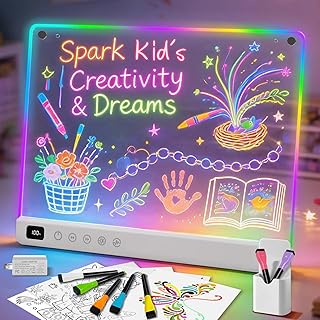
Led Drawing Board with 13 Light Effects, 16" Rechargeable Glow Doodle LED Note Board with Colors, Neon Light Up Drawing Tablet Gifts for Kids for Easter Birthday Christmas Gift Ideas
Best For:
Video creators, livestreamers, energetic teachers and social media producers who want camera-friendly, colorful on-screen signage.
A neon LED drawing board might sound like a children’s toy at first glance, but the 16" rechargeable glow doodle pad offers surprising utility for creators working on camera. The bright, colorful light effects (13 preset options) make simple notes and sketches pop during video calls, and the rechargeable battery removes the annoyance of frequent battery swaps. Writers and content creators who want a stylized on-camera prop (think bold headings, chapter markers, or bright cue cards) will appreciate how the neon lines register clearly on most webcams and phone cameras.
Beyond being camera-friendly, this board is a tactile way to brainstorm short ideas without reaching for a digital device. The surface accepts neon markers and erases cleanly, letting you test composition or color accents before committing to a final design on your computer. Compared with paper cue-cards or dull dry-erase boards, the LED glow attracts attention and reads well even under softer lighting conditions, which can be helpful when filming in a living room or improvised studio setup.
Use-case scenarios include: marking the current segment during a livestream, creating a bright sign for a video thumbnail background, or letting students answer a quick question visibly during hybrid lessons. It’s also easy to pack into a tote for pop-up shoots or in-person workshops.
Limitations are straightforward: it’s not intended for long-form note-taking, and the novelty lighting may feel excessive for strictly professional, conservative meeting environments. Also, neon boards tend to be less legible at extreme angles, so positioning matters.
Who should buy it: Creators who film from home, teachers running lively hybrid classes, or social media producers who want colorful on-camera signage that’s rechargeable and portable.
Who may not need it: Professionals who prefer neutral, minimalist aesthetics during calls or those who rarely appear on video.
Pros: Bright, camera-friendly neon lines; rechargeable battery; portable 16" size.
Cons: Limited for extended note-taking; neon style may not suit formal settings.
Check the latest price on Amazon.
Pros
- 13 light effects make notes stand out on camera
- Rechargeable—no disposable batteries
- Large 16" surface that’s still portable
Cons
- Not ideal for long-form writing or dense notes
- Neon aesthetic may not fit formal meeting styles
Check the latest price on Amazon.
Scanmarker Max Reading Pen – Designed for Classroom Support with Phonics Assistance, Lock Function and Assistive Web App

Best For:
Researchers, writers, teachers and creators who convert printed materials into editable digital text frequently.
The Scanmarker Max Reading Pen is a specialized tool for quickly transferring printed text into digital form—useful when you’re juggling research, printed briefs, or reference books during hybrid work. Rather than typing out important paragraphs, you can scan lines of text and have them sent to your computer or mobile device. This model emphasizes classroom support features, including phonics assistance and a lock function tailored for sustained scanning or use with assistive apps. The bundled web app helps convert scanned text into editable formats and supports text-to-speech, which can be helpful for proofreading or multitasking while doing other creative work.
For creators who research dense print materials—think authors, academics, journalists, or podcast producers compiling notes—the Scanmarker speeds up the capture process significantly. Compared with taking photos with a phone camera and using OCR later, the pen is more precise for line-by-line capture and often requires less cleanup. It also helps when you need to capture small sections of a book without dismantling the binding or holding pages flat for a camera shot.
Realistic use cases include scanning quotes into a notes document during an interview prep session, capturing recipe steps from a cookbook when filming a cooking segment, or converting printed classroom handouts into accessible digital text for remote learners. Users report that the device works best on standard printed fonts and that very glossy paper or unusual typefaces can reduce accuracy—common limitations with portable OCR devices.
Who should buy it: Researchers, teachers, writers, and creators who frequently convert printed text into editable digital content and value speed and accessibility features.
Who may not need it: Casual users who rarely work with printed text or who already rely exclusively on fully digital sources.
Pros: Fast line-by-line scanning, phonics and accessibility-focused features, helpful web app for conversion.
Cons: Accuracy drops on glossy pages or unusual fonts; requires pairing with a device for full functionality.
Check the latest price on Amazon.
Pros
- Efficient line-by-line scanning into editable text
- Phonics assistance and accessibility-focused features
- Companion web app for easy conversion and text-to-speech
Cons
- Performance can decline on glossy paper or unusual fonts
- Dependent on a paired device for full functionality
Check the latest price on Amazon.
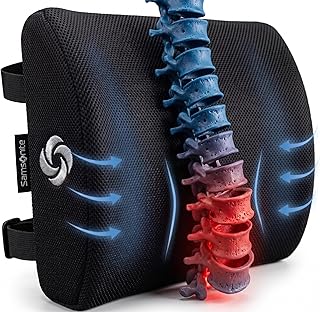
Samsonite Lumbar Support Pillow for Office Chair, Lower Back Support for Car, Back Pillow Desk Chair Cushion with Memory Foam, Improved Posture Backrest
Best For:
Video editors, writers, streamers and remote workers who need extra lower-back support during long seated sessions.
Comfort directly impacts how productive you are during long hybrid workdays, and that’s where a quality lumbar support pillow becomes a practical investment. Samsonite’s lumbar support pillow uses memory foam to conform to the lower back, helping preserve the natural curve of the spine and reduce slouching. The product is shaped to sit behind your lumbar region and typically includes a removable, breathable cover that’s washable—useful if your workspace doubles as a home office and sees heavy daily use.
Compared with thin foam pads or passive cushions, the memory foam approach offers better pressure distribution and longer-lasting shape. For creators who spend hours editing video, writing, or doing focused design work, consistent lumbar support can reduce lower-back stiffness and the micro-discomforts that interrupt deep work sessions.
Use-case scenarios include: sitting through an afternoon of photo editing, commuting with a laptop for mobile work, or providing extra support during long study sessions. Reviewers commonly note that the secure strap or contoured shape keeps the pillow from sliding on many chairs, but fit can vary based on your chair’s back profile—so check compatibility. Also consider the pillow thickness and your personal posture: people who already have an ergonomic chair with built-in lumbar support may find the addition unnecessary, while those using older or flat-backed chairs will likely notice the biggest benefit.
Who should buy it: Creators who sit for prolonged periods without strong built-in lumbar support in their chairs—video editors, writers, streamers, and anyone prone to lower-back tightness.
Who may not need it: If you have a high-quality ergonomic chair with adjustable lumbar support, this pillow may be redundant.
Pros: Memory foam conforms to lower back, washable cover, portable for car or office use.
Cons: Fit depends on chair shape; may be unnecessary with high-end ergonomic chairs.
Check the latest price on Amazon.
Pros
- Memory foam for pressure relief and shape retention
- Removable, washable cover
- Portable—works in car or office chairs
Cons
- Fit varies with chair back profiles
- Redundant if you already own a quality ergonomic chair
Check the latest price on Amazon.
SELEAD Desktop Glass Whiteboard with Wireless Charger Station, Dry Erase Board Computer Pad Keyboard Stand with Organizer for Home, School, Office Desk Accessories, Black

Best For:
Small-desk creators, multitasking content producers, and hybrid workers who want tidy cable-free charging plus a writable desktop surface.
For creators who crave both function and decluttered aesthetics, the SELEAD desktop glass whiteboard that doubles as a wireless charging station is an attractive multi-tool. The tempered glass surface serves as a dry-erase pad for jotting quick reminders, sketching layout ideas, or creating camera-facing cue cards, while an integrated Qi wireless charger powers compatible phones without an extra cable. The board often doubles as a keyboard stand or computer pad, giving your desk a neat, uniform surface that resists stains and ghosting better than plastic.
Compared with standalone wireless chargers and separate small whiteboards, combining both functions saves desk space and reduces cable clutter. This is particularly helpful for creators who swap between writing and phone-dependent tasks—imagine charging your phone while you sketch a storyboard or drop a quick agenda on the board during a livestream.
Practical observations include: the glass finish looks cleaner on camera than matte plastic and is easier to wipe, but the wireless charging performance depends on proper device alignment. The charging pad usually supports standard Qi-compatible phones, but thicker cases or nonstandard phone sizes can affect charging efficiency. As with any glass product, care is needed to avoid heavy impacts, and this isn’t an ideal solution if you routinely need to capture whiteboard notes digitally—there’s no built-in digitizing.
Who should buy it: Creators who want a tidy, multifunctional desktop solution that combines a writable surface with cable-free charging—perfect for small desks, shared spaces, or camera setups.
Who may not need it: Those who prefer fully digital capture workflows or who regularly use wired fast-charging that exceeds standard Qi performance.
Pros: Two-in-one glass whiteboard and wireless charger, sleek camera-friendly finish, reduces desk cable clutter.
Cons: Charging requires correct device alignment; glass surface needs careful handling.
Check the latest price on Amazon.
Pros
- Integrated Qi wireless charging with writable tempered glass surface
- Sleek, camera-friendly finish that resists ghosting
- Saves desk space by combining two functions
Cons
- Wireless charging can be sensitive to device alignment and cases
- Glass needs careful handling to avoid impacts
Check the latest price on Amazon.
Final Verdict
Small desktop accessories can have outsized effects on hybrid creators’ day-to-day workflow. The five products outlined here address common pinch points: the need for camera-friendly notes (HURUC glass whiteboard; LED drawing board), fast conversion of printed text to digital (Scanmarker Max), physical comfort for long sessions (Samsonite lumbar pillow), and a decluttered, multi-use surface with charging (SELEAD glass pad).
If you prioritize tidy, visible reminders and low-maintenance surfaces, the HURUC board and SELEAD charging glass are practical choices—one purely writable, the other combining charging and writing. For creators who appear on camera and want a bold visual element, the LED drawing board adds energy to livestreams and lessons. If your work requires frequent transcription from printed sources, the Scanmarker Max can save time and improve accessibility. And if long hours are starting to affect your posture and focus, a memory foam lumbar pillow is one of the simplest, most effective comfort upgrades.
Choose based on where you feel the current friction: visible reminders and camera readability, digital capture of print, better sitting comfort, or desk decluttering. Each of these items targets a specific everyday problem without major setup or learning curves.
If one of these solves your biggest daily annoyance, it’s worth adding to your setup; small upgrades compound into smoother hybrid days. Check the latest price on Amazon.
Conclusion
These Office accessories creators use during realistic hybrid schedules picks are trending now and offer great value and variety. Check the links above for latest prices and reviews.
As an Amazon Associate, I earn from qualifying purchases.
Tags:
hybrid work accessories, desk organizer, desktop whiteboard, led drawing board, scanmarker, lumbar support pillow, wireless charging glass pad
