Top Office Accessories for Apartment Deep Work
As an Amazon Associate, I earn from qualifying purchases. This article may contain affiliate links, which means we may receive a commission at no extra cost to you.
Working from a small apartment presents a unique set of challenges: limited desk space, unavoidable distractions, and the need to maintain comfort through long creative sessions. Whether you’re a content creator, writer, designer, or developer, setting up a compact, efficient workstation can make deep work sessions far more productive and less tiring. This guide highlights five practical accessories many creators favor for apartment-based deep work: two different laptop stands, a flexible LED desk lamp, a rotating productivity timer, and a simple daily notepad. Each item is chosen for portability, space-sensitivity, and real-life usefulness in confined spaces. The goal here is to help you assemble a lightweight, ergonomic, and distraction-minimizing setup without a full office overhaul.
Right away: As an Amazon Associate, I earn from qualifying purchases. This article may contain affiliate links, which means we may receive a commission at no extra cost to you.
Read on for a focused buyer’s guide, detailed product breakdowns with realistic use cases, and clear recommendations so you can choose the right accessories for your apartment deep work sessions.
Buying Guide
What to prioritize when choosing deep-work accessories for an apartment setup
Space and portability: Apartment desks are often smaller than office desks. Prioritize foldable, lightweight items that can be stowed away when not in use. Laptop stands with a small footprint and a folding mechanism keep your surface clear for sketching, notebooks, or a second device.
Ergonomics: Long deep-work sessions can cause neck and shoulder strain. A stand that raises your laptop screen to eye level and pairs well with a separate keyboard and mouse is a better long-term choice than working hunched over. Look for adjustable height and angle to tune the setup to your posture.
Cooling and ventilation: Laptops on soft surfaces or directly on the desk can overheat, especially during video editing or rendering. Ventilated stands or stands that promote airflow help maintain performance and reduce fan noise.
Lighting: Apartments rarely have perfect task lighting. An adjustable LED desk lamp with a clamp or small footprint is invaluable. Stepless dimming and color temperature control let you balance eye comfort and screen visibility throughout the day and into the night.
Focus tools: When distraction risk is high, simple tools like a mechanical timer help structure sprints and breaks. A rotating desk timer with preset sessions avoids fiddly apps and phone notifications while providing tactile feedback that many find calming and motivating.
Analog planning: Digital task managers are great, but a compact daily notepad or undated planner forces you to prioritize and keep intentions visible on the desk. A single-page-per-day notepad helps keep deep work goals tangible and reduces tab-switching.
Materials and stability: Metal or reinforced ABS stands tend to be sturdier than thin plastic alternatives. If you travel between rooms or cafes, weight matters; for permanent apartment setups, sturdiness often beats the lightest option.
Compatibility and device size: Many laptop stands list compatibility ranges (e.g., 10–15.6"). Check your device dimensions and whether you use a tablet or a second screen. Some stands provide silicone pads or clamps to protect surfaces and prevent slippage.
Noise and distraction reduction: Choose accessories that don’t rattle or creak when you type. For small spaces, clamp-style lamps reduce desk clutter, and stands with rubber feet keep things steady on imperfect surfaces.
Who should consider alternatives: If you already have a full standing desk or an external monitor setup, a minimalist stand may be unnecessary. Similarly, if you use strict digital planning and time-blocking apps and never reach for paper, a physical notepad could be optional.
Practical buying considerations: check product dimensions, weight capacity, adjustability range, and included accessories (like clamps or USB adapters). Read customer notes about stability on small desks and whether the lamp’s clamp fits thin furniture or requires a shelf. Finally, balance portability versus durability: frequent commuters need lighter, more compact stands, while apartment-only users can favor heavier, more solid units for longevity.
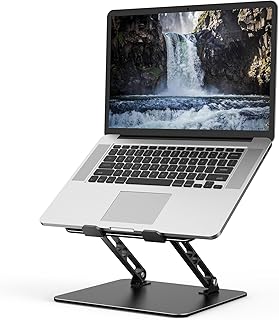
Adjustable Laptop Stand for Desk, Metal Foldable Laptop Riser Holder, Portable Desktop Book Stands, Ventilated Cooling Computer Notebook Stand Compatible with 10-15.6” Laptops
Best For:
Creators who prioritize durability and ventilation in a compact, foldable laptop riser; good for video editors, writers, and creators who move their workspace around the apartment.
This metal adjustable laptop stand is a no-nonsense option for creators who need a compact, sturdy riser that packs away easily. Built primarily from metal, it offers a more solid footprint than thin plastic stands and typically includes ventilation cutouts or an open design for airflow. The foldable mechanism makes it ideal for small apartments where the desk doubles as a dining table or when you want to clear the surface for drawing or photography. Unlike bulkier risers, this type of stand concentrates on elevating screen height and improving posture when paired with an external keyboard.
Main benefits for apartment deep work: The metal build reduces wobble and keeps a heavier laptop secure during fast typing or when you rest your hands on the chassis. Ventilation is practical when editing footage, running multiple tabs, or doing CPU-heavy work because it reduces the risk of thermal throttling. Portability-wise, the fold-flat design fits into a bag or a shallow drawer, so you can shift your workspace between a corner desk and the kitchen table without hauling a large frame.
Real-life usage scenarios: A freelance video editor working in a compact living room can place the laptop on the stand and plug in a compact mechanical keyboard and mouse, creating an ergonomically friendly setup for long editing sessions. A writer or blogger who bounces between a balcony and a home office can fold the stand and carry it to a different room to change scenery without sacrificing posture. The stand also works well for creators who do livestreaming: raising the laptop gives a better camera angle and leaves space for an external microphone or small ring light.
Why choose this metal stand over cheaper plastic alternatives: Many low-cost plastic stands feel light and can flex under heavier laptops, which leads to distracting movement and the occasional re-positioning. Metal stands offer durability and a steadier platform, which feels premium and reduces long-term wear. The ventilated design addresses heat better than closed platforms, an important consideration for multitasking creators.
Who this is best for: Creators who prioritize stability, heat management, and a professional posture while using a laptop as their main workstation. It’s also a solid choice for anyone who needs to move their setup around the apartment occasionally and wants a durable solution that folds flat.
Who might skip it: If you already use a full external monitor or a sit-stand desk with built-in elevation, this accessory may be redundant. Also, if you prefer a lap-friendly solution or ultra-light travel gear, a heavier metal stand might be overkill.
Practical observations and buying considerations: Check the maximum weight capacity, folding mechanism quality, and rubber feet/pads protection to prevent scratches. Confirm the stand’s folded dimensions if you plan to stash it in a slim drawer. If you use a laptop sleeve, verify whether the stand’s corners or edges could rub delicate finishes.
Overall, this metal foldable laptop riser is a reliable, low-fuss pick for apartment creators who want better posture, improved cooling, and a steady platform without sacrificing portability. Consider pairing it with a compact Bluetooth keyboard and a mouse to complete an ergonomic, small-space workstation.
CTA: If this looks like the stability-and-portability solution you need, grab it via the link and check the latest price on Amazon.
Pros
- Sturdy metal construction reduces wobble compared to thin plastic stands
- Fold-flat design for easy storage and portability
- Ventilated/open design helps laptop cooling during heavy workloads
Cons
- Heavier than ultra-light travel stands
- May be unnecessary if you already use an external monitor or standing desk
If this looks like the stability-and-portability solution you need, grab it via the link and Check the latest price on Amazon.
Tonmom Laptop Stand for Desk, Adjustable Laptop Riser ABS+Silicone Foldable Portable Notebook Holder, Ventilated Cooling Notebook Mount Computer Stand for 10-15.6” Laptops,Tablets-Black

Best For:
Students, mobile creators, and anyone who needs a lightweight, protective, adjustable laptop riser for small, multi-use apartment surfaces.
The Tonmom adjustable laptop stand is a popular lightweight option that blends ABS plastic frames with silicone padding for protection and grip. It targets creators who want a portable, adjustable riser that won’t scratch laptop surfaces and offers multiple angle settings. The foldable design makes it easy to store, while the silicone pads keep surface-to-device contact secure—helpful in small apartment environments where desks may have uneven surfaces.
Main benefits for apartment deep work: This stand’s main advantage is a practical mix of adjustability and protection. Multiple angle presets let you tune the screen height for different tasks—low for typing, higher for video calls or content review. The silicone cushions help prevent slippage during quick typing bursts, which is especially useful on narrow desks or multi-use surfaces. The ABS structure keeps weight down, making it a reasonable choice for creators who frequently change work locations, such as moving between a desk and a sunny window seat.
Real-life usage scenarios: A freelance illustrator who switches between sketching on a tablet and referencing images on a laptop will appreciate how easy it is to flip and adjust the stand quickly. Podcasters or live-streamers who rely on laptop cameras can raise the angle to achieve a better framing and reduce the need for additional mounts. For students or freelance professionals renting a small apartment, the stand’s foldability means it can be tucked into a backpack for library sessions or co-working days.
Why pick this over heavier metal options: Compared to solid metal stands, the Tonmom emphasizes portability and surface protection. If you travel light or want a stand that won’t add significant bulk to a laptop bag, ABS+silicone constructions typically win. However, ABS sometimes flexes more under heavier typing compared to thicker metal designs, so consider your typing habits and laptop weight when choosing.
Who this is best for: Mobile creators, students, and casual to moderate users who value portability, protection, and adjustable viewing angles without the weight of a metal stand.
Who may not need it: Heavy typists, creators with very large laptops outside the compatibility range, or those who prefer a rock-solid metal frame for maximum stability.
Practical observations and buying considerations: Confirm your laptop’s weight and dimensions against the stand’s specs. Check whether the silicone pads are replaceable or likely to wear over time. Read notes on angle-lock durability if you plan to adjust height frequently.
CTA: If you want a lightweight, protective stand that’s easy to carry between rooms, follow the link and Check the latest price on Amazon.
Pros
- Lightweight and very portable
- Silicone pads protect laptop finish and prevent slipping
- Multiple angle settings for versatile viewing
Cons
- Less rigid under heavy typing compared to metal stands
- ABS construction may show wear sooner than metal options
If you want a lightweight, protective stand that’s easy to carry between rooms, follow the link and Check the latest price on Amazon.
Airlonv LED Desk Lamp for Office Home, Eye-Caring Desk Light with Stepless Dimming Adjustable Flexible Gooseneck, 10W USB Adapter Desk Lamp with Clamp for Reading, Study, Workbench (Black)

Best For:
Writers, editors, photographers, and students who need adjustable, space-saving task lighting for small desks and multi-use rooms.
Good task lighting is one of the most underrated deep-work upgrades for apartment creators. The Airlonv LED desk lamp is designed to be compact, flexible, and easy on the eyes—ideal qualities for small workstations. It features stepless dimming (so you can fine-tune brightness), a flexible gooseneck for precise positioning, and a clamp base that helps save desk real estate by attaching to desks or shelves. The lamp typically includes a USB power option, making it compatible with power banks, laptop ports, or small adapters.
Main benefits for apartment deep work: Proper lighting reduces eye strain during long sessions and improves the visual clarity of screens and printed materials. The gooseneck allows you to direct light where you need it—on a keyboard, a sketchpad, or a page while referencing source material. Stepless dimming helps you match ambient light throughout the day or dim the lamp for late-night sessions without harsh glare. The clamp option is convenient for small desks because it eliminates a lamp base that eats precious surface area.
Real-life usage scenarios: A video editor working late into the evening can dim the ambient light to reduce screen reflections while keeping a focused area brightly lit for thumbnails and notes. A photographer or product content creator using a small desk for still-life shots can use the lamp to add directional light without needing full studio equipment. For writers and students, placing the lamp on a narrow bookshelf or the side of a desk keeps the main work surface clear for notebooks and references.
How this lamp stacks up against alternatives: Clamp-style LED lamps beat traditional desk lamps when surface area is tight. Compared with clip lights without full gooseneck control, the flexible neck here offers far more precise direction and is less likely to cast awkward shadows. If color-temperature tuning is critical to your work (for color-accurate photo editing, for example), confirm the lamp’s reported color rendering and whether it offers multiple color temperatures; some budget LED desk lamps focus primarily on brightness control.
Who this is best for: Creators who need precise task lighting without sacrificing desk space—writers, editors, photographers, and students working in small apartments.
Who might skip it: If you already have balanced room lighting and an adjustable overhead fixture, a clamp lamp may be redundant. Also, professionals requiring highly accurate color rendering for photo or video grading may need a lamp with specified color temperature control.
Practical observations and buying considerations: Check the clamp’s thickness capacity to ensure it fits your desk edge or shelf. Confirm whether the USB power adapter is included or sold separately and read notes on gooseneck stiffness—some users prefer a firmer neck that holds position more reliably.
CTA: If compact, adjustable lighting sounds useful for late-night creative sessions, tap the link and Check the latest price on Amazon.
Pros
- Stepless dimming and flexible gooseneck for precise lighting
- Clamp base saves desk space
- USB power option for versatile power sources
Cons
- May not offer advanced color-temperature control needed for critical photo grading
- Clamp thickness compatibility should be checked before purchase
If compact, adjustable lighting sounds useful for late-night creative sessions, tap the link and Check the latest price on Amazon.
Rotating Productivity Timer 5, 25, 10, 50 Minutes Preset, Desk Cube w/Gravity Sensor for ADHD, Mute Functions, Ideal for Work, Study, Kitchen, Back to School (1, Wood Grain Finish)

Best For:
Anyone looking to structure sprints—students, writers, developers, and creators who want a tactile, phone-free focus tool.
The rotating productivity timer is a low-tech but powerful focus tool for apartment creators. Instead of relying on phone apps that send distracting notifications, this tactile desk cube uses preset timers—common Pomodoro increments such as 25 minutes work and 5-minute breaks—with a gravity sensor that starts the countdown when the cube is turned. The mute function is useful for shared living spaces or late-night focus sessions where loud beeps would be disruptive.
Main benefits for apartment deep work: The biggest advantage is behavioral: having a dedicated, physical timer encourages you to commit to a focused sprint without the temptation to check messages or switch tasks. The preset modes remove decision fatigue—flip for a short focus session or a longer deep-work block. The mute and vibration options let you adapt the cube to an environment where loud alarms might disturb roommates or neighbors.
Real-life usage scenarios: A freelance copywriter can place the cube on their desk and flip it to start a 25-minute writing sprint, keeping only a notepad and the laptop in view to minimize digital distractions. A student preparing for an exam can use the 50-minute mode for intensive chapter reviews with scheduled breaks to avoid burnout. Someone who shares a studio apartment with a partner can run silent sessions so the timer helps without waking or irritating the other person.
Why this over an app: Physical timers eliminate the smartphone-vs-focus conflict. Many creators report that apps invite distraction—one more notification or the urge to check social media—whereas a device dedicated to timing enforces boundaries. The cube’s tactile action is also satisfying and can become part of a consistent pre-work ritual that signals the brain it’s time to focus.
Who this is best for: Writers, students, developers, and creators who struggle with distraction or want to enforce structured work sprints without involving their phone.
Who may not need it: If you’re already disciplined with digital timers or use specialized time-management software with integrated task tracking, the cube might be redundant.
Practical observations and buying considerations: Check the device’s power source (battery vs. rechargeable), the clarity of any on-cube icons, and whether vibration or silent modes meet your needs. Note the cube’s size—on cramped desks, the footprint matters, but most models are compact and unobtrusive.
CTA: If a tactile, distraction-free timer sounds like the missing piece in your routine, follow the link and Check the latest price on Amazon.
Pros
- Physical, tactile control reduces phone-related distractions
- Preset modes simplify choosing session lengths
- Mute/vibration options are apartment-friendly
Cons
- Limited flexibility compared with custom digital timers
- Requires physical space on a small desk
If a tactile, distraction-free timer sounds like the missing piece in your routine, follow the link and Check the latest price on Amazon.
Taja To Do List Notepad – To Do List Notebook for Work with 52 Sheets, 9.8" x 6.5", Undated Daily Planner Perfect for Daily Tasks and Goal Setting, Notepad Suitable for Office, Home & School – Greenery Sway

Best For:
Writers, creators, students, and remote workers who want a visible, low-friction way to plan daily priorities at their desk.
A compact undated daily notepad is an underrated ally for apartment deep work. The Taja To Do List Notepad offers a simple, focused layout—one page per day—with space for top priorities, tasks, and quick notes. Its size is small enough to sit next to a laptop without crowding a narrow desk, yet large enough to capture a day’s worth of tasks and micro-goals. This kind of analog planner helps translate larger projects into bite-sized actions, which aligns well with timed sprints or Pomodoro-based work.
Main benefits for apartment deep work: Writing tasks down on a dedicated notepad externalizes your to-dos, reduces cognitive load, and makes it easier to commit to single-tasking during deep work sessions. Because the notepad is undated, pages don’t go to waste if you skip a day or want to use it only for focused project sprints. The compact dimensions make it easy to stash in a drawer or prop next to a laptop stand without taking over the workspace.
Real-life usage scenarios: A content creator planning a weekly batch of videos can use each page to list one day’s recording tasks, shots, or edits—pairing the notepad with the rotating timer for structured production days. A student juggling readings and assignments can list immediate priorities for the day and cross them off as they go, which is satisfying and motivating. For remote workers with intermittent deep work hours, a single-page daily planning system makes it easy to re-center quickly whenever time opens up.
How it compares to apps and full planners: Digital task managers are excellent for syncing and long-term project planning, but a desk-facing notepad gives instant visibility and removes the friction of unlocking a device. Compared with more elaborate planners, a simple notepad avoids over-structuring and fits the spur-of-the-moment nature of apartment work bursts.
Who this is best for: Creators and students who benefit from visible, short-form planning at their desk, and anyone who wants a low-friction analog complement to digital tools.
Who might skip it: If you rely exclusively on synced digital task systems and prefer not to mix analog/digital workflows, a physical notepad may feel redundant.
Practical observations and buying considerations: Look for paper quality (to avoid bleed-through with pens you like), whether the pad is glued at the top for easy page removal, and the line spacing/layout to ensure it fits your planning style. The undated format is flexible but means you’ll need to date pages yourself if you want chronological records.
CTA: If a simple daily notepad sounds like the missing piece for focused apartment work, follow the link and Check the latest price on Amazon.
Pros
- Undated, one-page-per-day layout reduces wasted pages
- Compact size fits small desks and tucks away easily
- Encourages visible prioritization and single-tasking
Cons
- No digital sync—requires manual transfer to long-term trackers
- Paper quality should be checked for preferred pens
If a simple daily notepad sounds like the missing piece for focused apartment work, follow the link and Check the latest price on Amazon.
Final Verdict
Creating a productive deep-work environment in a small apartment doesn’t require expensive upgrades or a full office setup. The five accessories covered here—two foldable laptop stands, a flexible clamp desk lamp, a tactile rotating productivity timer, and a compact undated notepad—address the core needs of creators who work in tight spaces: ergonomics, lighting, focus structure, and visible planning. Metal and ABS stands offer different trade-offs between stability and portability; the right choice depends on whether you prioritize sturdiness or light travel convenience. The clamp LED lamp conserves precious desk area while improving eye comfort. The rotating timer enforces distraction-free sprints in a way many find more effective than phone apps, and the notepad keeps daily priorities front and center.
If you’re building a compact workstation, start with the laptop stand that best matches your device weight and mobility needs, add targeted task lighting, and use the timer plus notepad to structure and visualize your work. Together these items create an affordable, portable, and practical deep-work kit that fits apartment living and helps you maintain focus, posture, and progress. As with any small-space purchase, double-check dimensions, clamp compatibility, and material notes before ordering.
If one accessory resonates, consider starting there and adding the others as your routine solidifies. Small changes in posture, lighting, and focus cues compound into noticeably better deep-work sessions over time.
Check the latest price on Amazon.
Conclusion
These Office accessories creators use during apartment deep work sessions picks are trending now and offer great value and variety. Check the links above for latest prices and reviews.
As an Amazon Associate, I earn from qualifying purchases.
Tags:
apartment office accessories, laptop stand, desk lamp, productivity timer, daily notepad, deep work, creator workspace
