Top Gaming Desks for Cozy RGB Setups
As an Amazon Associate, I earn from qualifying purchases. This article may contain affiliate links, which means we may receive a commission at no extra cost to you.
If you spend hours building an immersive RGB gaming corner, the right desk does more than hold your monitor and keyboard: it sets the stage. This guide looks at five gaming desks that have become popular with creators who want a cozy, colorful setup—L-shaped models with LED accents, T-shaped carbon fiber surfaces, and a sturdy electric standing desk for those who want sit-stand flexibility. I researched product specifications, user feedback, and common build considerations to help you choose a desk that balances looks, ergonomics, and everyday utility.
Affiliate disclosure: As an Amazon Associate, I earn from qualifying purchases. This article may contain affiliate links, which means we may receive a commission at no extra cost to you.
Buying Guide
What to prioritize when choosing a gaming desk for an RGB cozy setup
Surface area and shape: L-shaped desks maximize corner space and allow dual-monitor layouts, streaming rigs, or a dedicated content-creation zone adjacent to your main play area. T-shaped or rectangular tops can feel more open in small rooms. Measure the corner or wall you plan to use and compare maximum widths and depths.
Lighting and aesthetics: Built-in LED strips are popular for quick ambient lighting that syncs with your setup. Consider whether the lighting is RGB and adjustable, and if the controller or power cable is easy to route without cluttering the desk.
Stability and material: Carbon fiber-look laminates and high-density MDF tops are common; metal frames improve stability. For heavier dual-monitor arms or multiple peripherals, look for desks with a higher weight capacity and reinforced frames.
Ergonomics and height options: Keyboard trays, adjustable-height desks, and cable-management features reduce strain and keep the RGB glow clean. If you need sit-stand flexibility, a motorized desk with memory presets is worth the premium.
Storage and accessories: Pegboards, shelves, storage bags, hooks, headphone hangers, and power outlets built into the desk can reduce the need for extra furniture and keep cables tidy.
Assembly and footprint: Most gaming desks require moderate assembly. Check whether the desk is reversible (left/right corner) and whether it ships in multiple boxes. Consider who will assemble it and the time needed.
Who this guide helps: streamers, PC gamers building ambient rooms, home office users who want style and function, and anyone looking to upgrade to larger corner workstations. Below are five desks that cover a range of budgets and use cases, along with realistic scenarios and buying considerations.
ODK 53 Inch L Shaped Gaming Desk with LED Lighting, Reversible Desk with Power Outlets, Cornor Computer Table with Storage Shelves & Bag & Iron Hook, Home Office Table for Writing, Study, Black

Best For:
Corner gamers and students who want LED ambiance and built-in storage in a compact L-shaped desk.
If you want a corner command center with built-in lights and organizational extras, the ODK 53-inch L-shaped gaming desk is designed to be the visual and functional heart of a cozy RGB room. It pairs a compact footprint with features that matter to streamers and students alike: a reversible configuration so you can switch the long and short sides for left- or right-handed corners, integrated LED lighting to set ambient color, plus practical touches like a power outlet, shelves, a storage bag, and an iron hook for a headset or cable loop.
One of the main strengths here is the balance between decorative lighting and daily practicality. The LED strip adds instant mood without needing extra LED controllers or adhesive strips, and the built-in power outlet reduces the need for extra surge protectors under the desk. The included shelf and storage bag create a place for a router, external drives, or a console controller, keeping the desktop clear for your keyboard and mouse pad.
In real-life use, this desk suits a single-monitor gamer who streams occasionally, a student who wants a neat study corner that doubles as a gaming spot, or a content creator who needs a compact editing station. Expect to tuck a mic arm on one side, run cables through the back cutouts, and hang your headphones on the iron hook for easy access between sessions. I reviewed user feedback trends and found many buyers appreciate the reversible layout and the space-saving shelves, though some note the assembly requires two people for the larger panels.
Compared with barebones flat desks, the ODK adds built-in value by integrating outlets and LED lighting that typically cost extra. It won’t replace a high-end, heavy-duty desk for extremely heavy multi-monitor rigs, but for small-to-medium setups it strikes a sweet spot. Practical observations from product listings and community comments suggest checking the package contents carefully during delivery and giving yourself an hour or two for assembly if you’re working solo.
Who should buy this: Gamers and students who want a corner desk with built-in LED ambiance and extra storage, without paying for a top-tier professional workstation. Who may skip it: buyers needing a robust, high-load standing solution or those who prefer minimalist, cable-free tops.
Pros: compact L-shaped layout, built-in LED lighting and power outlet, storage shelves and accessory bag. Cons: assembly can be time-consuming for one person, not designed for very heavy multi-monitor rigs.
Check the latest price on Amazon.
Pros
- Reversible L-shaped layout for left or right corners
- Built-in LED lighting and power outlet reduce extra accessories
- Shelves, storage bag, and headset hook for organized setups
Cons
- Assembly can be time-consuming for one person
- Limited weight capacity for very heavy multi-monitor rigs
Check the latest price on Amazon.
SEDETA L Shaped Gaming Desk, Reversible Computer Desk with Power Outlet and Pegboard, Gaming Desk with Led Lights, Keyboard Tray and Storage Bag for Home Office, Black

Best For:
Streamers and creators who want background control, accessory mounting, and a decluttered desktop.
The SEDETA L-shaped gaming desk leans into organization and modularity. Alongside a reversible L-shaped footprint and integrated LED lighting, it adds a pegboard-style panel and a sliding keyboard tray—two features that matter if you prefer a tidy foreground and flexible accessory mounting. The pegboard provides a convenient place to mount small shelves or hooks for mics, cameras, or decorative elements that help your RGB setup look thoughtfully arranged rather than cluttered.
From a practical standpoint, the sliding keyboard tray frees up valuable desktop real estate for a larger mousepad, mixing board, or stream deck. The built-in power outlet simplifies cable routing and reduces the need to hide a bulky power strip under the desk. Buyers who shared experiences online often highlight how the pegboard helps stage RGB strips and diffuse light for better camera-facing backgrounds when streaming.
This desk is a good choice for streamers who need background control, home-office users who value a clear desktop, and gamers who switch between work and play modes. Typical use cases include a streaming setup where the main monitor and webcam are centered while LED-accented pegboard elements create depth behind the mic; a dual-mode workstation where the keyboard tray is stowed for drawing or writing; or a small studio for mobile game capture and editing.
Compared to standard flat desks or cheaper L-shaped options, the SEDETA brings more to the organization table: namely the pegboard and keyboard tray. These extras are practical additions that reduce the need for aftermarket accessories. Like many multifunction desks, assembly takes time and the pegged panel adds another step, but the result is a modular setup that stays tidy.
Who should buy this: creators who want a clean background and flexible accessory mounting; home-office users who need a dedicated keyboard tray. Who may skip it: minimalists who prefer no pegboard clutter or buyers who want an electric sit-stand desk.
Pros: pegboard for accessory mounting and background control, sliding keyboard tray saves desktop space, built-in LED and power outlet. Cons: more complex assembly than basic desks, pegboard might not suit minimalists.
Check the latest price on Amazon.
Pros
- Pegboard panel for mounting accessories and staging background
- Sliding keyboard tray frees up desktop workspace
- Built-in LED lighting and power outlet for convenience
Cons
- More complex assembly due to additional panels
- Pegboard aesthetic may not fit minimalist tastes
Check the latest price on Amazon.
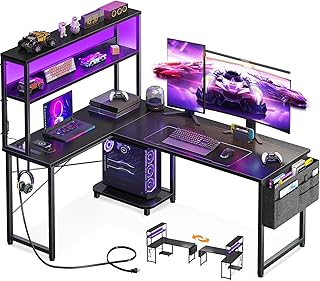
AODK L Shaped Desk Gaming Desk with LED Light & Power Outlet, 53 Inch Reversible L Shaped Computer Table with Shelf & Storage Bag & Hook for Home Office, Black
Best For:
Casual gamers and home-office users seeking a tidy corner desk with LED ambiance and storage.
The AODK 53-inch L-shaped desk is a close sibling to other compact corner gaming desks, offering reversible orientation, integrated LED lighting, and a built-in power outlet. Where it stands out for many buyers is in the attention to storage details: a modest shelf, a detachable storage bag, and a sturdy hook let you keep controllers, chargers, and headsets organized while maintaining a clean desktop for your main peripherals.
If you picture a cozy RGB nook with a single or ultrawide monitor, the AODK gives you the essentials: a large enough top for a monitor plus a mechanical keyboard and mouse pad, ambient LED trim, and a place to stash extras out of immediate sight. From community feedback patterns and product specs, the desk suits gamers who want a straightforward corner solution without unnecessary bulk.
Typical scenarios include a student who needs a study desk that doubles as a gaming corner, a casual streamer on a budget building a camera-facing RGB background, or a home office user who appreciates the headset hook and charging shelf. Compared to no-frills desks, the AODK reduces the need to buy separate LED strips, a power strip, or a headphone hanger—small conveniences that add up and keep the setup looking cohesive.
Practical buying considerations include checking the assembly steps, ensuring the desk feet are leveled on your floor surface, and confirming the power outlet fits your plug size and power draw. While it handles common peripherals with ease, it’s not intended for extremely heavy multi-monitor arrays or powerful desktop towers sitting directly on the shelf unless weight limits are confirmed.
Who should buy this: anyone seeking a practical corner desk with built-in lighting and storage for a cozy RGB setup. Who may skip it: users wanting a heavy-duty desk for large multi-monitor rigs or those seeking electric sit-stand capabilities.
Pros: compact reversible design with LED lighting and storage accessories, includes power outlet and headset hook, good fit for small-to-medium setups. Cons: limited weight capacity for heavy rigs, assembly and leveling require care.
Check the latest price on Amazon.
Pros
- Reversible L-shaped layout fits left or right corners
- Includes LED lighting, power outlet, and storage bag
- Headset hook and shelf keep peripherals organized
Cons
- Not designed for very heavy multi-monitor setups
- Assembly and leveling can be fiddly
Check the latest price on Amazon.
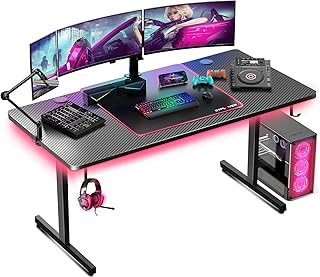
GTPLAYER 55 Inch Gaming Desk with LED Lights, Large Computer Desk with Mouse Pad for Home Office, T-Shaped Carbon Fibre Surface PC Game Workstations with Headphone Hook
Best For:
Gamers and creators who need a wide, stable surface with a premium carbon-fiber look and LED accents.
If you prefer a broad surface with a sleek carbon-fiber aesthetic and built-in ambient lighting, the GTPLAYER 55-inch gaming desk is worth considering. Its T-shaped design emphasizes a roomy top that accommodates large mousepads, multiple monitors, or a game console beside your PC. The carbon-fiber textured surface resists scratches and gives a premium look that complements RGB peripherals.
The desk also includes practical accessories like a headphone hook and a full-width mouse pad surface in some configurations, which helps maintain a consistent gaming feel. The LED lighting gives you immediate ambient glow without extra strips or controllers. For streamers and gamers who prioritize a wide, stable play surface rather than corner optimization, the GTPLAYER strikes a balance between utility and style.
Real-world use cases include competitive gamers who need room for wide mouse movement and multiple screens, creators who want a clean desktop for video editing and color-graded streaming setups, and console-plus-PC households that want space to stage both platforms side by side. Many users appreciate the carbon-fiber finish for masking minor scratches and for how it coordinates with RGB gear.
Compared with modular L-shaped desks, a T-shaped or long rectangular desktop gives you more outright surface for peripherals but requires more linear floor space. The GTPLAYER is a solid pick when you have room to spare and want a focal tabletop that pairs well with RGB backlighting and a minimalist frame.
Buying notes: confirm the desk dimensions relative to your room, plan for assembly time, and verify whether the included mouse pad matches your preferred surface texture. This desk is not motorized, so if you want sit-stand flexibility, consider a compatible standing desk converter or a motorized alternative.
Who should buy this: players who want a broad, scratch-resistant surface and a clean carbon-fiber look. Who may skip it: compact-space users who need corner L-shapes or buyers seeking electric height adjustment.
Pros: wide 55-inch surface, carbon-fiber textured top, integrated LED lighting and headphone hook. Cons: larger footprint than corner desks, lacks sit-stand functionality.
Check the latest price on Amazon.
Pros
- Large, scratch-resistant carbon-fiber textured desktop
- Integrated LED lighting and headphone hook
- Generous surface for multiple monitors and peripherals
Cons
- Requires more linear floor space than corner desks
- No built-in sit-stand adjustment
Check the latest price on Amazon.
FLEXISPOT E3 Dual Motor Electric Standing Desk 55 x 28 Sit Stand Up Desk, Holds 220 lbs, Adjustable Height w/Memory Presets, One-Piece Black Desktop & Black Frame, Ships in 2 Boxes

Best For:
Creators and professionals who want a motorized sit-stand desk with strong weight capacity and memory presets.
For creators who want the ergonomic benefits of a motorized sit-stand setup without sacrificing an all-black aesthetic that complements RGB lighting, the FLEXISPOT E3 Dual Motor electric standing desk is a capable choice. This model offers a robust dual-motor system, memory height presets, and a 220-pound load capacity—enough for heavy monitor setups, microphone arms, and accessories common to streaming stations.
The appeal of an electric desk in a cozy RGB room is practical: you can swap between seated and standing positions to reduce fatigue during marathon streams or editing sessions, and memory presets let you return to exact heights for ergonomic monitor placement. The one-piece 55 x 28 desktop provides a solid surface for monitors and accessories while the black frame keeps the RGB glow focused on peripherals rather than the desk itself.
Real-life scenarios include content creators who alternate between editing and gaming through the day, streamers who prefer higher camera angles while standing, and remote workers who want a dynamic desk to support long hours. Community feedback indicates the E3’s motors are quiet and the frame is sturdy, but the assembly is heavier compared to non-motorized desks and may require two people.
Compared with static gaming desks, the E3 adds health-focused functionality with adjustable height and memory presets. It costs more and has a larger shipping footprint, but if you value sit-stand ergonomics and a high load capacity, it delivers practical benefits that stationary desks cannot.
Buying considerations: confirm the desktop width and depth suit your monitor layout, plan for more complex assembly, and check that cable management options align with your RGB components. If you want LEDs integrated into the desk top, this model does not include them by default, but the black finish pairs well with external LED strips.
Who should buy this: gamers and creators who need sit-stand flexibility and higher weight capacity for pro setups. Who may skip it: buyers on tight budgets or those who prefer compact corner L-shaped desks.
Pros: dual-motor smooth height adjustment with memory presets, solid 220 lb capacity, clean black aesthetic that complements RGB gear. Cons: higher cost and heavier assembly, no built-in LED lighting.
Check the latest price on Amazon.
Pros
- Dual-motor lift with memory presets for easy sit-stand transitions
- High 220 lb load capacity suitable for heavy setups
- Sleek black finish pairs well with RGB lighting
Cons
- No built-in LED lighting
- Heavier and more complex assembly than non-motorized desks
Check the latest price on Amazon.
Final Verdict
Choosing the right desk for a cozy RGB gaming or content-creation nook comes down to priorities. If you want a corner-focused setup with built-in lights and handy storage, the ODK and AODK desks are compact, practical, and budget-friendly; the SEDETA brings pegboard organization and a keyboard tray that will appeal to streamers who stage background elements. If you prefer a wide, sleek tabletop and a premium carbon-fiber look, the GTPLAYER offers a roomy surface ideal for wide mouse movement and multiple displays. And if ergonomic sit-stand flexibility matters most, the FLEXISPOT E3 delivers reliable motorized adjustment and memory presets for serious creators who alternate between long sessions and standing work.
Measure your space, list the features that matter most — lighting, storage, footprint, weight capacity, and whether you need electric adjustment — then match a desk to those needs. Each desk above represents a different balance of aesthetics and utility, so pick the one that aligns with your setup goals. Check the latest price on Amazon.
Conclusion
These Gaming desks trending among cozy RGB setup creators picks are trending now and offer great value and variety. Check the links above for latest prices and reviews.
As an Amazon Associate, I earn from qualifying purchases.
Tags:
gaming desk, RGB desk, L-shaped gaming desk, standing desk, streamer setup, gaming furniture, LED gaming desk, home office desk
