Top Gaming Accessories for Realistic Streaming Setups
As an Amazon Associate, I earn from qualifying purchases. This article may contain affiliate links, which means we may receive a commission at no extra cost to you.
As an Amazon Associate, I earn from qualifying purchases. This article may contain affiliate links, which means we may receive a commission at no extra cost to you.
If you stream gameplay, host podcasts, or create live video content, the small details in your setup make the difference between amateur and professional-looking output. This guide rounds up five practical, creator-focused accessories—microphones, lighting, macro keypads, and production controllers—commonly used to build realistic streaming rigs without an intimidating price tag. I researched product specs, user feedback, and real-world use cases to explain what each product does, who it’s best for, and what trade-offs to expect.
Below you’ll find a concise buying guide to help match the right tool to your workflow, then five in-depth product breakdowns that highlight practical benefits, features, and scenarios where they shine. Whether you’re improving audio clarity, streamlining live production, or dialing in on-camera lighting, these picks are aimed at creators who want dependable performance and sensible controls.
Buying Guide
A few core questions help narrow down which accessories will move your stream forward: What’s your primary goal (audio clarity, production speed, or visual quality)? How much desk space and budget do you have? Which software ecosystem do you prefer (OBS, Streamlabs, Elgato, or platform-native tools)? Answering these will prevent buying redundant gear.
Microphones: Prioritize capsule type and pickup patterns. Condenser USB mics like the FIFINE models and the Logitech Yeti Orb offer clear vocal capture and plug-and-play convenience for streamers who don’t want to manage mixers or interfaces. Cardioid or directional patterns reduce room noise—important if you don’t have a treated room. Look for built-in mute and gain controls if you need quick, tactile adjustments during live broadcasts.
Lighting: Consistent, tunable light is underrated. LED streaming lights with adjustable color temperature and intensity (for example, the Logitech Litra Glow) reduce harsh shadows and make face tracking and image sensors perform better. Consider a mount that fits your desk or monitor and software control for quick scene matching.
Macro controllers and stream decks: Dedicated hardware like Elgato Stream Deck + or the FIFINE AmpliGame Stream Controller speeds up scene switching, effects, and audio adjustments. Look for programmable keys, tactile feedback, and compatibility with your streaming software. A compact keypad reduces ALT-TAB juggling and gives confident, on-the-fly control.
Production mixers and consoles: If you plan live multi-source audio mixing, a device with dials or touch strips simplifies levels without diving into software menus. Evaluate how many channels you’ll use and whether you need hardware dials for quick fades.
Compatibility & workflow: Confirm OS and software compatibility. Many creators use a blend—OBS for scenes, Streamlabs for chat overlays, and Elgato utilities for device control—so pick tools known to play well together. Also consider desk space: tripod stands and smaller keypads can fit into tighter layouts than full-sized consoles.
Buying considerations: Don’t chase RGB alone—prioritize functional controls (mute, gain, programmable keys). Check user reports on build quality and driver stability. Finally, decide if you want an expandable system; stream decks and modular controllers scale better than single-function devices.
FIFINE Gaming USB Microphone for PC PS5, Condenser Mic with Quick Mute, RGB Indicator, Tripod Stand, Pop Filter, Shock Mount, Gain Control for Streaming Discord Twitch Podcasts Videos- AmpliGame

Best For:
Entry-to-intermediate streamers and podcasters who want a plug-and-play USB mic with physical mute and gain controls.
The FIFINE AmpliGame USB condenser mic is built with streamers in mind: a plug-and-play USB connection, integrated gain control, quick mute switch, and simple desk mounting options (tripod stand and shock mount included). The microphone delivers a clear mid-focused presence that works well for commentary, co-op streams, and podcast-style segments. It includes a pop filter and an RGB mute indicator so guests and viewers can easily tell when you’re live or muted.
What makes this model practical is how it balances ease of use with a few professional touches. Unlike an XLR mic that requires an audio interface, this USB condenser gets you usable results right away—useful for creators who are upgrading from headset mics but aren’t ready to commit to an audio interface. The onboard gain knob means you can raise or lower input levels without opening settings mid-stream, and the quick mute provides tactile control for sudden interruptions. The included shock mount and pop filter reduce vibration and plosive sounds, improving clarity without extra purchases.
Compared with basic headset mics, you’ll get notably clearer voice definition and less room noise with correct positioning and a bit of room treatment (blankets, rugs, or foam panels). Against higher-end XLR condensers, you’ll sacrifice some depth and low-end richness, but you gain convenience and lower setup complexity.
Who it’s for: Streamers, podcasters, and Discord hosts who want a straightforward plug-and-play upgrade from headset microphones. It’s particularly well-suited to creators who value quick physical controls and don’t want to manage an external audio interface.
Use cases: A single-person Twitch streamer who needs fast mute access during raids; a YouTube creator recording explainer commentary; a casual podcaster recording interviews with remote guests. If you often stream late at night in an untreated room, pair this mic with simple acoustic adjustments (a towel behind you or a foam panel) to minimize reflections.
Buying considerations: Check compatibility with your OS (Windows/Mac) and ensure your USB port supports stable power. If you plan multi-mic setups or want studio-grade warmth and control, consider budgeting for an XLR microphone and interface later. If you prefer the convenience of USB but need extra software control, look for companion apps or OBS plugins that expose microphone features.
Check the latest price on Amazon.
Pros
- Easy USB setup—no interface required
- Onboard gain and tactile mute switch
- Includes shock mount and pop filter
Cons
- Less tonal depth than XLR studio condensers
- May pick up room reflections in untreated spaces
Check the latest price on Amazon.
FIFINE AmpliGame Stream Controller with 15 Macro Keys, Streaming Keyboard with Trigger Actions in OBS/Twitch/YouTube/Streamlabs, Shortcut Buttons Keypad Works with Mac and PC-D6

Best For:
Streamers and creators who want a compact, affordable macro pad to control scenes, sounds, and shortcuts without a large stream deck.
The FIFINE AmpliGame Stream Controller D6 is a compact macro keypad with 15 programmable keys that integrates with popular streaming platforms and software like OBS, Twitch, YouTube, and Streamlabs. It’s designed to give creators quick access to scene switches, sound effects, chat commands, and other live actions without combing through menus. For creators moving from keyboard shortcuts to hardware control, this unit reduces the cognitive load while streaming.
Build and layout favor desk-friendly ergonomics: the keys are arranged for rapid access while still being small enough to sit next to a keyboard or on a secondary surface. Each key can be assigned multiple functions or macros, which is handy for chaining scene transitions with audio fades or launching media sources. The D6 emphasizes software compatibility, so setting up actions with OBS or Streamlabs usually involves mapping keys to hotkeys or integrating through the controller’s utility.
Compared with full-sized stream decks, the FIFINE keypad is less feature-heavy (no LCD icons) but more affordable and compact. It’s an excellent bridge for creators who want physical control without the price or space commitment of premium multi-screen controllers. If you’re used to keyboard macros, the D6 feels familiar—just more reliable and lower-latency for live scenarios.
Who it’s for: Content creators who need hardware shortcuts but prefer a smaller footprint and a lower cost than large stream decks. Great for single-PC streamers with limited desk space or multi-tasking commentators who need quick audio triggers.
Use cases: A speedrunner who toggles overlays and timers mid-run; a streamer who drops pre-recorded clips and sound bites on cue; a podcast host who mutes secondary participants and triggers ad stingers without fumbling through software. It can also work as a productivity macro pad for video editors or live-engagement moderators.
Buying considerations: Confirm your streaming platform supports external hotkeys or APIs you plan to use. Without customizable LCD keys, you’ll rely on muscle memory or labeled keycaps for complex setups. For larger productions, you might prefer a full Stream Deck with visual feedback.
Check the latest price on Amazon.
Pros
- Compact and desk-friendly
- 15 programmable keys for versatile macros
- Good software compatibility with popular streaming tools
Cons
- No LCD icons—relies on muscle memory or labels
- Fewer features than premium stream decks
Check the latest price on Amazon.
Logitech for Creators Litra Glow Premium LED Streaming Light with TrueSoft- Computer lighting for video conferencing, Zoom meetings, with adjustable mount and desktop app control for PC/Mac – Graphite

Best For:
Creators and professionals who need compact, natural-looking desk lighting to improve webcam quality and color reproduction.
Good lighting is foundational to a polished stream, and the Logitech Litra Glow aims to simplify that step. It’s a desktop LED light built for creators who need consistent, flattering illumination with quick software controls. TrueSoft diffusion helps soften shadows and reduce hot spots, while adjustable color temperature and brightness let you match ambient room light or camera auto-exposure.
The Litra Glow attaches easily to monitors or sits on a small stand, making it flexible for different desk configurations. Built-in mounts and a low-profile design mean it won’t obstruct your view or interfere with webcam placement. A desktop app gives finer control over intensity and color temperature, which is useful for switching between bright daytime streams and warmer evening content.
Compared to cheaper clip-on ring lights, the Litra Glow focuses on producing natural-looking skin tones and reducing glare rather than creating an obvious halo. That aesthetic is especially helpful for creators who stream long-form content or interviews, where sustained comfort and realistic color reproduction matter. It doesn’t replace multi-light three-point setups for studio shoots, but it significantly levels up the typical webcam look with a single, convenient device.
Who it’s for: Single-camera streamers, remote interviewers, and content creators who want flattering on-camera lighting without complex rigging. It’s also a good choice for video callers and professionals doing frequent conferencing.
Use cases: A Twitch streamer getting rid of grainy webcam footage during night streams; a content creator recording face-cam reactions for montages; a vlogger who needs consistent color across multiple short takes. If you often switch between streaming and video calls, preset modes and quick adjustments shave setup time.
Buying considerations: Measure your monitor and desk clearance to ensure the mount fits. If you’re building a multi-light studio or require extreme directional control, pair this with a fill or backlight. Check compatibility with your OS for the desktop app controls.
Check the latest price on Amazon.
Pros
- TrueSoft diffusion for flattering skin tones
- Adjustable color temperature and brightness
- Compact mount fits desks and monitors
Cons
- Not a replacement for multi-light studio setups
- Desktop app required for full control
Check the latest price on Amazon.
Elgato Stream Deck +, Audio Mixer, Production Console and Studio Controller for Content Creators, Streaming, Gaming, with customizable touch strip dials and LCD keys, works with Mac and PC

Best For:
Professional streamers and creators who need a comprehensive, visual production controller with deep software integrations.
The Elgato Stream Deck + is a premium production console that combines tactile hardware with deep software integration, aimed at serious streamers and content producers. It expands on the classic Stream Deck concept by adding touch strips and dials alongside customizable LCD keys, enabling layered control over scenes, audio levels, media, lighting, and third-party integrations. For creators who want a single device to handle production tasks, the Stream Deck + offers an intuitive surface and rich visual feedback.
Each key is an LCD display that can show custom icons, making complex setups easier to manage without memorizing macros. The touch strip dials provide quick, smooth control for audio mixing, transitions, and fine adjustments during live shows. Elgato’s software ecosystem is one of the reasons many creators gravitate to this product; it integrates seamlessly with OBS, Streamlabs, Spotify, Philips Hue, and popular chat tools, turning a hardware button press into multi-step actions.
Compared with simpler macro pads, the Stream Deck + stands out for visual clarity and integrated workflows. It’s more expensive and larger than compact keypads, but it reduces cognitive load for streamers running multi-scene productions, co-hosts, or live editors who need immediate feedback and precise control.
Who it’s for: Professional or semi-pro creators, multi-source streamers, and production teams who need rapid, visual control over scenes, audio, and effects. It’s ideal for creators who run frequent live events, multi-guest shows, or channels where production polish matters.
Use cases: A variety show streamer switching between game capture, guest webcams, and remote performers; a live podcast host mixing multiple audio channels on the fly; a creative streamer triggering overlays, sound cues, and lighting presets without pausing gameplay. The visual keys reduce mistakes and help newer operators learn a show flow quickly.
Buying considerations: Factor in desk space and how many concurrent actions you need. The Stream Deck + pays off when you take advantage of integrations and custom iconography. If you only need a handful of hotkeys, a compact keypad is more cost-effective. Also confirm macOS/Windows compatibility for the specific integrations you plan to use.
Check the latest price on Amazon.
Pros
- Customizable LCD keys with visual feedback
- Touch strips and dials for precise control
- Extensive software and third-party integrations
Cons
- Higher cost and larger footprint
- May be overkill for simple one-person streams
Check the latest price on Amazon.
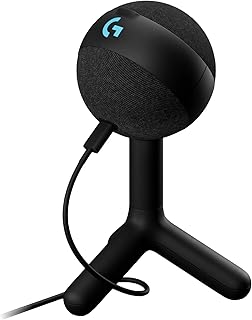
Logitech G Yeti Orb Condenser RGB Gaming Microphone with LIGHTSYNC, USB Mic for Streaming, Cardioid, USB Plug and Play for PC/Mac – Black
Best For:
Creators who value a polished USB microphone with simple setup and reliable capture for streaming and voice work.
The Logitech G Yeti Orb brings a familiar, user-friendly USB microphone format to streamers looking for reliable vocal clarity and some customizable flair. With a cardioid pickup pattern optimized for single-speaker use, it reduces background noise and emphasizes midrange detail—useful for commentary-heavy streams, interviews, and voiceovers. The LIGHTSYNC RGB element provides customizable illumination, but the mic’s core strengths are in its plug-and-play convenience and consistent capture quality.
What sets the Yeti Orb apart from entry-level USB mics is Logitech’s focus on a balanced sound signature and software integration. While you won’t get the raw warmth of a high-end XLR condenser, the Yeti Orb typically requires less post-processing to sit well in mixes and pairs well with basic noise suppression plugins or OBS filters. Onboard controls and easy-to-reach mute functions make it practical for live use, and the USB connection keeps setup simple.
Compared with the FIFINE USB option, the Yeti Orb often offers a slightly more polished sound and broader brand ecosystem support, including firmware and software updates. It’s larger and more noticeable on a desk, so consider its visual presence if you’re filming a small face-cam area.
Who it’s for: Streamers and podcasters who want a dependable USB mic with a professional silhouette and simple software tuning. Ideal for creators who want fewer technical hassles but expect consistent, broadcast-ready results.
Use cases: A streamer who does daily commentary and needs a reliable vocal chain; a co-op streamer hosting guest interviews; a video creator recording voiceovers and narration without a full audio rack setup. Pairing with a pop filter and shock mount helps reduce plosives and desk noise.
Buying considerations: Ensure your workspace can accommodate the mic’s size and weight. If you expect to expand into multi-microphone sessions, plan for an audio interface and XLR mics down the line. For solo streamers who value simplicity and brand support, the Yeti Orb is a solid mid-range choice.
Check the latest price on Amazon.
Pros
- Consistent, broadcast-ready sound
- Plug-and-play USB convenience
- LIGHTSYNC RGB for aesthetic customization
Cons
- Larger desk footprint
- Not as warm as higher-end XLR condensers
Check the latest price on Amazon.
Final Verdict
Putting together a realistic streaming setup is less about buying every new gadget and more about matching tools to the specific problems you’re trying to solve: clearer audio, faster production control, or cleaner on-camera visuals. The five products here cover those core needs: the FIFINE USB microphone for an accessible audio upgrade, the FIFINE AmpliGame keypad for compact macro control, the Logitech Litra Glow for natural desk lighting, the Elgato Stream Deck + for full production control, and the Logitech G Yeti Orb for a reliable mid-range USB mic.
Start by prioritizing what frustrates you most in your current streams. If viewers complain about muffled voice or inconsistent levels, invest in a microphone and physical mute/gain controls. If you’re constantly fumbling with keyboard shortcuts or phone apps to change scenes, a programmable keypad or Stream Deck will save you time and reduce mistakes. If your webcam looks grainy, a single, well-placed light will deliver the biggest visual improvement for the least complexity.
For creators on a budget or with limited desk space, the FIFINE condenser and the compact FIFINE macro pad form a balanced, affordable combo that replaces headset mic audio and manual hotkeys without major rewiring. If production polish and workflow efficiency are priorities and you have the desk space, the Elgato Stream Deck + paired with a quality mic (like the Logitech Yeti Orb) and a dedicated light (Logitech Litra Glow) gives you a professional, integrated setup you can scale.
Final buying tips: verify software and OS compatibility, think about future expandability, and avoid buying gear solely for RGB flair—focus on functional controls and reliability. Read recent user reports about firmware and driver updates; that’s often where long-term satisfaction lives.
If you want to upgrade your streaming setup strategically, pick one category to improve first (audio or control) and add complementary tools over time. Check the latest price on Amazon.
Conclusion
These Gaming accessories creators use during realistic streaming setups picks are trending now and offer great value and variety. Check the links above for latest prices and reviews.
As an Amazon Associate, I earn from qualifying purchases.
Tags:
streaming accessories, gaming microphone, stream deck, streaming light, macro keypad, content creator gear, broadcast setup
