Top Desk Organizers Creators Use During Desk Resets
As an Amazon Associate, I earn from qualifying purchases. This article may contain affiliate links, which means we may receive a commission at no extra cost to you.
As an Amazon Associate, I earn from qualifying purchases. This article may contain affiliate links, which means we may receive a commission at no extra cost to you.
Every creator knows the reset ritual: tidy the cables, clear loose papers, put tools in their place, and reclaim the view of your workspace. Whether you film overhead desk videos, edit late into the night, or simply need a clear surface to think, a good desk organizer is the unsung hero of the desk reset. This guide highlights compact multi-tier organizers, monitor riser stands with drawers, and stylish metal stationery holders commonly used by content creators, designers, and remote workers to speed up their reset routines and keep essentials within reach.
Below you’ll find an in-depth buying guide followed by curated recommendations. Each product section outlines who it’s best for, real-life use cases, key benefits, and potential downsides to help you pick the right organizer for your workflow.
Buying Guide
Why a focused buying guide matters: creators often need a mix of rapid-access storage (pens, hard drives, sticky notes) and flat-surface clearing (papers, tablets, incoming mail). The right organizer speeds up the reset routine and reduces decision fatigue.
Key features to consider
– Tiers and slots: More tiers equal better vertical organization. Look for slightly angled trays for easy paper retrieval and labeled tiers for recurring categories like “To File,” “To Scan,” “To Pay.”
– Drawer(s): Small drawers are ideal for brittle items — SD cards, dongles, and personal items — that you don’t want sliding around. A smooth glide drawer reduces fiddling during a quick reset.
– Integrated pen holders and compartments: Built-in pen cups and phone slots prevent loose items from being put on top of your keyboard or mouse pad.
– Material and finish: Plastic organizers are lightweight and budget-friendly; metal adds a modern look and durability; wood or wood-veneer gives a warmer, studio-friendly backdrop for creator videos. Consider finish reflecting light—matte finishes reduce reflections in filmed content.
– Stability and footprint: Balance the height-to-base ratio—tall organizers should have a wider base or non-slip feet. If you pair an organizer with a monitor riser, check the riser’s weight capacity and clearance for external drives or a small keyboard drawer.
– Cable management and monitor integration: Monitor risers that double as storage free up desk real estate and lift the screen to an ergonomic height, which is helpful for long editing sessions. Some risers include cutouts or raised lips for cable routing.
– Aesthetics vs function: Creators often film their workspace, so you’ll want something that both performs and looks good on camera. Neutral colors and clean lines generally photograph well.
Compare with standard alternatives
– Drawerless desk trays: Simpler and cheaper, but they leave small items exposed and can create clutter on top.
– Full-size filing cabinets: Better for archival storage but overkill for daily reset rituals and take up more floor space.
Who should prioritize which feature
– Creators filming desk setups: prioritize looks, matte finish, and compact footprint.
– Remote workers and students: prioritize tiers and labeling for document flow.
– Hybrid users with peripherals: choose a monitor riser with integrated storage and cable routing.
Practical buying considerations
– Measure your desk depth to ensure trays don’t overhang your keyboard area.
– If you have many small accessories, look for organizers with a mixture of drawer + small compartments.
– If you film, pick a color and texture that won’t reflect your studio lights.
– Read product load capacities if you plan to put a monitor on a riser.
With these factors in mind, the following picks are selected for their blend of function, looks, and creator-friendly features.
WALI Desk File Organizer, 4 Tier Desktop Paper Letter Tray Organizer with Drawer and 2 Pen Holders, Office Desk Accessories & Workspace Organizers for Office, Home Supplies(DO005DH-B), 1 Pack, Black

Best For:
Creators and remote workers who need a compact, camera-friendly multi-tier paper organizer with a small drawer and pen holders.
The WALI 4-tier desk file organizer is a compact, no-fuss solution for creators who need clear, vertical paper organization during quick desk resets. It combines four shallow trays sized for letter paper with a small glide drawer and two pen holders built into the side—so you have distinct areas for active projects, reference papers, and incoming mail. The trays are slightly angled to make sliding pages out easy without fumbling, and the unit’s matte black finish keeps reflections low on camera while providing a neutral backdrop in recorded desk tours.
What this product solves: Instead of a pile of loose printouts or sticky notes scattered across your workspace, the WALI organizer gives you immediate visual separation—“today,” “this week,” “archive,” and “shred” lanes, for example. The small drawer is perfect for SD cards, USB sticks, or spare batteries, while the pen holders keep your primary writing tools visible and upright so you don’t bury them under a keyboard.
Practical usage scenarios: Creators who film unboxing or tutorial content will appreciate that the WALI unit clears the desk quickly between takes—you can sweep pens into the holders, stack printouts into the trays, and tuck accessories in the drawer for a neat on-camera surface. Writers and podcasters who work with reference sheets will find the tier separation helpful for switching contexts without riffling through stacks.
How it compares: Compared with single-tray organizers, the WALI’s multi-tier format provides clearer task separation and reduces time spent searching for a specific paper. Compared to wood organizers, it’s lighter and easier to reposition but doesn’t offer the same warm visual texture.
Who should buy it: This is ideal for creators and remote workers who want a budget-friendly, camera-safe solution with small-item storage. It’s also suitable for students managing multiple classes or for home offices juggling bills and mail.
Who might skip it: If you need archival storage for bulky documents or prefer a premium wood or metal aesthetic for on-camera shoots, a larger filing solution or a wooden organizer may be a better fit.
Buying considerations: Measure desk depth—this unit sits best against a wall or to the side of a monitor. If you have many thick catalogs or binders, the trays may be too shallow.
Check the latest price on Amazon.
Pros
- Four-tier vertical organization speeds up desk resets
- Included drawer for small accessories keeps things contained
- Matte black finish reduces on-camera reflections
Cons
- Trays are shallow for very thick documents
- Plastic construction isn’t as premium-looking as wood or metal
Check the latest price on Amazon.
OPNICE Desk Organizers and Accessories, Computer Monitor Stand Riser with Drawer and 2 Pen Holders, Printer & Laptop Stand, Office Desk Accessories & Workspace Organizers for Home Office Supplies, Black

Best For:
Creators and home-office users who want a combined monitor riser and hidden storage drawer to keep camera frames tidy.
The OPNICE monitor stand riser blends two functions many creators prioritize: raising a screen to an ergonomic height and adding immediate under-riser storage for peripherals. With a broad platform for most laptops or monitors and an integrated drawer beneath, this riser keeps the desk surface free of clutter and hides items like hard drives, cable adapters, or notebooks. Two pen holders built into the riser’s front edge give you a reliable place for pens, styluses, and small tools.
What it solves: For anyone who alternates between recording and editing, the riser streamlines the reset ritual—elevate the monitor to a comfortable filming height, then sweep miscellaneous items into the drawer. The riser effectively creates a staging zone so your capture area looks intentional and tidy.
Real-life use cases: Video editors and streamers who require a clean lower-third of the frame will like that the riser clears the visual clutter directly under the monitor. Photographers or product creators using a laptop for tethered shooting can slide a small keyboard or tablet underneath when not in use. The drawer works well for sensitive items (SD cards, dongles) that you don’t want exposed during a live stream.
How it compares: Compared to a dedicated monitor arm, a riser doesn’t offer full adjustability, but it’s significantly cheaper and simpler to install. Against stand-alone storage drawers, this model’s advantage is in combining riser and storage into one footprint, freeing up more desktop surface than having two separate pieces.
Who should buy: Choose this if you frequently switch between creation and presentation and want an easy way to lift your screen while adding discrete storage for small tech accessories. It’s a good pick for home office creators who value ergonomics and a minimal on-camera surface.
Who might skip it: If you need precise monitor height/angle controls for multi-monitor setups, a VESA-compatible arm may be better. Also avoid if you plan to put very heavy monitors on the riser—check the product’s weight capacity.
Buying considerations: Confirm the riser dimensions against your monitor or laptop base, and measure the clearance under the platform to ensure your keyboard or devices will fit.
Check the latest price on Amazon.
Pros
- Combines an ergonomic riser with concealed storage
- Drawer hides small tech and accessories
- Pen holders keep tools accessible
Cons
- Not as adjustable as a monitor arm
- May have limited weight capacity—check specs before mounting heavy monitors
Check the latest price on Amazon.
gianotter Wood Desk Organizers and Accessories with File Holder, 4-Tier Desk Accessories & Workspace Organizers with Drawer and Pen Holder, Desk Reference Organizer (Wood, 4T with Drawer)

Best For:
Creators and home-office users who want a warmer, camera-friendly wood aesthetic with practical multi-tier paper organization and a small drawer.
The gianotter wood 4-tier desk organizer offers a warmer, more premium look than typical plastic organizers—an aesthetic many creators prefer when their desk is on camera. Constructed with a wood finish and featuring four horizontal slots, a small drawer, and a dedicated pen holder, it’s designed for creators who want an organized workspace that also looks like part of the set.
What it solves: If your workspace doubles as a backdrop for videos, the visual texture of wood adds depth on camera while keeping the same practical organization of multi-tier trays. The drawer is useful for delicate items (memory cards or personal items) and the pen holder keeps your writing tools easy to spot during quick resets.
Real-life scenarios: Lifestyle vloggers, remote presenters, and makers who demonstrate products often choose wood organizers to match a softer studio palette. For someone filming desk-based tutorials, the gianotter organizer helps maintain a consistent visual brand—paper piles are reduced and frequently-used tools are displayed intentionally rather than strewn about.
How it compares: Against metal organizers, wood reads warmer and is less reflective under studio lights. It’s heavier and generally more stable than lightweight plastic, though it can be bulkier. Compared to a full shelving or filing cabinet, it’s a compact, camera-friendly compromise focused on daily workflow rather than long-term archiving.
Who should buy: Creators who prioritize on-camera aesthetics without sacrificing function will appreciate this wood organizer. It’s also a good match for home offices that double as content spaces or for anyone who prefers a natural material over industrial finishes.
Who might skip it: If you need a minimal, ultra-light travel-friendly option, a smaller plastic or foldable organizer may be preferable. Also skip if you need deep trays for thick reference manuals or binders.
Buying considerations: Check the wood finish in product photos relative to your studio lighting—darker or lighter stains can change how your camera registers color. Verify the drawer glide and hardware quality if you plan frequent access.
Check the latest price on Amazon.
Pros
- Warm, premium wood finish ideal for on-camera setups
- Stable construction compared to lighter plastics
- Combination of tiers and drawer balances access and concealment
Cons
- Bulkier and heavier than plastic alternatives
- May not suit very modern or industrial studio aesthetics
Check the latest price on Amazon.
OPNICE Desk Organizer, 4-Tier Desktop File Organizer with Drawer and 2 Pen Holders, Office Desk Accessories, File Sorters, Workspace Organizers for Office Supplies(Black)

Best For:
Practical creators and home-office workers who want a reliable, low-profile multi-tier organizer for daily desk resets.
The OPNICE 4-tier desktop file organizer mimics features creators appreciate in studio-friendly setups: clear division of paper types, a small drawer for fragile accessories, and dual pen holders to corral markers and styluses. This black model leans toward a utilitarian, low-profile visual that reduces light bounce in camera shots while keeping commonly used items within arm’s reach.
What it solves: It streamlines the common problem of ‘where did I put that note?’ by giving each category its own tray. The drawer hides tiny items that otherwise add visual clutter, and the pen holders make it quick to stash writing tools during a reset. Instead of moving multiple items individually, you can toss a few things into distinct slots for a tidy, reproducible desk look.
Real-life use cases: Hosts of craft or DIY content often have many small tools; this organizer gives them a staging area to arrange supplies by project. Writers juggling research topics can assign a tray to each story or client. Home office workers handling bills and receipts can create a simple ‘incoming, action, pending, file’ system.
How it compares: Compared to similar multi-tier models, the OPNICE unit focuses on practical function over decorative finish. It’s lighter than wood and usually more affordable, making it a sensible choice for creators starting to systematize their workflow without a big investment.
Who should buy: This is a solid option for creators and professionals who want a dependable, low-profile organizer that helps maintain a consistent desk reset routine without drawing attention on camera.
Who might skip it: If you want a statement piece for your background or prefer premium materials, consider wood or metal alternatives.
Buying considerations: Ensure the trays accommodate the types of documents you use—larger prints or catalogs may not fit neatly. Check drawer dimensions if you store multiple small accessories.
Check the latest price on Amazon.
Pros
- Simple, functional design ideal for routine organization
- Drawer and pen holders reduce surface clutter
- Lightweight and typically budget-friendly
Cons
- Less premium finish compared to wood or metal options
- Not suited for very large or bulky documents
Check the latest price on Amazon.
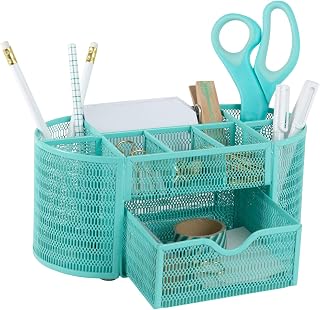
BLU MONACO Aqua Desk Organizer | Metal Stationery Holder With Drawer and Eight Compartments | Desktop Storage for Home Office or Study Space | 4.3”D x 9.3”W x 4”H Workspace Organizer
Best For:
Creators and students who need compact, compartmentalized storage for pens, adapters, and small tools rather than paper sorting.
The BLU MONACO Aqua desk organizer takes a different approach: compact, compartmentalized metal construction with a small drawer and multiple sections for pens, clips, and small peripherals. Rather than focusing on tiered paper storage, this unit is about immediate-access desktop tools and tidy surfaces—perfect for creators who want to keep small items visible and arranged in one place.
What it solves: If your reset routine centers around clearing pens, cables, and sticky notes rather than managing stacks of paper, the BLU MONACO organizer gives each item its own slot so you can restore order in minutes. The metal body is sturdy and gives a modern, slightly industrial look that reads well in lifestyle and tech videos. The color options let you add a subtle pop to your background or match your studio palette.
Real-life use cases: Podcasters and streamers who use multiple markers, earbuds, and adapters can sort everything into the eight compartments for quick grabs during live sessions. Designers with small toolkits—rulers, cutters, styluses—will appreciate the compartmental approach. Students who alternate between devices and analog tools can tuck away essentials while still keeping them visible.
How it compares: Against tiered file organizers, the BLU MONACO is more specialized for small-item management and won’t handle letter-size documents well. Compared to bulky desktop caddies, it’s compact and often more visually striking due to its colored metal finish.
Who should buy: Pick this if your primary clutter is small accessories and you want a stylish, durable option that looks crisp on camera. It’s also great for smaller desks where vertical stacking isn’t practical.
Who might skip it: If you need multi-tier paper trays for print workflows, this model won’t replace a dedicated file sorter.
Buying considerations: Consider how many tiny items you actually use—if you only have a couple of pens, this may be overkill. Check compartment sizes for items like large marker caps or wrapped cables.
Check the latest price on Amazon.
Pros
- Multiple compartments for immediate access to small items
- Durable metal construction with appealing color options
- Compact footprint ideal for small desks
Cons
- Not designed for letter-size papers or bulky documents
- Compartments may be small for larger tools or thick cables
Check the latest price on Amazon.
Final Verdict
A smart desk organizer streamlines the creator’s reset routine and saves minutes across every workday. For creators who need tiered paper separation and a small hidden drawer, the WALI and OPNICE 4-tier units offer reliable, camera-friendly solutions. If you also want an ergonomic boost and concealed storage, the OPNICE monitor stand riser provides the dual benefits of lifting your screen and hiding clutter underneath. For a warmer, more polished on-camera backdrop, the gianotter wood organizer balances aesthetics with function. And for studios where small accessories are the primary clutter, the BLU MONACO metal compartment organizer keeps tools visible, tidy, and within arm’s reach.
When choosing, match the organizer’s strengths to your most frequent reset tasks—do you clear papers or corral small items? Do you need a riser or simply vertical slots? Consider desk depth, camera angles, and the kinds of items you access daily. Any of the picks here will reduce friction in your reset routine; the best one depends on whether you prioritize paper flow, on-camera appearance, hidden storage, or compact compartmentalization.
Ready to tidy your creative space? Check the latest price on Amazon.
Conclusion
These Workspace organizers creators use during desk reset routines picks are trending now and offer great value and variety. Check the links above for latest prices and reviews.
As an Amazon Associate, I earn from qualifying purchases.
Tags:
desk organizers, workspace organization, creator desk setup, monitor riser with drawer, desktop file organizer, desk accessories, studio reset routine
