Top Budget Gaming Setup Picks — Trending Essentials
As an Amazon Associate, I earn from qualifying purchases. This article may contain affiliate links, which means we may receive a commission at no extra cost to you.
As an Amazon Associate, I earn from qualifying purchases. This article may contain affiliate links, which means we may receive a commission at no extra cost to you.
If you’re building a budget-friendly gaming setup that looks modern and performs reliably, the current market has a handful of options that punch far above their price. Whether you want a roomy desk with cable management, a complete peripheral bundle to get started, a compact mini PC that can drive multiple monitors, or accessories to keep your station tidy, this guide collects trending picks that work well together. I compiled these suggestions from product specifications, community feedback, and common buyer concerns to help you choose components that fit both space and playstyle. Below you’ll find detailed breakdowns, realistic use cases, and practical buying considerations so you can assemble a balanced setup without overspending.
Buying Guide
How to choose parts for a budget gaming setup: what matters and what to skip.
1) Start with a desk that solves space and cable issues. A good gaming desk with a full-surface water-resistant mat and cable cutouts like the Arozzi Arena Special Edition offers a clean visual anchor and prevents spills from damaging gear. Look for desks designed for curved ultrawide monitors if you plan to use a 34"+ display.
2) Pick a peripherals bundle for instant compatibility. Affordable combo kits (keyboard, mouse, headset, mousepad) are inexpensive ways to get RGB and decent ergonomics without buying components piecemeal. Prioritize keyboard key feel, mouse DPI range, and headset mic clarity.
3) Consider a mini PC if you need a small footprint that still handles modern titles at 1080p or multi-monitor productivity. CPUs like Ryzen 5 mobile chips offer solid multicore performance; ensure the mini PC has enough RAM and a fast SSD or the ability to upgrade.
4) Accessories matter: a headset/controller stand, cable organizer, and a mousepad or full-desk mat reduce clutter and improve durability. A clamp-mounted stand saves desk surface and keeps controllers accessible.
5) Performance vs. value trade-offs: on a budget you’ll often choose better ergonomics and peripherals over the absolute highest framerate. For many players, stable 60–100 FPS at medium settings is more enjoyable than chasing ultra settings with expensive hardware.
6) Compatibility and future upgrades: verify USB types, display outputs (HDMI/DP/USB-C), and Wi‑Fi/Bluetooth versions. These decide whether you can add a new monitor or controller without replacing the whole system.
Use-case prioritization: if you stream, allocate extra to CPU and network; if you mostly play CS:GO/Valorant, prioritize mouse sensor and keyboard switch responsiveness; if you’re a space-limited user, pick a compact PC and vertical storage solutions.
With those principles in mind, here are five well-rounded picks that pair nicely for a trending, budget-focused gaming station.
Arozzi Arena Special Edition Ultrawide Curved Gaming and Office Desk with Full Surface Water Resistant Desk Mat Custom Monitor Mount Cable Management Cut Outs – Purple Galaxy

Best For:
Players using ultrawide or multi-monitor setups, streamers who value a clean background, and anyone wanting a spill-resistant, gaming-focused desktop.
The Arozzi Arena Special Edition Ultrawide curved desk is designed for gamers who want a commanding surface without the clutter many desks bring. At its core is a full-surface water-resistant desk mat that covers the entire desktop—this does more than look good: it protects the desk from spills, reduces friction for mouse movement across a large area, and gives a unified aesthetic under multi-monitor setups. The desk is sized and shaped to accommodate ultrawide monitors and curved displays, making it a natural match for immersive single-screen gaming or multi-monitor productivity. Its curved front gives you closer access to peripherals while the reinforced frame and simple assembly make it practical for apartments or dorm rooms.
Cable management is a standout feature: cutouts and routing channels at the rear allow you to run power bricks, monitor cables, and headset wires out of sight. Many budget desks skimp here, but a tidy cable solution improves airflow for any PC tower placed beneath and reduces accidental tugs. The custom monitor mount compatibility means you can choose either a freestanding monitor or a clamp-mounted arm if you want more desk surface or easier height adjustments.
Real buyers often praise the desk for its size-to-value ratio. Compared to standard office desks, the Arozzi focuses on gaming-oriented ergonomics—full-surface mat, cable management, and a surface shaped specifically for curved screens. Compared with budget flat desks, it’s more protective and gaming-centric.
Who should get this desk: gamers or content creators who plan to use at least one large monitor, anyone who wants a spill-resistant work/play surface, and people who value built-in cable routing. Who may not need it: those with very tight small-space constraints or people who already own a purpose-built standing desk.
Practical observations: confirm the desk footprint fits your room and measure for your monitor stand or VESA arm if you plan to mount monitors. The full-surface mat simplifies mouse tracking but can trap crumbs—spot clean regularly. Assembly is straightforward but having a second person helps when aligning the frame.
If a roomy, tidy, and gaming-focused surface is the foundation you want, this desk is a smart budget-conscious choice. Check the latest price on Amazon.
Pros
- Full-surface water-resistant desk mat protects and enhances mouse movement
- Curved design optimized for ultrawide and close-in ergonomics
- Built-in cable cutouts and routing for a tidy setup
Cons
- Large footprint may not suit very small rooms
- Full-surface mat can show wear over time and needs occasional cleaning
Check the latest price on Amazon.
Gaming Keyboard Mouse Mousepad and Headset with mic Combo All in One USB Wired RGB Backlit Rainbow Side Button Gamer Bundle Set Compatible with PC Windows Xbox one PS4 PS5(Black)

Best For:
New PC or console gamers looking for a simple, all-in-one wired peripheral set that works out of the box.
If you’re starting from scratch or replacing an old set of peripherals, an all-in-one gaming combo is one of the most cost-effective routes. This USB-wired gaming bundle bundles a backlit keyboard, a responsive gaming mouse with side buttons, a headset with a microphone, and a mousepad—everything you need to get online quickly without compatibility headaches. The keyboard offers RGB backlighting and a fairly standard key profile that most newcomers find comfortable for long sessions, while the mouse typically provides adjustable DPI settings for different game genres. The headset includes a boom mic, which is crucial for clear team communication in multiplayer titles.
Practical benefits include plug-and-play convenience and unified styling. For dorm gamers, casual players, or anyone who values simplicity, a single purchase reduces the time spent calibrating separate peripherals and ensures drivers and connectors will be straightforward with modern consoles and Windows PCs. The wired design minimizes latency compared with budget wireless options, making it suitable for competitive titles where input lag matters.
Compared to buying a midrange mechanical keyboard, gaming mouse, and standalone headset separately, combos trade the premium feel of high-end switches and sensors for convenience and value. Many buyers note that while the keyboard’s keys are not true mechanical switches, they are durable and comfortable enough for prolonged typing and gaming. The mouse’s side buttons and DPI toggles give practical in-game advantages without complexity. The headset performs well for voice chat and basic immersion, though dedicated audiophile headsets will outclass it in sound depth and comfort.
Who should buy: first-time PC gamers, console players who want a wired USB bundle for PC or PS/Xbox compatibility, and anyone assembling a budget-friendly rig. Who might skip it: audiophiles, competitive esports players seeking high-end mice and mechanical keyboards, and users who prefer wireless freedom.
Buying considerations: check that the keyboard layout matches your regional preference, verify the headset’s mic quality for your streaming or communication needs, and remember that wired cables limit desk mobility but reduce latency.
This all-in-one set is great for getting a reliable, styled setup quickly. Check the latest price on Amazon.
Pros
- Complete plug-and-play set saves money and setup time
- Wired connections reduce latency—good for competitive play
- RGB backlighting and side buttons add practical customization
Cons
- Per-keyboard switches are not premium mechanical
- Headset comfort and audio depth are good but not high-end
Check the latest price on Amazon.
FANTECH P51S Gaming Keyboard and Mouse Combo, Headset and Stand, Mouse Pad Wired RGB Rainbow Keyboard PC Beginner Gamer Basic 5 in-1 Gaming Set

Best For:
Beginner gamers, students, and anyone wanting a tidy, color-matched peripheral set with a stand and mousepad included.
The FANTECH P51S is another budget-friendly 5-in-1 gaming kit designed for beginners and those building a secondary rig. It combines a wired RGB keyboard, an RGB gaming mouse with adjustable DPI, a headset with a mic, a mousepad, and a small stand—covering more than the basics by including a headset stand for organization. The keyboard typically uses membrane or hybrid switches that favor quiet typing and forgiving actuation, making it suitable for shared spaces. The mouse is tuned for versatility with a DPI range that handles both precise aim in shooters and smooth tracking in strategy or MMO games.
What sets this package apart is the packaged thought toward desktop ergonomics: the included mouse pad and headset stand remove two common friction points in budget setups—less slipping and easier headset storage. Buyers consistently note that the package offers a cohesive look and performs reliably for learning players. Compared with single-component purchases, it’s easier to keep uniform color schemes and avoid driver conflicts with branded combos.
Practical use cases include students setting up a dorm gaming corner, parents buying a gift for a teenager who needs reliable peripherals, and casual streamers who want consistent RGB aesthetics. For users who frequently switch between console and PC, the USB wired design keeps pairing trivial while remaining compatible with many modern consoles.
Drawbacks mirror typical combo trade-offs: keyboard key feel won’t match midrange mechanical models and the headset is functional rather than audiophile-grade. If you plan to log competitive hours or require pro-level voice quality, consider upgrading the mouse sensor and headset later. However, the FANTECH package provides excellent immediate value and a clean starting point.
Buying tips: measure your desk area to ensure the included mousepad fits how you game, and consider whether you need a separate wrist rest if you play long sessions. If you expect to upgrade one component first, most buyers prioritize a better mouse sensor.
For a cohesive starter kit that emphasizes organization and ease of use, the P51S is a dependable pick. Check the latest price on Amazon.
Pros
- All-in-one kit includes headset stand for neat desk organization
- Versatile mouse DPI for multiple game types
- Coordinated RGB aesthetics for a unified setup
Cons
- Keyboard and headset are entry-level—may need upgrading for pro use
- Wired setup limits mobility compared to wireless options
Check the latest price on Amazon.
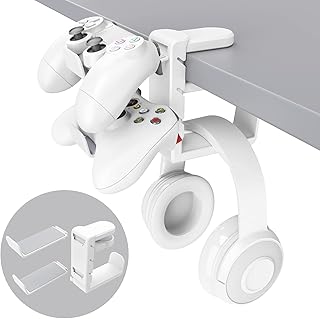
3-in-1 PC Gaming Headset&Controller Holder – EURPMASK Headphone Stand w/Adjustable Clamp&2 Controller Holder&Rotating Arm&Cable Organizer, Universal PC Gaming Accessory Controller Headset Stand-White
Best For:
Gamers with limited desk space, those who want to declutter and protect headsets/controllers, and streamers aiming for a tidy on-camera background.
Small accessories can make a big difference. The EURPMASK 3-in-1 headset and controller holder is a compact, clamp-mounted accessory that attaches to the edge of a desk to free up tabletop real estate. It combines an adjustable headset arm, two controller holders, a rotating arm for flexible positioning, and an integrated cable organizer. For gamers with limited desk space or those who prefer a clean surface, it’s a practical upgrade that reduces clutter and prevents accidental knocks to expensive headsets.
One practical advantage of a clamp mount is that it doesn’t require additional desk footprint: the holder secures to most desks with a clamp, which keeps your surface entirely usable. The rotating arm lets you position your headset out of the way while still making it instantly accessible when you’re ready to play. The dual controller holders mean couples or roommates can keep controllers separate and charged (depending on your charger setup), and the cable organizer reduces tangles from headset cords or charging cables.
Compared with freestanding stands, clamp-mounted designs are more stable on small desks and keep the headset at a consistent height. Compared to makeshift solutions (cups, boxes, or stacking), this holder presents a deliberate and protective place for expensive gear.
Who benefits most: compact-space gamers, streamers who want a tidy camera background, and anyone who frequently swaps between controllers and a headset. Who may skip it: users with very deep or thick desks that complicate clamping, and those who already have dedicated shelving or a large desk where a freestanding stand is preferred.
Buying considerations: verify your desk thickness and edge clearance for the clamp. While the product is sturdy for typical headsets and controllers, extremely heavy or oversized headsets may still be better on a heavy-duty freestanding stand. Assembly is usually tool-free and quick.
A small investment in organization goes a long way for a clean gaming station—this holder keeps gear safe and within reach. Check the latest price on Amazon.
Pros
- Clamps to desk to save surface area
- Holds headset plus two controllers—good for multi-device setups
- Rotating arm and cable organizer increase flexibility
Cons
- Clamp compatibility varies with very thick desks
- Not ideal for extremely heavy or oversized headsets
Check the latest price on Amazon.
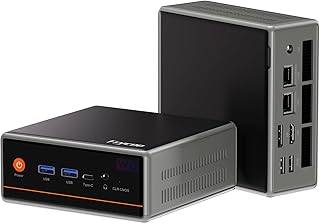
Trycoo Mini PC Gaming, Ryzen 5 5600H 16GB DDR4 RAM/512GB SSD (Beats 5700U/7430U),Micro pc Mini Desktop Computer,Type-C/HDMI/DP/HD,Triple 4K Display,WiFi6/BT5.2/USB3.2 for Home Business
Best For:
Users who need a compact yet capable gaming and productivity machine, small-space dwellers, and multi-monitor setups.
If desk space is at a premium but you still want respectable gaming and productivity performance, this Trycoo mini PC powered by a Ryzen 5 5600H platform is worth considering. The 5600H is a competent mobile-class chip that balances multicore performance and power efficiency, making it capable of running modern games at 1080p and handling multitasking, streaming, and content creation workflows at modest settings. With 16GB of DDR4 RAM and a 512GB SSD onboard, the unit is ready for most users out of the box and offers snappy boot times and responsive application loading.
A major selling point is the connectivity: multiple display outputs including HDMI, DisplayPort, and USB-C let you drive up to three 4K displays for productivity or multi-monitor gaming setups. Built-in Wi‑Fi 6 and Bluetooth 5.2 modernize your network and peripheral pairing, while USB 3.2 ports provide fast external drive access. These features make the mini PC suitable for small streaming setups, home offices that double as gaming spaces, or living room gaming where a small chassis that tucks behind a TV is preferred.
Compared with full-size desktops, mini PCs trade expandability for size. You won’t have the same upgrade path for discrete GPUs or large cooling solutions, but you gain a tiny footprint, lower noise, and lower power consumption. For gamers who prioritize high-refresh 1440p/4K gaming with ray tracing, a full desktop with a discrete GPU will outperform a mini PC. For many players seeking a compact, capable system for mainstream titles, the Ryzen 5 mini PC hits a sweet spot.
Realistic use cases include a student who needs a compact desktop for study and play, a content creator testing multi-camera streams, or a small-living room gamer who wants a powerful but unobtrusive PC. Consider whether you need more storage or a secondary SSD slot—many mini PCs support upgrades but check the expansion options.
Buying tips: ensure cooling is sufficient for sustained gaming sessions, and look into an external GPU enclosure only if you need desktop-level graphics later on. If you stream and game simultaneously, consider a wired Ethernet connection for more stable upload performance.
For a space-efficient, well-connected system that handles day-to-day gaming and productivity, this mini PC is a solid budget-savvy choice. Check the latest price on Amazon.
Pros
- Ryzen 5 5600H delivers strong multicore performance for the size
- Triple-display outputs and modern connectivity (Wi‑Fi 6, USB-C)
- Compact form factor saves desk/entertainment space
Cons
- Limited internal upgradeability compared with full desktops
- Integrated graphics limit high-settings 1440p or 4K gaming performance
Check the latest price on Amazon.
Final Verdict
Putting together a budget gaming setup that feels modern and stays organized doesn’t require buying the most expensive parts. A roomy, spill-resistant desk like the Arozzi Arena Special Edition gives you a functional base and cable management; combo peripheral kits from well-known budget brands deliver immediate value and compatibility; an organized clamp-mounted holder keeps expensive headsets and controllers safe; and a compact mini PC provides surprising performance for its footprint.
If you’re assembling a first gaming station, prioritize ergonomics (desk height, monitor distance, keyboard layout), input quality (mouse sensor and keyboard responsiveness), and future expandability (ports and upgrade slots). Over time, you can selectively upgrade the mouse and headset first, then the display or PC internals as budget allows. For small-space setups, the Trycoo mini PC and the EURPMASK clamp-mounted stand are particularly useful.
Who should invest in this bundle: students, entry-level streamers, and casual to mid-tier gamers who want reliable performance without a large investment. Who might pass: competitive esports pros chasing sub-millisecond input and custom high-end gear, and power users who need extensive internal upgrade options.
Use this guide to mix and match: choose the desk first to set dimensions, pick a peripheral bundle that suits your comfort, secure accessories to reduce clutter, and select a mini PC if you need a compact but capable core. Take measurements, consider your primary game types, and think about which component you might upgrade first.
If you want a budget-friendly, trending gaming setup that looks cohesive and performs well for most modern games and everyday tasks, these picks form a practical starting point. Check the latest price on Amazon.
Conclusion
These Gaming,Budget Gaming Setup That’s Trending Right Now picks are trending now and offer great value and variety. Check the links above for latest prices and reviews.
As an Amazon Associate, I earn from qualifying purchases.
Tags:
budget gaming setup, gaming desk, gaming peripherals, mini pc gaming, headset stand, budget gaming accessories, gaming bundle
