Sunday Desk Organizing Essentials for Creators
As an Amazon Associate, I earn from qualifying purchases. This article may contain affiliate links, which means we may receive a commission at no extra cost to you.
As an Amazon Associate, I earn from qualifying purchases. This article may contain affiliate links, which means we may receive a commission at no extra cost to you.
If you treat Sunday as your weekly reset, a handful of simple desk tools can make that ritual faster, clearer, and more satisfying. Creators—whether writers, designers, small-business owners, or content hobbyists—often turn to compact planners, tear-off notepads, and tidy desktop organizers to plan the week, set priorities, and clear mental clutter before Monday hits. This guide walks through five popular desk-friendly planning products that show up again and again in creator routines. I’ll cover what each item does, who it’s best for, realistic ways to use it in a Sunday session, and practical buying considerations based on product specs and common user feedback.
Why this matters: a short, consistent Sunday reset reduces decision fatigue, prevents missed deadlines, and frees up weekday focus. The tools below are low-friction additions that slot into that ritual—no elaborate systems required.
Buying Guide
How to pick a Sunday organization tool: a short buyer’s guide for creators
1) Decide the planning scale you need. Daily notepads (smaller sizes) are best for micro-tasks and habit tracking; weekly pads (letter or A4 size) give layout room for time-blocking, project notes, and cross-day priorities. If you split creative work and admin tasks, a weekly pad with sections for both is particularly useful.
2) Choose undated vs. dated. Undated pads and planners let you skip weeks without feeling wasteful and are ideal for creators with irregular schedules. Dated planners enforce cadence but can be wasteful if your routine is inconsistent.
3) Look for tear-off sheets. A clean sheet for each week or day keeps your desk tidy and gives you a physical archive you can stack or store. Creators who like to review past weeks will appreciate the easy-to-file format.
4) Think about layout: some pads focus exclusively on tasks, while others include habit trackers, priority flags, timeslots, and notes. Match the layout to how you plan—if you time-block your writing sessions, choose a planner with hours; if you prioritize tasks, pick a pad with top-three priority slots.
5) Consider materials and size. If you like to spread things out, get an 8.5"×11" sheet; smaller 9.8"×6.5" notepads travel well or sit neatly on a smaller desk. Paper weight matters if you use heavy pens or markers.
6) Desktop organizers and whiteboards: if you want reusable daily planning and a tech-friendly desk, a glass whiteboard with built-in storage and wireless charging can reduce paper waste and gather tech clutter.
7) Price, durability, and aesthetics: creators often choose tools that feel good to hold and look at their workspace. Pick a color and finish you enjoy—you’re more likely to keep the habit if you like the object.
Below are five specific products that fit common creator workflows, with practical scenarios and buying considerations based on product descriptions and real user reports.
Taja To Do List Notepad – To Do List Notebook for Work with 52 Sheets, 9.8" x 6.5", Undated Daily Planner Perfect for Daily Tasks and Goal Setting, Notepad Suitable for Office, Home & School – Greenery Sway

Best For:
Creators who prefer a compact, task-first notepad for short Sunday resets and on-the-go planning.
If your Sunday routine is about clearing the week’s micro-tasks and setting a short, actionable agenda, a compact daily to-do notepad like the Taja To Do List Notepad can be a very effective tool. Sized at about 9.8" x 6.5", it’s larger than a pocket notebook but small enough to keep close to a laptop or tuck into a weekly folder. With 52 undated sheets, the pad gives you an entire year’s worth of weekly resets if you use one sheet per week, or two months of daily planning if you prefer a sheet-per-day approach. The undated format keeps things flexible for creators who don’t work a standard five-day schedule.
What it does well: the Taja pad is purpose-built for straightforward task capture. Typical layouts emphasize top priorities, a running task list, and short notes—perfect for creators who want to identify the three most important wins for the week and break them into bite-sized actions. The paper weight is tuned for standard pens and gel inks; users commonly report minimal bleed-through when using everyday ballpoint or fine-liner pens. The compact size also makes it a nice companion for creative meetings or a quick planning session at a café when you want to draft next-week objectives.
Real-world Sunday use cases: a freelance writer might use a sheet to list article deadlines, research tasks, and two focused writing sessions. A small-team content creator could use the pad to jot client follow-ups, schedule quick social media posts, and note ideas to move into a longer editorial calendar. For people who do a Sunday 20–30 minute reset, the pad gives structure: capture inbox zero follow-ups, set three priority tasks, and note any appointments.
Why choose this over a full weekly planner: compared with larger weekly pads, the Taja notepad is quicker to pick up and less intimidating—there’s no empty white space to procrastinate over. It’s a better fit for makers who prefer a minimal capture tool rather than a time-blocking grid.
Who should buy it: creators who value simplicity, portability, and quick weekly or daily capture. It’s also a practical choice for students and home-office users who like a focused task-first approach.
Who may skip it: if you need detailed time-blocks, project timelines, or a habit tracker on the same sheet, a larger weekly planner with sections might serve you better.
Buying considerations: check the sheet count (52) relative to how often you plan, and keep in mind that undated sheets are waste-conscious but require consistent habit. If you write with fountain pens or markers, verify paper weight in the full product listing.
Pros: compact and portable, undated flexibility, clean task-focused layout.
Cons: limited space for extensive notes, not ideal for heavy-ink pens.
If a tidy, low-friction daily capture tool is what you need for your Sunday reset, this notepad is worth a look. Check the latest price on Amazon.
Pros
- Compact and portable size
- Undated sheets for flexibility
- Simple, task-focused layout that’s quick to use
Cons
- Limited writing space for long notes
- May not suit heavy-ink pens without bleed-through
Find this compact task pad on Amazon. Check the latest price on Amazon.
Weekly To Do List Notepad with 52 Undated Sheets(8.5"×11")- Undated Weekly Planner Notepad for Office Desk Accessories and Supplies – Midnight Lilac

Best For:
Creators who prefer a full-week visual layout—social media managers, video producers, and small-business owners.
For creators who like to spread tasks across days and include a bit more context, an 8.5"×11" weekly notepad gives the breathing room many need. This Weekly To Do List Notepad in Midnight Lilac brings a full letter-size format with 52 undated sheets—enough for a full year of weekly planning if you use one sheet per week. The undated design is a common favorite among freelancers, makers, and podcasters who work irregular weeks and appreciate the freedom to skip or jump into planning without wasted pages.
What it does well: the larger format supports organized columns for each day, a dedicated priorities section, and space for notes or a short habit tracker. Creators who juggle content calendars, shoot schedules, or recurring podcast tasks can assign blocks to specific days while keeping a visible list of weekly priorities. The colorway—Midnight Lilac—adds a pleasant aesthetic touch to a desktop, which matters for people who keep their workspace Instagram-ready or simply prefer visually calming tools.
Real-world Sunday use cases: a video creator could outline shoot days, edit sessions, and publishing slots across the week while using a notes column for props or guest contact info. A small e-commerce owner might use the columns for inventory checks, shipment days, and customer follow-ups, while the priorities box keeps the week’s main revenue-driving tasks front and center. The size lets you sketch micro timelines without crowding.
Why choose this instead of smaller daily pads: compared with compact notepads, the letter-size weekly pad reduces the need to flip between multiple pages and gives a single-plane view of the whole week—valuable for creators who plan sequences or coordinate collaborators.
Who should buy it: content creators, social media managers, and makers who prefer a visual weekly layout and need space for notes and lightweight tracking.
Who may skip it: if you prefer single-day deep work lists or carry your planner while commuting, the full-letter size might feel bulky.
Buying considerations: check paper thickness if you use markers, and consider whether the undated format fits your discipline—undated pads are forgiving but require a habit of weekly setup.
Pros: full letter-size layout for clear weekly overviews, undated flexibility, pleasing design.
Cons: larger footprint on small desks, may be more paper than needed for micro-planners.
If you want a single-sheet weekly snapshot for planning large creative projects or coordinating multiple tasks, this notepad is a practical choice. Check the latest price on Amazon.
Pros
- Full letter-size layout for easy weekly overviews
- Undated sheets reduce wasted pages
- Attractive design that suits a creative desk
Cons
- Takes up more desk space
- May be bulky for mobile use
See this weekly notepad on Amazon. Check the latest price on Amazon.
Weekly To Do List Notepad, Undated Planner with 52 Sheets (8.5”x11”), Desk Weekly Planner for Women & Man, Home School & Work

Best For:
Creators who want a balanced weekly planner for planning and quick reflection—freelancers, educators, and project-based workers.
This version of an 8.5"×11" undated weekly planner targets creators who want structure without rigidity. With 52 tear-off sheets, it’s designed for weekly rhythm building—use one sheet to plan a focused sprint, then file it in a folder for retrospective reviews. The layout typically includes daily columns, a priority section, a notes panel, and small habit or mood trackers, giving a balanced mix of scheduling and reflection tools.
What it does well: the planner aims to reduce the cognitive load of deciding what to do next. Instead of a blank page, each sheet prompts you to set top priorities, list daily tasks, and note one or two wins. For people who hold a Sunday review, this encourages short-term goal clarity and makes it easy to glance at the week’s commitments.
Real-world Sunday use cases: a busy creator might spend 30 minutes on Sunday transferring deadlines from a master calendar to the weekly sheet, adding two focus blocks per day, and assigning administrative tasks to lower-priority slots. Parents who create content around family life can combine homeschooling tasks with content production plans on the same sheet. The tear-off design is helpful when you want a clean, archived record of what you planned versus what you completed.
Why pick this over a dated planner or a daily pad: undated weekly planners strike a balance—more context than a daily pad and less permanence than a dated planner. They’re especially good for creators in project-based cycles who need flexible start times.
Who should buy it: makers, freelancers, educators, and anyone who benefits from a weekly viewpoint with quick reflection prompts.
Who may skip it: if you need hourly scheduling or highly detailed project timelines, a planner with hourly blocks or a dedicated project management tool may be better.
Buying considerations: confirm the paper weight if you use fountain pens, and if you like color coding, ensure the layout has room for different pen colors. Also consider whether the included habit prompts match your workflow.
Pros: balanced mix of planning and reflection, 52 tear-off sheets for archiving, undated flexibility.
Cons: may lack hourly time-blocking, layout might be too generic for niche workflows.
If you want a practical weekly canvas that supports both planning and quick review, this undated planner is a solid pick. Check the latest price on Amazon.
Pros
- Good balance between planning and reflection
- Tear-off sheets for easy archiving
- Undated and flexible for irregular schedules
Cons
- No hourly time-blocking
- Layout could be generic for some workflows
View this balanced weekly planner on Amazon. Check the latest price on Amazon.
Weekly To Do List Notepad, 8.5”x11” Weekly Desk Planner with 52 Tear Off Sheets Undated Weekly Planner Habit Tracker & Productivity Organizer for Home and Work, Pink

Best For:
Creators working on habit formation and consistency—writers, video creators, and hobbyists building routines.
This pink 8.5"×11" weekly desk planner is aimed at creators who like a touch of personality in their office tools without sacrificing functionality. Like the other weekly pads, it offers 52 undated tear-off sheets so you can adopt a consistent weekly ritual while keeping the option to skip or restart without waste. What sets it apart is a more explicit habit-tracker area and a productivity organizer section that encourages not just task listing but intentional habit development.
What it does well: the integrated habit tracker turns a passive planning sheet into a lightweight behavior change tool. Creators who are building new routines—daily writing, editing blocks, consistent uploads—can use the tracker to record quick yes/no completions. The productivity organizer area often features checkboxes and a clear priority strip so that the week’s main goal stays visible even as smaller tasks shift.
Real-world Sunday use cases: if you’re a podcaster building a cadence, you might list recording, editing, and promotion tasks across the week while tracking a habit like “publish on time” or “send episode summary to guests.” A freelance artist could block studio days versus admin days and track studio hours as a habit. The aesthetic color can also make a home desk feel more inviting—small pleasures that encourage sticking with a weekly reset.
Why choose this over a basic weekly sheet: the added habit-tracking and productivity prompts make this planner better for creators who are trying to pair weekly planning with habit-building. If your goal is not just to list tasks but to form predictable creative routines, the format nudges you in that direction.
Who should buy it: creators focused on habit formation and consistency—writers aiming to hit weekly word counts, video creators tracking publish cadence, or hobbyists turning sporadic work into routine.
Who may skip it: if you only need a pure task list or require sophisticated project management features, a simpler sheet or a digital tool may be preferable.
Buying considerations: ensure the habit tracker aligns with the behaviors you want to build, and check paper thickness if you prefer heavy markers. If you like color-coded systems, the layout should have clear zones for multiple pen colors.
Pros: built-in habit tracker for routine building, attractive design, undated tear-off sheets for flexibility.
Cons: may feel too prescriptive for free-form planners, larger size for small desks.
If habit-tracking and a visible productivity organizer help you keep creative momentum, this planner provides structure and visual appeal. Check the latest price on Amazon.
Pros
- Built-in habit tracker to support routines
- Clear productivity organizer and priorities area
- Attractive design to brighten a workspace
Cons
- May be too prescriptive for free-form planners
- Larger footprint on smaller desks
Browse this habit-focused weekly planner on Amazon. Check the latest price on Amazon.
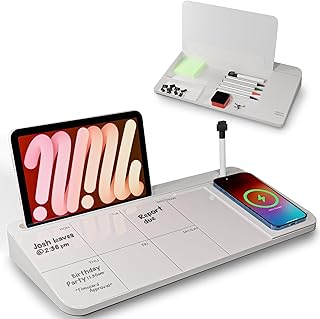
NEXTLUXE Glass Desk Whiteboard with Wireless Charger – Desktop Whiteboard with Storage, Weekly Planner, Dry Erase Pad, Organizer Drawer for Home, School, Office Gadgets – White
Best For:
Creators with dedicated desks who prefer reusable planning and want integrated tech organization—streamers, designers, and remote workers.
If you’re trying to reduce paper, keep your desk tech organized, and prefer a reusable planning surface, a glass desktop whiteboard with integrated features like the NEXTLUXE Glass Desk Whiteboard can be a transformative addition to a Sunday ritual. This product doubles as a weekly planner and a utility hub: the glass dry-erase surface lets you sketch a weekly layout, jot quick priorities, and erase each week without paper waste. The built-in wireless charger and storage drawer aim to consolidate cables, phones, and small accessories so your Sunday reset also clears physical clutter.
What it does well: the glass writing surface stays crisp, resists staining better than plastic boards, and gives a premium look on a desk. Creators who like a visible, reusable planning surface—where ideas are temporary and flexible—often prefer a whiteboard because it removes the pressure of permanence. The additional storage keeps markers, sticky notes, or charging cables within reach while the wireless charger reduces desktop cable noise.
Real-world Sunday use cases: during a 20–40 minute Sunday planning session, you can sketch a high-level weekly plan, block two or three focus sessions per day, and write out priority checkboxes on the board. Use the storage drawer to collect loose receipts, flash drives, or business cards you want to file later. If you publish frequently, the board can host the week’s headline ideas and quick publication checklist. On busy weekdays, the whiteboard is a glanceable reminder of the week’s top three goals.
Why choose a glass board over paper: reusability is the biggest advantage—no wasted paper and the ability to iterate quickly. The integrated charging and storage reduce desktop clutter that otherwise competes with your planning space.
Who should buy it: creators with stable desk setups who want a reusable planning surface and added tech convenience—streamers, remote workers, designers, and anyone who values visual, erasable planning.
Who may skip it: if you need an archival paper trail for accountability or prefer to file weekly plans, a tear-off pad might be better.
Buying considerations: check the wireless charger specs for compatibility, confirm board dimensions to ensure it fits your desk, and evaluate marker quality for minimal ghosting. Also consider whether you want a single reusable surface or a hybrid system that combines paper archives with erasable planning.
Pros: reusable glass surface, integrated wireless charger and storage, sleek desk aesthetic.
Cons: not suited for archival record-keeping, requires regular erasing to avoid clutter.
For creators who prefer a low-waste, highly visible planning surface with tech-friendly features, this glass desk whiteboard is an attractive option. Check the latest price on Amazon.
Pros
- Reusable, premium glass surface
- Integrated wireless charger and storage drawer
- Reduces paper waste and desktop clutter
Cons
- Not ideal for archived planning records
- Requires frequent erasing to stay tidy
Explore this glass desk whiteboard on Amazon. Check the latest price on Amazon.
Final Verdict
Sunday organization rituals don’t need to be elaborate to be effective. For creators, the right tool depends on whether you want quick capture (Taja To Do List Notepad), a full-week canvas (8.5"×11" weekly notepads), habit-focused structure (pink weekly planner with habit tracker), or a reusable, tech-friendly surface (NEXTLUXE glass desk whiteboard).
Start by asking: do you want an archival paper record, or do you prefer a reusable surface? Do you need hourly time blocks or a simple priority list? If you like portability, the smaller 9.8"×6.5" notepad is a friction-free companion. If you plan visual sequences across days—shoot schedules, editorial calendars, or lesson plans—the letter-size weekly pads give more space and context. If reducing waste and consolidating tech is a priority, the glass whiteboard with wireless charging is a stylish, practical choice.
All five options above are usable in short, repeatable Sunday sessions that take 15–40 minutes and leave you ready for Monday. Mix and match: many creators combine a reusable board for weekly brainstorming with a tear-off weekly pad for an archival record. Others pair a compact daily notepad for task capture with a digital calendar for time blocking.
Whichever tool you choose, the most important variable is consistency. A simple 20-minute weekly planning habit—capturing priorities, assigning 1–3 focused blocks per workday, and noting one metric to hit—will likely yield better creative output than any single premium planner.
Check the latest price on Amazon.
Conclusion
These Desk products creators use during Sunday organization routines picks are trending now and offer great value and variety. Check the links above for latest prices and reviews.
As an Amazon Associate, I earn from qualifying purchases.
Tags:
Sunday planning, weekly planner, desk organizer, creator tools, to do notepad, habit tracker, glass desk whiteboard
