Smart Devices That Cut Your Electricity Bill
As an Amazon Associate, I earn from qualifying purchases. This article may contain affiliate links, which means we may receive a commission at no extra cost to you.
As energy prices fluctuate and home electrics multiply, small smart devices can add up to meaningful savings. Before diving into specific picks, a quick note: As an Amazon Associate, I earn from qualifying purchases. This article may contain affiliate links, which means we may receive a commission at no extra cost to you.
This guide looks beyond flashy smart-home features and focuses on gadgets that help reduce power draw, improve efficiency, or stop wasteful standby power. You’ll find a mix of plug-in optimizers, smart plugs, whole-circuit energy meters, and motion-based automation—each chosen for practical cost-saving potential in everyday homes and small offices.
I’ve organized this as a buyer-friendly guide so you can match devices to your habits, wiring, and goals rather than chasing the loudest marketing claims. The product sections include realistic use cases, who benefits most, and clear pros and cons to help you choose efficiently.
Buying Guide
How to choose smart energy-saving devices
Start with what you want to control: a single appliance, a room, or an entire breaker? Plug-in smart plugs and voltage optimizers are best for individual devices and small setups. If you want to monitor whole-circuit consumption or measure multiple appliances on a single feed, an inline energy meter (like a DIN-rail or clamp-style meter) will give the most actionable data.
Look for these practical features:
– Real usage metering: Devices that report wattage and kWh let you identify the biggest power draws. Without measurement, “savings” are guesswork.
– Scheduling and automation: Timers, geo-fencing, or motion-triggered off settings stop appliances wasting standby power or running when not needed.
– Integration with ecosystems: If you use Alexa, Google Home, HomeKit, or SmartThings, choose devices that integrate easily—this reduces friction when automating groups of devices.
– Safety and certifications: ETL, FCC, CE or equivalent marks matter for anything that interfaces with mains power. Surge protection is a welcome extra for sensitive gear.
– Installation complexity: Smart plugs are plug-and-play; smart energy meters and clamp meters can require basic electrical work or panel access. If you aren’t comfortable, plan for an electrician.
Real-life buying considerations
– Compatibility: Many Wi‑Fi smart plugs only work on 2.4 GHz networks. Check your router settings first.
– Load limits: Confirm the maximum amperage or wattage. Don’t plug high-draw appliances into a plug rated only for lamps or chargers.
– Automation maturity: If you plan complex automations, choose devices that support scenes and triggers in your platform.
Who should invest: renters and homeowners who want measurable reductions in standby and scheduled loads, hobbyists automating rooms, and small businesses wanting easy monitoring. Who might skip it: anyone whose energy costs are negligible compared to their usage patterns (for example, homes with very efficient, always-on renewables) or people uncomfortable with any electrical installation should stick to plug-and-play options.
Electricity Saving Box Energy Saving Device Smart Save Plug Power Saver Voltage Optimization Surge Protection Thermoregulation Outlet Home Office Compact Plug and Play Energy Efficiency(2PCS)
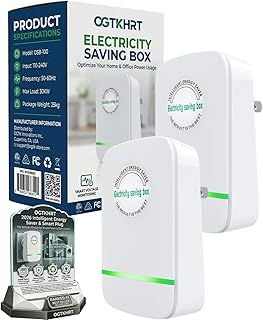
Best For:
Renters and homeowners who want a no-fuss plug-in device to potentially reduce standby power for small electronics and add basic surge protection.
If you’ve seen inexpensive “power saver” plugs and wondered whether they work, this dual-pack of Electricity Saving Box units positions itself as a simple, plug-and-play voltage optimizer and surge protection combo. It’s designed for people who want a low-effort way to reduce standby losses and stabilize small voltage fluctuations without rewiring or smart-home setup.
Main benefits: The unit claims to condition incoming voltage and reduce wasted power from devices that draw phantom loads when idle. In practical terms, that means it’s best applied to sets of small appliances—routers, TVs, phone chargers, and desktop PC peripherals—rather than large heating or HVAC equipment. Buyers report the appeal is convenience: pop it into an outlet, leave it, and hope a small percent reduction in consumption adds up over months.
Real-life usage: A common way to use these is to plug them into wall strips that feed multiple small electronics. For example, in a living room entertainment center the box sits between the strip and the wall supply. Another scenario is in a home office: routers, modem, printer, and a few chargers often draw continuous baseline power. Customers often pair the device with a smart plug that reports energy to verify savings over time.
Why it’s valuable: The Electricity Saving Box’s value lies in convenience and safety extras—many versions include surge protection and thermal management that add real utility beyond the “energy optimization” claim. Compared with standard alternatives such as manual power strips or outlet timers, this product requires no daily interaction and can complement automated schedules.
Buying considerations and who should buy: This is for budget-conscious users who prefer a non-invasive device to potentially lower standby consumption. It’s a good fit for renters, people who don’t want to reconfigure wiring, and those who want a simple complement to smart plugs and timers. It’s less useful for households with frequent heavy loads (ovens, space heaters, AC) or where energy savings must be precisely measured—if you need accurate ROI data, a metered smart plug or a whole-home consumption monitor will be better.
Practical observation: Expect subtle savings; buyers often report modest reductions rather than dramatic cuts. Pairing with a simple energy monitor can confirm whether this unit meaningfully affects your baseline draw. Check the device’s load ratings and ensure it sits on circuits that mostly feed electronics rather than high-power appliances.
Check the latest price on Amazon.
Pros
- Plug-and-play—no installation or hub required
- Compact and suitable for living rooms and offices
- Includes surge protection and thermoregulation features
Cons
- Savings may be modest and hard to verify without metering
- Not suitable for high-draw appliances or precise energy accounting
Check the latest price on Amazon.
Shelly EM Mini Gen4 | Wi-Fi, Zigbee, Matter Smart Energy Meter, 1-Channel 16 A | Home Automation | Alexa, SmartThings, Google Home, Apple HomeKit Compatible | Bluetooth Gateway | No Hub Required

Best For:
DIYers and smart-home enthusiasts who want accurate, circuit-level energy monitoring and easy integration with major smart platforms.
For anyone serious about understanding where electricity is going, the Shelly EM Mini Gen4 is a compact energy meter that brings accurate, real-time consumption data to popular smart-home ecosystems. Unlike a single smart plug that monitors one device, this 1-channel meter is designed to sit inline with a circuit or appliance (within its 16 A rating) and report precise wattage, kWh, and historical graphs to supported platforms.
Main benefits: The key benefit here is visibility. Knowing the real numbers lets you spot vampire loads, schedule heavy appliances for off-peak times, and validate savings from other devices. Shelly’s support for Wi‑Fi, Zigbee, and Matter increases compatibility, and built-in integrations with Alexa, Google Home, HomeKit and SmartThings make automation straightforward.
Real-life usage: Install it on a sub-circuit powering a laundry zone, garage, or water heater (within rating) to track actual consumption. For a dedicated washing machine circuit, you can measure each cycle, identify inefficient modes, and create automations to defer cycles to cheaper tariff windows. Small-business owners can use it to monitor a single high-consumption appliance like a refrigerator or server rack.
Why it’s valuable: Compared with basic smart plugs, the Shelly meter provides more accurate whole-appliance or circuit-level data without sacrificing smart controls. It’s a particularly good fit when you want to combine measurement and automation—use consumption thresholds to trigger scenes, disable devices when idle, or alert you to abnormal usage spikes.
Buying considerations and who should buy: This product suits DIYers comfortable with basic wiring or anyone willing to have an electrician perform a quick installation. It’s best for homeowners, renters with panel access, and small business owners who want actionable data. Avoid if you need multi-channel monitoring out of the box or are uncomfortable working near mains electricity.
Practical observation: Users value the robust integrations and the fact that Shelly’s ecosystem is developer-friendly—if you like building custom automations, this is a strong choice. Keep in mind the amperage limit and ensure your target circuit falls within it.
Check the latest price on Amazon.
Pros
- Accurate real-time metering with historical data
- Supports Wi‑Fi, Zigbee, and Matter for broad compatibility
- Integrates with Alexa, Google Home, HomeKit, and SmartThings
Cons
- Requires inline installation or electrician assistance
- Single-channel limits monitoring to one circuit or appliance
Check the latest price on Amazon.
GHome Smart Plug, WiFi Smart Plugs Work with Alexa and Google Home, Smart Outlet Timer with APP Remote Control, 2.4GHz Wi-Fi Only, No Hub Required, ETL FCC Listed

Best For:
Renters, beginners, and smart-home newcomers who want plug-and-play scheduling and voice control for individual appliances.
Smart plugs are the simplest route to lower electricity use: they let you schedule, remotely control, and monitor the energy draw of individual appliances. The GHome Smart Plug is a straightforward 2.4 GHz Wi‑Fi outlet with app control, voice assistant support, and basic scheduling—ideal for users who want immediate control without a hub.
Main benefits: The GHome plug shines where convenience matters. Use it to turn lamps off on a schedule, stop entertainment systems drawing standby power, or remotely power down chargers and space heaters when not in the room. With ETL and FCC listings, it meets common safety standards you’d expect for consumer plugs.
Real-life usage: Put one on a bedside lamp and set a nightly schedule to cut power when you sleep. Use another for your home-office printer and set it to power up only during work hours to avoid phantom standby use. Parents find smart plugs handy to limit game console access after curfew, while apartment dwellers can retrofit smart control without any electrical work.
Why it’s valuable: Compared with outlet timers and power strips, a smart plug provides remote control and often energy reporting in the app—so you can confirm whether turning a device off actually changed consumption. It’s cheaper and less complex than inline meters and more precise than manual unplugging.
Buying considerations and who should buy: Choose GHome if you need an easy, low-cost way to automate a few key appliances and want voice control. Note it works on 2.4 GHz Wi‑Fi only—if you have a 5 GHz-only network, you’ll need to adjust router settings. Also check the plug’s maximum supported load before connecting heaters or other high-draw devices.
Practical observation: Smart plugs are one of the fastest ROI items when used to eliminate standby power for multiple devices. For whole-home insights, pair them with a central meter or monitor inventory of plugs in the app.
Check the latest price on Amazon.
Pros
- Easy setup—no hub required
- Works with Alexa and Google Assistant
- ETL and FCC listed for safety
Cons
- 2.4 GHz Wi‑Fi only—may need router changes
- Not suitable for very high-wattage appliances
Check the latest price on Amazon.
Energy Saving Motion Sensor-Automatically Turn Off Air Conditioner.Reduce Your Energy Expenditure,Your Energy Bills.Control Devices and Save on Your Electricity Bills.

Best For:
Homeowners and small businesses with intermittently used rooms who want occupancy-driven automation to cut HVAC and lighting waste.
Motion-based automation is one of the most intuitive ways to cut HVAC and lighting waste. This Energy Saving Motion Sensor is designed to automatically switch devices or trigger scenes when no presence is detected, helping reduce hours that air conditioners, fans, or lights run empty.
Main benefits: By focusing on occupancy rather than fixed schedules, a motion sensor reduces false-on time—rooms that are occasionally used no longer need fixed timers. For example, an AC left on in a seldom-used guest bedroom can be set to turn off after a motion-free interval, preventing hours of unnecessary cooling.
Real-life usage: In a two-story home, place the sensor in upstairs hallways or guest rooms to cut HVAC runtime when those spaces are empty. Small offices can use motion sensors to control communal lights and reduce after-hours consumption. Paired with a compatible smart plug or a smart thermostat, you can create a workflow where the sensor disables power to a window AC unit when the room is empty for a set period.
Why it’s valuable: Compared with manual switches or rigid schedules, motion sensors adapt to real occupancy patterns and often yield larger savings in spaces with intermittent use. They’re especially effective in vacation homes, rarely used guest rooms, laundry rooms, and workshops.
Buying considerations and who should buy: This option is ideal for households where rooms are used sporadically and for offices looking to reduce lighting and HVAC runtime. Confirm compatibility with your existing smart-home hub or plug (some sensors work natively with Wi‑Fi, Zigbee, or Z‑Wave systems). Keep in mind placement: sensors must cover common pathways and can miss very still occupants if sensitivity isn’t tuned.
Practical observation: Motion sensors can eliminate large chunks of wasted HVAC time when installed thoughtfully. They’re not a replacement for a smart thermostat when fine-grained temperature control is needed, but they complement thermostats and plugs well.
Check the latest price on Amazon.
Pros
- Reduces wasted HVAC and lighting runtime
- Works well in seldom-used rooms and offices
- Can be integrated with plugs and thermostats for automation
Cons
- Placement and sensitivity affect reliability
- May require hub compatibility checks for some ecosystems
Check the latest price on Amazon.
Electricity Saving Box Energy Saving Device Smart Save Plug Power Saver Voltage Optimization Surge Protection Thermoregulation Outlet Home Office Compact Plug and Play Energy Efficiency(2PCS)
Best For:
People who want wider coverage across multiple living spaces and prefer a set-and-forget plug-in approach to modestly reduce standby losses.
This second listing of the Electricity Saving Box mirrors the same concept: a compact plug-in module aiming to optimize voltage, clip spikes, and reduce small inefficiencies in a household’s baseline consumption. Since it’s offered as a two-pack, some buyers find it useful to distribute one in the living room and another in the home office for broader coverage.
Main benefits: The two-pack format is practical for users who want to protect multiple zones and potentially multiply marginal gains. It’s positioned as an easy, no-hassle option to reduce phantom draw and provide extra surge protection for sensitive electronics.
Real-life usage: Use one box near entertainment centers (to target TVs, streaming boxes, and consoles) and the other in a home office to cover routers, NAS devices, and chargers. Paired with intermittent energy measurement using a smart plug or inline meter, you can estimate whether the boxes are lowering baseline draw in each zone.
Why it’s valuable: When compared with single-unit optimizers or standard surge protectors, a two-pack gives flexibility to target multiple circuits where standby consumption accumulates. It’s less intrusive than panel-level solutions and cheaper than installing circuit monitors in each area.
Buying considerations and who should buy: This is a fit for those who want a low-interaction solution and don’t need fine-grained metering. It’s ideal for renters or people who prefer not to modify infrastructure. If you need precise savings data or have many high-power devices, pair these units with metering hardware to verify effects—or choose a more measurable solution like smart plugs or an energy meter.
Practical observation: Expect incremental benefits rather than dramatic reductions. Users who combine these boxes with smart scheduling and sensors often see the best results—hardware that reduces voltage losses works best when paired with automation that limits runtime.
Check the latest price on Amazon.
Pros
- Two units provide broader coverage
- Simple installation—no electrician needed
- Adds surge protection and thermal management
Cons
- Effectiveness varies by household and is often modest
- Not a substitute for precise energy metering
Check the latest price on Amazon.
Final Verdict
Smart devices that reduce electricity use come in many flavors: measurement-focused meters like the Shelly EM Mini give you actionable data, smart plugs like the GHome let you control and schedule individual loads easily, motion sensors reduce wasted HVAC and lighting runtime, and compact power optimizers offer a non-invasive way to attempt small baseline reductions. The best approach is often a combination—measure first, then automate and optimize.
If you’re new to energy-saving tech, start with a few smart plugs on the biggest phantom-power culprits and a motion sensor for intermittent rooms. If you want to dig deeper, add a circuit-level meter to track meaningful changes and validate savings before buying more devices. For renters, plug-and-play options and motion sensors provide the most flexibility without electrical work. For homeowners and small business owners willing to install inline meters, the visibility can pay for itself in smarter usage decisions.
Check the latest price on Amazon.
Conclusion
These Smart Devices That Save Electricity picks are trending now and offer great value and variety. Check the links above for latest prices and reviews.
As an Amazon Associate, I earn from qualifying purchases.
Tags:
energy saving devices, smart plugs, energy meter, motion sensor, electricity saver, home automation, voltage optimizer
