Productivity Gadgets Creators Are Linking Now
As an Amazon Associate, I earn from qualifying purchases. This article may contain affiliate links, which means we may receive a commission at no extra cost to you.
As an Amazon Associate, I earn from qualifying purchases. This article may contain affiliate links, which means we may receive a commission at no extra cost to you.
Creativity, focus and practical tools are the currency of modern content creation. Lately, creators across YouTube, Instagram and TikTok have been sharing a cluster of compact, inexpensive gadgets that promise to shave minutes off tedious tasks and turn scattershot days into focused work sessions. From tactile countdown cubes to smart, screen-free trackers and reusable notebooks that bridge analog and cloud workflows, these products are getting disproportionate airtime because they solve small but persistent friction points.
This long-form guide pulls together five of the most-linked gadgets, why creators keep recommending them, and how they might fit into your routine. Each product section includes realistic use cases, who will get the most value, pros and cons based on product specs and user feedback, and practical buying considerations. Whether you’re a student juggling deadlines, a creator batching videos, or someone trying to reclaim time in a busy home, there should be an option here that helps you do more with less friction.
Buying Guide
How to choose a productivity gadget that actually improves your workflow
1) Match the gadget to a real pain point: A timer fixes procrastination and context-switching, a reusable notebook reduces paper clutter while keeping tactile note-taking, and a wearable tracker nudges healthier habits. Don’t buy tech because it’s trendy — buy it to eliminate a recurring problem.
2) Consider friction versus benefit: Small docks and dongles are useful if you regularly connect hardware; otherwise they add pocket weight. Timers should be easy to set and audible (or vibrate) enough to break focus gently without startling you.
3) Compatibility and ecosystems: For smart or cloud-connected items, check which apps and services are supported. If you rely on Google Drive, Dropbox, or iOS scanning, ensure the gadget’s companion app or workflow fits your stack.
4) Durability and daily use: Creators often treat these gadgets as daily tools. Look for solid materials, a simple interface, and replaceable parts (like bands for wearables or a wipe-clean notebook cover).
5) Privacy and data: For fitness trackers or connected hubs, understand what data is collected and where it’s stored. Screen-free trackers limit visible data but still often sync to an app.
6) Price versus long-term value: The best buys often cost less than a subscription. Ask yourself whether the time saved or the habit improved will pay back the purchase within a few months.
7) Read a range of user experiences: Creators highlight standout wins and frustrations. Use those as a guide to real-world reliability rather than marketing claims.
Use the product sections below to compare features, realistic daily scenarios, and whether each gadget fits your workflow.
GuDoQi Multi-Function Cube Timer, 5/10/30/60 Min & Custom Count Down, Included Pause & Resume Feature, Silent, Vibrate & Adjustable Sound Alarm for Productivity in Tasks, Study & Kitchen, Black

Best For:
People who want a low-friction, physical timer for Pomodoro sessions, study blocks, or kitchen tasks—students, writers and creators working in short bursts.
If you’ve watched creators batching work or filming Pomodoro sessions, you’ve probably seen cube timers on desks. The GuDoQi Multi-Function Cube Timer is a compact, tactile way to keep time without keyboard shortcuts or phone interruptions. Flip the cube to select preset intervals — 5, 10, 30, 60 minutes — or use the custom countdown for tasks that don’t fit a neat slot. A simple button layout provides pause and resume, and the alarm can be switched between silent vibrate, soft chime or adjustable louder tones.
The beauty of this cube is in how it reduces decision overhead. Instead of fumbling with your phone or opening a timer app, a single flip gets you started. That makes it ideal for students studying in bursts, creators allocating a set block to editing or captions, and home cooks who want an unobtrusive visual cue that won’t interrupt a recorded session. The configurable sound options are particularly helpful for shared spaces: choose vibration for a quiet workspace, or a clear beep when you need a stronger reminder.
Compared with standard phone timers, the GuDoQi cube removes the temptation to start a distracting app when you tap the screen. Compared with simple mechanical kitchen timers, this model offers a custom countdown and a muteable alarm, which is nicer for desk use and streaming creators who want to avoid sudden loud noises on camera. Build quality and weight make it sturdy on a desk, while the compact footprint keeps it out of the way.
Buying considerations: If you need a multi-hour scheduler or deep integrations with productivity apps, this cube isn’t that. It’s purpose-built for short to medium blocks of focused work and household tasks. Also pay attention to battery type and replacement: if you prefer rechargeable solutions, check whether the supplied power option aligns with your setup.
Who should buy: Students, writers, editors, creators doing timed sessions, and anyone who benefits from a physical, low-friction timer. Who may not need it: users who already rely on integrated digital timers synchronized across devices or those needing long multi-hour timers.
This cube is a small behavioral nudge with low overhead — great for turning intention into action without extra friction. Check the latest price on Amazon.
Pros
- Instant flip-to-start presets (5/10/30/60 min)
- Pause/resume and custom countdown for flexibility
- Silent vibrate option for shared or quiet spaces
Cons
- Not a replacement for app-based synchronized timers
- May require battery replacement depending on model
Check the latest price on Amazon.
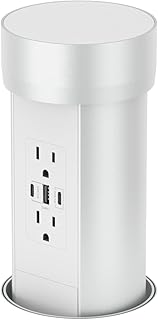
Connect Silver by Point Pod
Best For:
Mobile creators, travelers and anyone who wants a minimalist connector to speed up gear setup without carrying a full dock.
The Connect Silver by Point Pod is an accessory that frequently appears in creator gear lists because it’s small, stylistically neutral and designed to reduce a particular kind of friction: awkward connections and cable swaps. Rather than trying to replace a laptop dock or an all-in-one hub, these compact accessories usually act as a bridge — a magnetic adapter, a pocketable connector, or a compact interface that simplifies one or two recurring tasks like plugging in a microphone, charger or external display.
What creators appreciate is the immediacy. Instead of digging through bags for multiple adapters, a single, well-designed connector reduces setup time and the chance of leaving something behind. In real use, that means faster transitions between filming segments, easier charging while editing on location, and fewer fiddly moments when you need to connect a phone to a camera or laptop for file transfers. For folks who travel for shoots or move between coworking spaces, the convenience of a lightweight, robust adapter is tangible.
Compared with bulky multi-port hubs, the Point Pod style accessory favors portability and simplicity over an exhaustive list of ports. That’s a trade-off: you get less versatility than a full dock but more reliability and less pocket bulk. If your workflow relies on many simultaneous connections (multiple USB devices, ethernet, and external displays), a larger hub still makes more sense. If you want a minimal item to carry every day and reduce setup friction, the Connect Silver fits that niche.
Buying considerations: confirm compatibility with your devices (connector type, charging protocols or data transfer speeds if applicable), and look for reinforced construction if you plan to use it on the go. Also consider whether you need pass-through charging or high-bandwidth video support; smaller connectors may not provide those features.
Who should buy: travelers, mobile creators, and anyone who needs a minimal, attractive connector to simplify daily setups. Who may not need it: desktop power users who already own a comprehensive docking station.
A tidy little convenience item can remove a disproportionate amount of daily friction—especially for creators packing light. Check the latest price on Amazon.
Pros
- Ultra-portable and easy to carry
- Streamlines common connections and setup
- Stylish, neutral design that fits creator rigs
Cons
- Less versatile than a full multi-port hub
- May lack support for high-bandwidth video or multiple simultaneous connections
Check the latest price on Amazon.
HEALBE Calorie Tracker, Automatic Calorie Intake Smart Band with App, Screen-Free Fitness Tracker, Sleep, Hydration, Stress, 24/7 Heart Rate, 5 ATM Waterproof

Best For:
Creators and knowledge workers who want passive wellness insights—sleep, stress, hydration—and an approximate calorie estimate without a distracting screen.
Wearable tech has become a common recommendation in creator communities because it helps build micro-habits without interrupting workflow. The HEALBE Calorie Tracker is notable for positioning itself as a screen-free fitness band that estimates calorie intake automatically while also tracking heart rate, sleep, hydration and stress metrics. With 5 ATM water resistance and continuous monitoring, it’s built for daily life rather than intermittent activity checks.
The primary appeal is the automated calorie estimation. For creators mindful of energy levels during long shoots or editing days, the band aims to provide insight into how many calories you’re burning versus consuming. Paired with sleep and stress tracking, it can paint a clearer picture of when you’re most productive and when you need rest. Being screen-free on the band reduces temptation to constantly glance at data; instead, a paired app stores detailed logs and trends for periodic review.
In real use, creators report the band helps identify patterns: late-night editing sessions followed by poor sleep, or skipped meals before long recording blocks. Those insights can lead to simple changes—timed hydration, scheduled movement breaks, or shifting demanding tasks to high-energy parts of the day. Compared with standard smartwatches, a screen-free band trades immediate glanceability for less distraction and often longer battery life.
Buying considerations: automatic calorie estimation uses algorithms and sensor data, so expect variance versus lab-grade measurements. Review the app’s data export and privacy policies if you’re sensitive about health data. Also check strap comfort and the charging method—creators who wear trackers 24/7 prize comfortable bands and quick charging.
Who should buy: creators and professionals who want passive wellness insights without a distracting screen, fitness-minded users tracking daily calorie balance, and those who want 24/7 monitoring with water resistance. Who may not need it: users who prefer detailed on-device readouts or medically accurate metabolic measurements.
If you want to build healthier habits around content work without adding another screen, this band offers a balance of passive monitoring and actionable trends. Check the latest price on Amazon.
Pros
- Automatic calorie estimation and 24/7 heart rate
- Screen-free design reduces distraction
- 5 ATM water resistance suitable for daily wear
Cons
- Calorie estimates can vary from lab measurements
- Depends on companion app for detailed data and trends
Check the latest price on Amazon.
Rocketbook Core Reusable Smart Notebook, Lined Pages For School, Work and Creative Projects, Letter Size 8.5×11, Gray – Premium

Best For:
Writers, designers, students and creators who prefer handwriting but want cloud-sync and reusable pages to cut waste and clutter.
The Rocketbook Core (formerly known as the Everlast in earlier versions) has become a staple for creators who like to brainstorm with pen and paper but want their notes transported to the cloud instantly. The notebook uses special reusable pages that pair with erasable pens: write, scan with the Rocketbook app to save to cloud services (Google Drive, Dropbox, email, etc.), then wipe the page clean with a damp cloth to reuse it. It’s a hybrid analog-digital workflow that fits anyone who hates losing handwritten ideas but also dislikes stacks of paper.
What makes the Core useful for creators is its blend of tactile freedom and modern filing. Brainstorming, storyboarding, shot lists, and caption drafts all feel more natural when sketched by hand. The Rocketbook app’s page detection and OCR mean your handwriting can be searchable and routed to the folders and tools you already use. That reduces friction when converting notes into scriptboards, task lists, or project files.
Compared with regular paper notebooks, Rocketbook reduces waste and long-term clutter. Compared with a tablet and stylus, it’s cheaper and replicates the familiar pen-and-paper feel that many people prefer for initial ideation. It’s not a replacement for professional archival paper if you want permanent ink records, but for iterative creative work it’s fast and forgiving.
Buying considerations: the reusable pages work best with recommended pens; some inks may not wipe clean. If you use extremely heavy inks or highlighters, test a page first. Consider whether you need the lined or dotted layout and whether Letter size fits your carry system. If you rely heavily on instant, high-precision OCR for legal or archival notes, a dedicated scanner or paper may still be preferable.
Who should buy: creators, students, designers and writers who draft by hand but want searchable, cloud-synced notes without paper buildup. Who may not need it: people who archive permanent signed documents or prefer digital-first note-taking on a tablet.
For creators who move fast between pen-and-paper thinking and cloud-based production, Rocketbook Core bridges the gap cleanly. Check the latest price on Amazon.
Pros
- Reusable, wipe-clean pages reduce paper waste
- Companion app routes scans to cloud services with OCR support
- Feels like regular pen-and-paper—no learning curve
Cons
- Best used with recommended pens; some inks won’t erase cleanly
- Not intended for permanent archival documents
Check the latest price on Amazon.
Rotating Productivity Timer 5, 25, 10, 50 Minutes Preset, Desk Cube w/Gravity Sensor for ADHD, Mute Functions, Ideal for Work, Study, Kitchen, Back to School (1, Wood Grain Finish)

Best For:
People who benefit from a physical timing ritual—students, ADHD users, creators doing Pomodoro-style work—and those who want a decorative desk timer.
Wood-grain finishes and minimalist desk tools are a frequent aesthetic choice among creators. This Rotating Productivity Timer combines that look with practical presets—5, 10, 25 and 50 minutes—plus a gravity sensor so the unit powers on when you place it upright and mutes when turned face down. The familiar tactile action of rotating the cube feels satisfying and becomes a small ritual that signals the brain to settle into a chosen task.
Creators and students who struggle with attention fragmentation find discrete benefits in a device that’s both visible and physical. Where phone timers invite swipes to social apps, a desk cube isolates timing as a single-purpose action. The mute function and adjustable volume accommodate streaming or shared spaces, and the preset durations match common productivity rhythms: short bursts, focused Pomodoros, and longer deep-work blocks.
Compared to simpler mechanical timers, this rotating cube adds intelligent conveniences like a gravity sensor and multiple mute options. Compared to app-based timers, it’s more intentional—an object on your desk that acts as a commitment device. That said, it’s not a digital planner replacement; it won’t sync with calendars or notify you across devices.
Buying considerations: consider the visual profile—wood-grain looks great on many desks, but if you prefer stark minimalism there are other finishes. Check alarm tone characteristics if you record audio or stream; creators may prefer vibration or mute. Battery life and power type are worth confirming if you’ll use it daily.
Who should buy: people with attention challenges, students, creators who prefer a physical ritual for timed work, and anyone who wants a non-digital timing cue. Who may not need it: users who want app synchronization across devices or those who already rely on integrated smart home timers.
A stylish, tactile timer can be more than decor: it’s a tiny habit engine that makes focus easier to start and maintain. Check the latest price on Amazon.
Pros
- Gravity sensor and easy rotation for preset times
- Mute function and adjustable volume for shared spaces
- Attractive wood-grain finish that suits many desks
Cons
- No app sync or cross-device notifications
- Requires battery replacement or charging depending on model
Check the latest price on Amazon.
Final Verdict
Small, well-designed gadgets can deliver surprisingly large gains if they address a real daily friction. The timers—GuDoQi Multi-Function Cube and the Rotating Productivity Timer—are practical, low-friction tools that help you convert intention into timed action, making them excellent for Pomodoro fans, students, and creators who need uninterruptible stretches. The Rocketbook Core sits between analog and digital work, ideal for anyone who brainstorms by hand but wants searchable, cloud-synced notes. The HEALBE band brings passive wellness tracking into the creator routine without adding another screen, which helps spot patterns that affect energy and focus. The Connect Silver accessory is a lightweight convenience item that reduces setup friction for mobile creators who don’t want to carry a full dock.
When choosing, match the device to the pain point you’re actually facing: are you losing time to distractions, struggling to archive ideas, or unsure why your energy dips mid-day? Pick one gadget that addresses that core issue instead of buying several trendy items. For many people the combination of a tactile timer, a reusable notebook, and a simple wearable or connector covers the most common productivity leaks.
If you want to start small, try a single timer to build habit consistency. If you need both analog ideation and better habit signals, pair Rocketbook with a screen-free tracker. Each of these picks is popular with creators because they’re practical, affordable, and focused on doing one job well.
Check the latest price on Amazon.
Conclusion
These Productivity gadgets creators keep linking online lately picks are trending now and offer great value and variety. Check the links above for latest prices and reviews.
As an Amazon Associate, I earn from qualifying purchases.
Tags:
productivity gadgets, Pomodoro timer, reusable notebook, fitness tracker, creator tools, desk accessories, productivity tools
