Office Tools Creators Use for Deep Focus
As an Amazon Associate, I earn from qualifying purchases. This article may contain affiliate links, which means we may receive a commission at no extra cost to you.
Deep work—those extended, undistracted blocks of concentration—is where creators turn ideas into finished work. Whether you write, design, code, or plan content, the right desk setup and tools matter more than a million productivity tips. This guide collects five thoughtfully chosen items that frequently show up in creator workflows: a supportive ergonomic chair, a dedicated focus timer, and several Rocketbook reusable notebooks and planners that bridge analog thinking with cloud storage.
Before we dive into each product, a quick note: the tools below are selected for how they help sustain attention, reduce friction in capturing ideas, and support healthy posture and breaks. They are not magic bullets, but practical pieces of a system that enables long, productive sessions with fewer distractions. Read on for detailed product breakdowns, realistic use cases, and buying considerations to help you choose the right combination for your workflow.
Buying Guide
How to choose tools for focused deep work
What problem are you solving? Deep work requires removing friction: discomfort, scattered notes, and poor break structure all interrupt flow. Start by identifying your most common interruptions—physical discomfort, runaway to-do lists, or attention drift—and pick one tool that targets the largest source of friction.
Ergonomics first. If you sit for long sessions, a supportive chair that encourages good posture and reduces fidgeting pays off quickly. Look for adjustable lumbar support, a tall breathable back, and an appropriately firm seat cushion. Flip-up arms and recline range are handy when you need to shift from tense typing to relaxed brainstorming.
Time management tools. A focused timer that pairs clear work intervals with intentional break activities can stop the doom-scroll cycle. Consider timers that include short wellness prompts (breathing, stretches) rather than only beeps—these keep breaks restorative without adding decision fatigue.
Analog + digital capture. Creators still rely on pen-and-paper for ideation, but standard notebooks scatter notes and require manual archiving. Reusable smart notebooks and planners that let you quickly digitize pages to cloud folders remove the friction of keeping analog thoughts organized and searchable.
Compare with standard alternatives. Cheap office chairs save money but often sacrifice support; kitchen timers and phone timers are functional but invite distractions. Standard paper notebooks are familiar but create siloed notes and waste. The curated picks below aim to raise the baseline by solving one or two common pain points well.
Buying considerations
– Fit and size: For chairs, confirm weight capacity and ergonomic adjustability. For notebooks, choose page layout (lined, dotted, planner) based on how you sketch or write. For timers, check alarm types and whether it pairs with wellness prompts you’ll actually use.
– Portability: If you switch work locations, pick lighter notebooks and compact timers. Larger ergonomic chairs are meant for a dedicated workspace.
– Longevity and maintenance: Mesh backs and replaceable armrests last longer; reusable notebook pages require only an appropriate pen and periodic cleaning with a damp cloth.
Use these products together: a chair that keeps you comfortable, a timer that organizes your attention, and a system of reusable notebooks that captures and archives ideas without clutter.
GABRYLLY Ergonomic Office Chair, High Back Home Desk Chair with Flip-Up Arms, 3D Headrest, Thick Sponge Seat &90-120° Recline, Big and Tall Mesh Executive Chairs for Man Woman, Glacier Flow

Best For:
Creators and remote professionals who sit for extended deep work sessions and need adjustable lumbar, head, and arm support.
Comfort and focus go hand-in-hand. The GABRYLLY Glacier Flow ergonomic office chair is designed for creators who spend long blocks seated at a desk and need a supportive, adjustable seat that reduces distractions caused by soreness or poor posture. Its tall mesh back provides breathability on warm days, while a thick sponge seat and 3D adjustable headrest let you fine-tune support across neck, shoulders, and lower back. The 90–120° recline and solid base support big-and-tall users, offering a stable feel when you lean back to think through a problem or read drafts.
Why it stands out: many budget office chairs skimp on adjustability, leaving you to wrestle with uncomfortable positions. This GABRYLLY model includes flip-up arms—handy when you need to get closer to the desk or switch to a standing converter—plus lumbar support that’s effective without feeling overly firm. The mesh back balances airflow with a supportive contour so you can sit for longer without the typical build-up of heat and pressure.
Real-life use cases: writers and editors who alternate between typing and annotating printed materials will appreciate the headrest and recline for quick review sessions. Designers and illustrators who use pen displays benefit from flip-up arms when drawing, then return them for keyboard work. Remote workers who share a home office appreciate the ease of adjustment when different people use the same chair.
Buying considerations: confirm the chair’s weight capacity and seat dimensions against your needs—big-and-tall chairs vary in sizing. The assembly is typical for this category and requires basic tools; if you prefer plug-and-play setups, factor assembly time into your buying decision. Compared with simple task chairs, the Glacier Flow offers more ergonomic features at a mid-range price point, making it a solid upgrade for creators who treat their chair as an investment in concentration and comfort.
Who it’s best for: freelancers, creatives, and remote professionals who sit for multiple hours and want adjustable support without a premium executive price. Who might not need it: if you spend most of your day standing or only sit for short bursts, a lightweight task chair or stool may suffice.
Check the latest price on Amazon.
Pros
- Tall mesh back for breathability and support
- Flip-up arms for flexible desk access
- Adjustable headrest and 90–120° recline for varied postures
Cons
- Requires assembly
- May be larger than compact task chairs for small spaces
Check the latest price on Amazon.
Mindsight Focused Activity Timer & Tracker | Promotes Work Life Balance & Productivity | Pomodoro ‘Plus’ w/ 5 Fixed timers + 5 curated Wellness Activities | Office Desk Accessory | Mindfulness | ADHD

Best For:
People who want a physical, distraction-free Pomodoro-style timer with guided wellness activities and basic tracking.
Attention management is the invisible infrastructure of deep work. The Mindsight Focused Activity Timer & Tracker reimagines the classic Pomodoro approach by bundling fixed work intervals with guided micro-activities for breaks—short breathing prompts, simple stretches, or quick mindfulness checks. Instead of a single noisy timer, Mindsight encourages balanced work cycles that protect attention while preventing burnout.
Why choose a dedicated timer? Many creators default to phone timers or generic apps, but phones bring temptation. A physical timer sits on your desk as a visual cue that you’re in a focused session and avoids app notifications. Mindsight’s curated wellness activities are particularly useful: rather than deciding what to do during a five-minute break, you can follow a suggested activity that restores energy without derailing focus.
Practical use cases: writers using 50-minute focused blocks can pair the timer’s activity prompts with a standing stretch or breathing routine to reset before the next block. Designers and coders prone to hyper-focus appreciate the timer’s gentle nudges to take eye breaks and move, which reduce fatigue and maintain long-term productivity. For creators with ADHD or fluctuating attention, the fixed structure plus calming break options provides repeatable cues that reduce decision overhead.
Features to note: multiple preset timers remove friction in setup, and the interface is intentionally simple to prevent fiddling during sessions. The tracker function helps you see how many focused intervals you completed—useful for planning realistic goals and celebrating progress.
Comparisons: unlike cheap kitchen timers that only beep, this product integrates wellness prompts and a tracking habit. Unlike smartphone apps, it’s distraction-free and always visible on the desk.
Who it’s best for: anyone who benefits from structured work/break rhythms—writers, developers, and creatives who want a tangible, distraction-free cueing system. Who may not need it: people already anchored to a workplace with enforced schedules or those who reliably use a digital productivity suite with integrated timers.
Check the latest price on Amazon.
Pros
- Physical timer reduces phone distractions
- Includes guided wellness activities for breaks
- Multiple preset timers simplify setup
Cons
- Limited customization compared to some apps
- Tracker is basic and may lack advanced analytics
Check the latest price on Amazon.
Rocketbook Core Reusable Smart Notebook, Lined Pages For School, Work and Creative Projects, Letter Size 8.5×11, Gray – Premium

Best For:
Writers, planners, and students who prefer handwriting but want fast cloud archiving and reusable pages.
Many creators think best with pen in hand, but persistent stacks of paper and fragmented notes make retrieval painful. The Rocketbook Core (Premium, lined) offers the tactile benefits of handwriting with the convenience of immediate digitization. Write with a compatible erasable pen, scan pages using the Rocketbook app, and send notes to cloud destinations—Google Drive, Dropbox, or email—where they become searchable and archived.
Why this matters: the analog-digital hybrid reduces friction between inspiration and organization. Instead of leaving a notebook on the desk or losing ideas in drawers, you capture thoughts digitally in the moment and then erase pages for reuse. That saves physical space and keeps your most important notes accessible across devices.
Real-life scenarios: content planners can sketch article outlines in the morning, send them to a specific project folder, then wipe the page and reuse it for daily notes. Students and course creators who alternate between structured lecture notes and freeform drafting will appreciate the lined format for clear text and the ability to preserve key pages digitally. Teams that like sharing visual notes can quickly scan and upload sketches to a shared workspace.
Practical observations: the paper-like feel is closer to standard notebooks than some other reusable options, and the letter size provides ample room for outlines, sketches, and pasted references. The launch-ready Rocketbook ecosystem simplifies routing scanned pages to folders via presets—this reduces the administrative burden of organizing notes after a deep work session.
Buying considerations: you’ll need compatible pens and a damp cloth for cleaning; repeated heavy ink may require occasional deeper cleaning. Compared with disposable notebooks, Rocketbook has a higher upfront cost but reduces recurring purchase needs and paper clutter. Compared with fully digital tablets, it keeps the low-latency feel of pen and paper without the distraction of apps and notifications.
Who it’s best for: creators who prefer handwriting but want easy archiving—writers, planners, and students. Who might not need it: those fully committed to a stylus/tablet workflow or those who rarely review written notes.
Check the latest price on Amazon.
Pros
- Pen-and-paper feel with easy cloud digitization
- Reusable pages reduce physical clutter
- Large letter size good for drafts and outlines
Cons
- Requires compatible erasable pens and cleaning
- Not a full replacement for dedicated drawing tablets
Check the latest price on Amazon.
Rocketbook Fusion Reusable Undated Productivity Planner, Letter Size 8.5×11, Gray – Goals, Monthly and Weekly Calendar, Daily To-do List, Lined and Dotted Notes Pages

Best For:
Creators who want a reusable, undated planner that combines goal-setting, calendars, and note-taking in one digitizable notebook.
If you want structure in addition to capture, the Rocketbook Fusion blends an undated planner layout with reusable pages. It combines goal-setting sections, monthly and weekly calendars, daily to-do lists, and mixed lined/dotted pages for notes and sketches. When used as part of a deep work routine, the Fusion helps creators move from big-picture planning to focused execution without juggling multiple notebooks or wasting paper.
How it integrates into a workflow: start your week on the Fusion by laying out top priorities and schedule focus blocks. During deep work sessions, use the daily to-do space to record the specific tasks for that block; after scanning, archive your completed items into cloud folders or project boards. The undated format removes pressure to start on a particular day, making it forgiving for irregular schedules—handy for freelance creators and project-based workflows.
Use-case examples: a podcaster can draft episode outlines and send summaries to a production folder. A freelance designer might track client milestones on the monthly spread while using dotted pages for wireframes and idea sketches that are then digitized and shared. The mixed layouts are flexible: use lined pages for scriptwriting, dotted for composition sketches, and calendar pages for deadlines.
Practical notes: the reusable nature reduces notebook accumulation and helps you iterate on weekly goals without buying new planners each year. Printing or exporting scanned pages relies on the Rocketbook app routing, so consider your cloud setup—set up presets for each project folder to save time. Compared to disposable planners, Fusion’s value comes from reuse and integrated digital capture; compared to fully digital planning apps, it preserves the cognitive benefits of physically writing your priorities.
Who it’s best for: planners and creators who like a structured yet reusable planning system—project managers, content creators, and freelancers. Who may not need it: those who strictly use calendar apps with team collaboration features or those who prefer a single-page paper journal.
Check the latest price on Amazon.
Pros
- Undated planner layout with multiple formats
- Reusable pages reduce waste and recurring purchases
- Great for moving from planning to focused execution
Cons
- Relies on app routing for digital organization
- Not ideal if you need advanced calendar sharing or reminders
Check the latest price on Amazon.
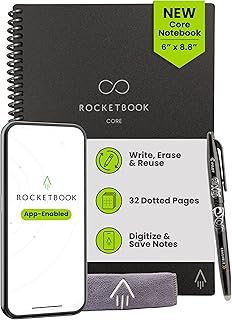
Rocketbook Core Reusable Smart Notebook, Dot Grid Pages For School, Work and Creative Projects, Executive Size 6×8.8, Black – Premium
Best For:
Travelling creatives, UX designers, and anyone who sketches or diagrams during brainstorming and wants easy cloud capture.
For creators who favor sketching, mind-mapping, or mixed text-and-diagram workflows, the Rocketbook Core in executive size with dot grid pages hits a sweet spot. The smaller footprint is easy to carry between meetings or work locations, while the dot grid layout provides subtle structure for diagrams, layouts, and lettering without locking you into rigid lines.
Why dot grid matters: dot grids give the visual cues of graph paper without the dominance of solid lines, making them ideal for quick wireframes, flowcharts, or creative lettering. The executive size fits in a laptop bag and is less visually imposing during video calls while still providing enough space for detailed sketches.
Real-world usage: UX designers sketch user flows between meetings and scan them to project folders. Creative writers map story beats and character relationships, sending cleaned images to a writing folder. Students and workshop participants use the compact size for note capture and collaboration during sessions.
Comparison and practical considerations: compared with the larger letter-size Rocketbook Core, the executive size sacrifices some workspace in exchange for portability. Compared with paper-only pocket notebooks, Rocketbook adds the advantage of cloud routing and reusability. Keep in mind you’ll need the proper erasable pen and occasional page cleaning; heavy inking or certain inks may take more effort to remove.
Who it’s best for: traveling creators, designers, and planners who want a portable reusable notebook with flexible dot-grid pages for diagrams and sketches. Who might not need it: those who prefer very large canvases for detailed art or those committed to full digital sketch tablets.
Check the latest price on Amazon.
Pros
- Portable executive size with flexible dot grid pages
- Reusable and easy to digitize
- Great for wireframes and mixed-media notes
Cons
- Smaller page area than letter-size options
- Requires erasable pens and periodic cleaning
Check the latest price on Amazon.
Final Verdict
Creating conditions for deep work is both about removing distractions and equipping yourself with tools that minimize friction. The GABRYLLY ergonomic chair helps reduce physical distraction so you can sit comfortably for longer sessions. The Mindsight Focused Activity Timer & Tracker provides structure and gentle wellness prompts that keep focus sustainable. The Rocketbook lineup—letter-size lined Core, Fusion planner, and executive dot-grid Core—offers a flexible analog-to-digital capture system so ideas don’t get lost in stacks of paper.
Together, these products cover posture, attention management, and idea capture: three pillars of a reliable deep work setup. If you must pick one starting point, choose the item that fixes your biggest daily interruption. For many creators that’s comfort (the chair) or the inability to maintain focus (the timer). Combine those with a Rocketbook that matches how you plan and sketch, and you’ll have a compact, repeatable system for long, productive sessions.
Check the latest price on Amazon.
Conclusion
These Office products creators use during focused deep work sessions picks are trending now and offer great value and variety. Check the links above for latest prices and reviews.
As an Amazon Associate, I earn from qualifying purchases.
Tags:
deep work tools, office ergonomics, productivity timers, reusable notebooks, Rocketbook, pomodoro timer, creator desk setup
