Office Gadgets for Focused Apartment Workflows
As an Amazon Associate, I earn from qualifying purchases. This article may contain affiliate links, which means we may receive a commission at no extra cost to you.
Working in a small apartment forces you to be deliberate about tools: limited surface area, shared living spaces, and a need to switch quickly between creative and administrative tasks. The right set of compact, multifunctional gadgets can turn a cramped desk into a focused, productive workstation. This guide looks at five practical gadgets creators—writers, designers, streamers, and makers—reach for when they need streamlined workflows without sacrificing style. Below you’ll find clear buying advice, realistic use cases, and pros and cons drawn from product specs and aggregated user feedback. Note: this is a research-based recommendation guide, not a report of personal hands-on testing.
The items here lean into two common patterns that help apartment-based creators: integrated solutions that combine storage, planning, and charging to reduce desktop clutter, and tactile, low-distraction timers that support focused blocks of work. Whether you prefer a clean glass whiteboard that doubles as a wireless charger or a simple rotating timer that’s easy to use with one hand, there’s something on this list that fits small-space constraints and the way creators actually work—frequently switching tasks, needing quick visual reminders, and keeping devices charged within arm’s reach.
Below the short buying guide you’ll find detailed breakdowns of each product, who it’s best for, realistic use scenarios, and practical buying considerations to help you pick the right gadget for your apartment workflow.
Buying Guide
When shopping for small-space office gadgets, prioritize footprint, multifunctionality, and noise control. Creators in apartments often trade a single multipurpose item for several single-use tools because it saves surface area and keeps visual clutter low. Here are the key factors to weigh before you buy.
Size and footprint: Measure your desk first. A glass whiteboard that doubles as a keyboard riser or storage tray can be a huge space saver, but make sure it fits over your keyboard and leaves room for a mouse or tablet. Timers should be compact enough to sit near your workspace without blocking monitor views.
Material and durability: Tempered glass surfaces resist stains and ghosting better than cheaper acrylic boards; they feel nicer for quick notes and are easier to wipe clean. For organizers, solid construction and smooth drawer slides matter if you plan to store pens, cables, or small hard drives.
Charging and power: Integrated wireless chargers are convenient, but check the output (usually 5W/7.5W/10W) and compatibility with your phone model. Some units require you to align your phone precisely to charge effectively; others offer broader charging coils. If you rely on wireless charging for long streaming sessions, confirm whether the charger can keep pace while your phone is active.
Timer behavior and alerts: Look for multiple modes—preset Pomodoro-style blocks and custom countdowns are most useful. Silent and vibrate modes are a must for shared living spaces. Gravity-sensor or rotating-cube designs let you start a timer without fiddling with buttons, which helps maintain flow.
Aesthetics and noise: Glass and wood-grain finishes tend to blend with modern decor. If you’re recording video or audio, pick timers with mute/vibrate options and whiteboards that don’t clang when you rest items on them.
Alternatives and trade-offs: Smartphone timers and paper planners are familiar and cheap, but they increase friction (unlocking phone, app distractions, paper clutter). Large wall whiteboards provide more visual space but may not be practical in apartments. The products here aim for a balanced compromise—compact, low-distraction tools that still offer the functionality of larger items.
Buying considerations from real users: many buyers highlight easier focus and desk tidiness after switching to integrated organizers, while complaints often focus on alignment issues with wireless chargers and timers with short battery life. If you have ADHD or struggle with task transitions, prioritize tactile timers and clear visual planners. If your top priority is a clean video background and elevated keyboard ergonomics, choose a glass keyboard riser with built-in storage and charging.
Use these criteria to match the gadget to your workflow: pick a whiteboard-charger combo for tidiness and on-screen backgrounds, a rotating or cube timer for low-friction focus blocks, and a compact glass pad with drawer if you need a subtle keyboard stand plus quick note-taking surface.
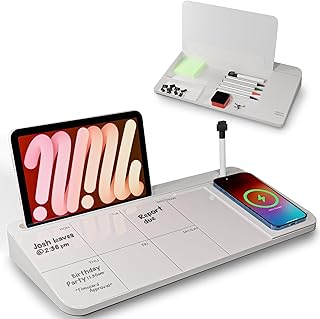
NEXTLUXE Glass Desk Whiteboard with Wireless Charger – Desktop Whiteboard with Storage, Weekly Planner, Dry Erase Pad, Organizer Drawer for Home, School, Office Gadgets – White
Best For:
Freelance writers, designers, streamers, and remote workers who need a tidy desktop, quick visual planning, and convenient wireless charging in a small apartment.
The NEXTLUXE Glass Desk Whiteboard combines a smooth tempered-glass writing surface with an integrated wireless charger and hidden storage—designed for creators who need both a visible plan and a clutter-free desktop. The white, glossy top is ideal for quick to-do lists, sketching layout ideas, or mapping story beats. A built-in weekly planner area helps keep recurring tasks in view, and the included organizer drawer stores pens, flash drives, or charging cables out of sight. The wireless charging pad is meant to keep your phone topped up while you work without adding more cables across your workspace.
This product solves two apartment-specific problems: a lack of horizontal space and the visual noise of tangled chargers. Writers and designers who use standing desks or compact monitors will appreciate how the whiteboard doubles as a keyboard riser, improving typing angle while offering immediate space for notes. The glass surface resists staining and erasing ghost marks far better than cheaper plastic options, and the low-profile drawer is large enough for daily desk essentials but small enough to keep your surface neat.
Real-life example: a content creator drafts an outline, writes bullet points on the glass surface during a call, then slides the pen into the drawer and sets their phone on the wireless pad—all without changing positions. For those doing livestreams or taking client calls from a single-room apartment, the white, reflective surface can also help keep your background tidy and consistent.
Compared with a basic paper planner or an acrylic board, the NEXTLUXE model elevates aesthetics and durability. It’s best for creators who value a minimalist desk and frequent device charging but may not need a large wall-mounted planning system. If you rely on a phone case that blocks Qi charging, check compatibility or consider using a thin case to ensure a reliable connection. Some users note the wireless charger requires a short alignment window for optimal charging—an expected trade-off for compact integrated chargers.
Best for: creators who want a compact, stylish desk organizer that combines visible planning with device charging and secure storage.
Pros
- Tempered-glass surface resists ghosting and cleans easily
- Integrated wireless charger keeps phone accessible while working
- Hidden drawer and weekly planner reduce desktop clutter
- Doubles as a keyboard riser for ergonomic benefit
Cons
- Wireless charging may require precise phone alignment
- White surface can show dust or marker residue if not wiped regularly
If you want a tidy desktop that keeps notes and your phone charged, check the NEXTLUXE Glass Desk Whiteboard and see if it fits your setup. Check the latest price on Amazon.
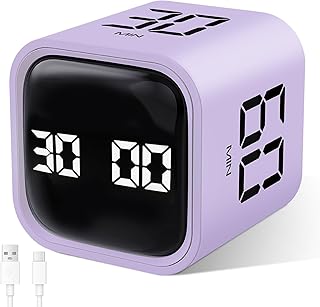
GuDoQi Multi-Function Cube Timer, 5/10/30/60 Min & Custom Count Down, Included Pause & Resume Feature, Silent, Vibrate & Adjustable Sound Alarm for Productivity in Tasks, Study & Kitchen, Purple
Best For:
Students, remote workers, and creators who need a low-friction physical timer with quiet and vibration options for shared living situations.
The GuDoQi Multi-Function Cube Timer is a compact, button-free timer cube that simplifies focus sessions with tactile preset faces—tap or place a face down to start a 5, 10, 30, or 60-minute countdown. A custom mode lets you set nonstandard intervals, and a pause/resume feature helps when interruptions happen. Importantly for apartment dwellers, the unit offers silent and vibrate modes as well as adjustable sound, so you can choose an alert style that won’t disturb roommates or neighbors.
This kind of physical timer reduces friction compared with using a phone app (no unlocking, no notifications) and is especially useful for creators who rely on short, intense blocks—podcasting edits, focused writing, or concentrated mixing sessions. The purple finish adds a pop of color to a neutral desk without drawing too much attention on camera.
Practical scenario: a video editor sets the cube to 25 minutes for a classic Pomodoro block, edits without opening any distracting apps, and lets the cube’s vibration remind them it’s time to stretch. If a meeting runs long, the pause and resume features keep the progress intact rather than forcing a full restart. Many users appreciate the ease of use: start a timer by simply placing it face-down and flip it to stop or change durations.
Compared to smartphone-based timers, the GuDoQi cube removes digital temptation and is easier to glance at. Compared with cheaper mechanical timers, it offers more preset flexibility and modern alert options. Downsides typically noted include battery life ranging by usage and the small size, which can be easier to misplace on a cluttered desk.
Best for: anyone who wants a no-app, low-distraction way to run Pomodoro-style sessions or interval work blocks without relying on a phone.
Pros
- Intuitive, no-button operation with preset faces
- Silent and vibrate modes suitable for shared spaces
- Pause/resume and custom timer options add flexibility
Cons
- Small size can be easy to misplace on a busy desk
- Battery life may vary with alert mode and frequency
For a tactile, distraction-free way to manage focus blocks, consider the GuDoQi cube timer for your desk. Check the latest price on Amazon.
Rotating Productivity Timer 5, 25, 10, 50 Minutes Preset, Desk Cube w/Gravity Sensor for ADHD, Mute Functions, Ideal for Work, Study, Kitchen, Back to School (1, Wood Grain Finish)

Best For:
People with ADHD, visual creators, and anyone who benefits from physical, non-digital focus cues and a warm, unobtrusive aesthetic.
This rotating productivity timer uses gravity-sensor technology and four convenient presets—5, 10, 25, and 50 minutes—to start countdowns simply by placing the correct face down. The wood grain finish gives it a subtle, warm look that fits both modern and traditional desks without looking toy-like on camera. Its mute functions and gentle alarm options make it an apartment-friendly choice for creators who need reliable focus cues without a blaring ringtone.
For people with ADHD or anyone who benefits from tactile, physical cues, the rotating cube removes the hesitation that comes with opening a phone or adjusting an app. It’s also an attractive prop for video creators who want a functional accessory that complements a wood- or neutral-toned background. The preset choices align with common productivity rhythms—short breaks, standard Pomodoro sessions, and longer focused blocks.
Real-world use case: a composer drafts melodies for 25 minutes, then flips the cube to 5 minutes to step away and reset their ears. If they need to keep working, flipping to 50 minutes avoids frequent interruptions. The gravity sensor is reliable for one-handed operation, making it useful when your other hand is recording or sketching.
Compared with digital timers, this cube’s simplicity is its advantage: no menus or accidental snoozes. Compared with cheaper plastic models, the wood grain aesthetic holds up better in video and on-stream backgrounds. Typical trade-offs include the preset limitations for users who need very specific durations and the possibility of losing a small cube if your desk is cluttered.
Best for: creators who value low-friction, tactile triggers for focus sessions and want a pleasing, camera-friendly accessory.
Pros
- Gravity sensor enables quick, one-hand operation
- Warm wood-grain finish looks good on camera
- Mute and gentle alarm modes appropriate for shared spaces
Cons
- Limited to preset durations (may not suit all timing needs)
- Small form factor can be misplaced on a crowded desk
If you want a tactile, camera-friendly timer with easy presets, the rotating Productivity Timer could be a great fit. Check the latest price on Amazon.
SELEAD Desktop Glass Whiteboard with Wireless Charger Station, Dry Erase Board Computer Pad Keyboard Stand with Organizer for Home, School, Office Desk Accessories, Black

Best For:
Photographers, live streamers, editors, and anyone who prefers a darker, low-reflection desk surface with integrated charging and storage.
The SELEAD Desktop Glass Whiteboard blends a sleek black tempered-glass writing surface with an integrated wireless charging station and organizer features designed to tidy busy desks. Unlike white variants, the black finish offers a stealth, low-reflection look that can minimize visual distractions on video calls while still providing a high-quality dry-erase surface. The board doubles as a keyboard pad and includes compartments for pens, sticky notes, or charging cables.
This unit is aimed at creators who prefer a darker, more subdued desk aesthetic—photographers, streamers, and editors who want a consistent on-camera background. The wireless charging pad keeps a phone visible and powered, and the tempered glass clears cleanly without the staining often seen in cheaper plastic pads. Organizer slots help consolidate small items, and using the whiteboard as a keyboard riser improves typing posture.
Use case example: a remote podcaster places the SELEAD board under their compact mechanical keyboard, jots down episode bullet points on the glass between takes, and keeps a phone charging on the pad to monitor messages without looking down at their pocket. The low-glare black surface also reduces reflections when studio lights are in use.
Compared to the white glass option, the SELEAD black finish is better for creators worried about light bounce and background consistency. As with many integrated chargers, compatibility depends on phone case thickness and exact placement. Buyers should check the charger’s output and ensure their device supports Qi charging. Some shoppers note that the organizer compartments are snug—great for pens, less so for bulkier items.
Best for: creators who want a low-profile desk surface that reduces glare on camera while consolidating charging and storage into a single footprint.
Pros
- Low-glare black tempered glass looks professional on camera
- Integrated wireless charging keeps devices visible and charged
- Organizer compartments reduce desktop clutter and improve ergonomics
Cons
- Charging can be affected by thick phone cases or poor alignment
- Organizer slots may be tight for larger accessories
If a darker, low-glare desktop with charging and storage appeals to your setup, review the SELEAD Desktop Glass Whiteboard. Check the latest price on Amazon.
TSJ OFFICE Small Desktop Whiteboard -Glass Dry Erase Board Computer Keyboard Stand White Board Surface Pad with Drawer, Desk Organizers with Accessories for Office, Home, School Supplies – White

Best For:
Budget-conscious creators, writers, students, and anyone who prefers a no-frills glass pad and drawer for desk organization.
The TSJ OFFICE Small Desktop Whiteboard is a budget-friendly tempered-glass dry erase pad that doubles as a keyboard stand and includes a shallow drawer for everyday essentials. It’s a straightforward solution for creators who want a neat writing surface, a slight typing elevation, and a place to stash pens and sticky notes—without integrated charging. The simplicity is its appeal: no electronics, just durable glass and usable desk real estate.
This product solves the basic apartment desk problem of too many loose notes and pens. For writers who sketch mind maps while drafting, the smooth glass feels more satisfying than paper and wipes clean without ghosting. As a keyboard riser, it lifts your hands into a more comfortable angle and keeps frequently used items within easy reach by storing them in the drawer.
Real-life scenario: a copywriter uses the TSJ whiteboard under a compact wireless keyboard, scribbles headline ideas during research sessions, and tucks a highlighter and a few index cards into the drawer for later reference. It’s especially handy on smaller desks where every square inch counts and you don’t need integrated charging.
Compared to pricier glass boards with wireless chargers, the TSJ model offers many of the core benefits at a lower price point—durability, easy cleaning, and a tidy look—without the complexity of electronics. If you need charging built into your organizer, this model won’t replace that functionality, but the lack of electronics means fewer points of failure and a longer-lasting, maintenance-free surface.
Best for: creators who want a simple, durable writing surface and keyboard riser without the need for integrated charging or extra tech features.
Pros
- Durable tempered-glass surface wipes clean easily
- Affordable, no-electronics design reduces potential failures
- Compact drawer provides discreet storage for small items
Cons
- No integrated charging—requires separate power solution
- Drawer is shallow and may not fit bulkier accessories
If you prefer a simple, durable desktop whiteboard and keyboard riser without added electronics, the TSJ OFFICE model is worth a look. Check the latest price on Amazon.
Final Verdict
Small-space creators benefit most from tools that do more than one job: keep notes visible, reduce cable clutter, and cue focused work with minimal friction. For a blend of tidy visuals and device convenience, the NEXTLUXE and SELEAD glass whiteboards are strong picks—choose the white finish for a bright, clean look or black for low-glare, camera-friendly backgrounds. If your priority is low-friction focus blocks, the GuDoQi cube and the rotating productivity timer give you tactile, phone-free control over Pomodoro-style sessions; the cube adds custom timing and adjustable alerts, while the rotating wood-grain cube offers a pleasing aesthetic and gravity-sensor simplicity. If you want a no-nonsense, budget-conscious surface without electronics, the TSJ OFFICE glass pad delivers durable functionality at a lower cost.
Match the tool to your workflow: pick glass whiteboards with wireless charging if you frequently use your phone during work and want everything consolidated. Choose tactile timers if you struggle with transitions or want to avoid phone distractions. And if you need a simple, reliable writing surface without tech, the TSJ option is a dependable choice.
Practical buying tips: measure your desk, confirm Qi compatibility if choosing a wireless charger, and think about how visible the item will be on video. For shared apartments, prioritize mute and vibration modes on timers and choose low-reflection finishes for on-camera comfort. These small investments can shrink visual clutter, improve posture, and create the kind of predictable workspace that makes focused, apartment-based creative work far more productive.
Whichever option you pick, use the links above to check the current product details and compatibility information before you buy.
Conclusion
These Office gadgets creators use during focused apartment workflows picks are trending now and offer great value and variety. Check the links above for latest prices and reviews.
As an Amazon Associate, I earn from qualifying purchases.
Tags:
desk whiteboard, wireless charger desk, pomodoro timer, productivity gadgets, workspace organizer, apartment office, ADHD focus tools
