Office Gadgets Creators Use for Workflow Resets
As an Amazon Associate, I earn from qualifying purchases. This article may contain affiliate links, which means we may receive a commission at no extra cost to you.
As content creators, designers, and solo entrepreneurs, the rituals we use to hit refresh matter as much as the work itself. A short, intentional reset — whether between video takes, editing sessions, or deep-focus chunks — can transform a scattered afternoon into productive momentum. This guide walks through five office gadgets often recommended by creators and remote workers for realistic workflow resets: compact glass desk whiteboards with wireless charging and storage, tactile productivity timers, and a discreet mouse mover.
Affiliate disclosure: As an Amazon Associate, I earn from qualifying purchases. This article may contain affiliate links, which means we may receive a commission at no extra cost to you.
Below you’ll find in-depth, research-based descriptions, practical scenarios, buying considerations, pros and cons, and who will get the most value from each pick.
Buying Guide
What to look for when choosing workflow-reset gadgets
1) Function over form (but don’t ignore style): For creators the desk is both a tool and a background. Glass whiteboards look cleaner on camera than cheap plastic variants and are easier to photograph if you’re doing desk tours. Choose tempered glass for durability and a smooth dry-erase experience.
2) Wireless charging compatibility: If a whiteboard advertises a wireless charger, confirm it supports standard Qi charging and the wattage your phone needs. Some integrated chargers handle 5–10W; fast-charge features vary.
3) Organizer capacity and layout: Decide whether you need a shallow drawer for pens and sticky notes or a more modular organizer for cables and dongles. Bigger drawers can hide clutter; small slots keep frequently used tools within reach.
4) Timer features: For reset cycles, physical timers with preset intervals (5/10/25/50 minutes) and tactile controls are invaluable. Look for mute modes, battery life, and whether the timer uses mechanical rotation or electronics.
5) Mouse mover considerations: Mouse jigglers keep machines awake and are useful during long uploads or when presentation software blocks idle timers. Confirm device compatibility (USB, driver-free) and legal/ethical use in your environment.
6) Build quality and desk footprint: Creators often have limited desk real estate. Measure the footprint and choose low-profile pieces that fit your workflow without crowding cameras or lighting.
7) Real-world reliability: Read verified reviews focusing on long-term use — does the whiteboard stain? Does the wireless pad get hot? Does the timer lose accuracy? These are the practical questions that matter.
Combining products: A compact glass whiteboard plus a tactile timer gives a physical ritual for resets — write a micro-plan, rotate the timer, and return to work with a clean slate.
NEXTLUXE Glass Desk Whiteboard with Wireless Charger – Desktop Whiteboard with Storage, Weekly Planner, Dry Erase Pad, Organizer Drawer for Home, School, Office Gadgets – White

Best For:
Creators, remote workers, and students who prefer tactile planning, want an integrated Qi charger, and need a compact, camera-friendly desk organizer.
The NEXTLUXE Glass Desk Whiteboard combines a sleek tempered glass writing surface, an integrated wireless charging pad, and a slim organizer drawer into a single desktop unit. Its glossy white surface doubles as a weekly planner and dry-erase pad, letting creators sketch shot lists, jot micro-goals, or map an editing sequence without opening a notes app.
Why it matters: this is a hybrid desk tool built for people who want to keep their workflow tactile and visible. Creators who use physical checklists to reset before a new task will appreciate the instant clarity a visible weekly planner offers. The wireless charging area reduces cable clutter and the drawer hides pens, SD cards, or dongles.
Real-life usage examples: imagine finishing a 45-minute editing sprint, erasing the last task from your dry-erase list, and writing a three-step setup for the next recording. Or place the unit behind your microphone if you’re working on a camera-facing desk — the white glass reads well on camera and looks intentional. For podcasters or livestreamers the built-in wireless charger lets you top off a phone between sessions without unplugging a single cable.
Features and practical observations: tempered glass surface resists staining better than cheaper melamine boards; the planner print under the glass gives a clean, reusable weekly template; the wireless charger supports Qi-compatible phones (confirm device wattage compatibility). The drawer is shallow but useful for pens, erasers, and a small SSD.
Who should buy this: remote creators, home-office workers, and students who like physical planning and want a tidy, camera-friendly desk. It’s particularly useful for people who use their phone as a secondary monitor or teleprompter and benefit from on-desk charging.
Who may skip it: if you already have a full-sized wall planner, a large desk mat, or rely purely on digital task managers, this compact hybrid may feel redundant. Also, if you need a deep organizer for many accessories, the drawer is modest.
Buying considerations: confirm Qi charging compatibility, measure your desk space to ensure the footprint works on camera, and check color options if you want a darker surface to reduce glare. Based on product listings and user feedback, the glass surface cleans well with proper markers but avoid leaving ink to sit for months.
Check the latest price on Amazon.
Pros
- Tempered glass surface resists staining and looks great on camera
- Integrated Qi wireless charging reduces cable clutter
- Slim drawer keeps pens, erasers, and small accessories hidden
Cons
- Drawer is shallow — not for large accessories
- Wireless charging wattage varies; confirm compatibility
Check the latest price on Amazon.
SELEAD Desktop Glass Whiteboard with Wireless Charger Station, Dry Erase Board Computer Pad Keyboard Stand with Organizer for Home, School, Office Desk Accessories, Black

Best For:
Creators and professionals who prefer a darker, camera-friendly surface and want a combined writable pad and wireless charger with slight keyboard lift.
The SELEAD Desktop Glass Whiteboard positions itself as a multifunctional desk pad: a tempered black glass surface that doubles as a dry-erase board, a wireless charging station, and a low-profile keyboard stand or wrist rest. The darker surface makes it a subtle backdrop on camera and reduces the starkness of white surfaces that can reflect studio lights.
Why it matters: creators who film or photograph their workspaces often prefer darker backgrounds that don’t blow out in highlights. The SELEAD board gives you that aesthetic while still serving as a writable planner and a cable-free charging spot. A combined keyboard stand function also raises your hands slightly for ergonomic comfort during long sessions.
Real-life usage examples: a photographer setting up a quick checklist for a flat-lay shoot can write shot notes directly on the board, charge their phone over lunch, and use the board as a light-absorbing mat for small gear. Video editors can lean the keyboard on the edge and use the writable surface for short color-grade notes or timecode reminders.
Features and practical observations: tempered black glass for a premium feel; built-in Qi pad for compatible phones; low-rise profile doubles as a slight keyboard lift; easy-to-clean surface if wiped after use. Some users report that glossy black glass hides marker contrast slightly more than white glass, so use bold markers for legibility.
Who should buy this: content creators who prefer a darker desk aesthetic, people wanting an all-in-one pad that reduces ropes of cables, and anyone who likes to keep short notes in sight while working.
Who may skip it: those who need a large writable area for brainstorming or who prefer white surfaces for maximum marker contrast. If you rely heavily on fast-charging specs, verify the charger’s output first.
Buying considerations: check Qi compatibility with your phone, think about marker color for contrast on black glass, and measure to ensure the keyboard stand height suits your setup. Overall, it’s a polished solution for creators seeking a low-profile, camera-friendly desk accessory.
Check the latest price on Amazon.
Pros
- Premium black tempered glass reduces camera glare
- Combines writable surface with wireless charging and slight keyboard stand
- Easy to clean and looks polished on camera
Cons
- Marker contrast is lower on black glass—use bold markers
- Not a substitute for a large brainstorming whiteboard
Check the latest price on Amazon.
TSJ OFFICE Glass Desktop Whiteboard – 17 X 7 Inches Small Dry Erase Board with Pink Light, Black Glass White Board Surface Notepad with 1 Drawer, Desk Organizers for Office, Home, School Supplies

Best For:
Creators, students, and minimalists who need a compact, stylish writable surface and small accessory storage for tight desks.
The TSJ OFFICE Glass Desktop Whiteboard is a compact 17 x 7-inch solution aimed at creators who want a small, decorative, and functional desk piece. Its standout touches — such as a soft pink accent light and a single drawer — give it personality while offering a real desk utility: a glass dry-erase surface that won’t ghost easily and a place to tuck away the small things that clutter a creative workspace.
Why it matters: not every desk needs a large whiteboard. Sometimes a narrow, camera-friendly panel is the right ritual companion: quick lists, camera notes, or a prompt card for on-camera segments. The pink light is a stylistic flourish that can double as ambient mood lighting for late-night editing or livestream backdrops.
Real-life usage examples: a short-form video creator might use the board to display a three-bullet script behind a camera, or a podcaster could place it near the mic to keep episode points visible. Students can use the 17×7 pad for flashcard-style reminders while studying, while someone running frequent video calls might keep their next three talking points written and ready.
Features and practical observations: compact tempered glass surface resists staining; included small drawer holds markers and erasers; the decorative pink light is subtle and battery or USB powered depending on the model—check the listing. Because of the small size, it’s easy to move into frame during presentations or remove when not needed.
Who should buy this: creators with small desks, those who value aesthetic desk pieces, and anyone who wants a compact writable surface that’s also camera-friendly.
Who may skip it: if you need a large planning surface or a powerful wireless charger, this compact board won’t replace a full-sized organizer. The decorative light may be unnecessary if you prefer minimal gear.
Buying considerations: measure your intended placement and check how the light is powered; confirm drawer depth to ensure it fits your usual supplies. Based on user reports, the surface cleans well with the right dry-erase markers, and the compact footprint is its biggest selling point.
Check the latest price on Amazon.
Pros
- Compact, camera-friendly 17 x 7 size
- Decorative pink light adds ambient mood and personality
- Small drawer hidden storage keeps pens and erasers handy
Cons
- Too small for extensive planning or team whiteboarding
- Light is decorative—not essential for all users
Check the latest price on Amazon.
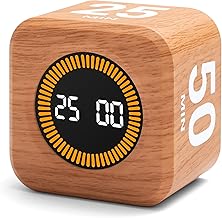
Rotating Productivity Timer 5, 25, 10, 50 Minutes Preset, Desk Cube w/Gravity Sensor for ADHD, Mute Functions, Ideal for Work, Study, Kitchen, Back to School (1, Wood Grain Finish)
Best For:
Those who use Pomodoro techniques, people with attention challenges, and creators who prefer tactile, low-friction timing tools.
This rotating productivity timer is a tactile desk cube with preset intervals (commonly 5, 10, 25, and 50 minutes) and a gravity sensor that starts the countdown when you place the chosen face down. It’s designed for people who respond well to physical, low-friction rituals — flip the cube, focus until the gentle alert, and reward yourself with a short break.
Why it matters: digital timers can be distracting when they sit on-screen among browser tabs. A physical timer removes friction: you don’t need to open an app, set values, or be tempted by notifications. The wood grain finish gives it a warm desk presence that blends well with creative setups.
Real-life usage examples: a writer might flip to 25 minutes for a focused drafting block, then switch to 5 minutes for a break. A video editor could use the 50-minute option for longer render-and-review cycles. For creators managing ADHD or deep-focus needs, the tactile flip and a visible cube remove an extra step in establishing a work ritual.
Features and practical observations: preset intervals remove decision fatigue; mute functions let you use it in quiet settings; gravity sensor simplifies operation — no buttons required for basic use. Battery life varies by model and usage; check whether it uses replaceable batteries or a rechargeable cell. As with any mechanical device, occasional calibration or battery replacement may be necessary.
Who should buy this: anyone who benefits from Pomodoro-style routines, people with attention challenges who rely on physical cues, and creators who want a non-digital reset ritual.
Who may skip it: those who prefer to manage intervals with an app that logs sessions, integrates with calendars, or provides analytics. If you need precise timing beyond preset intervals, a digital stopwatch may be better.
Buying considerations: check the preset lengths to ensure they match your preferred work cycles, confirm mute and alert volume options, and look into battery type and lifespan. The wood grain finish is an aesthetic choice; if you want a more modern look, look for alternate finishes.
Check the latest price on Amazon.
Pros
- Tactile preset intervals reduce decision fatigue
- Gravity sensor and mute functions are practical for quiet workflows
- Simple, distraction-free ritual helps maintain focus
Cons
- Limited to preset intervals—no custom times
- Battery-dependent; check power type before buying
Check the latest price on Amazon.
Vaydeer Undetectable Mouse Mover, M3 Mouse Jiggler Device with ON/Off Switch, Driver-Free Shaker Wiggler Mouse Movement Simulation for Computer Awakening, Gift Ideal for Men/Women (River Blue)

Best For:
Freelancers, creators, and anyone who needs to keep a desktop awake during long uploads, renders, or presentations.
The Vaydeer Undetectable Mouse Mover (M3) is a compact, driver-free device that gently simulates mouse movement to prevent a computer from idling into sleep or locking during long uploads, lengthy presentation queues, or when monitoring long-running tasks. It’s plug-and-play with an ON/OFF switch and does not require drivers, which keeps it simple and compatible with most systems.
Why it matters: creators frequently face long render times, uploads, or livestreams where a sleeping screen interrupts progress or complicates remote control. A discreet mouse jiggler keeps the system awake without changing system settings. It’s also useful during client presentations where screen-sharing pauses might trigger idle timeouts.
Real-life usage examples: a photographer leaving large file uploads running overnight can use the jiggler to keep the workstation active; a live-streamer preparing overlays and chat moderation can avoid a locked screen between segments; remote presenters can keep meeting screens live while setting up camera angles off-screen.
Features and practical observations: driver-free operation and a simple on/off switch make it easy to use; subtle motion patterns are designed to be undetectable to obvious mouse movement while still being recognized as activity by the OS. Check compatibility notes in the listing — some corporate environments have security rules that restrict peripheral behavior.
Who should buy this: creators, IT professionals, and anyone who needs to keep a machine awake during long tasks without changing system power settings. It’s especially useful for people who manage uploads, long renders, or remote presentations.
Who may skip it: users in strict corporate environments where simulated input is prohibited, or anyone uncomfortable using automation to prevent system sleep. If you can change power settings or have server-grade machines handling uploads, a jiggler may be unnecessary.
Buying considerations: verify that the device’s motion pattern works with your OS and mouse setup, and consider workplace policy before use. Based on product information and user reports, this model is straightforward and reliable for typical home and freelance workflows.
Check the latest price on Amazon.
Pros
- Driver-free, plug-and-play simplicity
- Discreet motion pattern avoids obvious cursor shifts
- On/off switch makes it easy to control
Cons
- May conflict with strict corporate policies regarding input simulation
- Not necessary if you can change power settings or use server-based uploads
Check the latest price on Amazon.
Final Verdict
Putting it together: which combo works for your reset ritual?
If you want a turnkey desk ritual, pair a compact glass whiteboard (NEXTLUXE or SELEAD) with the rotating productivity timer. The whiteboard gives a visible micro-plan; the timer enforces duration without a phone distraction. For creators who prefer darker aesthetics and a slight keyboard lift, the SELEAD is a thoughtful pick. If you have a very small desk or love personality in your tools, the TSJ OFFICE 17 x 7 board is a stylish, functional accent.
Add the Vaydeer mouse mover when you need a hands-off way to keep machines awake during renders and uploads, and use the rotating timer for Pomodoro-style focus. Remember to check Qi compatibility for wireless chargers, the drawer depth for your usual accessories, and whether the timer’s presets match your work rhythm.
These tools aren’t replacements for good habits or robust workflows — they are aids that reduce friction and make resets feel tangible. Pick one primary ritual gadget (whiteboard or timer) and one helper (charger-enabled organizer or mouse mover) to start. Adjust based on desk space, camera needs, and whether you prefer visible or subtle tools.
If you’re building a creator-friendly desk that supports realistic resets, these picks cover the common needs: visible planning, tactile timing, discreet machine management, and a cleaner camera-friendly surface. Check the latest price on Amazon.
Conclusion
These Office gadgets creators use during realistic workflow resets picks are trending now and offer great value and variety. Check the links above for latest prices and reviews.
As an Amazon Associate, I earn from qualifying purchases.
Tags:
office gadgets, desk whiteboard, productivity timer, mouse jiggler, wireless charger, workflow reset, creator tools, desk organizer
