Office Gadgets Creators Use for Focused Work
As an Amazon Associate, I earn from qualifying purchases. This article may contain affiliate links, which means we may receive a commission at no extra cost to you.
If you depend on focused work blocks to ship creative projects, the right desk gadgets can make a surprising difference. Whether you’re a writer, designer, developer, or content creator, simple hardware — a visual timer, a tactile cube, or a wellness-focused timer — helps anchor attention, reduce context switching, and protect your creative flow. This guide looks at five popular timers and focus accessories creators actually gravitate toward for Pomodoro-style sessions, quiet sprints, and mindful breaks.
Affiliate disclosure: As an Amazon Associate, I earn from qualifying purchases. This article may contain affiliate links, which means we may receive a commission at no extra cost to you.
Why this guide matters: digital notifications and back-to-back meetings make it easy to lose deep work. Timers do more than count down minutes — they provide visual cues, remove decision fatigue about when to stop or break, and, in some cases, add gentle wellness prompts. Below you’ll find practical comparisons, realistic use cases, and buying considerations so you can pick the gadget that best suits your workflow and workspace setup.
Buying Guide
How to choose the right focus gadget for your desk: start by thinking about your environment and attention style. Do you need a silent visual cue to avoid distraction in shared spaces? A Time Timer-style visual disk is ideal. Prefer tactile controls and presets you can trigger without looking at a screen? Cube timers with preset durations work well. If you want a hybrid that nudges both productivity and wellbeing, look for curated wellness activities or mindfulness reminders.
Key features to compare
– Visual vs audible alerts: Visual timers (red disk or LED) are unobtrusive and great in quiet zones; audible or vibrating alerts work if you can’t constantly see the desk. Many devices offer mute/vibrate options.
– Presets and custom timers: Standard Pomodoro uses 25/5, but creative sessions sometimes need longer or shorter blocks. Devices with multiple fixed timers and custom countdowns reduce set-up time.
– Build and desk presence: A compact cube or minimalist disk takes little space; metal-edged or matte finishes look sleeker on a creator’s desk. Consider a tilt stand or magnetic base if you move between work surfaces.
– Wellness extras: Some newer devices (like “Pomodoro plus” designs) include short breathing prompts or stretches to break up long sessions and protect posture.
Who should prioritize which feature
– Writers and editors who need uninterrupted quiet: visual-only, silent timers.
– Designers and creators who move between desk and meeting table: portable cubes with vibration/alert.
– People managing ADHD or attention variability: devices with strong tactile controls, multiple presets, and visual cues.
Buying considerations
– Battery life and power type: rechargeable units save hassle; coin-cell options are fine but replaceable.
– Size and visibility: larger displays or disks are easier to see across the room.
– Simplicity vs customization: if you dislike fiddly setup, choose a model with predefined common intervals and a single-button workflow.
Use the product sections below to match a gadget to your daily routines. Each entry includes realistic use cases, pros and cons, and who benefits most.
Mindsight Focused Activity Timer & Tracker | Promotes Work Life Balance & Productivity | Pomodoro ‘Plus’ w/ 5 Fixed timers + 5 curated Wellness Activities | Office Desk Accessory | Mindfulness | ADHD

Best For:
Creators who want structure plus short wellness breaks—ideal for writers, editors, and ADHD users who benefit from predictable cues.
Mindsight takes the basic Pomodoro idea and expands it with a clear, creator-focused workflow: five fixed work timers and five short wellness activities that help you reset between sprints. If you’re balancing deep creative work with wellbeing, this device merges both without needing an app. The tactile design and easy-to-read display make starting a session as simple as pressing one button — no menus, no phone distractions.
Main benefits
This device is designed for people who want structure plus restoration. The fixed timers cover common intervals (short bursts and longer deep work windows), while the built-in wellness prompts — quick breathing exercises, micro-stretches, or short mindfulness cues — give your brain an actual reason to break. This reduces the tendency to turn breaks into scroll-time and promotes better work-life balance during long creative days.
Real-life usage examples
A freelance copywriter might use the 25-minute preset for a focused draft, then automatically follow it with a two-minute breathing prompt to reduce tension before editing. A content creator editing a video could select a 50-minute timer for long tasks and schedule a stretch reminder to prevent neck strain. For ADHD creators who benefit from predictable cues, the combination of fixed timers and short wellness activities reduces decision fatigue between intervals.
Why this product is valuable
Unlike app-based timers that compete for your attention, Mindsight is a minimalist desk presence that encourages intentional breaks. It’s especially useful for anyone who finds standard Pomodoro timers too rigid or for teams that want one physical anchor at a shared desk. The curated wellness activities are a standout feature — they’re short, practical, and designed to keep you off your phone.
Who should buy it and who may not need it
Buy if: you want a hybrid focus/wellness tool that nudges healthy habits, you dislike fumbling with phone timers, or you manage long creative sessions and need reminders to move or breathe.
Skip if: you prefer app ecosystems with integrations (calendar sync, analytics), or you only need a basic countdown without wellness prompts.
Practical notes and considerations
Customers report the presets are intuitive and the wellness prompts genuinely help reduce screen fatigue. Check battery or charging specs if you prefer less frequent recharges. The device sits nicely on a crowded desk and reads clearly from a typical seated position.
Friendly CTA
Check the latest price on Amazon.
Pros
- Combines Pomodoro timers with curated wellness activities
- Simple, tactile controls—no app needed
- Reduces break-time phone scrolling with practical prompts
Cons
- May not integrate with calendar or productivity apps
- Not ideal if you want only basic countdowns
Check the latest price on Amazon.
Printers ack Pomodoro Timer – Productivity Cube, Visual Focus Timer, Mute & Vibration & Adjustable Sound Alert, for Office, ADHD, Study, Work, 3/5/10/25/30/60min & Custom Countdown – Silver

Best For:
Creators who prefer tactile, screen-free controls—excellent for co-working, ADHD users, and people who want vibration alerts.
The Printers ack Pomodoro Timer cube is a no-nonsense, tactile approach to timeboxing: flip, press, or tap to set one of several preset durations. Its combination of visual feedback, mute and vibration modes, and adjustable sound alerts makes it a flexible choice for creators who alternate between quiet solo work and collaborative environments. The cube form factor is intuitive — you don’t need to look at a screen to switch modes, which keeps you in flow.
Main benefits
This cube shines when you want speed and simplicity. The presets cover all the common intervals used by creators, from short bursts to hour-long blocks. The vibration option is particularly useful if you work in shared spaces or get distracted by audible beeps; a subtle buzz can cue you without disturbing others. Adjustable sound levels mean it can be loud enough to catch your attention at a distance or silent for library-like quiet.
Real-life usage examples
A designer working at a co-working table can set a 50- or 60-minute block for deep layout work, switch to vibration during team meetings to avoid noise, and use the 10- or 25-minute presets for focused edits. Students prepping course materials will appreciate the cube’s quick orientation — place it on the desired face and the corresponding timer starts. For ADHD creators who rely on tactile input, the cube’s physical presence and simple gestures reduce reliance on phone apps.
Why this product is valuable
Compared with app timers, the cube avoids screen time and reduces interruptions. Compared with large visual disks, it’s compact and portable. The custom countdown option also gives flexibility if you need an unusual interval for a specific task. In small studios or shared offices, its mute/vibrate modes are a practical advantage.
Who should buy it and who may not need it
Buy if: you want a fast, physical timer you can operate without looking, if you need vibration alerts, or you frequently switch between timed intervals.
Skip if: you need large, room-visible visual cues or prefer decorative desk accessories.
Practical notes and considerations
Look for surface stability — cubes sit best on flat desks. Check battery type and replacement needs. Many users appreciate its durability and how easy it is to build a routine around flipping or pressing.
Friendly CTA
Check the latest price on Amazon.
Pros
- Tactile cube design for hands-off timer switching
- Mute, vibration and adjustable sound options
- Several presets plus custom countdown
Cons
- Smaller display may not be visible across a room
- Cube must sit flat to use reliably
Check the latest price on Amazon.
TIME TIMER Home MOD – 60-Minute Visual Timer, Home Edition, Silent Operation, for Homeschool Supplies, Study, Office & Meetings (Fern Green)

Best For:
Creators who want a silent, room-visible visual timer—great for podcasters, writers, and shared studios.
The TIME TIMER Home MOD is a modern take on the classic visual countdown: a 60-minute disk that visibly disappears as time passes, creating an immediate, intuitive sense of how much time remains. Creators who need a quiet, non-digital reminder appreciate its silent operation and large visual field — the red disk is easy to spot from across a room and works especially well in shared studios or home offices.
Main benefits
Visual timers like the Time Timer reduce anxiety about abstract minutes and eliminate the need to constantly check a number. This model’s silent operation keeps a quiet workspace undisturbed while still providing a strong visual cue. Its individual size is designed for a single desk and it’s simple enough for kids, students, and adult creators alike.
Real-life usage examples
A podcaster scheduling recording blocks can place the Time Timer on the desk so the whole team sees how much recording time remains. A writer working in a home office uses 60-minute blocks for uninterrupted drafting, glancing at the disk to monitor progress without breaking flow. The clear visual is also helpful when collaborating with a partner who needs to know when to return to an edit or when a break will start.
Why this product is valuable
Compared to app timers or small digital counters, the Time Timer’s visible disk is a passive, low-tech nudge that still achieves the goal of time awareness. Its silent operation is a major plus for creators who need to block sound during concentration. The MOD design brings a clean, modern aesthetic that sits unobtrusively on a desk.
Who should buy it and who may not need it
Buy if: you value a silent, highly visible countdown, or you work in a shared space and want a non-invasive way to communicate time remaining.
Skip if: you prefer discrete vibrations or sound alerts, or you need complex presets and analytics.
Practical notes and considerations
The visible disk is best for people who respond to visual cues rather than numbers. It’s not meant as a portable, pocket-sized device; consider a cube timer or app when you need mobility.
Friendly CTA
Check the latest price on Amazon.
Pros
- Large, intuitive visual countdown
- Silent operation — no beeps or vibrations
- Minimalist design that sits well on any desk
Cons
- Not portable—designed to stay on a desk
- Lacks presets or custom countdown flexibility
Check the latest price on Amazon.
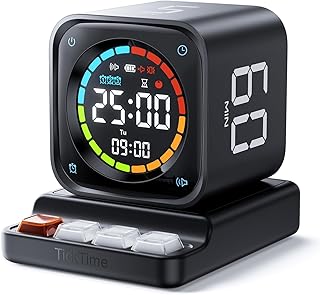
TK3 Pomodoro Timer Cube, Desk Productivity Timer with 5/10/30/60 Min Presets, Custom Countdown, Stopwatch, Clock, 3 Alarm, Silent, Vibrate & Sound Alert, for Task, ADHD, Study, Kitchen, Black
Best For:
Multitasking creators who want a multi-function timer—photographers, students, and people balancing home and desk work.
The TK3 Pomodoro Timer Cube is a versatile, feature-packed cube designed for creators who want both simplicity and flexibility. With several preset intervals, a custom countdown, stopwatch, and clock functions, it can double as a daily desk companion. Its combination of silent, vibrate, and sound alerts makes it adaptable to almost any workspace scenario — quiet studio, shared office, or a bustling kitchen when you’re juggling creative work and household tasks.
Main benefits
What stands out is the TK3’s multi-function nature. Beyond simple timeboxing, it can act as a stopwatch for quick brainstorming sprints, a clock for time-checking, and a precise custom timer for unique rituals. The three alarm modes are practical: sound for solo sessions, vibrate for shared spaces, and silent for visually driven workflows when paired with a visible disk or separate visual cue.
Real-life usage examples
A freelance photographer might use the stopwatch for short setup rehearsals, then flip to a 30-minute preset for editing. A content creator balancing a household will appreciate being able to set a 60-minute block while keeping audible alerts muted — the vibration ensures tasks finish on time without disturbing others. Students in study groups can use the cube for timed debates or quick problem-solving rounds.
Why this product is valuable
Compared with single-function visual timers, the TK3 is a compact Swiss Army knife of timekeeping. It’s a smart choice if you often switch between modes and want one device that handles simple analytics (stopwatch durations) along with routine Pomodoro cycles. The tactile cube is easier to operate when you’re deep in flow and don’t want to navigate menus.
Who should buy it and who may not need it
Buy if: you want a multi-mode desk timer with robust presets, a stopwatch, and different alert types; great for multitasking creators and those managing ADHD.
Skip if: you need a large room-visible visual disk or prefer a minimalist single-purpose timer.
Practical notes and considerations
Ensure the cube sits on a stable surface to avoid accidental flips. Check battery type if you want rechargeable options. Many users highlight the utility of the stopwatch and clock alongside the usual Pomodoro presets.
Friendly CTA
Check the latest price on Amazon.
Pros
- Multiple modes: presets, custom timer, stopwatch, and clock
- Three alert types: sound, vibrate, silent
- Compact and flexible for varied use cases
Cons
- Cube requires a flat surface to function reliably
- Smaller display than some digital timers
Check the latest price on Amazon.
Time Timer MOD – Home Edition – Individual Sized 60 Minute Visual Countdown Timer for ADHD, Adults, Students, and Pomodoro with Silent Operation (Metallic Midnight)

Best For:
Creators who want a stylish, silent visual timer—ideal for illustrators, songwriters, and neurodivergent users who prefer visual cues.
The Time Timer MOD in Metallic Midnight is another visual countdown option that focuses on clarity and calm. Like the other Time Timer model in this list, it relies on a disappearing visual disk to make remaining time feel tangible. The MOD line usually brings a sleeker aesthetic and individual sizing that’s ideal for a single workstation or bedside table.
Main benefits
This version is particularly useful if you want a refined-look visual timer that fits modern desk setups. The metallic finish is understated yet stylish — it blends with a minimal workspace without drawing attention. Silent operation and a straightforward interface make it an easy, low-friction addition to a creator’s toolkit.
Real-life usage examples
A songwriter could set 45-minute composition sessions and simply glance at the disk to judge pacing, without interrupting the creative flow. An illustrator working with timed studies (gesture drawings, color experiments) benefits from the visual countdown to ensure each exercise remains brisk and focused. For neurodivergent creators, the tangible visual of time passing can be more effective than abstract numbers.
Why this product is valuable
Compared to app-based timers or noisy gadgets, the Time Timer MOD offers a quiet, elegant solution for time awareness. It doesn’t need pairing or setup, and its simple presence reduces decisions about when to start or stop working. If decorating your workspace matters — and many creators lean toward curated aesthetic — this model is a tasteful pick.
Who should buy it and who may not need it
Buy if: you want a stylish, silent visual timer that complements a modern desk and helps manage attention without sound.
Skip if: you need app integrations, analytics, or portable vibrating alerts.
Practical notes and considerations
The disk is most effective in a consistent spot on your desk where you can glance up while working. It’s not meant as an on-the-go solution. Review battery or power information based on how often you plan to move it.
Friendly CTA
Check the latest price on Amazon.
Pros
- Sleek metallic finish and modern design
- Silent visual countdown reduces interruptions
- Simple, no-setup operation
Cons
- Not portable or vibration-capable
- No app integrations or analytics
Check the latest price on Amazon.
Final Verdict
Timers and small desk gadgets are deceptively powerful tools for creators. They externalize time, reduce decision fatigue, and help preserve the fragile continuity of deep work. If you prefer minimal interruptions and strong visual cues, the Time Timer MODs are excellent. If you need portability and tactile controls, cube-style timers like the Printers ack and TK3 are better. For a hybrid focus-and-wellness approach, Mindsight stands out by encouraging meaningful breaks that aren’t spent in a feed.
When choosing, think about where you work (desk-bound vs mobile), whether you need sound or vibration, and how much customization you want. Most creators benefit from keeping one physical timer on the desk: it’s a small investment that often pays back in more consistent productive sessions and less burnout. Pick the model that aligns with your environment, and pair it with a simple routine (warm-up, focused sprint, deliberate break) to protect your creative flow.
Check the latest price on Amazon.
Conclusion
These Office gadgets creators use during focused work sessions picks are trending now and offer great value and variety. Check the links above for latest prices and reviews.
As an Amazon Associate, I earn from qualifying purchases.
Tags:
Pomodoro timer, visual timer, focus gadgets, ADHD tools, office productivity, desk accessories, time management
