Office Gadgets Creators Use for Focus Mornings
As an Amazon Associate, I earn from qualifying purchases. This article may contain affiliate links, which means we may receive a commission at no extra cost to you.
Mornings are prime creative time, but staying in a deep, productive groove takes more than willpower. Many creators build a reliable ritual — a tactile timer, a clear checklist and a distraction-free desk setup. The gadgets below are small, inexpensive tools that nudge focus and structure your session without pulling you into another app or tab. They’re ideal for people who prefer physical cues, short deep-work blocks, and easy-to-use tools that fit into a realistic creator morning.
Buying Guide
When choosing a focus gadget, think about how you work: do you need rigid Pomodoro blocks, flexible countdowns, or an analog planner to pair with timed sprints? Hardware timers (cubes) offer immediate, tactile feedback and reduce the temptation to check your phone. Look for silent or vibration modes if you share a space; adjustable alarms help avoid startling interruptions. If you get interrupted often, a pause/resume or custom countdown is invaluable. For planning, a weekly dashboard notepad helps translate loose ideas into prioritized blocks that pair naturally with timer intervals. Practical considerations: size (desktop footprint), battery type, build material, and whether presets match your preferred focus lengths. Compared with phone apps or browser extensions, physical gadgets remove screen distractions and signal to roommates or co-workers that you’re in a focused block.
Rotating Productivity Timer 5, 25, 10, 50 Minutes Preset, Desk Cube w/Gravity Sensor for ADHD, Mute Functions, Ideal for Work, Study, Kitchen, Back to School (1, Wood Grain Finish)

Best For:
Creators who prefer tactile timers, people with ADHD, students, and remote workers seeking distraction-free cues.
This rotating productivity cube uses a gravity sensor and four convenient presets (5, 10, 25, 50 minutes) so you can flip it and get straight into the next focus block. The wood-grain finish makes it feel less like gadgetry and more like a deliberate part of your desk ritual. For creators who value tactile routines, the physical act of turning the cube signals the brain to switch into work mode without opening an app or setting timers on your phone.
Practical benefits include silent and audible modes for shared spaces, a simple one-button interface for start/stop, and preset lengths that map nicely to common Pomodoro variants (25/50) and quick tasks (5/10). Compared to a basic kitchen timer or a phone alarm, this cube reduces screen time and visual distractions while offering better ergonomics than small digital keychain timers.
Real-life uses: place it beside your notebook and flip for a 25-minute content-writing sprint, use 50 minutes for uninterrupted editing, or set 5 minutes for warm-up planning. Users who juggle family duties often keep it in a kitchen-living hybrid space to block time for focused work between chores. Buying considerations: it’s battery powered, compact, and easy to read, but if you prefer deeply customizable intervals or integrations with calendar apps, an app-based timer may suit you better.
Best for tactile-focused creators, people managing ADHD, students, and remote workers who want a distraction-free physical cue to start and stop work. Check it out on Amazon.
Pros
- Tactile rotation for fast start/stop
- Wood-grain aesthetic fits home desks
- Silent and audible modes
Cons
- Limited to four preset lengths
- No app integration for logging sessions
Add a tactile focus cue to your desk—see it on Amazon.
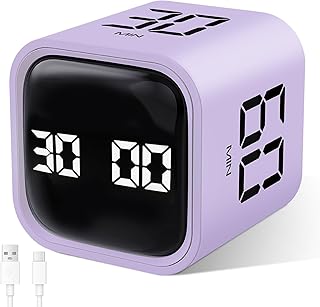
GuDoQi Multi-Function Cube Timer, 5/10/30/60 Min & Custom Count Down, Included Pause & Resume Feature, Silent, Vibrate & Adjustable Sound Alarm for Productivity in Tasks, Study & Kitchen, Purple
Best For:
Flexible schedulers, parents, creators who need pause/resume and custom countdowns.
The GuDoQi Multi-Function Cube Timer is built for flexibility: it offers four preset lengths (5, 10, 30, 60 minutes) plus a custom countdown and a useful pause/resume feature for interrupted sessions. The bright purple finish makes it easy to spot on a cluttered desk, and its silent/vibrate/adjustable alarm modes mean you can tailor notifications to an open-plan studio or a quiet home office.
What makes this cube stand out is the pause/resume capability—when a collaborator needs a quick answer or a delivery arrives, you don’t lose track of the block. The custom countdown is handy for creators who prefer nonstandard sprints like 18 or 42-minute sessions, and the vibration option gives a discreet nudge without disturbing others. Compared to standard kitchen timers, this cube is purpose-built for productivity with multiple alert modes and user-friendly controls.
Real-life scenarios: use 30 or 60 minutes for concentrated editing or deep creative work, flip to 5 or 10 for micro-tasks or email triage, or set a custom timer when following a specific workflow. Practical notes from user observations include sturdy plastic construction and clear display, though it won’t replace an integrated time-tracking app for heavy analytics. If you want flexible physical timing with a pause function, this cube is a strong choice.
Best for flexible schedulers, parents balancing tasks, and creators who need pause/resume during work sprints. Check it out on Amazon.
Pros
- Custom countdown and pause/resume
- Multiple alert modes including vibrate
- Good visibility and clear presets
Cons
- Plastic build may feel less premium
- No digital logging of sessions
Grab a flexible cube timer on Amazon.
Printers ack Pomodoro Timer – Productivity Cube, Visual Focus Timer, Mute & Vibration & Adjustable Sound Alert, for Office, ADHD, Study, Work, 3/5/10/25/30/60min & Custom Countdown – Silver

Best For:
Pomodoro practitioners, creators mixing short and long blocks, and people needing visible focus signals.
This silver Pomodoro cube offers a wide range of preset intervals (3, 5, 10, 25, 30, 60 minutes) plus a custom countdown, making it a versatile companion for varied creative workflows. The visual face-forward design makes it obvious when a block is running—handy if you want a visible signal to roommates or collaborators that you’re in focus mode. Adjustable sound and vibration settings let you tune alerts for a studio, coworking space, or quiet home office.
Compared with smartphone apps or simple kitchen timers, this cube blends visual clarity with more granular preset options, so you can easily switch between micro-sprints (3–5 minutes) and longer deep-work sessions (30–60 minutes). The silver finish and compact footprint suit modern desks and stand out compared to more toy-like designs. Users often appreciate the variety of presets because they match multiple workflows without fiddling with settings.
Real-life uses include alternating 25-minute writing sprints with 5-minute breaks, using 3–10 minute timers for rapid ideation, or setting 60 minutes for uninterrupted production work. Practical observations include solid readability and intuitive flipping action; however, if you need calendar sync or session analytics, you’ll want a complementary digital tool. This cube is especially valuable for creators who mix short bursts with longer blocks and prefer clear visual cues.
Best for multi-mode creators, Pomodoro fans, and people who need visible desk signals. Check it out on Amazon.
Pros
- Wide variety of presets
- Visual face-forward design
- Adjustable sound and vibration
Cons
- Lacks app/calendar integration
- May be larger than minimalist cubes
Add a versatile Pomodoro cube to your desk—find it on Amazon.
Weekly Productivity Planner – 8.5" x 11" Dashboard Desk Notepad Has 6 Focus Areas to List Tasks for Goals, Projects, Clients, Academic or Meal-Organize Your Daily Work Efficiently, 54 Weeks, Green

Best For:
Analog planners, freelancers, students, and creators pairing written plans with timed sprints.
This 8.5" x 11" weekly productivity notepad is designed to sit on your desk as a visible planning dashboard. With 6 focus areas per page and 54 weeks of layout, it’s built for creators who prefer analog planning—list priorities, block time, and check off items without switching screens. The larger page size gives you room to pair timed sessions from a cube timer with daily goals, so a 25-minute sprint and its task fit on the same row.
Compared to digital planners, a physical notepad reduces the temptation to open other apps and serves as a persistent, glanceable cue about your day’s priorities. Real-life uses include mapping client work to morning focus blocks, assigning chapters or scenes to specific sprint sessions, or organizing meal prep alongside short task timers. Observations from users highlight clear sections for goals and projects, and the paper quality tends to be suitable for pens and markers without heavy bleed-through.
Buying considerations: it’s a top-bound notepad style—ideal for single-sheet tear-off planning but not for long-term archiving. If you prefer a bound planner or a refillable system, look for a disc-bound or ring option. This pad is best paired with a desk timer to translate intention into timed action.
Best for analog planners, freelance creators, and students who pair written plans with timed sprints. Check it out on Amazon.
Pros
- Large dashboard layout with 6 focus areas
- 54 weeks of tear-off pages
- Good for pairing with timers
Cons
- Top-bound notepad may not be ideal for archiving
- No weekly habit-tracking features
Organize your week with this desk planner—see it on Amazon.
Final Verdict
For creators who build realistic focus mornings, combining a tactile cube timer with a simple weekly planner offers an effective, low-friction workflow. Choose a cube with the presets and alert modes that match your environment, and use the planner to translate those sprints into concrete tasks. If you prefer fully integrated digital tracking, apps may be better, but for screen-free focus and visible desk signals these picks are practical and approachable. Check the latest price on Amazon.
Conclusion
These Office gadgets creators use during realistic focus mornings picks are worth comparing if you want practical options with useful features, clear use cases, and buyer-friendly details.
As an Amazon Associate, I earn from qualifying purchases.
Tags:
focus timers, pomodoro, desk gadgets, productivity tools, adhd aids, creator workflow, time management, weekly planner, office gadgets creators use during realistic focus mornings, office gadgets creators use for focus mornings, gifts, amazon affiliate, product recommendations, buying guide, shopping guide
