Office Focus Gadgets for Realistic Workflows
As an Amazon Associate, I earn from qualifying purchases. This article may contain affiliate links, which means we may receive a commission at no extra cost to you.
As an Amazon Associate, I earn from qualifying purchases. This article may contain affiliate links, which means we may receive a commission at no extra cost to you.
Finding tools that actually support focus—especially during long stretches of deep work, ADHD-prone days, or hybrid office routines—can feel like a scavenger hunt. The right physical gadgets (beyond apps and noise-cancelling headphones) make focus routines tangible: visible timers that reduce decision fatigue, discreet fidgets that channel nervous energy, and low-friction desk whiteboards that keep priorities front-and-center.
This round-up looks at five useful desktop aids that people are using in realistic focus workflows: visual Pomodoro timers, timed activity trackers, quiet fidget toys, and glass desktop whiteboards with built-in organization. Each product section includes practical use cases, comparisons to common alternatives, and buyer-focused considerations so you can pick what suits your day-to-day rhythm. Whether you’re balancing meetings and deep-focus time, supporting neurodiverse needs, or just trying to keep a packed to-do list from crashing your productivity, these gadgets can help create structure without adding noise.
Below you’ll find an easy buying guide, detailed product breakdowns, and a final verdict to help you choose a set of tools that work together rather than compete for your attention.
Buying Guide
When shopping for focus gadgets, prioritize simplicity, visibility, and low friction. The goal is to reduce choices during work sessions, not introduce more. Here are practical criteria to weigh before buying.
1) Purpose and workflow fit: Are you mainly looking to time focused sprints (Pomodoro), track wellness breaks, or manage fidgeting and sensory needs? Timers and trackers are for structured sessions; fidgets and whiteboards are for continuous regulation and quick planning.
2) Noise and distraction: Look for mute or silent modes and low-visibility alerts if you share a workspace. Small vibration alerts or subtle LEDs maintain privacy. If you’re in meetings or open-plan offices, quiet fidgets and visual timers that don’t beep loudly are better than phone alarms.
3) Visibility and placement: A desktop timer or glass whiteboard should be easily seen from your chair. Glass surfaces reflect light differently than plastic; they often feel more premium and are easier to clean, but can be heavier.
4) Durability and materials: Metal or glass surfaces last longer than flimsy plastic. Check for well-sealed electronics on timers, replaceable batteries or rechargeable options, and sturdy drawer slides for organizers.
5) Accessibility and neurodiversity: Curated activities or preset timers (5/25/30 minutes) help reduce decision fatigue for people with ADHD. Fidgets that click quietly or offer tactile variety can provide sensory regulation without being disruptive to others.
6) Integration vs. independence: Decide if you want a single multi-function product (timer + tracker + wellness prompts) or a set of focused tools. Standalone physical gadgets are ideal for screen-free cues and for those who prefer to avoid app notifications.
7) Price-to-value considerations: Compare what a gadget replaces. A physical timer can replace fumbling with phone timers; a glass whiteboard replaces sticky notes and loose papers. Factor in long-term durability and whether the tool will be in daily rotation.
With these points in mind, the product sections below highlight who benefits most from each item and how they fit into typical focus workflows.
Printers ack Pomodoro Timer – Productivity Cube, Visual Focus Timer, Mute & Vibration & Adjustable Sound Alert, for Office, ADHD, Study, Work, 3/5/10/25/30/60min & Custom Countdown – Silver

Best For:
Students, knowledge workers, and people with ADHD who prefer a tactile, phone-free Pomodoro cue. Good for shared or quiet workspaces where silent alerts are needed.
If you want a plain, physical way to enforce focused work blocks without reaching for your phone, this Productivity Cube-style visual Pomodoro timer is built around simplicity. It offers a selection of fixed durations (3, 5, 10, 25, 30, and 60 minutes) plus a custom countdown mode so you can match it to existing routines. The cube’s main strength is instant visibility: you set the timer by placing the desired face up, and the scene on your desk changes to reflect whether you’re in a focused sprint or a break. That kind of tangible interaction reduces the friction of starting a session and helps cut down on the “one-more-website” temptation that happens when you use a phone or desktop app.
Practical benefits are straightforward—no Bluetooth pairing, no app updates, and battery-powered portability so it’s as usable in a shared office, home desk, or library study nook. It supports mute and vibration modes alongside adjustable sound alerts, which is important if you need discretion in an open-plan office or during quiet study times. The physical cube is easier to glance at than a phone buried beneath a stack of papers, and the tactile action of flipping it creates a mini-ritual that can help cue focus.
Compare this to app-based Pomodoro tools: software gives analytics and deeper customization but can pull you back into your device. Traditional kitchen timers are often loud or bulky and lack the refined timing options and quiet modes this cube provides. If you need session tracking history, consider pairing the cube with a simple notebook or habit tracker, since the cube itself focuses on the immediate task rather than long-term analytics.
Who this is best for: people who want a low-tech, reliable visual cue, students who benefit from short, frequent sprints, and workers in shared spaces who need a quiet, tactile way to mark focus sessions. Not ideal for users who need detailed session analytics or cloud syncing.
Buying considerations: Check the power source (replaceable batteries vs rechargeable), the sturdiness of the cube faces, and whether vibration is strong enough to notice at your desk without being disruptive. Visual clarity of the face icons and the ease of changing timer lengths are practical points to test in reviews.
Check the latest price on Amazon.
Pros
- Simple tactile interface reduces friction to start focus sessions
- Multiple preset times plus custom countdown
- Mute and vibration modes for discreet alerts
Cons
- No session analytics or cloud sync
- Physical object can be misplaced if moved often
Check the latest price on Amazon.
Mindsight Focused Activity Timer & Tracker | Promotes Work Life Balance & Productivity | Pomodoro ‘Plus’ w/ 5 Fixed timers + 5 curated Wellness Activities | Office Desk Accessory | Mindfulness | ADHD

Best For:
Knowledge workers, remote employees, and anyone seeking built-in wellness reminders alongside focus timers; good for people who want a balance-focused approach.
This Mindsight Focused Activity Timer & Tracker aims to go a step beyond a basic Pomodoro cube by pairing structured focus periods with curated wellness prompts. It typically offers five fixed focus timers—and alongside those, five pre-selected wellness activities such as breathing breaks, short stretches, or screen-off pauses. That blend is useful when you want a single desktop tool to remind you to both concentrate and reset, which helps prevent burnout during long workdays.
Practically, the device is designed for people who appreciate prompts that combine cognitive focus with physical micro-breaks. Rather than forcing you to figure out what to do during a break, the device suggests short, doable activities so you don’t default to doomscrolling. The tracker function provides a simple visual record of completed sessions, which can be helpful for accountability without the complexity of app-based tracking. For teams or people who work hybrid schedules, this device keeps the focus structure visible and portable.
Compared with standalone timers, the Mindsight device emphasizes balance (focus + wellness) instead of pure timing. Compared with fully digital solutions, it stays screen-free and avoids notifications, which many people find helpful for reducing digital interruptions. However, it won’t replace a full-featured productivity suite that logs time to projects or integrates with calendars.
Who it’s best for: professionals prone to skipping breaks, folks juggling task-heavy days who want gentle wellness cues, and people with ADHD who benefit from fixed structure plus guided micro-activities. It may be less appealing to those who need advanced reporting, integrations, or deep customization beyond the preset activities.
Buying considerations: Look for clarity on the activity prompts (are they customizable?), battery life or recharge options, and how the tracker displays completed sessions. If you prefer app-syncing, this device intentionally avoids that complexity.
Check the latest price on Amazon.
Pros
- Combines focus timers with wellness prompts
- Simple session tracking without a screen
- Encourages healthy break behavior
Cons
- Limited customization of activities
- Not a replacement for time-tracking software
Check the latest price on Amazon.
Fidget Toys Adults Stress Relief: 4 Pack Quiet Desk Fidget Clicker for ADHD Focus & Stress Relief, Sensory Desk Toy for Office, Meetings, Work, Travel

Best For:
Adults with ADHD, fidgeters, and anyone who benefits from tactile self-regulation during long meetings or focus sessions.
For many people, subtle sensory engagement is a critical part of staying on task. This 4-pack of quiet desk fidget clickers is designed to provide tactile stimulation without being disruptive—ideal for office desks, meeting rooms, and travel. The set usually includes a mix of clickers and tactile pieces that vary in texture and feedback so you can switch depending on your current need: a repetitive click for nervous energy, a soft squeeze for tension release, or a smoother spinner for low-profile motion.
These fidget toys are particularly valuable because they offer a low-cost, noninvasive way to anchor attention. When someone is restless in a long meeting, or when a complex task requires background sensory input, small fidgets can reduce the urge to stand up or check a device. They’re also easily pocketable for commuting or long flights when you want to channel stress without disturbing others.
Compared to larger desk toys, this pack is compact, quiet, and affordable. They won’t provide the visible structure of a timer or the planning surface of a whiteboard, but paired with a timed workflow they can make focus sessions more sustainable by reducing internal distraction. Compared to smartphone games or browsing, fidgets keep your hands busy without pulling your attention to a screen.
Who it’s best for: adults with ADHD, people who fidget under stress, and professionals who need a quiet self-regulation tool in meetings or open offices. Not ideal for those who are easily distracted by any movement or who prefer complete stillness.
Buying considerations: Check reported noise levels (some clickers can be louder than advertised), the durability of moving parts, and whether the textures suit your sensory preferences. Since these are small, consider buying spares or a few different styles to find the right fit.
Check the latest price on Amazon.
Pros
- Quiet and discreet sensory stimulation
- Variety pack allows switching between textures
- Portable and inexpensive
Cons
- Some pieces may still produce more sound than expected
- Small parts can be misplaced easily
Check the latest price on Amazon.
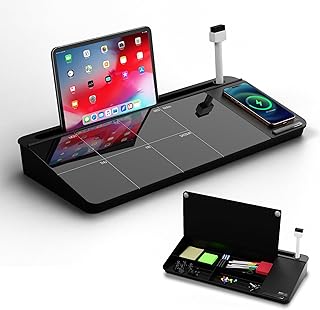
NEXTLUXE Glass Desk Whiteboard with Wireless Charger – Desktop Whiteboard with Storage, Weekly Planner, Dry Erase Pad, Organizer Drawer for Home, School, Office Gadgets – Black (Black)
Best For:
People who want a premium desktop planning surface with storage and phone charging—best for tidy desks and those who benefit from visual daily planning.
A glass desktop whiteboard with integrated organization and a wireless charger aims to declutter your workspace while giving you an always-visible planning surface. This NEXTLUXE model combines a black glass dry-erase board, a small organizer drawer, and the convenience of Qi wireless charging—so your phone can sit within reach without cluttering the desk. Glass boards look cleaner than cheap melamine alternatives and erase more cleanly, resisting ghosting from repeated notes.
In day-to-day workflows this product serves multiple roles: a quick-capture surface for daily priorities, a weekly planner to keep focus themes in view, and a spot to hold small office supplies. The organizer drawer stores markers, sticky notes, or earbuds, so your desk stays tidy and you waste less time searching for tools. The wireless charger is a practical addition if you like to keep your phone off but charged during focus sessions.
Compared to standing whiteboards or wall-mounted planners, a glass desktop board is more intimate and within immediate sightline—ideal for people who need reminders right in front of them rather than across the room. Versus cheap plastic boards, glass feels and writes better, and the built-in drawer and charger make it a consolidated solution rather than a single-use item.
Who it’s best for: professionals who juggle many small tasks, people who prefer visible daily reminders, and users who like a tidy desk with multifunction gear. If you already use a full digital planning system with calendar integrations, or if you lack desk space, this might be redundant.
Buying considerations: Confirm the size fits your desk and that the wireless charger is compatible with your phone’s Qi standards. Check weight and stability (glass is heavier), and look for reviews about marker ghosting and drawer quality. Also consider whether the black glass finish fits your lighting—dark boards can be harder to photograph or show faint notes in dim light.
Check the latest price on Amazon.
Pros
- Premium glass surface wipes clean with minimal ghosting
- Integrated organizer drawer reduces desktop clutter
- Built-in wireless charger adds convenience
Cons
- Heavier than plastic alternatives
- May be overkill for those who use only digital planners
Check the latest price on Amazon.
TSJ OFFICE Glass Desktop Whiteboard – 17 X 7 Inches Small Dry Erase Board with Pink Light, Black Glass White Board Surface Notepad with 1 Drawer, Desk Organizers for Office, Home, School Supplies

Best For:
Users with limited desk space, students, and those who want a compact glass planning surface with a small organizer drawer.
This compact 17 x 7-inch glass desktop whiteboard from TSJ OFFICE is aimed at people who want a smaller, more space-efficient planning surface with a touch of personality. The black glass surface (often styled with a subtle pink light accent) provides a high-contrast writing area for daily notes, quick to-do items, and short reminders. Like other glass boards, it resists staining and cleans reliably compared to traditional melamine boards.
Its size is the main selling point: it fits on narrow desks, shared workstation bays, or side tables where larger boards would be intrusive. The integrated drawer stores markers, erasers, or small cables, keeping essentials handy but out of the way. The pink light detail is a nice visual cue for some users (a subtle ambient glow that can function as a soft accent), though in very bright rooms it may be less noticeable.
Compared to larger desktop glass boards with wireless chargers, this TSJ model is simpler and more compact. It’s a pragmatic choice if you want the clean writing surface and organizational benefits without the additional electronics and bulk. If you prefer a decorative accent or a smaller footprint, this model strikes a balance between utility and style.
Who it’s best for: apartment workers, students with small study surfaces, and anyone who needs a compact planning board that won’t dominate a desk. It’s less suited to people who want a full weekly planner in large view or an integrated charging solution.
Buying considerations: Measure your desk before buying to ensure the board doesn’t crowd your workspace. Check the quality of the drawer slide, the clarity of the glass surface, and how prominent the pink light is under your lighting conditions. Also consider marker compatibility and whether the board lies flat and stable while writing.
Check the latest price on Amazon.
Pros
- Compact size fits narrow desks
- Clean glass surface wipes easily
- Small drawer keeps essentials organized
Cons
- Smaller writing area may not suit long weekly planners
- Accent light may be too subtle for some lighting conditions
Check the latest price on Amazon.
Final Verdict
A focused workflow is rarely about a single gadget—it’s about combining visible structure, discreet sensory tools, and low-friction planning. For many people, a simple tactile timer (like the Productivity Cube-style Pomodoro) provides the immediate cue to start work without pulling you back into a phone. Pairing that with a wellness-aware tracker (the Mindsight device) helps prevent burnout by nudging short, restorative breaks. Quiet fidgets fill in the micro-regulation role, letting you channel restless energy without disrupting colleagues. And a glass desktop whiteboard—whether the more full-featured NEXTLUXE model with wireless charging or a compact TSJ OFFICE board—keeps priorities and small tasks visible so your focus sessions have context.
If you prefer an entirely digital setup, these physical tools may feel redundant—but for people who want tangible cues, lower screen time, and a tidier desk, they work together. Start with one item that addresses your biggest pain point: if you lose time to decision-making, try the timer; if you forget breaks, start with the Mindsight tracker; if restless hands ruin meetings, get the quiet fidgets; if sticky notes overwhelm you, invest in a glass whiteboard. Combining two or three of these products often produces the best results—structure from a timer, cadence from a tracker, and visible priorities from a whiteboard.
The real goal is not gadget accumulation but creating small habits that resist distraction. Pick the tool that removes the most friction for your specific workflow and give it a week of consistent use. You may find a modest desktop toolkit transforms how much you get done without changing your entire routine.
Check the latest price on Amazon.
Conclusion
These Office gadgets people use during realistic focus workflows picks are trending now and offer great value and variety. Check the links above for latest prices and reviews.
As an Amazon Associate, I earn from qualifying purchases.
Tags:
office productivity gadgets, pomodoro timer, glass desk whiteboard, ADHD focus tools, desk organization, fidget toys, work focus accessories
