Office Focus Gadgets for Pomodoro Workflows
As an Amazon Associate, I earn from qualifying purchases. This article may contain affiliate links, which means we may receive a commission at no extra cost to you.
Staying focused through a full workday or a heavy study session is as much about the right environment as it is about discipline. Small, purpose-built office gadgets can nudge your attention, make breaks more effective, and keep your desk calm and organized. Whether you follow Pomodoro cycles, need sensory supports for ADHD, or like visual reminders of priorities, the right tools can reduce friction and help you get into — and stay in — a realistic flow.
As an Amazon Associate, I earn from qualifying purchases. This article may contain affiliate links, which means we may receive a commission at no extra cost to you.
Below you’ll find a practical, research-informed guide to five focused-office tools: two dedicated timers, two glass desk whiteboards (one with wireless charging), and a set of discreet fidget toys. Each section explains who benefits most, realistic use cases, important features, and buying considerations so you can match gear to the way you work.
Buying Guide
How to choose focus gadgets that actually improve workflow
Start with your routine: Do you use timed work blocks (Pomodoro), or do you prefer task-based sessions? A hardware timer with clear visual indications helps if you rely on fixed intervals. If your workflow leans toward flexible length sessions or you need wellness microbreaks, pick a timer that supports custom countdowns and curated activities.
Noise and notifications: Office gadgets live in shared spaces. Look for adjustable sound levels, mute or vibration modes, and visual-only cues (LED rings or color changes). This matters for open-plan offices and meetings.
Tactile vs. visual supports: Some people focus better with a physical fidget or tactile toy; others prefer a visual reminder like a whiteboard with a visible weekly plan. If you have ADHD or sensory needs, consider quieter fidget options and timers that offer vibration and low-light displays.
Desk footprint and organization: If surface space is limited, choose slim whiteboards or multi-function organizers that double as wireless chargers or drawers. Glass boards are easier to clean than laminated surfaces and look cleaner in professional settings, but they’re heavier.
Battery life & power: For battery-powered timers and wireless charging stations, check run time and whether the device can be used while charging. Rechargeable units reduce waste; replaceable-battery units are easier to keep in rotation without down-time.
Adaptability and real-world habits: A good gadget should be flexible — support multiple time presets, habit prompts, storage for pens, and easy cleaning. Compare each item to standard alternatives: phone timers can do the job, but dedicated devices remove distraction from your phone. Sticky notes are cheap, but a clear glass weekly planner keeps priorities visible and professional.
Accessibility & usability: Consider display contrast, button size, and tactile feedback for quick adjustments while in a flow state. If you need a learning curve of less than a minute, pick devices with simple, intuitive controls.
Final note: Think of these gadgets as workflow scaffolding. They won’t force discipline, but they reduce the small frictions that break attention and make consistent focus easier.
Printers ack Pomodoro Timer – Productivity Cube, Visual Focus Timer, Mute & Vibration & Adjustable Sound Alert, for Office, ADHD, Study, Work, 3/5/10/25/30/60min & Custom Countdown – Silver

Best For:
People who want a simple, dedicated Pomodoro cube that reduces phone distractions; good for students, remote workers, and ADHD users who need tactile/vibration cues.
The Printers ack Productivity Cube is a tactile Pomodoro-style timer designed to remove your phone from the equation. It offers a set of fixed presets (3/5/10/25/30/60 minutes) and a custom countdown mode, with a small, pocketable cube you can place on the desk. Visual cues, mute and vibration modes, and adjustable sound alerts allow you to pick how you want to be notified without disturbing colleagues. Based on product specifications and reported user experiences, this cube is best when you want a simple, physical reminder to start and stop focused work blocks.
Main benefits
The cube’s presets let you jump into a timed session with a single tap, which lowers decision friction — important when you’re trying to get into a flow. Vibration and mute options make it office-friendly, while adjustable sound levels keep it audible in noisier home offices. The visual indicators (a ring or light that shows remaining time) provide a glanceable progress cue so you don’t need to check a screen repeatedly.
Real-life usage examples
– Deep work blocks: Set a 25-minute focus session before opening your email. Place the cube where you can see the light ring; it becomes a silent promise to yourself not to switch tasks.
– ADHD-friendly pacing: Use shorter 10-minute sprints when starting a task that feels intimidating, then extend once momentum builds.
– Meeting transitions: A 3- or 5-minute countdown helps keep quick standups tight and signals when it’s time to wrap up.
Why this product is valuable
This cube solves the distraction problem: by moving timing off your phone, you avoid the temptation to scroll. Its tactile nature gives a physical ritual (flip, tap, or press) to begin focused time, which some people find triggers attention better than digital alerts. The customization of intervals and notification modes fits a variety of standard workflows, from classic Pomodoro to personalized micro-session strategies.
Who should buy this and who may not need it
Buy it if you want a low-friction, portable timer that minimizes phone use and supports sensory needs (vibration). It’s ideal for students, knowledge workers, and people with ADHD who benefit from discrete tactile cues. Skip it if you already rely on a well-integrated software timer within a task manager, or if you prefer a wristwatch or phone-based habit you won’t sideline.
Practical observations and buying considerations
The cube’s build is compact and desk-friendly; confirm battery type and expected run-time if you plan heavy daily use. If you work in a noisy environment, test the highest sound setting or use vibration. Also look at warranty and return options — tactile gadgets live on desks and should feel durable.
Pros: compact, tactile start/stop, vibration & mute modes, multiple presets
Cons: smaller display for time remaining, limited advanced tracking
Check the latest price on Amazon.
Pros
- Compact and portable cube design
- Multiple preset and custom intervals
- Mute and vibration modes for quiet environments
- Adjustable sound levels for different settings
Cons
- No deep activity tracking or app integration
- Smaller visual display for remaining time
Check the latest price on Amazon.
Mindsight Focused Activity Timer & Tracker | Promotes Work Life Balance & Productivity | Pomodoro ‘Plus’ w/ 5 Fixed timers + 5 curated Wellness Activities | Office Desk Accessory | Mindfulness | ADHD

Best For:
People who want guided, restorative breaks and a structured Pomodoro routine; excellent for remote workers, creatives, and those managing ADHD who need predictable breaks.
The Mindsight Focused Activity Timer moves beyond a plain countdown: it pairs fixed Pomodoro-style timers with short, curated wellness activities designed to encourage better breaks. The device commonly includes five fixed time presets and five quick wellness prompts (stretching, breathing, micro-walks) to help you shift from high cognitive load to restorative rest. From product descriptions and buyer feedback, owners value that it frames breaks as purposeful recovery rather than idle scrolling.
Main benefits
A timer that reminds you to do a specific wellness activity changes the quality of breaks. Instead of defaulting to social media, a 5-minute cooldown can become a guided breathing exercise or a posture reset. The five preset timers simplify start-up: tap the length you want and get to work, then follow a short prompt during the break. This approach makes the Pomodoro pattern healthier and more sustainable over a full day.
Real-life usage examples
– Remote employees: Use an extended focus cycle (50–60 minutes) followed by a 10-minute guided stretch to reduce sitting fatigue.
– Desk-bound creatives: Use shorter sprints (25 minutes) with breathing exercises to reset creativity without losing momentum.
– ADHD management: Keep sessions predictable; the wellness prompts provide structured sensory breaks that help maintain overall arousal regulation.
Why this product is valuable
This device solves a common problem: breaks that fail to refresh. By nudging you toward intentional micro-recovery, it helps preserve cognitive energy across longer workdays. The visual and audible cues bring structure without overwhelming your space, and the programmed activities reduce decision fatigue during breaks.
Who should buy this and who may not need it
Buyers who want habit-level support — people who struggle to take restorative breaks or who default to low-value phone use during pauses — will see the most benefit. Those who already have a established and healthy break routine, or who prefer smartphone wellness apps with richer guidance, may not need a separate hardware timer.
Practical observations and buying considerations
Check battery life and whether prompts can be customized. If you share a workspace, confirm that volume and alerts can be silenced or set to vibration. If you want deeper analytics, verify whether session tracking exports to an app, but remember that simplicity is often the point with hardware timers.
Pros: pairs timers with wellness prompts, easy presets, supports healthier breaks
Cons: limited customization on prompts for some users, fewer analytics than app-based tools
Check the latest price on Amazon.
Pros
- Built-in wellness prompts for better-quality breaks
- Simple preset timers for quick start
- Helps reduce default phone use during breaks
- Supports work–life balance with intentional recovery
Cons
- Prompts may be limited in customization
- Not a substitute for comprehensive tracking apps
Check the latest price on Amazon.
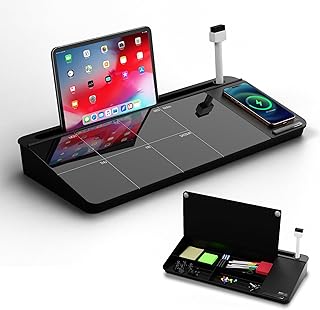
NEXTLUXE Glass Desk Whiteboard with Wireless Charger – Desktop Whiteboard with Storage, Weekly Planner, Dry Erase Pad, Organizer Drawer for Home, School, Office Gadgets – Black (Black)
Best For:
Professionals and home-office users who want a polished planning surface plus wireless charging and small-item storage; great for visual planners and hot-desk setups.
The NEXTLUXE Glass Desk Whiteboard doubles as a planning surface and charging hub. It combines a tempered glass dry-erase board with a wireless charging pad, a slim storage drawer for pens or cables, and a weekly planner layout printed underneath or on the board. This multi-function approach is meant for professionals who want a tidy desktop and a constant visual reminder of weekly priorities.
Main benefits
A glass whiteboard keeps your top tasks visible and easy to update: unlike sticky notes, the board provides a clean visual hierarchy you can revise throughout the day. The built-in wireless charger reduces cable clutter and keeps your phone powered without taking up extra desk space. An integrated drawer means markers, erasers, and small gadgets have a home, reducing the distracted hunt for tools mid-workflow.
Real-life usage examples
– Weekly planning: At the start of the week, lay out priorities in the printed planner area. Use color-coded markers for different projects so your week is glanceable without opening a task manager.
– Meeting prep: Jot quick talking points or action items and erase them as tasks are completed; the glass surface resists staining compared to cheap vinyl boards.
– Hot-desking and small offices: The single footprint combines power and planning for shared desks; simply plug the charger and keep your essentials in one tidy drawer.
Why this product is valuable
The NEXTLUXE unit consolidates three desk needs — planning, power, and small-item organization — into one aesthetic piece. It solves the problem of scattered notes and low battery anxiety by keeping a charging surface and a prominent planning area together. Glass is easier to clean and stays legible longer than cheaper materials, which matters if you update priorities frequently.
Who should buy this and who may not need it
Buy if you value an attractive, permanent planning surface and wireless phone charging on your desk. This is ideal for managers, freelancers, and anyone who benefits from a visible weekly plan. Skip it if you prefer paper planners, or if your phone doesn’t support wireless charging (or you use a unique charging cable system).
Practical observations and buying considerations
Confirm the charger’s Qi power rating and whether it supports thicker phone cases. Glass boards are heavier than plastic, so check desk stability. Consider marker type (low-odor, fine-tip for neat writing) and whether the drawer fits your usual accessories.
Pros: combines glass planning surface with wireless charging and storage, sleek look, easy to clean
Cons: heavier than plastic boards, wireless charging may be case-sensitive
Check the latest price on Amazon.
Pros
- Tempered glass surface resists ghosting and staining
- Integrated wireless charger reduces cable clutter
- Built-in drawer for pens, erasers, and small accessories
- Weekly planner layout keeps priorities visible
Cons
- Glass adds weight — needs a stable desk
- Wireless charging may not work with some thick phone cases
Check the latest price on Amazon.
TSJ OFFICE Glass Desktop Whiteboard – 17 X 7 Inches Small Dry Erase Board with Pink Light, Black Glass White Board Surface Notepad with 1 Drawer, Desk Organizers for Office, Home, School Supplies

Best For:
Users with limited desk space who want a stylish, high-contrast notepad for daily priorities and quick notes; great for students and compact home offices.
The TSJ OFFICE Glass Desktop Whiteboard is a compact 17 x 7-inch glass notepad designed for tight workspaces. It blends a sleek black glass surface with a small storage drawer and an accent pink LED light for a touch of style. The size and finish make it a good choice for quick notes, priority lists, and short-term reminders within arm’s reach of your keyboard.
Main benefits
A small glass notepad reduces the visual clutter of slips of paper while providing a higher-end look than standard whiteboard sheets. The black glass surface is striking and offers high contrast with bright white or neon markers, which can help important items stand out. The included drawer keeps a marker handy, and the pink light adds a subtle, mood-setting accent that some users report helps set a calm tone during focused sessions.
Real-life usage examples
– Daily top-three: Use the compact board for a daily top-three task list beneath your monitor so you won’t forget the most important item when meetings pile up.
– Quick calculations and reminders: Jot numbers, URLs, or one-line reminders during concentrated work and erase them instantly when done.
– Creative sessions: The black glass acts as a dramatic backdrop for sketches or brainstorming that you’ll later transfer to digital notes.
Why this product is valuable
This smaller whiteboard solves the issue of surface overflow: instead of cluttered sticky notes, you have a neat, erasable area to capture ephemeral thoughts and next steps. Its compact size makes it especially useful for people with limited desk depth or those who work from laptop tables.
Who should buy this and who may not need it
Buy this if your desk space is small and you want a high-contrast, stylish notepad that’s always within reach. It suits students, apartment office setups, and people who like a tactile, visible reminder system. If you need a larger weekly planner or wireless charging, this smaller board won’t replace those needs.
Practical observations and buying considerations
Black glass looks modern but requires the right color markers (bright or metallic) for legibility. Check marker compatibility and whether the drawer size fits the markers you prefer. The pink LED is decorative; confirm whether it’s battery-powered or needs a USB connection and whether it can be turned off if you prefer no light during late-night sessions.
Pros: compact and stylish black glass surface, handy drawer, high contrast for neon markers
Cons: small writing area, may need special markers for visibility
Check the latest price on Amazon.
Pros
- Compact 17 x 7-inch footprint fits small desks
- Black glass provides high contrast for neon/metallic markers
- Includes a drawer to store a marker or eraser
- Decorative pink LED adds ambient light
Cons
- Limited writing area—better for short notes than weekly planning
- Requires bright markers for optimal legibility
Check the latest price on Amazon.
Fidget Toys Adults Stress Relief: 4 Pack Quiet Desk Fidget Clicker for ADHD Focus & Stress Relief, Sensory Desk Toy for Office, Meetings, Work, Travel

Best For:
Adults and students who need low-volume tactile stimulation to support sustained attention and reduce restless energy; good for meetings, travel, and desk use.
This 4-pack of quiet desk fidget clickers is designed to provide discreet, low-volume tactile stimulation for adults who benefit from sensory input while concentrating. The small, mechanical clickers offer a satisfying click without being loud, designed to fit in a pocket or rest on a desk. Sensory desk tools like these are frequently recommended by productivity coaches and occupational therapists to reduce restless energy and maintain attention during meetings or long focus sessions.
Main benefits
A small fidget tool can reduce the urge to tap a pen, browse a phone, or otherwise fidget in ways that fracture attention. Quiet clickers provide tactile feedback without creating a noise distraction for coworkers. Because they’re compact and low-profile, users can keep them nearby and use them reflexively when attention dips.
Real-life usage examples
– During long video calls: Keep a clicker in your hand to occupy nervous energy without distracting others on the call.
– While writing or coding: Use a controlled click rhythm during repetitive tasks to maintain steady attention without resorting to frequent breaks.
– Travel and commutes: Pocket-sized fidgets are useful when you need to calm pre-meeting anxiety or settle in before a productive work block.
Why this product is valuable
This set addresses a common problem: how to manage small motor restlessness that otherwise leads to interrupting behaviors (phone-checking, chair-swinging, pen-chewing). Quiet mechanical fidgets provide a socially acceptable outlet and are cheaper and less obtrusive than larger sensory devices.
Who should buy this and who may not need it
Ideal buyers are adults with ADHD, high-anxiety professionals, students, or anyone who benefits from small, quiet sensory input while focusing. If you do not experience fidgeting urges or you already use discreet tactile objects (like worry beads), these may be redundant.
Practical observations and buying considerations
Look for smooth action and truly low-volume clicks — cheap fidgets can squeak. A set of four is handy to keep one in each regular location (pocket, desk, bag, car). Check materials (metal vs. plastic) if durability and weight matter.
Pros: quiet tactile feedback, compact and portable, multi-pack for multiple locations
Cons: limited to simple clicking—some users want more variety, potential wear over time
Check the latest price on Amazon.
Pros
- Quiet click action suitable for shared spaces
- Pocket-sized and portable
- Multi-pack allows placement in multiple locations
Cons
- Limited sensory variety—just clicker action
- May wear faster with heavy daily use
Check the latest price on Amazon.
Final Verdict
Small, targeted gadgets can make an outsized difference in realistic focus workflows. If your issue is distraction by your phone, a hardware Pomodoro cube is a low-friction way to reclaim attention. If your breaks tend toward doomscrolling, consider a timer like the Mindsight unit that pairs work blocks with intentional wellness activities. For visual planning and decluttering, glass desk whiteboards — especially a combined unit with wireless charging like the NEXTLUXE — keep priorities visible and your phone topped up without extra cables. And for people who need discreet sensory input, a quiet set of fidget clickers can reduce the urge to interrupt flow.
Choosing the right tool depends on how you work: opt for tactile timers and quiet fidgets if you need sensory cues; choose whiteboards and charging stations if visibility and organization are your priorities. These five products cover the full spectrum of common focus problems — distraction, scattered notes, low-quality breaks, and restless energy — and they slot easily into most desks and routines.
Remember: technology and small accessories scaffold behavior; they don’t replace good habits. Use these tools as consistent supports: set simple rules (no phone during timed blocks, review the glass board at the start of the day) and give each gadget a fair trial for a week. With the right match, a modest investment in focused accessories often yields clearer days and more productive weeks.
As an Amazon Associate, I earn from qualifying purchases. This article may contain affiliate links, which means we may receive a commission at no extra cost to you.
Check the latest price on Amazon.
Conclusion
These Office gadgets people use during realistic focus workflows picks are trending now and offer great value and variety. Check the links above for latest prices and reviews.
As an Amazon Associate, I earn from qualifying purchases.
Tags:
pomodoro timer, desk whiteboard, focus gadgets, ADHD productivity, office organization, fidget toys, wireless charger desk, productivity tools
