Office Accessories Creators Use for Focused Work
As an Amazon Associate, I earn from qualifying purchases. This article may contain affiliate links, which means we may receive a commission at no extra cost to you.
As an Amazon Associate, I earn from qualifying purchases. This article may contain affiliate links, which means we may receive a commission at no extra cost to you.
If you’ve ever watched studio tours or "what’s on my desk" breakdowns from creators, one thing becomes clear: the right small office accessory can transform a chaotic desk into a focus-friendly zone. Whether you’re a writer chasing uninterrupted sprints, a video editor managing revision cycles, a developer building through deep work, or a content creator juggling ideas across screens, the tools on this list are designed to reduce friction, limit distractions, and keep creative momentum.
This guide highlights five practical accessories commonly used to structure sessions, simplify small tasks, and keep the physical part of your workflow tidy—timers that encourage healthy pacing, magnetic glass whiteboards that double as planning and charging surfaces, keyboard-stand whiteboards that reclaim desk real estate, and modular reference organizers that make busy desks feel manageable. Each product description explains who it’s for, realistic use scenarios, and the pros and cons to help you choose what fits your workflow.
Buying Guide
A short buying guide will save you hours and a pile of impulse purchases. When shopping for desk accessories that help with focus, weigh these points:
1) Primary function vs. multi-function: Decide if you want a single-purpose specialist (a reliable Pomodoro-style timer) or a combined tool (glass whiteboard + wireless charger + drawer). Multi-function items reduce clutter but sometimes compromise on quality for one feature or another.
2) Desk footprint and ergonomics: Creators often work with multiple monitors, drawing tablets, or audio gear. Measure your desk depth and keyboard area. Items that double as keyboard stands reclaim space, while bulky organizers can feel like roadblocks on a smaller desk.
3) Surface material and maintenance: Glass whiteboards look premium and resist ghosting, but they’re heavier and need a soft cleaner for streak-free results. Dry-erase laminated boards are lighter but can stain faster. Consider marker compatibility and whether you prefer a white or black writing surface for contrast on camera.
4) Charging compatibility: Many modern desktop whiteboards include Qi wireless chargers. Confirm Qi standard and output (e.g., 10W vs 15W) and whether your phone requires a case-free connection for reliable charging.
5) Visibility and timing options: If you’re choosing a timer, check that the device has clear feedback—visual countdowns, gentle chimes or haptics—and multiple preset durations. Creators with ADHD or those practicing focus techniques benefit from timers that also encourage short resets or wellness breaks.
6) Expandability and compatibility: Some desk organizers are add-on modules (like pocket trays) that require a base unit. If you already have a system, an add-on is ideal; if not, buying the full set might be necessary.
7) Aesthetics and build quality: Your desk is a personal workspace. Matte black, white glass, and natural wood accents each suit different setups. Look for sturdy construction—metal hinges, tempered glass, and smooth glides—to avoid replacing cheaper items later.
In the sections below you’ll find realistic use cases, buying considerations specific to each product, and who benefits most from each option.
Mindsight Focused Activity Timer & Tracker | Promotes Work Life Balance & Productivity | Pomodoro ‘Plus’ w/ 5 Fixed timers + 5 curated Wellness Activities | Office Desk Accessory | Mindfulness | ADHD

Best For:
Writers, freelancers, designers, and creators who need a screen-free, repeatable timing cue for focused work; people who benefit from short wellness breaks and external structure (including many with ADHD).
If you struggle to maintain a steady rhythm during creative work—juggling inspiration, interruptions, and the tendency to overrun sessions—the Mindsight Focused Activity Timer & Tracker presents a structured yet flexible alternative to a standard kitchen timer. It leans on Pomodoro principles but expands them: five fixed focus timers paired with five short, curated wellness activities that nudge you to stretch, breathe, or step away briefly. That small behavioral nudge can reduce decision fatigue ("should I stop now?") and protect creative energy over a long day.
This device suits creators who need clear, repeatable session boundaries but don’t want constant app notifications. For writers, the preset timers help block editing, drafting, and research into predictable cycles. Video editors and motion designers can use the longer presets for concentrated render-and-review loops, while shorter ones work well for ideation bursts and quick admin tasks. Creators with ADHD, or anyone who benefits from external structure, often report that discrete, physical timers are easier to stick to than phone apps that are themselves a distraction.
In practical terms: expect a tactile desk accessory that signals session starts and ends with unobtrusive tones or lights, and prompts wellness breaks to avoid burnout. The emphasis on work-life balance is useful if you split time across meetings and deep work; it helps protect focused hours by making breaks non-negotiable.
Buying considerations include customization limits (some focused timers offer only preset durations), how audible alerts are in shared spaces, and whether you need app syncing for historical tracking. If you prefer full integration with digital calendars, a smart app may be necessary. But for creators who want a low-friction, screen-free way to maintain momentum and remind themselves to rest, this Mindsight timer presents a simple, ergonomic option.
Pros: tactile, reduces decision fatigue, tailored wellness prompts help sustain energy.
Cons: limited digital integration, preset durations may not match every workflow.
Check the latest price on Amazon.
Pros
- Screen-free physical timer reduces phone distractions
- Preloaded wellness activities encourage healthy breaks
- Multiple preset timers for quick session setup
Cons
- Limited or no app synchronization for long-term tracking
- Preset durations may not suit every personal workflow
Check the latest price on Amazon.
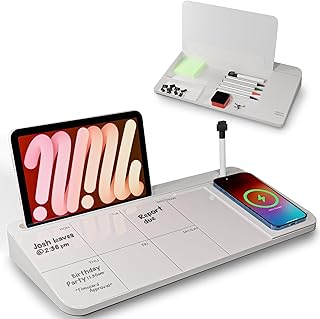
NEXTLUXE Glass Desk Whiteboard with Wireless Charger – Desktop Whiteboard with Storage, Weekly Planner, Dry Erase Pad, Organizer Drawer for Home, School, Office Gadgets – White
Best For:
Content creators, hybrid workers, and students who want a camera-friendly planning surface plus a tidy charging station—especially useful for small desks where reducing cable clutter matters.
A glass desktop whiteboard that doubles as a wireless charging station is an elegant way to handle two common friction points: visible planning and a phone that’s always running low. The NEXTLUXE Glass Desk Whiteboard blends a sleek tempered glass surface for dry-erase notes with a built-in Qi wireless charger and a shallow organizer drawer beneath. It’s pitched toward creators, students, and hybrid workers who use their desk for planning, filming, and quick sketches during meetings.
On a practical level, the glass surface resists ghosting better than cheaper laminated boards and gives written notes a crisp look—handy if you film quick desk tours or want clear camera-facing visuals during live streams. The wireless charger reduces cable clutter, and the organizer drawer hides small essentials like markers, sticky notes, or a compact hard drive. The included weekly planner area helps you visualize priorities at a glance, while the clean white finish brightens a workspace.
Use cases are straightforward: a social media creator mapping a week of thumbnails and captions, a podcaster keeping episode timestamps visible during recording, or a product designer sketching layout ideas while their phone charges. Compared to a standard corkboard or paper planner, the glass board is reusable and more camera-friendly; compared to a plain wireless charging pad, it adds tangible planning real estate.
Buying considerations: confirm your phone’s Qi compatibility and whether a case causes intermittent charging. Glass is heavier—measure your desk surface for stability—and glass boards benefit from proper cleaners to avoid streaks. If you want the cleanest camera look, choose white or black surfaces depending on marker color.
Pros: premium glass surface resists staining, built-in Qi charging cuts cable clutter, integrated drawer keeps small items tidy.
Cons: heavier than laminated boards, charging may be affected by thick phone cases.
Check the latest price on Amazon.
Pros
- Tempered glass surface resists ghosting and looks premium
- Built-in wireless charger reduces cables
- Hidden drawer keeps small desk items organized
Cons
- Heavier than thin laminated boards
- Wireless charging may be inconsistent with thick cases
Check the latest price on Amazon.
TSJ OFFICE Small Desktop Whiteboard -Glass Dry Erase Board Computer Keyboard Stand White Board Surface Pad with Drawer, Desk Organizers with Accessories for Office, Home, School Supplies – White

Best For:
Creators and remote workers with small desks who want to merge a keyboard riser and quick whiteboard into a single compact accessory.
When desk space is scarce, a multi-purpose surface that serves as a keyboard stand and writing pad can be a real productivity hack. The TSJ OFFICE Small Desktop Whiteboard functions as a keyboard riser while giving you a smooth glass dry-erase surface above a shallow drawer for pens, sticky notes, and small accessories. It’s an approachable solution for creators who want to make the most of a compact workspace.
Practical use cases include using the board as a quick sketchpad while you draft thumbnails or storyboards, jotting punchy script notes during recording, or keeping a running to-do at eye level while typing. The riser height improves ergonomics by slightly elevating your typing surface and freeing the space underneath for storage. Compared to separate organizers and a detached whiteboard, this combination minimizes footprint and visual clutter.
Buyers should note that the board is best for light to moderate daily use. If you’re cleaning the surface multiple times a day or using heavy-duty markers, glass will hold up well, but the drawer capacity is limited—this is not a full stationery chest. Also compare the rise height to your keyboard and monitor setup: while it helps for many setups, ergonomic needs vary. The white glass surface offers high contrast with dark markers, which looks tidy on camera, but if you prefer a darker aesthetic, some alternatives come in black.
This product is a practical mid-point between a basic desk organizer and a larger desk pad with charging. It’s ideal for creators who need a small, dual-purpose surface without the bulk of a larger accessory.
Pros: saves desk space by serving as keyboard stand and whiteboard, includes tidy storage drawer, ideal for compact setups.
Cons: limited drawer capacity, riser height may not suit all ergonomic preferences.
Check the latest price on Amazon.
Pros
- Dual-purpose keyboard stand and writing surface
- Helps improve desk ergonomics and reduce clutter
- Compact drawer for essential accessories
Cons
- Drawer is shallow—limited storage capacity
- Riser height may not be comfortable for every setup
Check the latest price on Amazon.
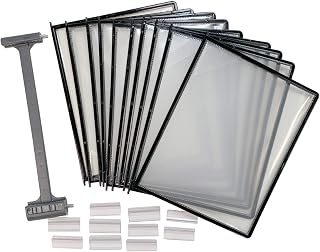
Ultimate Office AdjustaView 10-Pocket Desk Reference Organizer Add-On with Easy-Load Pockets (Add-On Module Only), Black Pockets
Best For:
Editors, illustrators, researchers, and creators who reference multiple print pages during sessions and want quick visual access without creating paper piles.
For creators who juggle multiple printed references—storyboards, style guides, reference photos, or script pages—a visible, tiered pocket system changes how you work. The Ultimate Office AdjustaView 10-Pocket Desk Reference Organizer is an add-on module designed to hold frequently accessed pages in easy-load pockets so you can flip between references without rifling through stacks.
This organizer is particularly useful for editors cutting footage who need cue sheets on standby, illustrators referencing multiple character sheets, or course creators keeping lesson notes in order. The angled pocket design keeps documents readable while seated and prevents paperwork from flopping onto the floor or getting lost under other items. Compared to filing cabinets or clumsy magazine racks, the AdjustaView keeps the most relevant materials visible and within arm’s reach.
A key buying consideration is that this listing is an add-on module. If you don’t already own a compatible base or track, you’ll need to confirm how it connects or consider purchasing the full AdjustaView system. The modular nature is powerful for established setups: add pockets as your reference library grows without replacing the entire unit. Pocket material and build quality are durable for daily use, but heavy or oversized binders won’t fit—this is for loose sheets, smaller notebooks, and thin pads.
Pros: quick-access pockets for frequently used documents, modular expandability, keeps visual clutter off the main desk plane.
Cons: sold as an add-on—may require a base system, not suitable for large binders or thick stacks.
Check the latest price on Amazon.
Pros
- Keeps reference pages visible and organized
- Modular design lets you expand pockets as needed
- Speeds up workflow by reducing paper shuffling
Cons
- Add-on module may require a base track/system
- Not made for bulky binders or oversized materials
Check the latest price on Amazon.
SELEAD Desktop Glass Whiteboard with Wireless Charger Station, Dry Erase Board Computer Pad Keyboard Stand with Organizer for Home, School, Office Desk Accessories, Black

Best For:
Streamers, video creators, and designers who prefer a darker desk aesthetic and need a compact combination of charging, writing surface, and keyboard elevation.
If your creative setup favors a darker, high-contrast look—popular on camera for livestreams and recorded tutorials—the SELEAD Desktop Glass Whiteboard in black offers a refined alternative to white surfaces. It combines a tempered glass dry-erase top with a built-in Qi wireless charger, a keyboard-stand profile, and a slim organizer area for pens and small accessories.
The black glass surface produces striking contrast with light-colored markers or metallic pens, which can be helpful when you want annotations to pop on a live video feed. The integrated wireless charger keeps your phone powered near your workspace without cords snagging during setup changes. Designers and streamers who switch between tablet drawing and keyboard work will appreciate the keyboard-stand aspect that reclaims desk depth.
Use cases include live editing sessions where you need visual notes visible to a camera, photographers managing shot lists while tethered, or podcasters keeping quick episode reminders in view. Compared with plain desk chargers or standalone whiteboards, the SELEAD model ties charging, note-taking, and ergonomics into one slim package. It’s especially attractive in darker-themed studio setups.
Drawbacks to consider: black glass shows fingerprints more readily and tends to reveal dust under strong lighting, so it needs regular wiping if you’re on camera. As with other wireless surfaces, confirm your phone is Qi-compatible and be mindful that thick cases can reduce charging reliability. If your primary need is large note-taking areas, a dedicated wall whiteboard or larger glass pad may be a better choice.
Pros: camera-friendly black glass for high contrast, built-in wireless charging, compact organizer and keyboard stand functionality.
Cons: shows fingerprints and dust easily, wireless charging may be case-sensitive.
Check the latest price on Amazon.
Pros
- High-contrast black glass surface for camera-friendly notes
- Qi wireless charging integrated into the pad
- Combines keyboard stand, organizer, and whiteboard in one
Cons
- Surface shows fingerprints and dust under studio lighting
- Wireless charging performance can be affected by phone cases
Check the latest price on Amazon.
Final Verdict
Choosing the right desk accessory to support focused work depends on how you organize time, documents, and physical gear. If you need structure, the Mindsight Focused Activity Timer & Tracker gives repeatable session cues and wellness prompts that remove decision friction. If your workspace doubles as a filming surface or you want to minimize cables, glass whiteboards with built-in Qi charging—like the NEXTLUXE or SELEAD models—combine planning and power into an elegant footprint. For small desks, the TSJ OFFICE keyboard-stand whiteboard saves real estate while keeping note-taking immediate. And for anyone drowning in papers, the AdjustaView 10-pocket module offers instant visual access to frequently used references.
When deciding, match the accessory to the primary problem you’re solving: is it time management, desk clutter, document visibility, or charger chaos? Multi-function pieces are great for compact setups, while single-purpose tools often deliver higher quality in their niche. Think about cable compatibility, desk stability, and whether you’ll be filming or sharing your workspace on camera—surface color and cleanliness matter there. Finally, consider expandability: a modular organizer can grow with your needs, while a timer or charging board is usually a long-term single purchase.
These five options reflect common choices creators use to protect focus and streamline workflows. Pick what closes whatever gap slows you down—be it timing your sessions, keeping key references visible, or simply having a dependable place to plop your phone while you work.
If you found this guide helpful, follow up by comparing product images and measurements to your desk layout. And remember, small changes to your physical setup can compound into big productivity wins over time.
Check the latest price on Amazon.
Conclusion
These Office accessories creators use during focus work sessions picks are trending now and offer great value and variety. Check the links above for latest prices and reviews.
As an Amazon Associate, I earn from qualifying purchases.
Tags:
focus tools, desk organizer, glass whiteboard, pomodoro timer, wireless charger, creator desk accessories, productivity tools
