Oddly Useful Desk Gadgets Creators Use
As an Amazon Associate, I earn from qualifying purchases. This article may contain affiliate links, which means we may receive a commission at no extra cost to you.
Creators and productivity-minded people have a knack for finding little objects that make a workspace both more efficient and oddly entertaining. In desk setup videos you’ll often see tiny accessories that pull double duty: they look great on camera, solve a specific annoyance, or provide a brief, satisfying distraction between tasks. This guide explores five notably odd but genuinely useful gadgets that frequently crop up in creator setups—from pixel-art speakers to kinetic sculptures—and explains why they matter beyond the aesthetics.
Whether you’re assembling a streaming background, optimizing a work-from-home station, or hunting for conversation pieces for a studio, these items can make everyday desk life smoother and more Instagram-friendly. Below you’ll find clear buying considerations, realistic use cases drawn from product research and common customer feedback, and pros and cons to help you decide which small addition is right for your desk.
As an Amazon Associate, I earn from qualifying purchases. This article may contain affiliate links, which means we may receive a commission at no extra cost to you.
Buying Guide
Choosing oddly useful desk gadgets is more than impulse decor—these small accessories should fit how you work and what you need. Start with purpose: do you want a gadget primarily for function (sound, shortcuts, memo organization), visual interest (kinetic sculptures, pixel displays), or both? Consider these factors:
– Size and footprint: If your desk is compact, prioritize low-profile or wall-mountable items. Kinetic sculptures and Newton’s cradle variants can look impressive but need stable surface area.
– Noise and distraction: Some kinetic toys and balance sculptures are quiet and meditative; others can click or clack in a quiet office. Look for customer notes on sound level.
– Compatibility and connectivity: For electronic gadgets (Bluetooth speakers, control pads), confirm Mac/PC compatibility and whether they need drivers or software. The Elgato Stream Deck Mini, for instance, integrates with many apps but works best when you can install its companion software.
– Build and finish: Metal desk ornaments and acrylic memo panels should feel sturdy and not wobble during use. Plastic pixel displays vary in brightness; check pictures and sample videos to confirm how they look on camera.
– Maintenance and durability: Moving parts collect dust over time; choose items with straightforward cleaning instructions. Acrylic and glass panels scratch, so buy with that in mind.
– Visual cohesion: If you stream or make videos, ensure the gadget’s colors and finish match your backdrop. A retro pixel speaker might complement a cozy setup, while minimalist memo panels suit a clean, modern desk.
Use-case fit is key: a content creator who needs quick app shortcuts benefits more from a macro pad than a decorative sculpture, while streamers who want camera-friendly, animated backgrounds might prefer a pixel speaker or LED-driven accessory. Finally, read multiple recent customer comments to validate longevity and real-world quirks before buying.
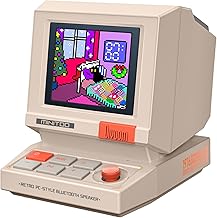
Divoom MiniToo Retro PC-Style Computer Speaker, Smart Pixel Screen with DIY Faces, Bluetooth & USB Audio, Alarm/White Noise Clock, Desk Setup Gift for Bedroom, Office & Gaming
Best For:
Streamers, vloggers, and desk creators looking for a camera-friendly, visual speaker with customizable pixel art.
If you want a tiny speaker that doubles as a personality-packed desk ornament, the Divoom MiniToo blends retro computer vibes with surprisingly versatile functionality. This compact, pixel-art enabled speaker features a smart pixel screen that displays custom animations, DIY faces, and simple visual alerts—making it both a source of sound and a small dynamic backdrop for video. The MiniToo connects via Bluetooth for streaming music from your phone or via USB for a steady audio feed from a PC, giving creators options depending on whether they prioritize wireless freedom or lower-latency wired sound.
Beyond music, the device offers alarm and white noise modes which are handy for routines and focus sessions. Many users praise the app that lets you create and upload pixel art, animated equalizers, and notifications like incoming messages or timers. This makes it useful for streamers who want an eye-catching but unobtrusive visual cue on camera, or for remote workers who like a playful clock/alarm on their desk. The sound profile is tuned for clarity at close range—think pleasing podcast playback and ambient music rather than deep, room-shaking bass. For video creators, the MiniToo’s pixel display adds motion and color without requiring additional lighting, and it photographs well on most cameras.
Practical considerations: the unit is very small, so if you want full-bodied audio for background music you’ll still need a proper speaker. Battery life tends to be modest if you use Bluetooth constantly, so many users keep it plugged in via USB. The app experience is a major selling point; check compatibility with your phone and be prepared to spend a little time customizing animations. Build quality feels consumer-grade and charming rather than premium; the aesthetic is intentionally playful.
Who should consider the Divoom MiniToo? Streamers, vloggers, and creators who want a compact, camera-friendly prop with functional audio and a lot of visual personality. It’s also a fun desk accessory for students and casual music listeners who value novelty. Who might skip it? Audiophiles seeking deep bass or those who need robust battery life for long portable use.
Check the latest price on Amazon.
Pros
- Compact, eye-catching pixel display
- Bluetooth and USB audio options
- Customizable animations via app
- Useful alarm and white-noise modes
Cons
- Limited bass and overall volume
- App-dependent customization can be time-consuming
Check the latest price on Amazon.
QLKUNLA Newtons Cradle Balance Balls Science Physics Gadget Desktop Decoration Kinetic Motion Toy for Home and Office

Best For:
Design-minded creators and office users who want a calming, kinetic desk toy and camera-friendly decor.
Newton’s cradle is one of those timeless desk items that shows up in many creator setups because it photographs well, demonstrates a tidy physics trick, and offers micro-break entertainment. The QLKUNLA Newtons Cradle presents a clean, modern take on the classic balance-ball kinetic toy, with metal spheres and a polished base that suits both home offices and streaming backgrounds. You’ll find people use it as a fidget tool during long editing sessions, a conversation starter on camera, or a way to add subtle motion to an otherwise static shot.
This version typically emphasizes smooth, equal-sized balls and well-aligned strings to maximize the satisfying click-and-swing effect. Many buyers report that after initial tuning (straightening strings and adjusting alignment), the cradle performs predictably and with a steady rhythm. That predictability is the point: it’s calming and lightly hypnotic without being so loud that it disturbs recording. Creators often place it within camera frame edges to add life and movement without drawing full attention.
Practical usage scenarios include using the cradle as a short, tactile break between takes—gently nudging the balls to reset focus—or as a visual anchor while introducing a segment in a video. Because it’s compact, this gadget doubles as desk decor for client-facing video calls where a little design detail can convey personality. It’s also an inexpensive way to test how much kinetic motion you want on-screen before committing to larger mechanical sculptures.
Considerations: cheaper versions can suffer from misaligned strings or poor polish, so expect a bit of setup to get perfect motion. If you work in a super-quiet environment, you may notice the soft clicking noise; conversely, in loud, busy spaces the effect can be lost. It’s decorative rather than functional in terms of productivity—its main value is mood and micro-distraction management.
Who should buy the QLKUNLA Newtons Cradle? Creators and desk workers who enjoy low-key, tactile breaks and want an elegant prop for video backgrounds. Not ideal for people who need absolute silence or those who prefer purely practical tools over decorative pieces.
Check the latest price on Amazon.
Pros
- Satisfying, hypnotic motion
- Compact and camera-friendly
- Polished aesthetic fits many setups
Cons
- May need initial tuning/alignment
- Produces soft clicking noise that some may dislike
Check the latest price on Amazon.
Elgato Stream Deck Mini – Control Zoom, Teams, PowerPoint, MS Office and Boost Productivity with Seamless Integration for Daily Apps, Set Up Shortcuts Easily, USB, Compatible with Mac and PC

Best For:
Streamers, podcasters, editors, and remote workers who want one-touch macros to speed up workflows.
For creators who want to speed up repetitive tasks and control live productions without fuss, the Elgato Stream Deck Mini is a compact macro pad with a deceptively simple promise: map frequently used actions to dedicated buttons. The Mini model provides six tactile, fully programmable keys with customizable icons, and integrates with streaming software, conferencing apps, and productivity tools. That means one button press can switch scenes, mute your mic, trigger overlays, or open specific documents in an instant.
In real-life use, small creators and remote workers appreciate how it reduces friction. During live streams, you can change scenes or play sound effects without hunting for a mouse cursor; in meetings, you can toggle camera and mic states or launch breakout-room links. Content editors use it as a workflow accelerator—assign buttons for common sequences like “export,” “render,” or “apply preset”—cutting minutes off repetitive tasks.
The Stream Deck Mini’s software ecosystem is a standout. Elgato’s app lets you drag-and-drop actions, nest folders to extend functionality beyond six buttons, and upload custom icons to make the pad visually informative on-screen. The device connects via USB for stable, low-latency control and is compatible with both Mac and PC. Setup is straightforward, though unlocking advanced integrations with certain third-party apps can require installing additional plugins or granting permissions.
Considerations: the Mini’s compact size is a strength and a limit—power users may prefer the full-sized Stream Deck with more buttons. Also, the device is hardware-dependent: if you ship or change desks frequently, remember to pack the unit and reconfigure it if you use a different computer. For teams or multi-user environments, centralized configuration can be more work than simply using software hotkeys.
Who should buy the Stream Deck Mini? Streamers, podcasters, video editors, and power users who want one-touch control of apps and scenes. Not necessary for casual users who rarely repeat actions or who are comfortable using keyboard shortcuts.
Check the latest price on Amazon.
Pros
- Powerful, customizable software integration
- Reduces mouse/keyboard friction
- Compact footprint fits small desks
Cons
- Limited buttons compared to larger models
- Requires software setup and occasional plugin installs
Check the latest price on Amazon.
The Fisherman Balancing Sculpture Large Metal Kinetic Art Desk Office Physics Science Decor Cool Items Desktop Gadgets Accessories Perpetual Motion Statue Men Funny Fishing Figurine Gifts (Fishing)

Best For:
Creators and designers seeking a large, camera-friendly kinetic sculpture to add personality to setups.
Kinetic sculptures like the Fisherman Balancing Sculpture are the kind of prop that instantly adds character to a desk or shelf. This large metal sculpture uses clever balance and motion to create the illusion of perpetual movement—perfect for creators who want a sculptural conversation piece or a visual anchor in a video frame. The fisherman motif gives it a playful, narrative quality that looks intentional on camera rather than random clutter.
Functionally, the sculpture is less about productivity and more about mood. Many customers describe it as hypnotic in a good way: a quick visual reset during long creative stretches or an attractive background for lifestyle and desk-setup shots. Its metal construction gives it weight and durability that cheaper plastic ornaments lack, and the finish tends to hold up well under normal office light conditions. Placement matters—on a steady, level surface you’ll get smooth, sustained motion; on a flimsy desk the effect can be dampened.
Use cases include featuring it in B-roll to imply a laid-back creative environment, using it as a desktop fidget while rendering video files, or placing it near a webcam during calls to give your background a light, kinetic focal point. It’s especially useful for creators who favor a slightly whimsical aesthetic over strictly minimal design.
Considerations: like other kinetic art, it may generate tiny sounds if it taps against its base—check reviews for notes about any audible clicking. If you need absolute silence for audio recording, test placement away from microphones. Also, because it’s larger than novelty toys, make sure you have display space where it won’t be accidentally knocked down.
Who should buy this sculpture? Creators and designers who want a sizable, camera-ready kinetic art piece that adds charm to videos and meetings. Skip it if you prefer purely functional gadgets or if you must maintain a completely silent recording environment.
Check the latest price on Amazon.
Pros
- High visual impact and storytelling motif
- Durable metal construction
- Sustained, hypnotic motion for background interest
Cons
- Larger footprint requires stable display area
- May produce small tapping noises on some surfaces
Check the latest price on Amazon.
Office Desk Accessories 2pcs Multifunction Computer Monitor Memo Board – Transparent Computer Side Panel Memo Creative Monitor Side Panel Suitable for Office Home Desktop

Best For:
Remote workers, streamers, and students who want a discreet, camera-safe place for quick notes.
Simple, practical, and oddly underused, transparent monitor-side memo boards are a quiet productivity hack you’ll spot in thoughtful desk setups. These 2-pack memo panels attach to the side of a monitor and provide a slim surface for sticky notes, quick sketches, checklists, or phone numbers—keeping essential reminders in peripheral vision without cluttering the desk. Because they’re transparent, they preserve the clean visual line of a minimalist setup while adding functional real estate.
Practical benefits include fewer sticky notes on the desk (reducing mess in camera shots), quick access to meeting IDs and passwords, and a place to jot fleeting ideas during brainstorming. Creators regularly comment that having a dedicated memo surface keeps their main monitor uncluttered, which helps when framing a tidy video or livestream. The panels are light, easy to install, and removable, making them a flexible solution for renters or people who change workstations.
Use-case scenarios: attach a panel to your primary monitor to store streaming scene notes or key talking points; place one on a secondary screen for a running to-do list during editing sessions; or use them as a camera-friendly place to prop short motivational quotes that show subtly in the background. Their transparency helps them disappear on camera when empty, which is ideal for creators who want utility without visual noise.
Considerations: these panels aren’t a replacement for large whiteboards—if you need big, collaborative spaces they won’t suffice. Adhesive or clip mechanisms vary by manufacturer; check customer feedback to ensure they hold your panel securely without leaving residue. Also, very glossy monitors may create reflections when a memo is attached—test for glare if you film in high-contrast lighting.
Who should buy these memo panels? Remote workers, video creators, and students who want a tidy, camera-friendly place for quick notes. Avoid if you require large writable surfaces or have a setup prone to glare.
Check the latest price on Amazon.
Pros
- Keeps notes off the desk and out of camera clutter
- Transparent design blends with most setups
- Easy to install and remove
Cons
- Not a substitute for large whiteboards
- Potential for adhesive residue or glare on glossy screens
Check the latest price on Amazon.
Final Verdict
Small, oddly useful gadgets can transform a desk from functional to thoughtfully curated. The five items in this guide cover a range of needs: the Divoom MiniToo mixes playful visuals with portable sound; the Newton’s Cradle and Fisherman sculpture add kinetic motion that livens video backgrounds; the Elgato Stream Deck Mini accelerates workflows with one-touch macros; and the transparent memo panels quietly solve the sticky-note problem for creators who film or stream.
Pick based on purpose: if you need hands-on productivity gains, start with the Stream Deck Mini; if you want camera-friendly personality, the Divoom speaker and the kinetic sculptures provide immediate visual impact. For everyday organization, the monitor memo panels are the low-effort productivity win. None of these are universal—sound quality varies, moving parts occasionally need tuning, and some pieces aren’t suited to ultra-quiet recording environments—so weigh noise, size, and connectivity for your setup.
If you’re building a desk to look good on camera while remaining genuinely useful, any one of these gadgets could be a worthwhile addition. Check product details and recent user feedback on the product pages before purchasing to match model variations and colors to your setup.
Conclusion
These Oddly useful gadgets creators use during desk setup videos picks are trending now and offer great value and variety. Check the links above for latest prices and reviews.
As an Amazon Associate, I earn from qualifying purchases.
Tags:
desk gadgets, desk setup, streaming accessories, workspace decor, creator tools, Elgato Stream Deck, pixel speaker
