Must-Have Amazon Gadgets: Echo Shows & Smart Plug Picks
As an Amazon Associate, I earn from qualifying purchases. This article may contain affiliate links, which means we may receive a commission at no extra cost to you.
Smart home gear has moved from optional novelty to everyday utility, and a few recent Amazon gadgets stand out so clearly they’re hard to ignore. Whether you’re upgrading a kitchen, adding a family communication hub, or simply trying to make daily routines smoother, the latest Echo Shows and companion devices deserve a close look. Below you’ll find an honest, researched guide to five Amazon products that can change how you manage your home, organize your day, and interact with your family.
Before we dive into individual picks, a quick note: As an Amazon Associate, I earn from qualifying purchases. This article may contain affiliate links, which means we may receive a commission at no extra cost to you.
Buying Guide
What to look for when choosing Amazon smart devices: Purpose and placement — decide whether you want a bedside companion, a kitchen hub, or a wall-mounted family command center. Display size and resolution — Echo Show models range from compact bedside units to large, wall-friendly screens; pick a size that matches viewing distance and intended use. Audio performance — built-in speakers vary. If you prioritize music or video, choose a model with clear mids and decent bass instead of relying on phone speakers. Smart home control and routines — check compatibility with your existing smart bulbs, plugs, and cameras. The best experience comes when devices integrate seamlessly into routines and scenes. Privacy features — Amazon offers physical camera shutters and microphone controls; if privacy is a priority, confirm those options. Ease of setup — some devices, like the Smart Plug, are designed for one-tap installation; others may require a bit more time to organize widgets and family profiles. Value vs. alternatives: Many third-party smart displays and hubs exist, but Amazon’s Echo Show line wins on native Alexa integration and frequent feature updates. If you’re loyal to Google Assistant or Apple HomeKit, compare voice assistant ecosystems before buying. Budget buyers might pair a smaller Echo Show with an Amazon Smart Plug to gain smart control without investing in a larger hub. Seniors and beginners should look for simple setup guides and straightforward voice commands; the Alexa user guide included here can be a helpful companion for new users. Finally, think about how you’ll use the device daily: recipe reference and timers in the kitchen, morning briefings by the bed, or a family calendar on the wall. Matching the gadget to these routines ensures the purchase feels indispensable rather than decorative.
Amazon Echo Show 11 (newest model), Vibrant Full-HD 11" display with more viewing area and spatial audio, Designed for Alexa+, Graphite

Best For:
Families, kitchen users, and remote workers who want a versatile mid-size smart display for recipes, video calls, and daily home control.
Why it grabbed attention: The Echo Show 11 takes the mid-size smart display and refines what many people expect from a living-room or kitchen companion. With a brighter, nearly full-HD 11-inch screen and updated spatial audio, this model focuses on making video calls, recipe reading, and streaming more comfortable and natural. If you want a device that’s more than a voice speaker and less bulky than a 15-inch wall display, this model sits squarely in that sweet spot.
Main benefits: The larger, clearer screen gives more room for split-view widgets — calendar, weather, and video — while spatial audio improves voice clarity and music playback without needing a separate speaker. Its size makes it easy to move between rooms: it’s large enough for group video calls but still compact enough for a countertop or nightstand. The updated user interface and Alexa+ features mean faster access to routines and an improved visual layout for smart home controls.
Real-world use cases: In the kitchen it stores recipe steps on screen while you follow along, uses timers for multiple dishes, and casts short how-to videos. On a family desk or living room side table it becomes a quick video-call station, a photo frame for rotating family images, and a hub to check grocery lists and calendar events at a glance. For people who like to watch news clips or catch a TV show while preparing meals, the Echo Show 11’s screen size is a practical middle ground between compact and immersive.
Why it’s valuable: Compared with smaller smart displays, the Show 11 delivers a notably better viewing experience with richer sound. Compared to larger 15-inch alternatives, it’s easier to place and less visually dominant while still offering core smart display features. If you already use Alexa devices, this integrates with your routines and smart-home controls smoothly — and its balance of size and performance often feels like the most versatile choice for most homes.
Who should buy it: Choose the Echo Show 11 if you want a clear visual interface for recipes, video calls, and media without committing to a large wall display. It’s especially good for families who share a central counter or table and for remote workers who need an occasional video-call station. Who might skip it: If you need a compact bedside device or the absolute largest screen for wall mounting, a Show 5 or Show 15 might be a better fit.
Practical observations and considerations: Expect straightforward setup through the Alexa app and easy integration with other Echo devices. If privacy is a concern, note the physical camera shutter and microphone toggle. For heavy music listeners, pairing with a dedicated speaker may improve low-end audio. Storage of widgets and personalization may require a short setup session to tailor to family needs.
Pros: 1) Crisp near-Full HD 11" display suitable for recipes and calls. 2) Improved spatial audio for clearer speech and music. 3) Ideal mid-size form factor—portable but substantial. 4) Smooth Alexa+ integration and smart-home control.
Cons: 1) Not as portable as smaller bedside models. 2) Bass still won’t match a dedicated speaker for audiophiles.
Check the latest price on Amazon.
Pros
- Bright, near-Full HD 11" screen for comfortable viewing
- Spatial audio improves voice clarity and everyday listening
- Balanced size—large enough for groups, compact enough for counters
- Seamless Alexa+ smart-home and routine integration
Cons
- Less portable than very small displays
- Audio depth won’t replace a dedicated speaker for music lovers
Check the latest price on Amazon.
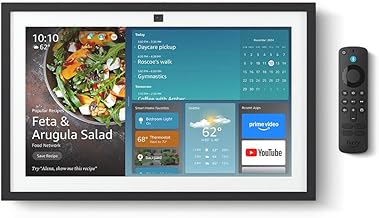
Amazon Echo Show 15 (newest model), Full HD 15.6" kitchen hub for home organization, with built-in Fire TV, Designed for Alexa+
Best For:
Families, shared households, and kitchens or entryways that benefit from a single, visible command center for schedules, media, and routines.
Why it stood out: The Echo Show 15 has pushed the idea of a smart home display from a countertop gadget toward a true family command center. With a full-HD 15.6-inch screen designed to hang on a wall or rest on a stand, it’s meant to be seen from across the room. This model emphasizes home organization: shared calendars, sticky notes, picture-in-picture video calls, and a larger canvas for widgets and Fire TV playback.
Main benefits: The expansive display gives up-front access to shared family information—calendars, meal plans, chores, and shopping lists all live on a single screen. Built-in Fire TV functionality means you can stream shows or mirror compatible apps directly on the device without needing a separate Fire TV stick. For busy households, the ability to pin notes, drag-and-drop widgets, and maintain a persistent view of household essentials reduces friction in daily coordination.
Real-world use cases: Kitchen-wall placement makes it a natural spot for meal planning and following long-form recipe videos. In an entryway it becomes a visual bulletin board for everyone to check the day’s schedule while grabbing keys. In a home office it can double as a second screen for quick video conferencing and calendar checks. For families with children, pinned chore lists and visual timers help keep tasks visible and trackable.
Why it’s valuable: Compared to smaller Echo Shows, the 15’s biggest advantage is scale. You get the same Alexa integration and app ecosystem but with a much larger workspace that reduces the need to pull up your phone for shared info. For households trying to consolidate notifications and schedules in a single glanceable place, the Show 15 functions more like a modern, smart bulletin board than a personal device.
Who should buy it: Ideal for families, roommates, or anyone who wants a central home hub visible from multiple rooms. It’s especially useful in kitchens and entryways. Who might skip it: If you live alone, prefer a private bedside device, or lack wall space, you might favor a smaller Echo Show instead.
Practical observations and buying considerations: Wall mounting provides the best experience but plan for placement near power and Wi‑Fi. The larger screen uses more power and may draw more attention than smaller devices—consider whether you want a focal piece. Integration with Fire TV apps is handy, though some users pair it with an external soundbar for richer audio during streaming.
Pros: 1) Large Full HD 15.6" display good for shared family use. 2) Built-in Fire TV for direct streaming. 3) Robust organization tools and widget customization.
Cons: 1) Requires wall or dedicated tabletop space. 2) Larger footprint may be overkill for single-person households.
Check the latest price on Amazon.
Pros
- Expansive Full HD 15.6" screen for room-wide visibility
- Built-in Fire TV streaming and app access
- Excellent family organization tools and widgets
Cons
- Needs wall/table space and nearby power
- May be unnecessary for solo dwellers or small spaces
Check the latest price on Amazon.
Amazon Echo Show 5 (newest model), Smart display, Designed for Alexa+, 2x the bass and clearer sound, Cloud Blue

Best For:
Individuals, couples, and small-space dwellers who want a compact smart display for alarms, briefings, and hands-free Alexa control.
Why it’s suddenly relevant: The Echo Show 5 remains one of the best compact smart displays because it hits the right balance of price, features, and size. The newest model improves bass and clarity, which makes it more capable for bedside music, podcasts, and short-form video. If you’re after a discreet display that still feels modern, the Show 5 fits the bill.
Main benefits: It’s small enough for a nightstand but large enough to show your calendar, weather, and timers. Improved audio means alarms and spoken responses sound fuller, and the compact form factor keeps things unobtrusive. Privacy controls like a physical camera shutter and microphone toggle make it easier to trust placing one in personal spaces.
Real-world use cases: On a nightstand it offers voice-controlled alarms, morning briefings, and quick video calls without taking up much space. In a home office it can display a tiny dashboard with a calendar and reminders while you work. It’s also a great secondary screen in kitchens where counter space is limited but you still want recipe steps and timers.
Why it’s valuable: Compared with smartphones or Bluetooth speakers, the Show 5 adds a hands-free, glanceable interface with Alexa and visual context. For many buyers the Show 5 is the easiest way to bring a smart display into the home without committing to a larger, more conspicuous device.
Who should buy it: Great for individuals, couples, and small living spaces that need a compact bedside or countertop smart display. Who might skip it: If you want large-screen media playback or a family command center, consider the Show 11 or Show 15 instead.
Practical observations and considerations: Setup is quick through the Alexa app, and the Show 5 responds well to voice commands from nearby. Camera angle can be limited for group video calls due to the compact size. If you want richer audio for music, pairing it with a smart plug and external speaker or choosing a larger Show might be preferable.
Pros: 1) Compact footprint fits nightstands and small counters. 2) Improved bass and clearer sound for its size. 3) Strong privacy controls and simple setup.
Cons: 1) Small screen limits group viewing. 2) Not ideal as a primary media center for larger rooms.
Check the latest price on Amazon.
Pros
- Space-saving design ideal for nightstands
- Improved bass and clearer audio for the size
- Straightforward setup and privacy features
Cons
- Too small for comfortable group viewing
- Limited audio depth compared with larger models
Check the latest price on Amazon.
Amazon Smart Plug, Works with Alexa, Simple Setup, Endless Possibilities

Best For:
Renters, smart-home beginners, and anyone who wants to automate lamps, small appliances, or holiday lights without replacing wiring.
Why it’s so useful: The Amazon Smart Plug is one of those small devices that quietly transforms how you interact with everyday appliances. It doesn’t need a hub and pairs directly with Alexa, making it a low-friction entry point into smart home automation. For people who want smart control without renovating fixtures or swapping bulbs, a simple smart plug is one of the most cost-effective upgrades.
Main benefits: Plug any lamp, fan, or small appliance into the Smart Plug and control it by voice, schedule it on a routine, or toggle it from your phone while away from home. The simplicity is the selling point: minimal setup, predictable behavior, and wide compatibility for devices with straightforward on/off control. It’s a highly practical way to automate lamps for security, schedule a slow cooker, or create scene-based control for groups of devices.
Real-world use cases: Set living-room lamps to switch on automatically at sunset, program a bedside lamp to turn on before morning alarms, or use a smart plug with a holiday decoration string to schedule evening lights. For renters or anyone who can’t replace hardwired fixtures, smart plugs offer a reversible and portable smart-home upgrade. They’re also useful in home offices to automate desk lamps and printers, reducing standby power usage.
Why it’s valuable: Compared to replacing bulbs or installing hardwired smart switches, the Smart Plug is inexpensive, portable, and easy to move between sockets. It’s an ideal first smart-home device because it demonstrates immediate value—convenience, energy savings, and remote control—without long setup or compatibility headaches.
Who should buy it: New smart-home adopters, renters, and anyone wanting to automate lamps, small appliances, or holiday lights. Who might skip it: If you need multi-outlet control, high-power appliance management, or advanced energy monitoring, look for more specialized plugs or smart switches.
Practical observations and considerations: Ensure the plugged device’s physical on/off switch is left in the "on" position for remote control to work. If you have many smart plugs, organize them in the Alexa app with clear names to avoid confusion. Also, be mindful of load limits—most consumer smart plugs aren’t designed for high-wattage appliances like large space heaters.
Pros: 1) Super-easy setup and Alexa pairing. 2) Portable and reversible smart automation. 3) Affordable way to add smart control to any plug-in device.
Cons: 1) Limited to the rated power load—avoid high-wattage devices. 2) Single-outlet design may be slower to manage than multi-outlet smart strips.
Check the latest price on Amazon.
Pros
- Plug-and-play simplicity with Alexa pairing
- Portable and reversible—move it between outlets
- Cost-effective way to add smart automation
Cons
- Not suitable for heavy-duty, high-wattage appliances
- One outlet per plug—may clutter multiple devices
Check the latest price on Amazon.
Amazon Alexa User Guide: Easy-to-Follow Manual for Beginners and Seniors – Setup, Voice Commands, Alexa+ Features, and Practical Everyday Uses

Best For:
Beginners, seniors, and anyone who wants a straightforward, practical manual to set up and use Alexa devices and routines.
Why this guide matters: Smart devices are powerful, but their value depends on how comfortably you can use them. This Alexa user guide is designed to help beginners, seniors, and anyone who wants a clear, step-by-step reference for setting up devices, learning voice commands, and creating useful routines. It’s less about hype and more about practical adoption.
Main benefits: The guide walks through initial device setup, account linking, privacy settings, and common pitfalls that new users encounter. Importantly, it explains how to set up routines and automations that save time—like having lights come on when you say "good night," or triggering a morning briefing that includes weather, traffic, and scheduled reminders. For less tech-savvy users, clear screenshots and easy language make following along much less intimidating.
Real-world use cases: New homeowners can refer to the guide while unpacking and installing their first Echo devices, seniors can learn how to place calls and use medication reminders via Alexa, and busy parents can set up shared shopping lists and chore reminders for kids. It’s also helpful for caretakers who want to set safety-focused routines, such as automating lights for fall prevention or scheduling medication alerts.
Why it’s valuable: Compared with searching piecemeal online tutorials, a concise manual organizes steps and best practices in one location. That reduces setup time and the frustration many people face the first time they try to pair devices, configure permissions, or build routines. For households adopting multiple Echo devices, a single, readable guide can make the difference between abandonment and regular use.
Who should buy it: Anyone new to Alexa, households introducing devices to seniors or kids, and people who prefer a reference manual over scattered web searches. Who might skip it: Experienced smart-home hobbyists and power users who already know Alexa’s ecosystem inside out.
Practical observations and considerations: Look for editions that include up-to-date screenshots and references to the Alexa+ features you plan to use. Pair the guide with one or two simple devices—like a Show 5 and a Smart Plug—to practice routines immediately. Keep the guide accessible during initial setup sessions to reduce repeated app navigations.
Pros: 1) Clear, step-by-step instructions for beginners. 2) Practical examples like routines, reminders, and privacy settings. 3) Helpful for seniors and non-technical users.
Cons: 1) May be redundant for experienced Alexa users. 2) Rapid Alexa feature updates can date some sections—look for current editions.
Check the latest price on Amazon.
Pros
- Step-by-step setup and routine-building instructions
- Written for beginners and seniors with clear screenshots
- Focuses on practical everyday uses and privacy tips
Cons
- Less useful for advanced or experienced Alexa users
- Physical editions may need newer updates as Alexa evolves
Check the latest price on Amazon.
Final Verdict
These five Amazon gadgets cover a wide range of smart-home needs: the Echo Show 5 for compact convenience, the Echo Show 11 for versatile day-to-day use, the Echo Show 15 for family-sized coordination, the Amazon Smart Plug for simple automation, and the Alexa user guide to shorten the learning curve. Together they offer a straightforward path from curiosity to a functional, voice-enabled home. Select a device based on where you need the most help—bedside, countertop, wall, or plug-in automation—and consider adding the guide if you or household members are new to Alexa. With simple setup and immediate benefits like hands-free control, visible family organization, and scheduled automation, these products can quickly move from novelty to necessity in daily routines. If you’re curious about making your home a little smarter, pick the device that matches your most frequent use case and get started.
Check the latest price on Amazon.
Conclusion
These Amazon gadgets that suddenly became impossible to ignore picks are trending now and offer great value and variety. Check the links above for latest prices and reviews.
As an Amazon Associate, I earn from qualifying purchases.
Tags:
Echo Show, Amazon gadgets, smart home, Alexa, Amazon Smart Plug, home automation, Echo Show 15
