Morning Office Gadgets Creators Rely On
As an Amazon Associate, I earn from qualifying purchases. This article may contain affiliate links, which means we may receive a commission at no extra cost to you.
Mornings set the tone for a productive day. For creators—writers, designers, developers, and makers—the right small desk tools turn scattered thoughts into a focused workflow. This guide highlights practical office gadgets that fit into realistic morning routines: compact glass whiteboards with storage and wireless charging, a simple rotating productivity timer, and a discreet mouse mover to keep systems awake. Each item is chosen to solve common friction points: note capture, device charging, time-blocking, and preventing idle computer locks.
Buying Guide
When choosing morning desk gadgets, prioritize three things: functionality, footprint, and durability. Look for glass whiteboards that double as keyboard stands and include storage drawers if you need space for pens and sticky notes. If you want fewer cables, pick a model with Qi wireless charging rated for your phone and a visible indicator light. For time management, a rotating cube timer with preset lengths (5–50 minutes) is easier to use than digital apps when you want tactile focus. A mouse jiggler is useful if you need your machine to stay awake during long uploads or presentations—ensure it has an on/off switch and is driver-free. Compare materials (tempered glass vs. plastic), check compatibility (phone size and charging specs), and consider desk ergonomics—raising the keyboard pad slightly can improve posture. Lastly, read use-case notes: creators often value low-noise devices, easy-to-clean surfaces, and compact organizers that keep frequently used items within reach.
SELEAD Desktop Glass Whiteboard with Wireless Charger Station, Dry Erase Board Computer Pad Keyboard Stand with Organizer for Home, School, Office Desk Accessories, Black

Best For:
Best for creators who want a durable writable surface plus wireless phone charging and small-item organization.
The SELEAD Desktop Glass Whiteboard pairs a sleek tempered glass dry-erase surface with an integrated wireless charging pad and desktop organization—designed for creators who need rapid note capture without sacrificing charging convenience. The black glass finish hides smudges better than white plastic and gives a professional look on video calls. Use it as a keyboard stand to raise ergonomics slightly while keeping a writable surface within thumb’s reach. The built-in organizer compartments are handy for markers, sticky notes, and a stylus, reducing time spent looking for tools during a morning sprint.
Compared to cheap roll-up mats or paper planners, this glass board is more durable and easier to erase cleanly. It solves the common problem of juggling a phone on the desk: the Qi charger keeps your device powered while you sketch ideas or jot priorities. Customers often mention that the charging pad is responsive with common phone sizes, though heavier phone cases may need removal for optimal contact. If your workflow relies on visual to-do lists, whiteboard-based weekly planning, or quick sketches, this model brings everything together without adding clutter. Consider desk depth—if your workspace is shallow, verify the footprint. Overall, it’s a good fit for remote creators, students, and anyone who prefers analog notes with modern charging convenience.
Pros
- Tempered glass surface wipes clean
- Integrated Qi wireless charger
- Keyboard-stand functionality
- Compact organizer compartments
Cons
- Black finish shows fewer marks but fingerprints can show
- May require thin phone case for reliable charging
View the SELEAD Desktop Glass Whiteboard on Amazon.
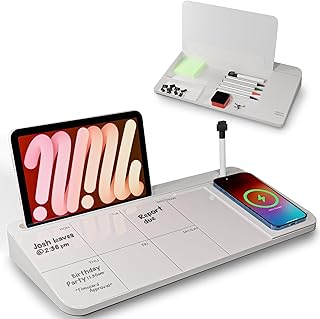
NEXTLUXE Glass Desk Whiteboard with Wireless Charger – Desktop Whiteboard with Storage, Weekly Planner, Dry Erase Pad, Organizer Drawer for Home, School, Office Gadgets – White
Best For:
Best for planners and creators who want a visible weekly layout plus drawer storage and wireless charging.
NEXTLUXE’s Glass Desk Whiteboard blends a bright, white tempered glass surface with a practical weekly planner layout and a discreet storage drawer—ideal for creators who prefer an organized, visible plan for the day. The whiteboard’s printed planner zones help structure morning routines: jot three priorities, outline time blocks, and mark meetings. The included wireless charging section keeps your phone topped up while the surface doubles as a clean, glare-resistant writing area for sketches or quick lists.
Compared to simple paper planners or plastic pads, this model’s glass is less prone to staining and feels more premium under marker strokes. The drawer is a thoughtful addition for pens, USB sticks, or sticky notes, keeping desktop clutter down. In real-use scenarios, creators report using the weekly template to shift priorities quickly at the start of the day and to leave visual reminders for afternoon tasks. Note that glass adds weight—if you move desks frequently, expect a bit more heft than flexible pads. Also confirm your phone’s Qi compatibility for consistent charging. This whiteboard is particularly useful for freelancers, content creators, and students who like a visible plan alongside their keyboard setup.
Pros
- Printed weekly planner zones
- Tempered glass resists stains
- Hidden storage drawer
- Integrated wireless charging area
Cons
- Heavier than flexible pads
- Planner layout may not suit free-form note-takers
Check the NEXTLUXE Glass Desk Whiteboard on Amazon.
Rotating Productivity Timer 5, 25, 10, 50 Minutes Preset, Desk Cube w/Gravity Sensor for ADHD, Mute Functions, Ideal for Work, Study, Kitchen, Back to School (1, Wood Grain Finish)

Best For:
Best for creators who use Pomodoro-style time blocks and want a quick, tactile timer without screens.
This rotating productivity timer is a tactile, low-friction way to bring time-blocking into a morning routine. With preset intervals (5, 10, 25, 50 minutes) and a gravity sensor that automatically starts when you set it down, the cube removes friction from starting a session—no fiddling with apps or screens. It’s especially helpful for creators who struggle with focus or who prefer Pomodoro-style work bursts. The mute function keeps notifications off and the wood grain finish looks at home on a creative desk.
Compared with smartphone timers that tempt you into checking messages, a physical cube encourages single-tasking. In practical use cases, people place the timer beside their keyboard, flip it to select an interval, and begin sketching, coding, or editing with a clear end-time. It’s also useful for meetings and kitchen tasks. Consider who should buy it: those who want a distraction-free, tactile prompt for work sessions will appreciate the simplicity. Those who prefer fully customizable digital timers or need intervals outside the presets may find it limiting. Build quality varies across brands, so expect a lightweight feel; still, its ease of use and quiet operation make it a solid addition for morning workflow rituals.
Pros
- Easy preset intervals
- Gravity sensor auto-start
- Mute function for quiet focus
- Attractive wood grain finish
Cons
- Limited to preset intervals
- Lightweight build may feel less premium
Find the Rotating Productivity Timer on Amazon.
Vaydeer Undetectable Mouse Mover, M3 Mouse Jiggler Device with ON/Off Switch, Driver-Free Shaker Wiggler Mouse Movement Simulation for Computer Awakening, Gift Ideal for Men/Women (River Blue)

Best For:
Best for creators who run long tasks, present remotely, or need their machine to stay awake without software tweaks.
The Vaydeer M3 Mouse Mover is a compact, driver-free device that subtly simulates mouse movement to keep a computer awake or prevent idle timeouts during long uploads or presentations. For creators who often step away to record a podcast, set up equipment, or let renders run, this gadget prevents repeated password prompts or screen locks without changing system settings. The on/off switch offers control and it’s small enough to tuck under a mousepad or behind a laptop stand.
Unlike software-based keep-alive tools that can be blocked by IT policies, this hardware solution is simple and platform-agnostic. Real-world users appreciate its quiet operation and portability—pop it in a bag for coworking days. Buying considerations include desk aesthetics (it’s a small plastic puck) and whether your workplace allows external devices. It’s not a substitute for proper security practices—use responsibly. If you need a stealthy way to keep long processes running without constant re-authentication, this is a practical, low-cost option. Those who don’t step away from their desk often or who rely strictly on corporate security policies may not need it.
Pros
- Driver-free, plug-and-play
- On/off switch for control
- Compact and portable
Cons
- Small plastic form may look utilitarian
- Not suitable where external devices are restricted
See the Vaydeer Mouse Mover on Amazon.
TSJ OFFICE Small Desktop Whiteboard -Glass Dry Erase Board Computer Keyboard Stand White Board Surface Pad with Drawer, Desk Organizers with Accessories for Office, Home, School Supplies – White

Best For:
Best for creators on a budget who want a clean writable surface, slight keyboard elevation, and small storage.
The TSJ OFFICE Small Desktop Whiteboard is a budget-friendly glass dry erase pad that doubles as a keyboard stand and includes a handy drawer for markers and small supplies. Its compact footprint makes it a smart choice for creators working in tight spaces or shared desks. The white tempered glass surface erases cleanly and resists staining compared with cheaper plastic pads, while the storage drawer keeps essentials within reach for a no-fuss morning setup.
Compared to larger desk organizers, this unit focuses on essentials—writing surface, slight elevation for ergonomics, and a place for pens. Creators who sketch quick ideas, track daily tasks, or leave a visible checklist for collaborators will find it useful. Considerations include the absence of wireless charging—if you need integrated power, opt for models that include Qi pads. Also, check that the drawer size matches the pens and accessories you plan to store. For anyone wanting a simple, reliable writable surface with minimal bulk, this TSJ option is a pragmatic pick.
Pros
- Affordable tempered glass surface
- Built-in drawer for supplies
- Compact footprint for small desks
Cons
- No integrated wireless charging
- Drawer is small—limited storage capacity
Browse the TSJ OFFICE Small Desktop Whiteboard on Amazon.
Final Verdict
A focused morning routine often depends on removing tiny frictions: easy note capture, a visible plan, tactile time blocks, and keeping devices awake. The glass whiteboards from SELEAD and NEXTLUXE combine writable surfaces with organization and charging options—great for planners and creators who like analog notes. The TSJ OFFICE board is a pared-down, budget-friendly alternative if you don’t need charging. The rotating productivity timer adds a tactile, screen-free way to start sessions, while the Vaydeer mouse mover quietly prevents idle locks during long tasks. Match features to your habits—if you frequently move between desks, prioritize lighter units; if you want fewer cables, prioritize wireless charging compatibility. Taken together, these five picks cover most morning workflow needs for creators looking to streamline focus and reduce distractions. Check the latest price on Amazon.
Conclusion
These Office gadgets creators use during realistic workflow mornings picks are worth comparing if you want practical options with useful features, clear use cases, and buyer-friendly details.
As an Amazon Associate, I earn from qualifying purchases.
Tags:
desk gadgets, office organization, productivity timer, mouse jiggler, wireless charger, glass whiteboard, home office, workflow tools, office gadgets creators use during realistic workflow mornings, morning office gadgets creators rely on, gifts, amazon affiliate, product recommendations, buying guide, shopping guide
