Minimal Desk Setups: Top Minimalist Desk Accessories
As an Amazon Associate, I earn from qualifying purchases. This article may contain affiliate links, which means we may receive a commission at no extra cost to you.
Minimal desk setups have become the go-to choice for productivity creators because they reduce visual noise and help focus. Whether you’re building a calming remote-work corner or a compact student desk, the right desktop accessories make a big difference. As an Amazon Associate, I earn from qualifying purchases. This article may contain affiliate links, which means we may receive a commission at no extra cost to you.
In this long-form guide I highlight five thoughtfully selected desk essentials—desk mats, memo boards, and multifunctional glass organizers—that are popular among creators aiming for a clean, efficient workspace. Each product description includes realistic use cases, practical observations based on common customer experiences, buying considerations, and clear pros and cons so you can match a product to your workflow. Expect comparisons to standard alternatives, like basic mouse pads, plastic organizers, or bulky docking stations.
Read on if you want a curated list of minimalist accessories that protect surfaces, tame small clutter, and subtly increase productivity without overwhelming your aesthetic.
Buying Guide
How to choose minimalist desk accessories for a productive setup
Start with your workflow: are you primarily keyboard-and-mouse, laptop-only, or a mix with frequent note-taking? That determines whether you need a large desk mat for mouse travel, a writable surface for quick notes, or small organizers for chargers and stationery.
Surface protection and material matter. Cork and PU leather desk mats are popular because they combine a soft feel with water resistance and non-slip backing. Cork absorbs small impacts and feels warm under the wrists; PU leather presents a cleaner, more polished look and wipes easily. If your desk gets sunlight or heat, prefer materials advertised as water-resistant and fade-resistant.
Modular organization beats one-size-fits-all towers. Look for compact trays or drawers built into a whiteboard or organizer; these are better for minimal setups than bulky, multi-drawer units. A glass whiteboard with storage and integrated wireless charging is a modern alternative to a paper planner and reduces visual clutter.
Size considerations: measure your desk and leave breathing room around the edges. A 23.6 x 13.7-inch mat or pad fits small desks and laptop trays, while larger desks may benefit from a 35–36-inch mat to house keyboard and mouse together.
Style vs. function: minimal doesn’t mean featureless. Choose muted tones (beige, gray, black) or natural cork for a timeless look. If you need an active planning surface, go for a dry-erase board with a weekly layout. For compact note capture, memo boards and sticky-note holders keep your essentials visible without spreading paper across the desk.
Durability and warranty: check for water resistance, stitched edges, and non-slip backing. Read product Q&As to clarify cleaning instructions and whether adhesives or magnets are included. If you frequently change setups or travel with your mat, pick a rollable, thin option that resists creasing.
Who should invest: anyone spending regular hours at a desk—content creators, remote workers, students, and hobbyists—will find these accessories helpful. Minimalists who prefer a single flat surface should prioritize slim organizers and writable panels over bulky gadgets.
What to avoid: cheap, very thin mats that curl at corners, adhesives that leave residue, and overly complex organizers that add more visual clutter than they remove. Minimal setups thrive on restraint—choose a couple of multipurpose pieces rather than many single-use items.
AFIING Cork Desk Mat 23.6 x 13.7, Dual-Sided Cork & PU Leather Desk Pad, Waterproof Non-Slip Desk Protector for Home Office, Study Desk & Minimalist Workspace Beige

Best For:
Students, remote workers, and creators who need a compact, reversible desk pad that balances natural cork texture with wipe-clean PU leather.
The AFIING Cork Desk Mat is a compact, dual-sided desk pad designed for minimal workstations where space and surface protection matter. With dimensions around 23.6 x 13.7 inches, it fits small desks and laptop trays while giving enough room for a laptop, compact keyboard, and mouse. What sets this pad apart for minimal setups is the combination of natural cork on one side and PU leather on the other—cork offers warmth, texture, and a slightly cushioned feel while the PU leather side wipes clean easily and looks more formal. This reversible design is useful if you switch aesthetics or want a different tactile experience for writing versus mouse use.
Practical benefits are immediate: the cork side provides a grippier surface for papers and prevents slips when you’re sketching or writing, while the PU leather side resists spills and is easy to sanitize. The backing is described as non-slip, which helps keep the pad steady during fast mouse movements—an advantage over thin, lightweight mouse pads that shift. Customers who prioritize a natural look often choose the beige cork that blends with wood desks and Scandinavian-style furnishings.
Use-case scenarios: a content creator setting up short-form recording space will appreciate that the mat defines a neat foreground and reduces uncontrolled reflections; a student using a small dorm desk will find the reversible material handy for alternating between note-taking and laptop work; someone with a laptop and compact mechanical keyboard will enjoy the soft edge for wrists compared with a bare desk.
Compared with standard single-material desk mats, this dual-sided pad offers more flexibility. A standard cloth mouse pad can fray or trap crumbs, while plain plastic mats look utilitarian. This AFIING pad strikes a middle ground—more refined than cheap plastic and more practical than a fragile rolling leather mat.
Buying considerations: check your desk width and make sure the 23.6 x 13.7 size accommodates your keyboard and mouse together if that’s important. If you prefer a seamless keyboard-and-mouse combo, larger mats exist; if you value a compact footprint, this size is ideal. Keep in mind cork can show wear over time if exposed to heavy abrasion, but the PU side is resilient to spills.
Who it’s best for: the AFIING mat is well suited to students, remote workers in small spaces, and creators who want a natural-minimal look without sacrificing surface protection. It’s not the best pick for gamers who need an expansive surface for high-sensitivity mouse movement or for users who require a thick cushioned wrist rest.
Check the latest price on Amazon.
Pros
- Dual-sided design (cork + PU leather) for versatility
- Compact size fits small desks and laptop trays
- Non-slip backing helps keep the pad stable
Cons
- Smaller footprint may not suit full-size keyboard + mouse setups
- Cork side can show wear over long-term heavy abrasion
Check the latest price on Amazon.
MDOZQ Office Desk Accessories 2pcs Computer Monitor Memo Board Message Board Supplies for Women Men Sticky Note Holder Home Desktop Decor

Best For:
Creators, students, and professionals needing a compact, near-screen reminder surface for quick notes and checklists.
Small, deliberate, and surprisingly effective—memo boards like the MDOZQ 2-piece set are often overlooked in minimal setups, but they address a specific productivity problem: scattered notes and sticky notes that crowd the desk. These two compact memo boards are designed to attach to your monitor or sit on the desktop as tidy message surfaces. They create a fixed place for reminders, short to-dos, or frequently referenced snippets like meeting codes or short checklists.
For creators and remote workers who run short, repeated workflows—think recording checklists, caption drafts, or quick client notes—having a small visible message board reduces context switching and keeps essential items in view. The boards are lightweight and small enough to avoid visual clutter yet visible enough to function as quick prompts. They often come with adhesive pads or clips for mounting, which is handy for renters who don’t want holes in walls. Compared with paper sticky notes that lose adhesion or end up in piles, a memo board centralizes information and is reusable.
Typical use cases: a YouTuber keeps a short shot list on a monitor-mounted memo board during a quick filming session; a designer pins hex color codes or short font pairings for reference; someone in customer support keeps quick reply templates or frequently used links close at hand. They’re also practical for households with shared workspaces—use one board for a weekly chore reminder and another for a rotating priority list.
Compared to larger cork panels or full-size whiteboards, these memo boards are much less obtrusive and more mobile. They won’t replace a full planner or weekly wall board, but they work well as immediate, near-screen prompts. Customers often praise their simplicity but note adhesive quality varies—if you need permanent mounting, verify the included mounting method or invest in small removable hooks.
Buying considerations: measure your monitor bezel and check whether the product ships with adhesive that matches your surface type. If you change monitor positions frequently, prefer clip-on options. Consider whether you want a writable surface or one designed for sticky notes.
Who it’s best for: anyone who wants to keep quick reminders visible without adding large wall organizers—especially creators, students, and multitasking professionals. Not ideal for people who prefer digital-only reminders or need a full weekly planning surface.
Check the latest price on Amazon.
Pros
- Keeps essential notes visible and reusable
- Compact and unobtrusive—good for minimal desks
- Easy to mount and reposition (adhesive or clip options)
Cons
- Adhesive quality can vary between surfaces
- Too small to replace a full weekly planner or large whiteboard
Check the latest price on Amazon.
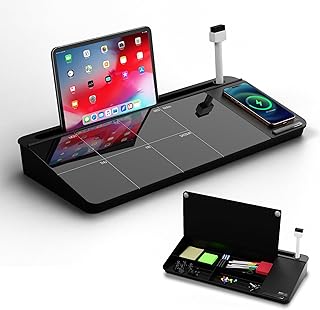
NEXTLUXE Glass Desk Whiteboard with Wireless Charger – Desktop Whiteboard with Storage, Weekly Planner, Dry Erase Pad, Organizer Drawer for Home, School, Office Gadgets – Black (Black)
Best For:
Content creators, remote workers, and students who want a premium-looking, multifunctional desk organizer with a writable glass surface and wireless charging.
The NEXTLUXE Glass Desk Whiteboard is a multifunctional organizer aimed at modern minimalists who want a clean surface with practical planning and charging features. At first glance it reads like a sleek plateau: a tempered glass dry-erase surface with a built-in wireless charger and a small hidden drawer for essential desk items. The glass top offers a premium look—less visually noisy than paper and more refined than plastic boards—and wipes clean for daily reuse.
A key appeal is consolidation. Instead of a separate wireless pad, weekly planner, and a tray for pens, NEXTLUXE combines these into a single footprint. For creators who value an intentional aesthetic on camera, the black tempered glass photographs well and reduces glare compared with glossy plastic. The included weekly grid or writable area helps with quick planning, while the integrated wireless charger keeps your phone within reach and powered without extra cables strewn across the desk.
Real-life scenarios: remote professionals can jot a three-point daily focus and drop their phone on the charger; students can use the dry-erase surface for problem work and slide small pens into the internal drawer; podcasters or streamers appreciate that the all-black aesthetic minimizes reflections and keeps the foreground tidy during recordings. Compared with a standard dry-erase office easel or sticky notes, this product reduces clutter by combining functions in a compact device.
Important buying considerations: confirm the wireless charger’s compatibility with your phone model and remove thick cases for reliable charging. The glass surface is heavier than plastic, so it offers stability but may not be ideal for very small or floating desks. Also check the drawer capacity—it’s designed for small items like pens, cables, and USB drives, not bulky accessories.
Who it’s best for: minimalists who want an all-in-one desk organizer with a premium look—content creators, remote workers, and students who appreciate an elegant writable surface plus wireless charging. It may be overkill for users who prefer purely digital planning or those who need large storage compartments.
Check the latest price on Amazon.
Pros
- Combines dry-erase planning surface with wireless charging
- Premium tempered glass reduces visual clutter and wipes clean
- Built-in drawer for small essentials keeps desktop tidy
Cons
- Heavier and less portable than plastic organizers
- Wireless charging may require removing thick phone cases
Check the latest price on Amazon.
TSJ OFFICE Small Desktop Whiteboard -Glass Dry Erase Board Computer Keyboard Stand White Board Surface Pad with Drawer, Desk Organizers with Accessories for Office, Home, School Supplies – White

Best For:
Students and remote workers who need a compact writable surface with small-item storage and an optional keyboard-elevating profile.
The TSJ OFFICE Small Desktop Whiteboard blends a writable glass surface with a discreet drawer and an elevated surface design that doubles as a keyboard stand in some setups. This product targets people who want a slim multi-use piece that keeps frequently used items close while providing a clean writing surface for short notes and sketches. The white glass finish brightens a desk and gives a neutral backdrop that works with most minimalist aesthetics.
Unlike full-size whiteboards, this desktop variant stays within arm’s reach—a big advantage if you jot reminders or sketch ideas during calls. The raised profile can be useful for small keyboards; elevating a keyboard improves ergonomics slightly and creates under-desk storage for thin items like a notebook or a foldable phone stand. The drawer is sized for pens, erasers, sticky notes, and small cables, making the piece a compact substitute for a larger organizer.
Practical use cases include quick meeting notes, keeping an active to-do list, and sketching wireframes during brainstorming sessions. Creators who film desk videos will find the white glass attractive as it reflects less texture than wood and provides a clean foreground. Compared to plastic desk organizers, the glass surface feels sturdier and wipes nearly stain-free. Compared to the NEXTLUXE glass organizer, this model may lack wireless charging but often comes at a lower price point and simpler functionality.
Buying considerations: confirm that the height and width fit your keyboard and monitor riser setup if you plan to use it as a stand. Glass surfaces are easy to clean, but watch for sharp edges in lower-cost models and handle with care during setup. If you frequently relocate your desk, note that glass is heavier and may chip if bumped.
Who it’s best for: people who want a compact, writable surface plus small-item storage—ideal for students, remote workers, and anyone who appreciates a bright, uncluttered workspace. Not suited for those who want integrated charging or large storage capacity.
Check the latest price on Amazon.
Pros
- Writable glass surface that wipes clean
- Discreet drawer for pens and small accessories
- Can serve as a low-profile keyboard stand
Cons
- No integrated charging features
- Glass adds weight and requires careful handling
Check the latest price on Amazon.
YSAGi Leather Desk Protector, Office Mat, Large Mouse Mat, Non-Slip PU Leather Blotter, Laptop Pad, Waterproof Writing Pad for Office and Home (Grayish Green, 23.6" x 13.8")

Best For:
Remote workers, creators, and professionals who want a polished, waterproof desk surface in a compact size.
The YSAGi Leather Desk Protector targets buyers who value a uniform, upscale surface that doubles as mousepad, writing surface, and laptop pad. With dimensions close to 23.6 x 13.8 inches, it occupies a compact footprint suitable for small desks and shared workspaces. Its PU leather finish gives a consistent texture that looks polished on camera and resists moisture from coffee or accidental spills.
The mat’s waterproof and non-slip features make it a practical surface shield. Compared with cloth mouse pads that trap dirt or expand with moisture, PU leather wipes clean and maintains a tidy look. The smooth top is friendly for mouse sensors and offers predictable glide, which is important for creators who frequently edit video or photos and need precise cursor control without a separate mousepad.
Use-case scenarios: remote workers using a laptop on a kitchen table can deploy this mat to protect the surface and define a neat work zone; designers using small tablets and a compact keyboard will benefit from the consistent slip-free area; minimalists who film desktop videos will appreciate the uniform backdrop that reduces distracting textures. Customers often note that the color choices—like grayish green—add a subtle but modern twist compared with standard black or brown mats.
Comparison with alternatives: larger stitched leather desk pads provide more area but require a bigger surface and are less portable. Cloth gamer pads are larger and targeted for sweeping mouse movement; if you don’t game and prefer a minimalist profile, the YSAGi mat is more suited. Unlike thin plastic protectors, the YSAGi offers a bit of padding and a clean edge finish.
Buying considerations: if you type for prolonged periods and need a thick wrist cushion, consider adding a separate wrist rest since this mat is thin. Measure your desk to ensure the size accommodates both keyboard and mouse if you prefer them side-by-side. PU leather can develop creases if rolled tightly—store flat when possible.
Who it’s best for: professionals and creators who want a refined, wipeable surface that looks great on camera and protects their desk in small spaces. Not ideal for gamers needing extensive mouse real estate or users seeking a thick ergonomic wrist rest.
Check the latest price on Amazon.
Pros
- Waterproof PU leather surface that wipes clean
- Non-slip backing and consistent mouse glide
- Compact size fits small desks and shared spaces
Cons
- Thin padding—no thick wrist cushion included
- May crease if rolled tightly for storage
Check the latest price on Amazon.
Final Verdict
Minimal desk setups are less about depriving yourself of tools and more about choosing multipurpose pieces that remove friction from your workflow. The five products above each tackle a core need: surface protection (AFIING and YSAGi mats), near-screen reminders (MDOZQ memo boards), and consolidated planning plus storage (NEXTLUXE and TSJ OFFICE glass organizers). If your priority is defining a calm foreground for videos or creating a tidy focus zone for deep work, start with a good desk mat and one multifunctional organizer.
For those on very tight desks, the compact AFIING cork/PU mat or the YSAGi leather protector offers immediate improvement. If you want to reduce paper and cables, a glass whiteboard with integrated storage—especially one that adds wireless charging—consolidates daily tools into a single footprint.
When choosing, measure your desk, know your workflow, and prioritize materials that match your maintenance habits: cork for texture, PU leather for easy cleaning, and glass for a premium writable surface. Minimalism thrives on restraint—pick one or two pieces that cover multiple tasks rather than many single-use accessories.
If you found a product here that fits your vision for a minimal workspace, follow the links to learn more and verify dimensions and compatibility. Small changes—like a reversible desk pad or a tidy memo board—can make hours of desk time feel smoother and more intentional.
Check the latest price on Amazon.
Conclusion
These Minimal desk setups trending among productivity creators lately picks are trending now and offer great value and variety. Check the links above for latest prices and reviews.
As an Amazon Associate, I earn from qualifying purchases.
Tags:
minimal desk setup, desk mat, glass whiteboard, minimalist workspace, desk organizer, productivity accessories, home office
