Desk Gadgets Writers Use for Deep Focus
As an Amazon Associate, I earn from qualifying purchases. This article may contain affiliate links, which means we may receive a commission at no extra cost to you.
Finding the right desk tools can be the difference between scattered notes and a productive writing session. Whether you’re working on a novel, crafting long-form articles, or knocking out a content calendar, a few well-chosen gadgets can help you lock into a flow state and maintain momentum. This guide gathers five practical desk accessories creators frequently rely on during focused writing routines. It’s based on product specifications, common user feedback, and how each gadget addresses everyday productivity problems—without claiming hands-on testing. As an Amazon Associate, I earn from qualifying purchases. This article may contain affiliate links, which means we may receive a commission at no extra cost to you.
Buying Guide
What to look for when choosing desk gadgets for focused writing: clarity of purpose, low friction, tactile or visual cues that encourage time-blocking, and durability for daily use. Timers should be easy to start and visible without being distracting. Notebooks (especially reusable ones) must pair well with your workflow—lined, dot grid, or executive size—so ink scanning and cloud backups are seamless. Desktop whiteboards are best when compact, with a surface that resists ghosting and offers storage for markers to keep the desk tidy. Fidget tools should provide quiet, satisfying feedback without creating a new distraction. Finally, consider build quality and compatibility with your digital ecosystem—does the notebook work with common scanning apps? Can the timer integrate mindfulness prompts or short wellness breaks? These practical questions help you pick tools that actually reduce friction instead of adding clutter.
Compare features to standard alternatives: many people substitute phone timers (which invite notifications) or paper notebooks (single-use, clutter). Reusable smart notebooks and dedicated timers give intentional separation between focus tools and entertainment devices. A compact glass whiteboard beats sticky notes for iterative planning and avoids the permanence of paper. If you write in public spaces or shared rooms, prioritize low-volume fidgets and small-format boards that respect others. Finally, factor in maintenance: marker refills, pen tip compatibility, and battery life matter if you use a gadget daily.
Use this guide to match each product to your style—time-boxing, analog sketching, or tactile focus aids—so your desk supports sustained writing rather than interrupting it.
Mindsight Focused Activity Timer & Tracker | Promotes Work Life Balance & Productivity | Pomodoro ‘Plus’ w/ 5 Fixed timers + 5 curated Wellness Activities | Office Desk Accessory | Mindfulness | ADHD

Best For:
Writers and creators who need structured focus blocks with built-in wellness prompts; people who want a dedicated, phone-free timer.
The Mindsight Focused Activity Timer & Tracker modernizes the Pomodoro concept with a focus on balanced work stretches and short wellness practices. Instead of a single countdown, this desk gadget provides five fixed timers designed for common work intervals and pairs them with five short wellness activities—breathing exercises, micro-stretches, and quick resets—to reduce mental fatigue. Its compact design is made for a writer’s desk: visible without being obtrusive, tactile buttons for quick starts, and a small footprint that keeps your workspace uncluttered.
Why it matters: phone timers can pull you into apps and notifications. A dedicated timer removes that temptation while giving you structure. The Mindsight device specifically targets creators who want to blend deep focus with short, intentional breaks—useful for anyone who struggles to remember to stand, hydrate, or breathe during long writing sessions. Compared with a standard kitchen timer, this one threads wellness breaks into your schedule, which many creators report helps maintain overall stamina across a full day of writing.
Practical use cases: schedule three 50-minute writing blocks in the morning using the preset intervals, each followed by a two-minute breathing routine. Use a short 15-minute session for editing work where you want a firm stop-start rhythm. If you’re dealing with ADHD or fluctuating attention, the device’s predictable cadence and tactile feedback can anchor your sessions without the dopamine traps of a smartphone. For remote meetings or co-working spaces, its non-intrusive alerts are less jarring than loud alarms.
Buying considerations: check battery life and whether the device has a mute or vibrate option if you prefer silent cues. Compare it to simple mechanical timers if you want absolute silence—this device trades that for extra features and wellness prompts. Users with a preference for total customizability might find fixed timers limiting, but many appreciate the curated simplicity that removes decision fatigue.
Who should buy it: writers, content creators, and students who want a structured, health-minded approach to time-blocking. Who might skip it: those who prefer fully customizable timers or already use a single integrated app for time-tracking and wellness.
Check the latest price on Amazon.
Pros
- Integrates wellness activities with time-blocking
- Tactile, desk-friendly design minimizes smartphone distraction
- Preset timers reduce decision fatigue
Cons
- Less customizable than app-based timers
- May require batteries or charging that need upkeep
Check the latest price on Amazon.
Rocketbook Core Reusable Smart Notebook, Lined Pages For School, Work and Creative Projects, Letter Size 8.5×11, Gray – Premium

Best For:
Authors, journalists, and students who take linear notes, outline long-form work, and want digital backups without paper waste.
The Rocketbook Core reusable notebook (lined, letter size) blends the tactile pleasure of handwriting with modern digital filing. The lined page format is familiar to writers who favor linear notes, outlines, and drafts. Using compatible pens, you write as usual, then scan pages with the Rocketbook app to upload notes to cloud services like Google Drive and Dropbox. When the page is full, a quick wipe with a damp cloth erases your notes and gives you a fresh page—reusable across many cycles and reducing paper clutter.
Why creators like it: many writers still think better on paper, and the Rocketbook removes the long-term clutter while keeping analog workflows intact. Compared to single-use notebooks, it’s environmentally friendlier and saves shelf space. Compared to digital-notebook tablets, the cost is far lower and there’s no learning curve involving styluses or battery life.
Real-life scenarios: use the letter-sized lined format to sketch long-form outlines, structure a multi-chapter book, or take detailed interview notes. The larger page works well during planning sessions where you need room for nested bullet points and extended paragraphs. For creative bursts, it’s easy to jot down a 500-word freewrite and scan it into your project folder for later editing. In co-writing or workshop contexts, you can quickly share scans with collaborators.
Practical observations: pen choice matters—use the recommended Pilot Frixion pens for best erasability. Scanned pages are generally crisp, but complex shading or heavy cross-outs can reduce scan clarity. If you want specialized layouts, Rocketbook offers dot-grid and executive sizes as alternatives; pick lined if you favor structured prose.
Who should buy it: writers who prefer handwriting but need digital backups and reusable pages. Who might skip it: heavy illustrators who need textured paper for markers or those who prefer a fully digital tablet experience.
Check the latest price on Amazon.
Pros
- Reusable pages reduce paper waste
- Seamless cloud integration for organized archiving
- Large letter size gives room for extensive notes and outlines
Cons
- Best results require compatible erasable pens
- Not ideal for heavy marker use or artistic shading
Check the latest price on Amazon.
Quartet Glass Dry Erase White Board 18"W x 6"H, Compact Desktop Whiteboard with Storage Drawer, Dotted (GDP186D)

Best For:
Writers and planners needing a compact, durable visual surface for goals, quick diagrams, and to-do lists.
A compact glass desktop whiteboard like the Quartet 18" x 6" offers a high-contrast, durable surface for short-form planning, daily to-do lists, and visual reminders. The dotted surface provides subtle guidance for handwriting and small diagrams, while the tempered glass resists ghosting and staining better than many cheaper boards. The thoughtful inclusion of a slim storage drawer keeps one or two markers and an eraser tucked away, so you don’t lose momentum hunting for tools mid-session.
Why creative writers and creators use it: this whiteboard does one job very well—give you a visible, easy-to-update canvas for tracking goals, word-count targets, quick plot pivots, or chapter checklists. Compared with sticky notes, it’s reusable and sits neatly on a desk so your planning is always in sight. Compared to larger wall boards, it’s portable and appropriate for smaller desks or shared spaces.
Use cases: pin a daily sprint goal at the top (e.g., ‘Write 1,000 words by 4 p.m.’), then track sub-tasks underneath: research, draft, revise. During a timed session, jot quick reminders or dissolve a paragraph structure into bullet points. In brainstorming sessions, use the dotted grid to sketch story arcs or character relationships without committing them to a permanent page. Its compact size keeps focus narrow—ideal for micro-planning rather than sprawling mind maps.
Practical notes: the glass surface cleans cleanly with a microfiber cloth or whiteboard cleaner, and the compact drawer reduces desktop clutter. If you prefer a louder visual statement, larger boards will be more visible; if you need to archive notes, scan the board or transcribe to your notebook after a session.
Who should buy it: writers who want quick visual prompts and a tidy, reusable planning surface on their desk. Who might skip it: those who require larger visual canvases or prefer entirely digital planning tools.
Check the latest price on Amazon.
Pros
- Tempered glass resists ghosting and stains
- Dotted grid aids neat handwriting and small sketches
- Built-in drawer keeps markers organized
Cons
- Small size limits large-scale brainstorming
- Requires periodic cleaning to stay pristine
Check the latest price on Amazon.
4-Key Keyboard Clicker Fidget Gadget with LED Lights, Stress Relief Tool for Office Desk & Focus, Satisfying Tactile Feedback Keychain for Adults (Black & White 2-Pack)

Best For:
Writers and remote workers who need quiet tactile stimulation to maintain focus and reduce phone-based distractions.
The 4-Key Keyboard Clicker Fidget Gadget gives you tiny, quiet tactile feedback when your hands need something to do between lines of text. Modeled after satisfying mechanical key switches, each key produces a distinct click with minimal volume. A two-pack means you can keep one at your desk and another in your pocket, or share with a writing partner. The LED accents add a playful touch for low-light writing sessions without overwhelming your workspace.
Why keep a fidget on your desk: many creators find that a small, non-distracting fidget helps maintain focus during long stretches by reducing the need for attention-sapping habits like smartphone scrolling. Compared with louder or bulkier fidget toys, this key-style clicker is compact and discreet—designed for adult users who want something tactile but not attention-grabbing in a shared office.
Real-world use cases: use it during research sessions when you’re reading and need a low-effort outlet for restless energy. Tap it quietly during phone calls that don’t require note-taking. Place one beside your keyboard for micro-breaks between paragraphs to keep fingers engaged without breaking flow. Writers with anxiety or ADHD often report that a subtle fidget reduces task-switching impulses.
Practical considerations: volume varies by build and desk surface; use a desk mat if you want to reduce resonance. LED lights are attractive but unnecessary for everyone—if you work in very dark settings, they might be distracting. The two-pack provides value, but some users prefer a single higher-end tactile device with customizable switches.
Who should buy it: writers and knowledge workers who benefit from subtle tactile stimulation to sustain focus. Who might skip it: those sensitive to repetitive sounds or who prefer entirely silent focus tools.
Check the latest price on Amazon.
Pros
- Compact, discreet design for shared spaces
- Satisfying tactile feedback mimics mechanical keys
- Two-pack offers extra value and portability
Cons
- Click volume may still be noticeable to some
- LED lights can be distracting in very dark settings
Check the latest price on Amazon.
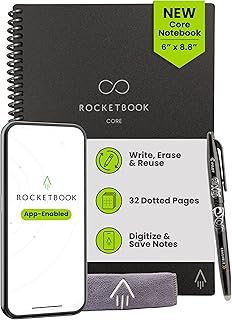
Rocketbook Core Reusable Smart Notebook, Dot Grid Pages For School, Work and Creative Projects, Executive Size 6×8.8, Black – Premium
Best For:
Traveling writers, planners, and creators who mix sketches and prose and want a compact reusable notebook.
The Rocketbook Core executive size with dot grid pages is tailored to creators who sketch, map ideas, and draft compact notes. The dot grid format is flexible—supporting neat prose as well as sketches, diagrams, and layout experiments—while the smaller executive size fits easily on a crowded desk or in a bag for writing sessions outside the home. Like other Rocketbook products, it uses erasable pens and an app-assisted scan process for clean digital archiving.
Why this format matters: compared to lined pages, dot grid strikes a balance between structure and freedom—helpful for writers who mix narrative notes with visual planning like storyboards or mind maps. Executive size is more portable than letter-size and suits short-form composition, daily journaling, or on-the-go idea capture.
Use cases: use the dot grid for mapping character relationships and spatial notes for scenes, then scan and organize into a project folder. For morning pages or short daily writing sprints, the executive size is comfortable and fast to review. If you attend interviews or book readings, you’ll appreciate the form factor for quick, digitized note capture.
Practical observations: dot grids are forgiving of imperfect handwriting and help when transferring ideas into digital outlines later. As with other Rocketbook notebooks, pen choice influences erasability and scan quality; light shading may scan faintly. If you need large-format layouts, the executive size will feel small; in that case, choose the letter-size Rocketbook instead.
Who should buy it: writers who blend sketches and text, planners, and traveling creators who need a compact, reusable notebook. Who might skip it: those who prefer full-size notebooks for extended drafting or heavy sketching with art markers.
Check the latest price on Amazon.
Pros
- Dot grid supports both sketches and structured notes
- Compact executive size is travel-friendly
- Reusable pages and cloud integration reduce paper clutter
Cons
- Smaller page limits long-form drafting
- Best performance requires specific erasable pens
Check the latest price on Amazon.
Final Verdict
A thoughtfully arranged desk can nudge your writing practice from sporadic bursts to reliable sessions. These five gadgets—the Mindsight Focused Timer, Rocketbook Core in both letter and executive options, a compact glass desktop whiteboard, and a discreet keyboard-style fidget—cover different aspects of focused work: time management, analog capture with digital backups, visual micro-planning, and tactile stimulation to prevent distraction. If you’re trying to build a sustainable writing habit, start by choosing one time-management tool and one capture tool (a whiteboard or notebook) that match your workflow. Avoid adding every gadget at once; clutter undermines focus. Instead, pick what solves your current pain point: losing time to phone distractions, drowning in paper, or needing small, tactile outlets for restless energy. These picks offer practical value for a variety of creators and are easy to test in daily routines. If one item improves your ability to start and finish writing blocks, it has paid for itself in regained time and fewer interrupted sessions.
Conclusion
These Desk gadgets creators use during focused writing routines picks are trending now and offer great value and variety. Check the links above for latest prices and reviews.
As an Amazon Associate, I earn from qualifying purchases.
Tags:
desk gadgets, writing tools, productivity for writers, Mindsight timer, Rocketbook, desktop whiteboard, fidget for focus
