Desk Gadgets to Boost Productivity Instantly
As an Amazon Associate, I earn from qualifying purchases. This article may contain affiliate links, which means we may receive a commission at no extra cost to you.
As an Amazon Associate, I earn from qualifying purchases. This article may contain affiliate links, which means we may receive a commission at no extra cost to you.
If your desk feels cluttered, your to-do list keeps growing, or you lose track of priorities between meetings and errands, the right desk gadgets can make a tangible difference. This guide highlights five compact, affordable tools designed to reduce friction in daily work: weekly and daily notepads for planning, clear monitor-side memo boards for quick reminders, and a glass desktop whiteboard that doubles as a wireless charger and organizer. These are the kinds of low-effort, high-impact items that help you capture thoughts fast, keep priorities visible, and cut the mental overhead of remembering small tasks.
In the sections that follow you’ll find careful, research-informed descriptions of each product, who will benefit most, realistic use cases, comparisons with standard alternatives like digital apps and sticky notes, plus pros and cons and practical buying considerations. Whether you prefer paper planning, a minimalist monitor-side reminder system, or an all-in-one desktop organizer with a charging pad, this article will help you choose the right tool for your workflow.
Buying Guide
How to choose the right desk gadget for productivity
Start with the problem you want to solve. Are you losing track of weekly goals, forgetting short reminders, or just drowning in sticky notes? Different gadgets address different pain points.
Paper planners and notepads. If you struggle with focus or prefer tactile planning, paper weekly and daily notepads (undated) are a dependable choice. They force you to write down priorities, reduce context switching from app-to-app, and make it easier to do a weekly review. Look for undated sheets so you can start anytime, perforated pages for clean removal, and a size that fits your desk or briefcase. These are simple, distraction-free alternatives to digital to-do apps—no notifications, just a visible plan.
Monitor memo boards. If quick reminders are your weakness, a low-profile clear monitor-side memo board keeps notes at eye level without taking desk real estate. Compared to sticky notes that crease or fall off, acrylic memo panels are reusable and neater. Consider the mounting style (clip-on vs. adhesive), thickness (sturdier acrylic resists bending), and size to ensure it won’t block screen corners or ports.
All-in-one desktop organizers. For people who juggle devices and need a tidy surface, a desktop whiteboard with storage and wireless charging consolidates essentials. Glass whiteboards resist staining and look premium; built-in drawers keep pens and chargers organized. If you rely on wireless charging, verify Qi compatibility and power output. These hybrid units replace messy cable clusters and scattered notes, but are bulkier and cost more than simple notepads.
Practical tips. Combine tools: a weekly notepad for planning, a daily pad for task execution, and a monitor memo board for urgent reminders. Match product size to your monitor and desk depth, and think about portability—if you move between home and office, a slim notepad or compact memo board is more flexible than a heavy organizer.
Buying considerations. Read descriptions for materials (acrylic vs. glass), included accessories (markers, mounts), and dimensions. For planners, sample the page layout—some people prefer hourly slots, others a simple checkbox list. For electronics, check charging specs and warranty. Finally, balance aesthetics with function: a gadget you like looking at is more likely to get used.
Weekly To Do List Notepad with 52 Undated Sheets(8.5"×11")- Undated Weekly Planner Notepad for Office Desk Accessories and Supplies – Midnight Lilac

Best For:
People who do weekly reviews, freelancers, parents, and professionals who want a visible weekly overview without using digital apps.
What it is: This is an undated weekly to-do list notepad sized at 8.5" x 11" with 52 sheets—one for each week of the year—designed to sit on your desk as a visible planning surface. The Midnight Lilac colorway gives it a subtle, professional look that reads well in home and office settings. It’s a paper-first solution for people who prefer to plan their week at a glance rather than using digital calendars.
Who it’s for: This notepad is best for planners who do a weekly review, people who manage multiple projects at once, and anyone who benefits from seeing a single-page overview for the week. It’s particularly useful for freelancers, parents juggling schedules, and knowledge workers who block time or prioritize in weekly chunks.
Main benefits and problems solved: The weekly layout helps you capture priorities, appointments, and project milestones in one place. It solves the “out of sight, out of mind” issue that comes with digital lists buried in apps. Because the pages are undated, you can start any time and skip unused weeks without wasting pages. The large 8.5" x 11" format gives room for multiple entries per day—handy for people who mix meetings, focused work blocks, and personal tasks.
Real-life usage examples: Place one sheet on your desk every Monday morning and use it to block deep work, list daily top 3 priorities, and note quick reminders. Use a highlighter to tag time-sensitive items, or snap a photo at week’s end and store it in a project folder. It also works well for household planning: assign family chores, meal plans, and appointments so everyone can see the week at a glance.
How it compares to alternatives: Compared with digital weekly planners, this notepad reduces friction—no login, no notifications, just pen and paper. Compared with small daily pads, the weekly sheet provides a better macro view so you can balance workload across days.
Buying considerations and practical observations: Check paper weight if you like using fountain pens or wet markers; budget pads may feather. Perforation quality matters for clean removal, so look for transcripts or images showing tear lines. If you travel a lot, a slightly smaller or spiral-bound option might be easier to carry.
Who should buy vs. who may skip it: Buy if you do weekly planning, prefer tactile lists, or want a low-distraction system. Skip it if you only plan by the hour in a digital calendar, need a portable planner, or prefer a multi-month bound planner with monthly overviews.
Pros:
Pros
- Undated 52-sheet format lets you start anytime and avoid wasted pages
- Large 8.5" x 11" layout offers room for detailed daily notes and time-blocking
- Clean, professional design that sits well on any desk
Cons
- Paper quality may vary—check for feathering with wet pens
- Not portable if you need a compact planner for travel
Check the latest price on Amazon.
Taja To Do List Notepad – To Do List Notebook for Work with 52 Sheets, 9.8" x 6.5", Undated Daily Planner Perfect for Daily Tasks and Goal Setting, Notepad Suitable for Office, Home & School – Greenery Sway

Best For:
Students, commuters, professionals who prefer daily focus, and anyone who needs a portable to-do solution.
What it is: The Taja To Do List Notepad is a compact undated daily planner with 52 sheets sized at 9.8" x 6.5". It’s designed for daily task capture and goal setting in a slim, portable format that fits a bag or small desk corner. The Greenery Sway design aims to be calming and minimal so the focus stays on tasks.
Who it’s for: This pad is ideal for people who work day-to-day rather than week-to-week—think students managing class assignments, professionals handling task lists, or parents keeping daily routines in order. It’s also a good fit for commuters and hybrid workers who need a portable planning surface.
Main benefits and problems solved: The daily notepad helps you break larger projects into actionable tasks and keeps a single-day focus that’s less overwhelming than a full week view. Since it’s undated, you can use a page only when you need it—handy for irregular schedules. The smaller footprint compared to full-size planners makes it easier to keep on a crowded desk or slip into a tote.
Real-life usage examples: Use a sheet each morning for a 10-minute planning ritual—list top priorities, delegate tasks, and note quick follow-ups. For students, use it to break down assignment steps with due dates. For those working in sprints, it’s a simple place to write your morning focus and then check off tasks as you go.
How it compares to alternatives: Compared with a weekly pad, the daily notepad encourages a sharper focus on immediate tasks, which can improve completion rates for short-term goals. Compared with digital task apps, this pad avoids notification fatigue and encourages a deliberate start to the day.
Buying considerations and practical observations: Inspect whether pages are perforated for neat removal and the paper weight if you prefer gel or fountain pens. The binding style affects ease of tearing and how flat it lies on the desk. Because the sheet count is 52, it lasts for about a year if used daily—good value, but not ideal if you need more frequent pages.
Who should buy vs. who may skip it: Buy if you need a portable, single-day capture tool to increase daily focus. Skip it if you prefer weekly or monthly overviews, or if you rely heavily on digital calendars with time-slot booking.
Pros:
Pros
- Compact, portable size fits bags and small desks
- Undated 52-sheet format offers flexibility
- Designed for focused daily task capture and goal-setting
Cons
- Limited number of sheets if used multiple times per week
- Smaller layout may not suit users who need space for extended notes
Check the latest price on Amazon.
Office Desk Accessories 2pcs Multifunction Computer Monitor Memo Board – Transparent Computer Side Panel Memo Creative Monitor Side Panel Suitable for Office Home Desktop

Best For:
Remote workers, customer support reps, students, and anyone who needs quick, visible reminders at eye level.
What it is: This product is a pair of transparent computer monitor memo boards that clip or adhere to your monitor side panel. They’re compact, reusable clear panels intended for short reminders, phone numbers, quick checklists, or sticky notes. The idea is to keep fast-access information at eye level without covering the main screen.
Who it’s for: These memo panels are best for professionals who need to glance at short reminders while working, remote workers who reference meeting times or PINs often, customer service reps who keep scripts handy, and anyone who finds desktop sticky notes clutter-prone. They’re excellent for multi-monitor setups where you can dedicate a side panel to notes.
Main benefits and problems solved: These acrylic or plastic panels replace loose sticky notes that fall off or lose adhesion. By positioning notes at eye level, they reduce the time spent switching gaze between keyboard and desk to find a reminder. They’re reusable—write directly on the panel with a dry-erase marker or slide sticky notes behind the acrylic for a tidier look.
Real-life usage examples: Attach a memo panel to the right of your main monitor to list today’s three priorities, or use one next to a secondary screen for meeting times and dial-in codes. Customer-facing staff can place standard responses or troubleshooting steps on the panel for quick access. Students can pin short formulas or vocabulary while studying.
How it compares to alternatives: Compared with sticky notes on the monitor bezel, these panels look cleaner and are sturdier. Compared with digital sticky-note apps, the physical presence tends to be more attention-grabbing and less easily hidden. They don’t replace full-sized whiteboards for brainstorming, but they excel at single-item visibility.
Buying considerations and practical observations: Verify the mounting method—clips are less likely to leave residue than adhesive strips, but they must fit your monitor thickness. Check panel dimensions so it won’t obscure webcam or screen corners. If you plan to write directly on the surface, ensure it’s compatible with dry-erase markers and that it wipes clean without ghosting.
Who should buy vs. who may skip it: Buy if you rely on short, visible reminders and want a neater alternative to sticky notes. Skip it if your monitor has an unusual bezel or if you already use a dedicated wall whiteboard that’s within your line of sight.
Pros:
Pros
- Keeps reminders visible without taking desk space
- Reusable and cleaner-looking than loose sticky notes
- Pair gives flexibility for multi-monitor setups
Cons
- Mounting may not fit all monitor types
- Smaller surface area—limited for long notes
Check the latest price on Amazon.
2PCS Computer Monitor Memo Board, 11" x 3.1"Clear Acrylic Office Desk Accessories, Computer Monitor Side Note Holder, Message Board for Sticky Notes, Reminders & Memos

Best For:
People who need extra horizontal space for sticky notes, multi-monitor users, and households sharing a computer.
What it is: This listing includes two clear acrylic monitor-side memo boards sized at roughly 11" x 3.1" designed to stick or clip to the side of a monitor. They serve as compact message boards for sticky notes, reminders, and short memos—an organizational accessory intended to keep key information visible without crowding the desk.
Who it’s for: These memo boards are suited to people who want a low-profile place to keep frequently referenced information—call scripts for customer service, task lists for knowledge workers, quick project notes for designers, or study cues for students. They’re also helpful for households where family members need a shared visual reminder next to a communal PC.
Main benefits and problems solved: The larger 11" length gives more horizontal room for multiple sticky notes or longer lines of text. Compared to loose sticky notes, the acrylic panel reduces the risk of notes curling or falling and offers a sleeker aesthetic. Because two panels are included, you can dedicate one to short-term reminders and the other to longer-term items.
Real-life usage examples: Use one panel to hold today’s action items and the other for login credentials (kept secure if obscured behind adhesive covers) or recurring URLs. Designers might keep client change lists on one panel while tracking deliverables on the other. Parents can use one board for the day’s family schedule and the other for grocery or chore reminders.
How it compares to alternatives: Versus standard sticky notes, these boards are more organized and reusable. Versus large wall-mounted whiteboards, they’re smaller and closer to the screen, making them better for micro-reminders. They won’t replace a notebook for deep planning but excel at keeping short, actionable notes in view.
Buying considerations and practical observations: Check how the product mounts to your monitor—adhesive is secure but may leave residue; clips are less invasive but must fit your monitor’s thickness. Confirm that the acrylic wipes clean without ghosting if you plan to write directly on it. Also consider the curvature of your monitor—these flat boards fit flat bezels best.
Who should buy vs. who may skip it: Buy if you want more horizontal space for notes than smaller panels provide or if you appreciate a two-board setup for organizing different types of reminders. Skip it if your monitor edge is curved or very thin, or if you prefer digital note widgets.
Pros:
Pros
- Larger 11" length provides room for multiple notes
- Two-panel set allows separation of short- and long-term reminders
- Clear acrylic looks tidy and professional
Cons
- Mounting method may not suit all monitor styles
- Flat panels don’t conform to curved monitor edges
Check the latest price on Amazon.
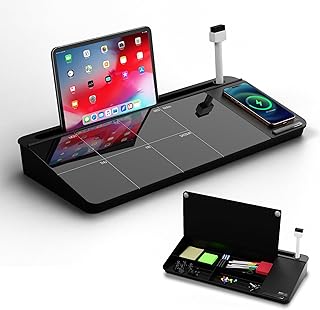
NEXTLUXE Glass Desk Whiteboard with Wireless Charger – Desktop Whiteboard with Storage, Weekly Planner, Dry Erase Pad, Organizer Drawer for Home, School, Office Gadgets – Black (Black)
Best For:
Hybrid workers, students, and anyone who wants an all-in-one desktop organizer with a premium dry-erase surface and wireless charging.
What it is: The NEXTLUXE Glass Desk Whiteboard is an all-in-one desktop organizer that combines a tempered glass dry-erase surface, a wireless Qi charging pad, and compartmentalized storage with a drawer. The unit is framed with a sleek black finish and offers a weekly planner template printed or erasable on the glass so you can plan at a glance.
Who it’s for: This product is best for people who want an integrated solution: those who juggle devices, pens, and small accessories and need a clean surface to jot notes or plan the week. It’s particularly useful for hybrid workers who want a permanent, attractive organization station on a home desk, and for students who appreciate having a charging spot and note surface in one place.
Main benefits and problems solved: By consolidating a whiteboard, charging pad, and small-item storage, this unit reduces desktop clutter and centralizes the most frequently used tools for daily work. The glass surface resists staining and ghosting better than cheaper melamine boards and looks more upscale on camera during video calls. Built-in storage prevents pens and chargers from scattering and makes it easier to maintain an uncluttered workspace.
Real-life usage examples: Use the glass weekly planner to block work hours and outline deliverables for the week while charging your phone wirelessly during deep work sessions. Keep markers and a phone cable in the drawer so they’re always available. Students can sketch study plans, track assignments, and top up their phones between study blocks. For call-heavy roles, jot quick notes on the glass between calls without reaching for a separate notepad.
How it compares to alternatives: Versus standalone whiteboards, this product adds charging and storage functionality—saving space and steps. Versus digital planning tools, it creates a persistent, visible plan on your desk and avoids app switching. The trade-off is size and price: it’s bulkier and costlier than single-purpose pads or memo boards, but offers a more polished, consolidated experience.
Buying considerations and practical observations: Confirm wireless charging compatibility and power output for your phone model, and check the drawer size for the accessories you keep. Consider desk depth—this unit takes up a measurable footprint. If you prefer ultra-portable tools, a notepad and separate charger may be better. For a permanent desktop station, the NEXTLUXE unit is a strong candidate.
Who should buy vs. who may skip it: Buy if you want a tidy, multi-function desktop hub that combines planning, charging, and storage in one attractive unit. Skip it if you need a lightweight, portable planner or if your workspace is extremely small and cannot accommodate the unit’s footprint.
Pros:
Pros
- Combines glass whiteboard, Qi wireless charger, and storage in one unit
- Tempered glass resists ghosting and looks premium on camera
- Drawer keeps small accessories organized and accessible
Cons
- Larger footprint than simple pads or memo boards
- Higher cost compared with single-purpose desk accessories
Check the latest price on Amazon.
Final Verdict
Small changes to your desk setup can deliver meaningful productivity wins. If you prefer a tactile, low-friction system that helps you plan and execute with less mental overhead, the Weekly To Do List Notepad and the Taja daily pad offer two paper-first approaches: one for macro weekly planning and one for day-to-day focus. For visible, short-form reminders, the monitor-side memo boards and the larger acrylic panels provide a neater, reusable alternative to sticky notes. And if you want a polished, consolidated desktop hub, the NEXTLUXE glass whiteboard with wireless charging is the most feature-rich option.
My recommendation for most people is to combine tools: use the weekly notepad for big-picture planning, the daily pad for execution each morning, and a monitor memo panel for urgent reminders you want in view. If you need a single, elegant desktop station and don’t move between workspaces often, the NEXTLUXE unit is worth considering despite the larger footprint and higher price.
Whichever combination you choose, think in terms of reducing the number of steps between capturing a thought and acting on it. The right physical gadget makes that step faster—one less obstacle to getting things done.
Check the latest price on Amazon.
Conclusion
These These Desk Gadgets Will Boost Your Productivity Instantly picks are trending now and offer great value and variety. Check the links above for latest prices and reviews.
As an Amazon Associate, I earn from qualifying purchases.
Tags:
desk gadgets, productivity tools, weekly planner notepad, monitor memo board, desk whiteboard, office organization, task management
