Desk Gadgets for Focused Creative Evenings
As an Amazon Associate, I earn from qualifying purchases. This article may contain affiliate links, which means we may receive a commission at no extra cost to you.
Evening is prime time for many creators: the house is quieter, email volume drops and deep work finally has room to breathe. The right desk gadgets can transform those hours from distracted slog to high-quality focus time. This guide collects practical, well-reviewed tools—organizers, glass whiteboards, a calming sand art piece, and compact boards with storage—that creators and makers commonly add to their evening workflow setups to remove friction and help sustain attention.
Affiliate disclosure (repeated for visibility): As an Amazon Associate, I earn from qualifying purchases. This article may contain affiliate links, which means we may receive a commission at no extra cost to you.
Below you’ll find a friendly buyer’s guide followed by detailed profiles of the top picks. Each product write-up explains who benefits most, real-life ways to use it, what problems it solves compared with typical alternatives, and practical pros and cons to help you decide faster.
Buying Guide
What to prioritize when choosing evening workflow desk gadgets
1) Reduce friction, not add it: The best gadgets remove small frictions—reaching for a frequently used reference, keeping a whiteboard cue within sight, or charging a phone without hunting for a cable. Look for features like easy-load pockets, built-in phone rests, wireless charging, and shallow drawers.
2) Size and footprint: Evening desks often double as dining tables or living-room surfaces. Pick compact, multi-functional items (keyboard-stand whiteboards, slim organizers) rather than large desktop towers. Measure your desk and allow for a small ‘breathing’ area so the gadget doesn’t feel imposing.
3) Materials and longevity: Tempered glass whiteboards wipe cleaner and resist ghosting compared with cheap melamine. For organizers, durable pockets and reinforced edges matter if you’ll be swapping paperwork often.
4) Quiet and low-distraction: A decorative piece like moving sand art introduces gentle motion without sound—helpful for creators who want a calming element instead of background noise.
5) Integration with routine: Ask how a gadget fits into a real run-through of your evening. Will you actually reach for markers on a glass whiteboard between focused sprints? Does the organizer hold the reference sheets you use every night? Gadgets that align with existing habits get used; those that require habit surgery often end up in drawers.
6) Alternatives vs. these picks: Standard plastic desk pads and cheap cork boards are affordable but often don’t solve visibility or durability problems. A tempered glass board with a keyboard stand elevates ergonomics and keeps the surface writable; a modular pocket add-on converts existing systems into high-visibility reference banks without replacing your whole setup.
7) Buying considerations and compatibility: For add-on organizers, confirm they fit your existing base unit. For wireless chargers, verify phone compatibility (Qi standard) and whether you’ll need a separate power adapter. Read return policies; tempered glass boards are durable but can be heavy in transit.
Use these guide points to match the right product below to your evening workflow and workspace constraints.
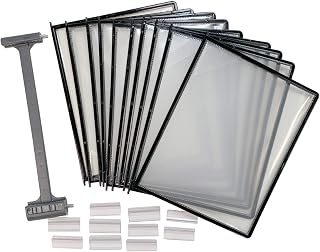
Ultimate Office AdjustaView 10-Pocket Desk Reference Organizer Add-On with Easy-Load Pockets (Add-On Module Only), Black Pockets
Best For:
Writers, developers, streamers, and anyone who relies on frequent-reference cards and wants them visible without taking extra desk space.
If your evening workflow depends on quick reference—cheat sheets, project checklists, contact cards—the Ultimate Office AdjustaView 10-pocket add-on is built to make those essentials visible and accessible without rearranging the whole desk. This entry is an add-on module, designed to snap into an existing AdjustaView base or compatible rack system; that makes it a cost-effective upgrade if you already own the modular setup.
Main benefits include its easy-load pocket design and ten vertical pockets that keep reference materials upright and readable at a glance. This is especially useful in evenings when you want to avoid interrupting deep work to search through piles or files. Compared with stacking loose papers or using a single open tray, the AdjustaView pockets reduce fidgeting: everything has a place and a predictable location.
Real-life use cases span creative writers and developers to podcasters and videographers. A copywriter might slot current story briefs, tone guides, and headline ideas into the pockets for quick switching between segments during a long edit session. A developer could store command cheats, terminal snippets, or bug-tracking notes. For livestreamers and podcasters, cue cards and ad copy remain within eye-line without cluttering the main keyboard area.
Why it’s valuable: the add-on approach avoids wholesale replacements—if you’ve already invested in a modular reference rack, adding ten pockets is cheaper and faster than buying a whole new organizer. The pockets’ vertical layout also preserves desk space while increasing visible surface area. Customers commonly report that the pockets reduce time spent hunting for small sheets and create a calmer desk environment during focused stretches.
Who should buy this: creators who already use modular organizers or those who need a compact, visible system for small-format references. It’s ideal for people who rotate between many short references and want predictable placement. Those who don’t have a compatible AdjustaView base or prefer flat document storage may need the full base product instead of this add-on.
Practical considerations: confirm compatibility with your base unit before purchasing. The pockets are best for index-card-sized to letter-folded papers; very thick stacks can create bulk. This add-on is not a standalone organizer—factor in the cost of the required base if you don’t already have it.
Check the latest price on Amazon.
Pros
- Maximizes visible reference space without expanding desk footprint
- Easy-load vertical pockets reduce paper searching
- Cost-effective upgrade if you own an AdjustaView base
Cons
- Add-on only—requires compatible base unit
- Not suitable for thick stacks or oversized documents
Find the Ultimate Office AdjustaView add-on and see details on Amazon. Check the latest price on Amazon.
Aoderun Moving Sand Art Picture Round Glass 3D Deep Sea Sandscape in Motion Display Flowing Sand Frame Relaxing Desktop Home Office Work Decor (7", Black)

Best For:
Artists, writers, designers, and creators who want a quiet, visual micro-break tool and tasteful desk decor for evening sessions.
Evening workflows can benefit from an element that calms rather than distracts. The Aoderun moving sand art picture offers slow, predictable motion in a compact, glass-framed orb that’s designed to sit on a desk or shelf. It’s not a productivity tool in the classic sense, but the gentle shifting of sand can act as a deliberate micro-break—helping creators reset between intense writing or design sprints without pulling them into a full distraction.
Compared with music or videos, a sandscape adds visual variety with zero audio and minimal cognitive load. Designers and writers often describe reaching for a tiny, tactile ritual when they feel attention slipping; watching the hourglass-like movement for 30–60 seconds can provide that ritual, offering a calming visual cue and a small, bounded break that’s less intrusive than scrolling a phone. For anxious or overstimulated minds, the contrast between kinetic art and screen flicker is especially helpful.
Real-life usage examples include a composer who glances at the sand during a constructive pause, a UX designer who uses it as a soft reset between prototype reviews, or a study session where a student times focus blocks by watching the sand reach the bottom. It also serves as an aesthetic anchor on a camera frame for livestreams—offering pleasant background motion without noise.
Why it’s valuable: it’s low-maintenance and turns an emotional regulation technique into an elegant object on your desk. Unlike bulkier relaxation machines or noisy devices, this piece is purely visual and compact enough to fit on a crowded workspace.
Who should buy this: creators who appreciate subtle desk decor that supports focus and mood management—artists, writers, designers, and anyone who benefits from non-digital micro-breaks. It’s less useful for those who prefer active breaks (stretching, phone timers) or need auditory cues to reset.
Practical observations: the 7-inch size fits small desks but check the base stability if your studio has pets or kids. The glass frame is delicate, so place it away from edges. It’s decorative first, functional second—expect calming effect rather than a measurable productivity boost.
Check the latest price on Amazon.
Pros
- Provides calming, non-distracting motion for micro-breaks
- Compact footprint fits smaller desks and shelves
- Noise-free alternative to audio-based relaxation
Cons
- Fragile—glass requires careful placement
- More decorative than a direct productivity booster
Add a calming sandscape to your desk setup—see product details on Amazon. Check the latest price on Amazon.
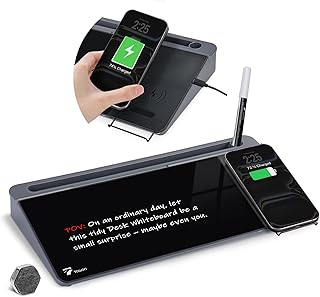
TOWON Glass Desk Whiteboard with Wireless Charger, Desktop Dry Erase Board with Storage & Phone Stand – Compact ~16 x 7 in, Black – Includes Marker & Eraser, Tempered Glass, Rewrite Reusable
Best For:
Remote workers, students, designers, and creators who want a writable surface, phone stand, and wireless charging in one compact desktop unit.
For evening-focused creators who need a writable surface without sacrificing desk real estate, the TOWON Glass Desk Whiteboard combines a tempered glass dry-erase surface, integrated storage, a built-in phone stand and wireless charging in a single compact unit. At around 16 x 7 inches, it sits conveniently above a keyboard while acting as a quick-scratch pad for ideas, task lists, equations, and visual notes.
Tempered glass offers cleaner erasing and less ghosting than standard melamine boards, which means notes stay legible and the surface looks fresh even after repeated use. The integrated storage tray keeps markers and the included eraser within reach—handy during evening sessions when you don’t want to walk away to hunt for supplies. The built-in phone stand keeps your device visible and at a natural angle for calls or timers, and the wireless charging pad (Qi-compatible on supported phones) removes an extra cable from the desktop tangle.
Real-life use cases: a freelance editor can scribble quick structure changes while listening to an audio file, glance at their phone timer on the stand, and wirelessly top up the phone between sessions. A product designer can sketch microflows and pin open reference tabs on the phone stand. Students and coders can draft algorithm steps or whiteboard small diagrams during practice runs.
Why it’s valuable: it consolidates functions—writing surface, phone stand, charging station, and small storage—into one shallow footprint, helping creators preserve a tidy workspace. Compared to separate devices (stand + charger + board), this reduces the number of items on the desk and minimizes reach time.
Who should buy this: creators who favor minimal desks and want a durable writable surface plus a clutter-free charging option—remote workers, students, designers, and content creators. If you have a phone that doesn’t support Qi charging or you prefer a larger whiteboard for extended sketches, consider alternatives.
Practical observations: verify your phone’s Qi compatibility and that the included cable or adapter fits your setup—some buyers pair the board with a dedicated power brick for optimal charging. The tempered glass surface is heavier than plastic alternatives, so stable placement matters.
Check the latest price on Amazon.
Pros
- Tempered glass wipes clean with minimal ghosting
- Combines phone stand and Qi wireless charger to reduce cables
- Compact design keeps desk surface tidy
Cons
- Heavier than plastic boards—needs stable placement
- Wireless charging depends on Qi compatibility and power source
See the TOWON glass desk whiteboard on Amazon and check compatibility details. Check the latest price on Amazon.
TSJ OFFICE Small Desktop Whiteboard -Glass Dry Erase Board Computer Keyboard Stand White Board Surface Pad with Drawer, Desk Organizers with Accessories for Office, Home, School Supplies – White

Best For:
Writers, coders, students, and anyone who wants an ergonomic keyboard stand with a writable surface and small storage drawer.
The TSJ OFFICE small desktop glass whiteboard doubles as a keyboard stand and desktop organizer, making it a practical choice for creators who want to add writing space without losing ergonomic benefits. This model is a glass dry-erase surface that typically includes a shallow drawer for storing markers, sticky notes and small accessories—an approachable alternative to larger wall-mounted boards or flimsy plastic pads.
This product solves a common evening-work problem: how to keep quick, editable notes and sketches within reach while preserving proper typing angle. By elevating the keyboard slightly, it improves wrist position while providing a writable top surface for jotting session goals, short to-do lists, or visual cues. Compared with a separate whiteboard sitting beside your keyboard, this integrated approach keeps important notes directly above your hands where you’re more likely to notice them during focused stretches.
Real-life usage includes a developer who writes a short bug-fix checklist on the board before starting a focused sprint, a creative director sketching a page layout and saving supplies in the drawer, or a student who uses the glass surface for quick math scribbles while referencing lecture notes on their screen. The included accessories (marker and eraser in many packages) make this an easy out-of-the-box upgrade for evening study and creative blocks.
Why it’s valuable: it blends ergonomics with scratch space. The combination reduces desktop clutter and keeps frequently used tools in a predictable place, which is especially helpful during late-night sessions when you don’t want to break flow looking for a pen.
Who should buy this: people who type for long stretches and want convenient annotation space above the keyboard—writers, coders, students, and remote workers who value an immediate writable surface and small-item storage.
Practical observations: the glass surface is easier to clean than cheaper pads, but thicker handwriting or permanent markers will stain if not cleaned promptly. Check the drawer size to ensure it fits the accessories you plan to store.
Check the latest price on Amazon.
Pros
- Combines ergonomic keyboard stand with writable glass surface
- Included drawer stores markers and small accessories
- Glass surface resists ghosting better than melamine pads
Cons
- Limited surface area—better for short notes than long sketches
- Drawer capacity may be small for bulkier supplies
Explore the TSJ OFFICE desktop whiteboard and included accessories on Amazon. Check the latest price on Amazon.
Desktop Glass Whiteboard with Storage, Desk Board with Computer Keyboard Stand, White Dry Erase Board with Drawers for Home, School, Office Desk Organizers and Accessories – Black

Best For:
Video editors, writers, developers, and students who want a durable writable surface combined with keyboard elevation and drawer storage.
This desktop glass whiteboard merges a full-width writable surface with integrated drawer storage and a keyboard-raising platform—an attractive option for creators who want both space to jot and improved desk ergonomics. The black-trimmed design blends into modern setups, while the tempered glass top is engineered for repeated use and easier cleaning than cheap foam-core alternatives.
Compared with standard desk pads or wall-mounted whiteboards, this unit centralizes notes and tools right where your hands naturally rest. That can significantly reduce friction: instead of opening an app or grabbing a sticky note, you write your next step directly above the keyboard and keep working. The drawers underneath are useful for storing frequently used items like markers, spare sticky notes, or small cables, helping keep the top surface visually clean for focused work.
Real-life scenarios: a video editor might list file names, timestamps, or quick color notes while cutting; a podcast editor can jot segment times and guest cues without tabbing away from their DAW. A weekend coder could map out tasks and mark completed items off the glass board between Pomodoro intervals. For people who alternate between standing and sitting, the raised keyboard surface can be part of an ergonomic stack that keeps wrists comfortable during long evening sessions.
Why it’s valuable: it provides a durable, multipurpose surface that supports both short-form notes and ergonomic typing. The tempered glass resists staining and preserves a clean look longer than standard writable pads.
Who should buy this: creators who want a visually pleasing, durable writable surface and compact storage built into the same unit—video editors, writers, developers, and students who frequently annotate while at the keyboard.
Practical observations: the unit’s footprint and weight mean it’s best for desks with stable surfaces; plan placement before ordering. If you need a very large whiteboard area, a wall-mounted option will still provide more continuous space than this desktop model.
Check the latest price on Amazon.
Pros
- Large tempered glass surface wipes clean easily
- Integrated drawers keep supplies organized and out of sight
- Raises keyboard for improved typing ergonomics
Cons
- Heavier and larger footprint—needs stable desk space
- Not ideal if you require a very large continuous writing area
Check the desktop glass whiteboard with storage on Amazon for specs and fit. Check the latest price on Amazon.
Final Verdict
Evening-focused creators benefit most from tools that reduce small frictions: visible references, a tidy writable surface, subtle mood aids, and fewer cables. The AdjustaView 10-pocket add-on is a smart choice if you already have a modular system and need rapid access to small reference cards. The Aoderun sand art piece brings low-effort, visual micro-breaks that help reset focus without sound. TOWON’s glass desk whiteboard with wireless charging consolidates notes, phone placement and cable-free charging into a single compact footprint, which is excellent for minimalists. The TSJ OFFICE and the Desktop Glass Whiteboard with Storage both blend ergonomics and writable surfaces, making them dependable choices when you want to keep notes directly above your keyboard while storing pens and small tools within reach.
Which one to choose depends on your priorities: pick the AdjustaView add-on if visibility of multiple small references is your bottleneck. Choose the TOWON board if you want writing space plus an integrated phone stand and wireless charge. Opt for the larger desktop glass whiteboard if you need more writing surface and drawer storage. The sand art is an elegant supplement for emotional reset between sprints.
All five products address the same core aim: simplify the small, repetitive tasks that interrupt flow during evening creative work. Match a gadget to your workflow constraints, check compatibility with existing gear, and prioritize features that reduce the number of times you need to stand up or hunt for supplies. Small changes in your desktop setup can add up to more sustained, higher-quality evening focus.
Check the latest price on Amazon.
Conclusion
These Desk gadgets creators use during focused workflow evenings picks are trending now and offer great value and variety. Check the links above for latest prices and reviews.
As an Amazon Associate, I earn from qualifying purchases.
Tags:
desk gadgets, evening workflow, glass whiteboard, desk organizer, wireless charger, sand art, creatives setup
