Desk Gadgets for Deep Work: Timers, Lamps & Planner
As an Amazon Associate, I earn from qualifying purchases. This article may contain affiliate links, which means we may receive a commission at no extra cost to you.
Wrestling distractions is the single biggest barrier to deep creative work. The right small gadgets—visual timers, an adjustable desk lamp, and a structured planner—can turn chaotic sessions into consistent, productive blocks. Below are practical tools creators reach for to protect attention, plan sessions, and shape a focused workflow.
Buying Guide
When choosing desk gadgets for deep work prioritize three things: clear time cues, comfortable lighting, and a simple planning system. Visual timers (analog or digital) make passing time visible and reduce clock-checking. A lamp with adjustable color temperature and brightness protects eyes during long stretches and reduces fatigue; look for memory settings and flexible arms. For planning, choose a daily system that enforces blocks and quick reviews rather than lots of blank pages. Consider noise or vibration alarms if you work in shared spaces, portability if you move between rooms, and battery vs plug-in power depending on your desk setup. Compare simple, tactile timers to feature-rich digital units—simplicity often wins for uninterrupted flow.
Time Timer Plus 60 Minute Desk Visual Timer — Countdown Timer with Portable Handle for Classroom, Office, Homeschooling, Study Tool with Silent Operation (White)

Best For:
Writers, designers, students, and creators who prefer a simple, visual countdown and want to avoid phone distractions.
If you want a no-nonsense visual cue to protect a 60-minute deep work session, the Time Timer Plus delivers. Its red disk visually disappears as time elapses, giving creators an intuitive sense of remaining focus time without needing to read numbers. The unit’s silent operation and simple knob mean you can start a session in seconds—no menus, no settings to fiddle with. Creators who juggle writing, editing, or focused coding benefit from the gentle pressure the timer provides: it externalizes the countdown so you can commit to uninterrupted blocks. Compared with smartphone timers or complex apps, the Time Timer removes digital temptation; there’s no screen to pull you into notifications. Practical observations from users include its sturdy presence on a crowded desk and the portable handle that makes it easy to move between home and co-working spaces. Considerations: it’s battery powered (so keep spare batteries), and if you need audible alarms or multi-mode timing you’ll want a digital alternative. Best for makers who prefer tactile, distraction-free timers and visual pacing rather than alarms or app-based solutions.
Pros
- Intuitive visual countdown (no reading required)
- Silent operation with portable handle
- Very simple to use—no learning curve
Cons
- Requires batteries; no advanced features
- No vibration or adjustable alarm options
A straightforward way to guard your next focus block—Check the latest price on Amazon.
Printer Jack Visual Timer for Kids, 100 Min Desk Timer Management Tools, Mute/Vibrate/Sound, Adjustable Brightness, Bear Design, Digtal Timer, Count Down/Up Timer for ADHD, Classroom, Home, Office

Best For:
Crafters, podcasters, parents who also work from home, and neurodiverse creators who benefit from vibrate/silent modes.
This compact digital visual timer combines versatility and gentle cues—useful for creators who need adjustable alerts and brightness for varied work contexts. The Printer Jack timer offers countdown and count-up modes, multiple alert types (mute, vibrate, sound), and brightness control so the visual indicator doesn’t fight your screen. The multi-mode alarm options are especially handy in shared households or co-working spaces where a loud beep would be disruptive. Compared with basic analog timers, this unit adds programmable flexibility: set longer 90–100 minute blocks, switch to a silent vibrate during recording sessions, or dim the display for low-light environments. Users report it’s helpful for managing chunked work, quick Pomodoro cycles, and transitions between deep work and shallow tasks. Practical buying considerations include the smaller form factor—great for portable use but less visible across a large studio—and the cute bear design which may not suit minimalist desks. If you need a feature-rich yet affordable digital timer with adaptable alerts, this is a solid pick.
Pros
- Multiple alert modes (mute/vibrate/sound)
- Adjustable brightness and longer max time
- Portable and programmable
Cons
- Smaller display may be hard to see across a room
- Design may feel juvenile for some desks
Flexible timing and discreet alerts help you keep flow—Check the latest price on Amazon.
LED Desk Lamp for Home Office with Full Spectrums Eye Care, 5 Color Color 5 Brightness, 4-Axis Flexible Rotation, Dual Output Charging, Memory & Timer Func, Desk Lamps with Small Night Light
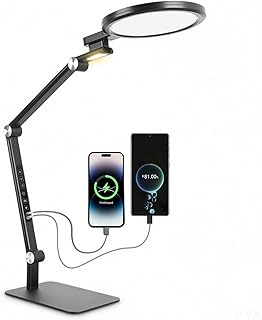
Best For:
Illustrators, video editors, writers, and anyone who needs adjustable, eye-friendly task lighting for long sessions.
Lighting is often overlooked until eyes feel strained. This LED desk lamp brings adjustable color temperatures, five brightness levels, and a flexible 4-axis arm so creators can shape light precisely for reading, sketching, or screen work. Memory functions recall your last setting, and the built-in timer can serve as a soft session end cue without an additional device. The lamp’s dual-output charging port is a practical plus—keep a phone or wireless earbuds topped up without extra adapters. Compared to simple single-bulb lamps, this model reduces glare with full-spectrum LEDs that mimic natural daylight and help reduce late-afternoon fatigue. Real-use observations include easier long-form editing and smoother color-critical tasks when switching between warm and cool light. Consider the lamp’s footprint—if you have a tiny desk, check measurements—and prefer a hardwired option if you dislike battery replacements. Ideal for creators who spend long hours at their desk and want customizable, eye-friendly light with smart conveniences.
Pros
- Multiple color temps and brightness levels
- 4-axis flexibility for precise positioning
- Memory and timer functions plus USB charging
Cons
- Takes desk space—check footprint before buying
- Higher-end features increase price vs basic lamps
Tune your workspace light for longer, more comfortable sessions—Check the latest price on Amazon.
The Time-Block Planner (Second Edition): A Daily Method for Deep Work in a Distracted World

Best For:
Professionals and creators who want a disciplined, visual system to plan and protect deep work blocks daily.
A physical planner can be the backbone of a focused workflow, and The Time-Block Planner offers a structured, daily approach to scheduling deep work in realistic chunks. The planner encourages you to map priorities into time blocks, review progress, and protect non-negotiable creative stretches. Compared to free digital calendars that invite endless editing, a paper planner reduces friction—you can visually commit to blocks and use the planner as a contract with yourself. Creators who’ve adopted time-blocking often report clearer boundaries between creative and admin work, fewer task-switching losses, and better weekly reviews. Practical tips for use: combine a visual timer (one of the gadgets above) with each block for consistent pacing; reserve morning pages or a quick rituals section to enter flow faster. Consider whether you prefer a dated planner (more structure) or undated (flexibility). If you’re easily pulled into apps or need recurring reminders, pair the planner with digital alerts rather than relying on paper alone.
Pros
- Clear daily time-block structure
- Supports habit formation and weekly reviews
- Paper format reduces digital distractions
Cons
- Requires discipline to keep updated
- Less useful if you rely entirely on digital calendars
Use a planner to reserve your best attention hours—Check the latest price on Amazon.
Final Verdict
Protecting deep work comes down to three simple investments: clearly visible timing, comfortable light, and a planning habit. Pair a tactile visual timer or a flexible digital timer with an eye-friendly desk lamp and the Time-Block Planner to create predictable, repeatable sessions. These tools reduce decision fatigue, make transitions smoother, and help you consistently block undisturbed time. Choose the combination that fits your workspace and work style—analog timers for simplicity, digital timers for flexibility, and a planner for structure.
Conclusion
These Desk gadgets creators use during focused deep work sessions picks are worth comparing if you want practical options with useful features, clear use cases, and buyer-friendly details.
As an Amazon Associate, I earn from qualifying purchases.
Tags:
deep work, visual timer, desk lamp, time blocking, productivity gadgets, creator setup, focus tools, adhd-friendly, desk gadgets creators use during focused deep work sessions, desk gadgets for deep work: timers, lamps & planner, gifts, amazon affiliate, product recommendations, buying guide, shopping guide
