Desk Gadgets Creators Use for Focused Productivity
As an Amazon Associate, I earn from qualifying purchases. This article may contain affiliate links, which means we may receive a commission at no extra cost to you.
When creators sit down for focused work—writing, editing, coding, or designing—the right desk gadget can make long stretches of concentration feel manageable. Small, tactile Pomodoro timers and flip cubes are a favorite because they are simple, visible, and interruptible on your terms. These timers remove decision friction (how long should I work?) and provide a gentle external structure that many creators find more motivating than a blinking app notification. Whether you prefer silent vibration alerts, discrete sound chimes, or preset visual cues like flipping the cube, the options below target the everyday problems that break focus: getting lost in distractions, misjudging time, and failing to schedule recovery breaks. I compared common features—preset intervals, custom countdown, vibration/mute modes, and form factor—so you can pick a gadget that fits your desk, workflow, and sensory preferences.
Buying Guide
Choose a desk timer based on how you signal breaks and how discreet you need it to be. If you work in a shared studio or with sleeping family, vibration or mute modes are essential. Creators who switch tasks frequently will appreciate a model with multiple presets and a quick flip-to-start design to avoid fumbling with buttons. If you like flexible sessions, look for custom countdown and stopwatch features; if you want minimal decisions, fixed Pomodoro presets (5/25 minutes) are ideal. Consider size and visibility—hexagon or cube shapes sit upright and act as a visual reminder, while rotating timers add a tactile element. Battery life and button placement matter if you use it all day; check that the unit feels sturdy and that the alarm volume or vibration strength suits open-plan rooms. Compared with phone apps, these physical timers reduce screen time and temptation to check notifications, and they’re typically more durable and immediate than software timers. If you need data tracking or calendar sync, a dedicated app or smartwatch might be better—these cubes keep things analog and reliably simple.
Digital Pomodoro Timer Cube 5/10/25/50min, Visual Productivity Flip Timer for Kids Classroom Desk, Custom Countdown, Silent and Sound Mode for ADHD Study Work Game Kitchen (White)

Best For:
Writers, students, and creators who want a clear visual Pomodoro timer with both silent and audible alerts.
This white Digital Pomodoro Timer Cube is built around simplicity: choose a preset by flipping the cube and the countdown starts. With 5, 10, 25 and 50-minute presets plus a custom countdown, it covers classic Pomodoro rhythms and longer deep-work blocks. It’s designed to be seen from across a room—helpful for creators who need a clear visual cue to stay on task—and offers both silent vibration and audible chime modes, so you can tailor alerts for a shared studio or quiet home office. The straightforward flip-to-start mechanic removes the friction of unlocking a phone or navigating an app, which helps keep you in a flow state. Compared with typical phone timers, this cube reduces screen temptation and provides an always-on desk presence that nudges you to begin and break intentionally. Practical considerations include its compact footprint and easy-to-reach sides, but note that small buttons and preset limits mean power users who want minute-by-minute control might prefer a model with more customization. Ideal for creators who want a visible, low-friction Pomodoro tool for writing sprints, editing blocks, or practice sessions. With classroom-friendly preset choices, it doubles as a kid-friendly focus gadget for homeschooling or study time. Check it out on Amazon to match the mode to your workspace.
Pros
- Simple flip-to-start presets
- Silent vibration and audible chime modes
- Compact, highly visible on a desk
- Custom countdown for flexible sessions
Cons
- Limited to preset intervals and one custom option
- Small buttons can be fiddly for some users
See full details and pickup options on Amazon.
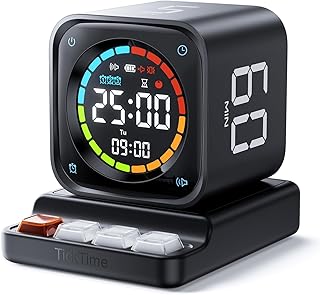
TK3 Pomodoro Timer Cube, Desk Productivity Timer with 5/10/30/60 Min Presets, Custom Countdown, Stopwatch, Clock, 3 Alarm, Silent, Vibrate & Sound Alert, for Task, ADHD, Study, Kitchen, Black
Best For:
Multitasking creators who want both preset timers and a stopwatch/clock for mixed workflows.
The TK3 Pomodoro Timer Cube adds a few productivity extras creators appreciate: beyond the 5/10/30/60 minute presets it includes a stopwatch and clock display, plus three distinct alarm tones. This makes it a versatile desk companion—use the stopwatch for open-ended creative warm-ups, the clock to check real-world time between sprints, and the preset Pomodoro modes for structured deep work. Silent, vibrate, and audible modes let you adapt to shared spaces or focus routines where audible chimes would be disruptive. Compared to basic flip cubes, the TK3’s multiple alarms and stopwatch provide more flexible session control without resorting to apps. Real customers often mention the clear display and dependable alerts, though some note a brief learning curve to cycle through modes. This model suits creators who switch between timed tasks and freeform sessions—think illustrators who want a 60-minute color study followed by short 5-minute breaks, or podcasters timing segments and ad breaks. Practical buying considerations include checking alarm volume and battery life if you’ll use vibration mode frequently. If app syncing or data logging is a must, this cube won’t replace software, but for tactile, distraction-free timing it’s a solid desk tool. Find it on Amazon to compare the alarm modes for your workflow.
Pros
- Multiple presets plus stopwatch and clock
- Three alarm tones and vibration/mute options
- Good for mixed task workflows
Cons
- Slightly steeper mode navigation
- No Bluetooth or app integration
View product details and buying options on Amazon.
Rotating Pomodoro Timer 5, 25, 10 30,60 Mins Preset Stopwatch, Desk Flip ProductivityTimer, ADHD Tool Hexagon, Vibration/Mute/Alarm, for Work, Study, Back to School, Kitchen, Black

Best For:
Creative professionals who value tactile rituals and visible session indicators on the desk.
The Rotating Pomodoro Timer brings a tactile twist with a hexagon design that you rotate or flip to select time. The physical motion of rotating the body to a preset can be surprisingly satisfying and acts as a mini ritual to begin focused work. Presets include the standard 5 and 25 minutes for classic Pomodoro cycles and longer 30 and 60-minute options for deep-focus blocks. It also has stopwatch functionality and three alert modes—vibration, mute, and audible alarm—so it’s flexible for open studios or quiet home offices. Compared with flat digital timers, the hexagon shape doubles as a visual signifier on your desk: teammates or family can instantly see if you’re in a session. Common buyer observations highlight its sturdy feel and clear preset markings, though some users mention that rotation requires a deliberate action and can take a moment to get used to. Creators who appreciate ritualized starts—musicians beginning practice runs, designers kicking off sketching sessions, or developers allocating 60-minute focus windows—will enjoy the physicality. Keep in mind that advanced time-tracking features are limited; if you need exportable data choose a software solution. For a satisfying, screen-free way to structure sessions, check the product page on Amazon.
Pros
- Tactile hexagon rotation for preset selection
- Visible desk presence as a focus signal
- Vibration, mute, and alarm modes
Cons
- Rotation action may take a few uses to feel natural
- Limited time-tracking features
Check the product on Amazon for more images and specs.
Productivity Timer 1, 5, 10, 30, 60 Minutes Preset, Desk Cube Timer with Gravity Sensor/Mute/Vibration for ADHD, Work, Study, Kitchen, Back to School (Wood Grain)

Best For:
Creators who want a stylish, tactile timer with gravity-sensor start and a range of short-to-long presets.
This wood-grain Productivity Timer blends a warmer aesthetic with practical presets tailored for frequent switching: 1, 5, 10, 30, and 60 minutes cover micro-tasks and longer focus blocks alike. The gravity sensor lets you start timing with a simple tilt or flip, which is ideal when you want to eliminate extra button presses. Vibration and mute modes make it discreet for shared environments, and the natural finish helps it sit unobtrusively on a creative desk or shelf. Compared to plastic cubes, the wood-grain finish feels more integrated into home studio decor and can be less visually intrusive. Users who balance short, reactive tasks (like email triage or quick edits) with designated deep-work windows will appreciate the 1-minute and 60-minute extremes. Consider that tactile sensors sometimes register unintended flips if the cube is jostled, so it’s best on a stable desk. Also, if you need precise sub-minute control or app-based logging, this analog approach won’t provide that. This timer is a great match for creators prioritizing aesthetics, a simple tilt-to-start flow, and flexible presets for varied session lengths. For a tactile, attractive desk timer, view it on Amazon.
Pros
- Attractive wood-grain finish
- Gravity sensor for quick tilt-to-start
- Wide range of preset intervals
Cons
- Sensor may trigger if moved accidentally
- No advanced tracking or app features
Tap through to Amazon to compare finishes and read specs.
VEWINGL Cube Productivity Timer, 25/5/10/45 Min Presets, Desk Flip Timer for Pomodoro Study Sessions, Vibration & Custom Modes for ADHD, Work, Study & Kitchen (Black)

Best For:
Creators who primarily use Pomodoro rhythms but want a flexible 45-minute option and custom countdowns.
The VEWINGL Cube Productivity Timer focuses on core presets (25/5/10/45 minutes) while also offering vibration and custom modes that fit diverse attention needs. It’s tailored for creators who use the classic 25/5 Pomodoro cycle but occasionally prefer a 45-minute flow state or a 10-minute quick task slot. The cube’s flip-to-start design is immediate and intuitive—no menu diving—making it convenient for back-to-back sessions. Compared to simpler single-mode timers, VEWINGL’s custom mode lets you fine-tune a countdown when a project requires an unusual interval. Buyers commonly praise the unit’s clear marking and reliable vibration for private reminders; some note the 45-minute preset is a handy middle ground for deeper creative work without committing to an hour. If you need cross-device syncing or analytics, this cube won’t replace a digital productivity platform, but for creators focused on minimizing screen use and keeping visible structure on the desk, it hits the mark. Good use cases include timed photo editing passes, focused composition sessions, or concentrated script edits followed by brief breaks. See full details and confirm which mode fits your routine on Amazon.
Pros
- Classic Pomodoro presets plus 45-minute option
- Flip-to-start design and custom mode
- Vibration mode for discreet alerts
Cons
- No sync or analytics features
- Custom mode may require reading the manual to set
Visit the Amazon listing to compare modes and buy.
Final Verdict
Physical Pomodoro cubes and desk timers are valuable because they reduce screen distractions, give a visible commitment to focus, and come in forms that fit different sensory needs—vibration, mute, or audible alerts. For creators who want ritualized starts, a tactile flip or rotation can be a surprisingly powerful cue. If you need data tracking, calendar integration, or cross-device sync, pair one of these timers with a digital tool. Otherwise, choose based on how discreet you need alerts to be (vibration/mute), whether you want quick presets or custom countdowns, and whether the cube’s look fits your workspace. Each option above is a solid pick for focused sessions; pick the model that matches your rhythm and desk aesthetic. Check the latest price on Amazon.
Conclusion
These Desk gadgets creators use during focused productivity sessions picks are worth comparing if you want practical options with useful features, clear use cases, and buyer-friendly details.
As an Amazon Associate, I earn from qualifying purchases.
Tags:
pomodoro timer, desk timer, productivity cube, focus tools, adhd timer, work timers, study timer, desk gadgets, desk gadgets creators use during focused productivity sessions, desk gadgets creators use for focused productivity, gifts, amazon affiliate, product recommendations, buying guide, shopping guide
