Desk Gadgets Creators Use for Focus Sessions
As an Amazon Associate, I earn from qualifying purchases. This article may contain affiliate links, which means we may receive a commission at no extra cost to you.
If you write, edit, design, or build content, you know that the right little gadget can transform a scattered work session into a productive sprint. Creators frequently turn to tactile, visual timers and thoughtful desk accessories to structure focus time, reduce decision fatigue, and protect attention. This short guide highlights compact Pomodoro-style timers and a wellness-focused tracker that many find useful for deep work, study, and ADHD-friendly workflows.
Buying Guide
When choosing a desk timer, think about three practical things: timing flexibility (fixed presets vs. custom countdown), alert modes (sound, vibration, or silent visual cues), and physical design (magnetic, cube, or hexagon for easy flipping). For creators who switch between editing, writing, and short breaks, timers with a 25-minute preset and a reliable pause/reset function are essentials. If you work in a shared space or record audio, vibration or silent visual alerts are preferable. Rechargeable models remove battery waste and small magnetic bases help attach the timer to monitors or desks. Finally, look for simple controls—complex menus defeat the point of a quick focus tool. Below are five practical options that cover lightweight portability, quiet alerts, and a wellness-minded timer for balanced sessions.
TK3 Pomodoro Timer Cube, Desk Productivity Timer with 5/10/30/60 Min Presets, Custom Countdown, Stopwatch, Clock, 3 Alarm, Silent, Vibrate & Sound Alert, for Task, ADHD, Study, Kitchen, Black
Best For:
Creators who want a simple, tactile Pomodoro cube with multiple presets and silent alert options; good for shared spaces and ADHD-friendly routines.
The TK3 Pomodoro Timer Cube is a straightforward, tactile focus tool for creators who want to structure their work without screens. This cube offers multiple presets (5/10/30/60 minutes), a custom countdown, stopwatch, and clock functions—so you can use it for short edits, longer writing sessions, or timed brainstorming. Alerts are flexible: pick sound, vibration, or completely silent visual cues depending on your workspace. That versatility makes it ideal for shared studios, podcast setups, or quiet home offices.
Practical benefits include fast tactile control (flip or press to start), an easy-to-read interface for time-left awareness, and a set of alarm options that prevent the jarring interruptions of phone notifications. Compared with phone apps, this physical timer reduces temptation to check messages and acts as an external commitment device—flip it on, and the session is set. Users who juggle ADHD-friendly workflows will appreciate the vibrate and visual-only modes that nudge focus without overstimulation.
Considerations: the cube’s design is minimal—if you want an integrated app or long-term analytics, this won’t replace software trackers. It’s best for creators who need a reliable, no-friction timer on their desk. For a quick look, view it on Amazon to see how it fits on your workspace.
Pros
- Multiple time presets and custom countdown
- Sound, vibration, or silent modes
- Simple tactile operation
Cons
- No advanced analytics or app integration
- Basic display compared to smart timers
See the TK3 on Amazon to match its presets to your workflow.
Rotating Pomodoro Timer 5, 25, 10 30,60 Mins Preset Stopwatch, Desk Flip ProductivityTimer, ADHD Tool Hexagon, Vibration/Mute/Alarm, for Work, Study, Back to School, Kitchen, Black

Best For:
People who prefer a tactile twist-to-start timer with multiple presets—ideal for students, teachers, and creators avoiding phone distractions.
This rotating hexagon Pomodoro timer brings a playful but practical twist to desk timing. Instead of pressing buttons, you twist the timer to a preset—5, 10, 25, 30, or 60 minutes—and it starts. That physical rotation makes starting a session faster and more satisfying than tapping a screen. The timer supports vibration, mute, and audible alarm modes so it adapts to quiet studios, shared coworking spaces, or louder home offices.
For creators who move between different tasks, the preset variety helps: 5-minute warmups for creative sprints, 25-minute deep work blocks, and 30–60 minute editing or recording sessions. Compared to smartphone apps, this hexagon removes the distraction layer; you don’t need to unlock your device and risk a scroll spiral. It’s also handy for teachers or students who need a visible, easy-to-use timer on a desk.
Practical buyer considerations include physical footprint—this is a slightly larger desk accessory—and the lack of connected features. If you prefer simple mechanical interaction and clear presets, this rotating timer is a pleasant, low-friction choice. Check it on Amazon to see if the twist-to-start fits your rhythm.
Pros
- Twist-to-start physical control
- Multiple practical presets
- Vibration and mute options
Cons
- Larger footprint than tiny cubes
- No smartphone connectivity
Rotate into focus—view this hexagon timer on Amazon.
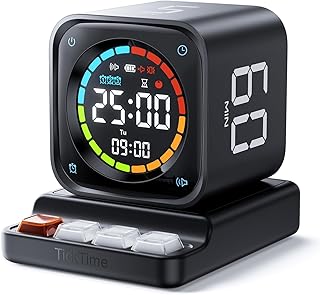
Ticktime Pomodoro Timer, Productivity Timer Cube, 3/5/10/15/25/30 Min Presets, Custom Countdown & Stopwatch 1s–99m59s, Sound/Vibration/Silent, Magnetic, Rechargeable, for ADHD Study Work, Gray

Best For:
Creators who want a rechargeable, magnetic Pomodoro cube with a wide custom range—ideal for hot-desking and recording setups.
The Ticktime Pomodoro Timer cube blends portability with practical power features creators often request. With a broad range of presets (3–30 minutes), a fully custom countdown from 1 second up to nearly 100 minutes, and stopwatch capabilities, it covers quick bursts and longer deep-work windows alike. Importantly, it’s magnetic and rechargeable—stick it to a monitor, fridge, or metal shelf and avoid replacing batteries over time.
For content creators juggling editing, scripting, and recording, the Ticktime’s rechargeable battery and magnetic back mean it stays in place during sessions and is ready whenever you are. Alerts can be sound, vibration, or silent visual cues, which suits shared apartments or recording environments where audible beeps might be disruptive. Compared to cheaper disposable battery cubes, Ticktime’s rechargeable design is more sustainable and reliable.
Note that this is a focused utility device rather than a smart desk hub—there’s no app sync or session history. If you want a durable, flexible physical timer that fits many scenarios (study, kitchen, studio), this is a standout practical pick. Click to view details and placement options on Amazon.
Pros
- Rechargeable and magnetic design
- Wide preset and custom time range
- Sound, vibration, or silent modes
Cons
- No app connectivity or analytics
- May be larger than minimalist cubes
Magnetize your workflow—check the Ticktime on Amazon.
Jack Pomodoro Timer – Productivity Cube, Visual Focus Timer, Mute & Vibration & Adjustable Sound Alert, for Office, ADHD, Study, Work, 3/5/10/25/30/60min & Custom Countdown – Black

Best For:
Users who want flexible preset options and adjustable alerts in a compact cube—suitable for creators juggling short sprints and longer edits.
The Jack Pomodoro Timer is a balanced, versatile cube designed for creators who want both preset simplicity and the option for custom timing. It offers a useful spread of presets (3–60 minutes) plus a custom countdown for irregular tasks. Adjustable sound and vibration alerts mean you can set a strong physical nudge for attention or keep things discreet during recordings or co-working.
Creators who switch between quick administrative tasks and longer creative stretches will appreciate the range of timing options. The visual element—an easy readout that shows remaining time—helps build momentum and reduces the urge to check a phone. Compared with smartphone timers, the Jack cube reduces digital temptation and sits plainly on a desk as a constant, non-distracting reminder of your session.
Buyer considerations include the absence of data tracking and the reliance on the physical device for timing—if you want logged focus sessions, you’ll need a separate app. For someone who values simplicity, tactile control, and flexible alerts, Jack is a practical, no-nonsense choice. Take a closer look on Amazon to confirm the audio and vibration settings fit your environment.
Pros
- Wide preset range plus custom countdown
- Adjustable sound and vibration
- Clear visual time display
Cons
- No session logging or app sync
- Dependent on physical device placement
Explore the Jack Pomodoro cube on Amazon to match its alerts to your setup.
Mindsight Focused Activity Timer & Tracker | Promotes Work Life Balance & Productivity | Pomodoro ‘Plus’ w/ 5 Fixed timers + 5 curated Wellness Activities | Office Desk Accessory | Mindfulness | ADHD

Best For:
Creators who want structure plus short wellness prompts—great for reducing burnout and encouraging healthy break habits during long workdays.
Mindsight takes the classic Pomodoro idea and adds a wellness-minded layer that many creators find valuable. Alongside five fixed focus timers it includes five short, curated wellness activities—breathing prompts, stretch reminders, and brief mindfulness breaks—designed to reduce burnout during long creative runs. This approach is particularly useful for creators whose work requires prolonged concentration and mental recovery, like writers, video editors, and illustrators.
Real-life use cases include alternating 25-minute editing sprints with a two-minute stretch and breathing prompt, or using shorter timers with a desk yoga break during long research sessions. Compared with bare-bones timers, Mindsight encourages a healthier rhythm and makes breaks intentional, which users often report increases overall productivity rather than simply extending screen time. It’s also a helpful visual cue in shared spaces for signaling break time.
Considerations: if you only need a simple countdown timer, the wellness extras may be unnecessary. Also, this product is focused on prompting good habits rather than providing deep analytics. For creators seeking a more humane, balanced approach to focus, Mindsight can be a valuable desktop companion. Visit its Amazon page to see how the activities align with your routine.
Pros
- Built-in wellness activities with timers
- Encourages healthier work-break balance
- Clear focus and break prompts
Cons
- May be more than needed if you only want a simple timer
- Not a substitute for detailed productivity analytics
Check Mindsight on Amazon to see if its wellness prompts suit your work style.
Final Verdict
Small, tactile timers and a wellness-minded tracker can change how creators manage attention: cubes and rotating timers remove phone distractions and provide immediate, low-friction cues, while the Mindsight unit adds prompts that protect long-term focus and well-being. Choose a rechargeable magnetic cube if you need portability and permanence, a rotating hexagon for playful, quick starts, or Mindsight for a focus-plus-wellness workflow. Match the alert mode—vibrate, silent visual, or sound—to your environment to avoid unnecessary interruptions. If you’re building a focused workspace, one of these tools will likely pay for itself in saved time and less mental friction. Check the latest price on Amazon.
Conclusion
These Desk gadgets creators use during focused productivity sessions picks are worth comparing if you want practical options with useful features, clear use cases, and buyer-friendly details.
As an Amazon Associate, I earn from qualifying purchases.
Tags:
pomodoro timer, productivity timer, desk gadgets, adhd focus tools, focus timer, time management, desk accessories, wellness breaks, desk gadgets creators use during focused productivity sessions, desk gadgets creators use for focus sessions, gifts, amazon affiliate, product recommendations, buying guide, shopping guide
