Best Wireless Presenters for Classroom Teaching & Training
As an Amazon Associate, I earn from qualifying purchases. This article may contain affiliate links, which means we may receive a commission at no extra cost to you.
Teaching a class or running a training session often hinges on smooth transitions, clear pointing and the freedom to move. A wireless presenter (also called a clicker) can transform how you lead a lecture or workshop — no more running back to your laptop, no awkward phone juggling and no missed beats. This guide walks through reliable, classroom-ready options from compact plug-and-play remotes to feature-rich Bluetooth models with cursor control.
Below you’ll find a short buying guide and five well-regarded presenters that suit small classrooms, large lecture halls and hybrid teaching setups. Each product section includes realistic use cases, who it’s best for, notable features and balanced pros and cons so you can pick the right one with confidence.
Buying Guide
What to look for in a classroom wireless presenter
Range and reliability: Classrooms and training rooms vary — small seminar rooms need less range, but auditoriums and large training spaces benefit from a 50–100 ft (15–30 m) wireless range. 2.4GHz USB receivers are common for dependable, low-latency connections; Bluetooth models are useful if you need to pair with tablets or some modern laptops that lack USB-A ports.
Compatibility: Check that the clicker works with PowerPoint, Keynote, Google Slides and your OS (Windows, macOS, Chromebook). Many presenters say “plug-and-play” but confirm if they require driver installs for advanced features.
Pointer type: Red laser pointers remain standard for classroom visibility. If you teach in front of projection screens, a laser pointer is handy. For digital whiteboards and screen control, models with cursor control or mouse-emulation can replace a separate pointing device.
Ergonomics and button layout: Look for clearly separated forward/back buttons, a dedicated black-screen (blank) button, and an intuitive ergonomic shape — small differences reduce fumbling during lectures.
Battery and charging: Some remotes use replaceable AAA/AA batteries, others have built-in rechargeable batteries. Rechargeable units remove the need to stock spare batteries but check advertised battery life and real-world reports.
Advanced features: Volume control, backlit buttons, integrated timers or vibration alerts are nice extras for trainers. However, more features can mean a learning curve; simpler models are often best for straightforward classroom use.
Alternatives: Smartphone remote apps and presentation software controls exist, but they depend on reliable Wi‑Fi, specific apps or accessories. Dedicated presenters remain the most consistent, low-friction choice for most educators and trainers.
QUI Presentation Clicker with Volume Control, 2.4GHz USB Wireless Presenter Remote, PowerPoint Clicker Slide Advancer Compatible with Mac, Windows, Google Slides, Keynote
Best For:
Teachers and trainers who want simple plug-and-play control plus on-remote volume adjustment for multimedia lessons.
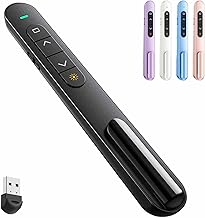
The QUI Presentation Clicker is a compact, functional presenter aimed at teachers and trainers who want a straightforward plug-and-play experience with a couple of thoughtful extras. Its 2.4GHz USB receiver promises a stable wireless link without pairing hassles — just plug the little nano-receiver into a laptop and you’re ready to move. One standout feature is integrated volume control, which lets you adjust the computer volume from the remote without needing to tap on-screen controls — a small convenience that matters during multimedia lessons or training sessions with embedded videos.
Design-wise the QUI clicker keeps the button layout minimal: forward and back slide buttons, a blank-screen shortcut and the volume rocker. It’s pocketable and light, so it’s easy to carry between classrooms and conference rooms. It also lists broad compatibility with Windows, macOS, Google Slides and Keynote, which makes it versatile for educators who switch between platforms. The unit typically runs on replaceable batteries, simplifying mid-day swaps if a charge runs low.
Real-life usage: In a mid-size classroom this clicker covers the distance a teacher usually needs — you can stand at the front, walk around a demonstration table and still advance slides reliably. The volume control is especially handy when you transition to a video clip and need to quickly raise or lower audio without returning to your laptop. Trainers running workshops with mixed media will appreciate that level of control.
Why it’s valuable: The QUI balances basic functionality with a practical extra (volume control) at a price and complexity level many educators prefer. Compared to smartphone apps, the hardware remote doesn’t rely on Wi‑Fi or app pairing. Compared to feature-rich enterprise models, the QUI strips back to essentials while adding a useful audio control.
Who should buy: Teachers and trainers who want a reliable, no-fuss remote with handy volume control. It’s ideal for lecturers who use embedded videos regularly and need quick audio adjustments.
Who may not need this: Large-venue presenters who require extended range, laser pointing or advanced cursor control. Also, users who prefer rechargeable remotes may seek another model.
Check the latest price on Amazon.
Pros
- Plug-and-play 2.4GHz connection for reliable slides control
- On-device volume control for videos and media
- Compact and easy to carry between classrooms
Cons
- No laser pointer for on-screen pointing
- Likely uses replaceable batteries rather than rechargeable cell
Check the latest price on Amazon.
Logitech Wireless Presenter R400, USB-A PowerPoint Clicker with Laser Pointer, Wireless Presentation Clicker Remote

Best For:
Educators and trainers who want a dependable, easy-to-use remote with a laser pointer for typical classroom and training-room setups.
The Logitech R400 is one of the most recognizable classroom clickers because it focuses on reliability and simplicity. It uses a USB-A nano receiver for a stable 2.4GHz connection and includes a built-in laser pointer — useful in lecture halls and lab demos where pointing at diagrams or whiteboard details helps student comprehension. The forward/back buttons are large and tactile, which reduces fumbling mid-presentation. There’s also a black-screen button to hide slides quickly, useful for prompting discussion without visual distraction.
In practice the R400 is a workhorse. Instructors often report that it just works: setup is typically plug-and-play, and the range holds up for standard classroom sizes. The laser is bright enough for most rooms with projector setups and helps when you need to highlight text or a portion of a slide. The ergonomic shape fits comfortably in hand and the button placement makes it easy to advance slides without looking at the remote.
Use cases: University lecturers who move between podium and floor can rely on the R400 to maintain a consistent connection from their teaching position. Corporate trainers running interactive workshops will also find the laser pointer handy for drawing attention during group exercises. Because the R400 uses a USB-A receiver, it’s most convenient with laptops that still provide that port — for newer machines or tablets you might need an adapter.
Why it’s valuable: The Logitech R400 is for educators who value a proven, no-frills presenter with a dependable pointer. Compared with smartphone-based remotes, the R400 avoids app compatibility issues; compared with more advanced models, it offers a lower learning curve and predictable performance.
Who should buy: Professors, K–12 teachers and corporate trainers who want a reliable laser-enabled remote for everyday classroom use.
Who may not need this: Users who need Bluetooth connectivity, cursor control or a rechargeable battery may prefer a different, more feature-rich presenter.
Check the latest price on Amazon.
Pros
- Reliable plug-and-play USB-A connection
- Built-in laser pointer for on-screen highlighting
- Ergonomic design and straightforward controls
Cons
- Requires USB-A port on the host device
- Fewer advanced features like cursor control or Bluetooth
Check the latest price on Amazon.
Kensington Expert Wireless Presenter with Red Laser Pointer and Cursor Control (K72425AM)

Best For:
Trainers and instructors who need both laser pointing and on-screen cursor control for live demos and interactive lessons.
The Kensington Expert Wireless Presenter steps up from basic clickers by combining a red laser pointer with cursor-control functionality. This dual capability is valuable when your presentation requires more than slide flipping — think annotating on-screen content, navigating menus, or simulating mouse movement during software demos. It’s particularly useful in hands-on training sessions where you need to highlight an interface element and then demonstrate a workflow directly on the screen.
Kensington’s design focuses on control: the presenter typically includes a high-quality laser, forward/back buttons and an integrated joystick or track pad for cursor movement depending on the exact variant. This makes it a favorite among trainers who switch often between slides and live demonstrations. The unit usually connects with a USB receiver for stable performance and broad OS compatibility, and its build is aimed at regular classroom or conference-room use.
Real-world usage: Imagine a computer lab session where an instructor alternates between slides explaining a concept and live walkthroughs in an application. Instead of walking back to the computer, the Kensington presenter lets the instructor both point and control the cursor to open menus, scroll windows or click controls in real time. It’s also handy in hybrid classes where the instructor needs to mirror actions for remote students while staying mobile.
Why it’s valuable: The main advantage is versatility — laser pointing plus cursor control reduces the need for multiple devices. Compared to basic remotes, the Kensington Expert can replace a separate wireless mouse during presentations, saving desk space and simplifying gear.
Who should buy: Computer lab instructors, software trainers and presenters who mix slide decks with live demos and need precise on-screen control.
Who may not need this: If you only flip slides and rarely interact with on-screen elements, a simpler, lower-cost remote might suffice.
Check the latest price on Amazon.
Pros
- Combines laser pointer with cursor control
- Well-suited for software demonstrations and lab teaching
- Reduces need for separate mouse during presentations
Cons
- More features can mean slightly higher learning curve
- May be overkill for simple slide-only presentations
Check the latest price on Amazon.
Kensington Wireless Presenter with Red Laser Pointer (K33272WW)

Best For:
K–12 teachers and lecturers who want a comfortable, durable presenter with a strong red laser and simple controls.
The Kensington Wireless Presenter K33272WW is a straightforward, reliable tool for educators who need a bright red laser pointer and dependable slide control without extra bells. Its button layout is designed for quick, confident access to forward/back slide commands and a black-screen button, and the laser is powerful enough to be visible on most classroom projectors and screens.
This clicker uses a USB receiver for a stable 2.4GHz connection and emphasizes comfort and durability — features that matter if you move between several classes each day. The form factor sits comfortably in the palm, and the tactile buttons help prevent accidental presses during active instruction. For teachers who use interactive discussions, the black-screen function can be used to pause visual material and redirect attention to class interaction.
Use cases: In K–12 classrooms where teachers often move between the whiteboard and the projector, the Kensington presenter provides a reliable pointer and slide control. It’s also appropriate for adjunct faculty or guest speakers who need a no-nonsense remote to plug into classroom workstations quickly.
Why it’s valuable: The K33272WW focuses on core functionality: dependable slide control and a visible laser pointer in an affordable package. Compared to smartphone remote apps or BT-only models, this unit avoids pairing hassles and provides consistent performance with the USB receiver.
Who should buy: Teachers and lecturers who want a comfortable, durable clicker with a bright laser pointer and long-term reliability.
Who may not need this: If you require cursor control, integrated timers, or Bluetooth connectivity for tablet pairing, consider a more feature-rich model.
Check the latest price on Amazon.
Pros
- Comfortable ergonomic design for frequent use
- Bright red laser pointer visible on most screens
- Durable build aimed at classroom use
Cons
- Limited advanced features (no cursor control)
- Uses USB-A receiver — may need adapter for newer laptops
Check the latest price on Amazon.
Microsoft Presenter+ (2022), Wireless and Bluetooth Presentation Clicker for PowerPoint, Advanced Built-in Features, Black Color

Best For:
Hybrid instructors and trainers who need Bluetooth connectivity and rechargeable convenience across multiple device types.
The Microsoft Presenter+ is a modern, flexible clicker that supports both wireless USB and Bluetooth connections, making it a good fit for educators who use a variety of devices — from older laptops to tablets and newer ultrabooks without USB-A ports. Its feature set often includes intuitive controls, a built-in laser pointer and some advanced features such as app integration for timer functions or slide previews depending on software compatibility.
This presenter aims at a slightly higher-end classroom user: someone who wants the convenience of rechargeable batteries, seamless switching between devices and the convenience of extra features like a blank-screen button or a vibration timer. Bluetooth pairing gives you the freedom to work with devices that lack a USB port while the included nano receiver still offers plug-and-play simplicity for traditional laptop setups.
Real-life scenarios: For hybrid instructors who teach both in-person and remote sessions, the Microsoft Presenter+ pairs quickly with tablets used to run meeting software, while still offering a reliable USB connection in lecture halls. Trainers who shuttle between rooms with different AV setups will appreciate the dual-connection flexibility. Rechargeable operation removes the need to carry spare batteries and helps ensure you’re ready for back-to-back classes.
Why it’s valuable: Versatility is the Presenter+’s main benefit. Compared to older USB-only remotes, it adapts to modern classroom hardware. Compared with basic models, it reduces friction for instructors who rely on a mix of devices.
Who should buy: Educators and trainers who need Bluetooth compatibility, rechargeable power and feature-rich controls for hybrid teaching environments.
Who may not need this: If you want the simplest, lowest-cost option and only use a USB-A laptop, a basic plug-and-play clicker may be perfectly adequate.
Check the latest price on Amazon.
Pros
- Dual connectivity: Bluetooth and USB receiver
- Rechargeable — no need for disposable batteries
- Designed for modern devices and hybrid teaching
Cons
- More features mean a slightly higher price and setup steps
- Some advanced functions depend on software compatibility
Check the latest price on Amazon.
Final Verdict
Choosing the right wireless presenter comes down to your teaching style and the environments where you present. For straightforward slide pushing and occasional videos, a compact plug-and-play unit with volume control like the QUI clicker is an efficient choice. If you need a bright laser pointer and rock-solid simplicity, the Logitech R400 and Kensington K33272WW are proven performers for everyday classroom use. When your lessons include software demos, the Kensington Expert’s cursor control can replace a separate mouse and streamline live demonstrations. And for instructors who move between modern devices or prefer rechargeable convenience, the Microsoft Presenter+ offers flexibility through Bluetooth plus a USB receiver.
Consider range, pointer type, connectivity and whether rechargeable batteries or replaceable cells suit your routine. For most teachers and trainers, a dependable 2.4GHz presenter with a clear button layout will remove friction and allow you to focus on teaching — not tech. Use the product summaries above to match features to your needs and pick the clicker that helps you present with confidence.
Check the latest price on Amazon.
Conclusion
These Wireless presenter for classroom teaching and training picks are trending now and offer great value and variety. Check the links above for latest prices and reviews.
As an Amazon Associate, I earn from qualifying purchases.
Tags:
wireless presenter, presentation clicker, classroom tech, teacher tools, presentation remote, training equipment, PowerPoint clicker
