Best Wireless Keyboards for Multitasking Workflows
As an Amazon Associate, I earn from qualifying purchases. This article may contain affiliate links, which means we may receive a commission at no extra cost to you.
In a world where workflows blend writing, spreadsheets, video calls, and quick app switching, a reliable wireless keyboard can make the difference between friction and flow. This guide walks through five wireless keyboards and combos that suit different multitasking styles—budget combos for basic office work, Bluetooth models for flexible device pairing, compact layouts for small desks, and premium performance gear for power users. Each pick is chosen for its balance of connectivity, ergonomics, and productivity features so you can focus on getting things done rather than fighting your peripherals.
Below you’ll find a short buying primer, detailed profiles for five keyboards well-suited to multitasking workflows, and practical notes from real buyer experiences and product specs. Whether you use multiple computers, hot-swap between tablet and laptop, or want a comfortable full-size board for spreadsheets, this guide aims to help you match keyboard features to daily tasks quickly.
As an Amazon Associate, I earn from qualifying purchases. This article may contain affiliate links, which means we may receive a commission at no extra cost to you.
Buying Guide
Choosing the right wireless keyboard for multitasking is more than picking the slickest-looking model. Here are the core considerations to help narrow the field.
1) Connectivity: Look for keyboards that offer both Bluetooth and a dedicated 2.4 GHz USB receiver if you work with multiple devices. Bluetooth lets you pair with tablets and phones without a dongle, while a 2.4 GHz dongle often provides lower latency and plug-and-play reliability for desktops or laptops without Bluetooth.
2) Layout and Size: Full-size keyboards with numpads are best for heavy spreadsheet work and data entry. Tenkeyless or compact models are better for cramped desks and mobile setups. If you switch between devices frequently, keyboards with easy-switch keys (often labeled 1/2/3) save time.
3) Key Mechanism and Feel: Scissor-switch keys are common on quiet office keyboards—comfortable for long typing sessions and less noisy on calls. Mechanical switches offer tactile feedback and faster actuation but can be louder. If you make many keystroke-heavy inputs, consider comfort and long-term fatigue.
4) Programmable Keys and Shortcuts: Customizable function keys, macro support, or dedicated shortcut hotkeys (like Copilot or media keys) speed up repetitive workflows. Programmability matters for power users who want tailored shortcuts for apps like Excel, Slack, or Adobe tools.
5) Build and Ergonomics: A slight incline, palm rest, and spill-resistant design add to day-to-day comfort and longevity. Some premium keyboards also have backlighting and adjustable key tilt for low-light work.
6) Battery Life and Power Type: Rechargeable units with USB-C are convenient and eco-friendly, while some budget models use replaceable AA/AAA batteries offering long standby life. Consider how often you want to charge versus swap batteries.
7) Price vs. Features: Budget combos provide basic, reliable typing and often include a mouse—great for office kiosks and home offices. Mid-range boards add Bluetooth and quiet keys; high-end options add multi-device pairing, premium key feel, and customization.
Practical buying notes: check compatibility with your OS (Windows, macOS, Linux, Chrome), read user reports on connection stability, and consider the desk footprint. If you use voice/video calls, prioritize quiet keys and a palm rest to reduce fatigue. If you bounce between a work laptop, personal tablet, and phone, a Bluetooth model or one with multi-device pairing is essential.
With these considerations in mind, the five picks below span from budget-friendly combos to performance-grade keyboards, each described with realistic use cases, strengths, and limitations.
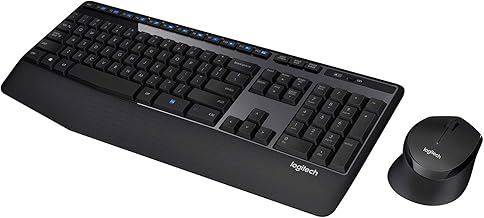
Logitech MK345 Wireless Keyboard and Mouse Combo with Palm Rest, 2.4 GHz USB Receiver, Compatible with PC, Laptop, Black
Best For:
Budget-conscious home office users who want a full-size, reliable plug-and-play keyboard and an included mouse for everyday multitasking.
The Logitech MK345 is a practical wireless keyboard-and-mouse combo designed for everyday productivity. It pairs via a single 2.4 GHz USB receiver and focuses on comfort and value: a full-size keyboard with an integrated palm rest, a number pad, and an ambidextrous optical mouse. The keycaps use a quiet scissor-switch style that keeps typing noise low during conference calls and shared workspaces. For multi-tab or spreadsheet-heavy tasks, the full numeric keypad and dedicated function keys help speed up entry and navigation.
This combo is aimed at home offices, small business desks, and anyone seeking an affordable plug-and-play solution. It solves the common problem of cluttered setups by using one receiver for both devices—no separate dongles to misplace. Users who prefer a simple, reliable pairing without dealing with Bluetooth settings will appreciate the straightforward USB receiver approach. The included mouse is basic but tuned for smooth cursor movement for common office tasks, web browsing, and light photo editing.
In real-world use, buyers note the palm rest reduces wrist fatigue for prolonged typing sessions compared to ultra-slim keyboards. Battery life tends to be strong thanks to efficient low-power design, and the keyboard’s spill-resistant layout offers extra peace of mind around coffee or water. Compared to compact Bluetooth keyboards, the MK345 trades device-swapping flexibility for immediate reliability on systems with limited Bluetooth support. It’s not targeted at gamers or those seeking premium mechanical feedback, but it excels as a dependable, no-frills productivity duo.
Who should buy this: budget-minded users, small office setups, and people who prefer a full-size board with a physical palm rest and simple USB plug-and-play. Who might skip it: those needing Bluetooth multi-device pairing, advanced programmability, or premium key feel.
Check the latest price on Amazon.
Pros
- Affordable full-size keyboard + mouse combo
- Integrated palm rest reduces wrist fatigue
- Single USB receiver for both devices
Cons
- No Bluetooth or multi-device pairing
- Basic mouse and non-rechargeable battery options
Check the latest price on Amazon.
Kensington KB535 Wireless Keyboard, Bluetooth & 2.4GHz Connection, Full-Size Layout, Quiet Scissor-Switch Keys, Programmable, Copilot Hotkey, Compatible with Windows, Black (K75408NA)

Best For:
Professionals who need multi-device pairing, programmable keys, and a full-size keyboard for extended typing and shortcuts.
The Kensington KB535 sits in the sweet spot between flexible connectivity and productivity-focused features. It supports both Bluetooth and a 2.4 GHz dongle, allowing quick switching between a desktop and a laptop or tablet. The full-size layout includes a dedicated number pad and quiet scissor-switch keys designed to be comfortable for long typing sessions and unobtrusive during calls. A notable inclusion is the Copilot hotkey and other programmable keys, which let users map shortcuts for Windows workflows—handy when piecing together routine tasks across apps.
What this keyboard solves is the divide between basic wireless models and premium, feature-laden boards. Users who need reliable multi-device use without losing the familiarity of a full-size layout will find it appealing. For example, a content creator could keep a desktop and a tablet paired and switch inputs during editing and research; an analyst might program hotkeys for macros or quick spreadsheet functions. The build is solid without being heavy, and the scissor switches give a quiet, cushioned typing experience—preferable to loud mechanical switches for shared workspaces.
Practical observations from buyers include praise for stable connections in both Bluetooth and 2.4 GHz modes and favorable feedback on the feel of the keys relative to similarly priced competitors. Programmability is useful but not as deep as on high-end mechanical keyboards—this is a productivity tool rather than a customization playground. Battery life depends on use mode (Bluetooth may draw more than the dongle in some scenarios), and some users recommend a light desk mat to reduce sliding under vigorous typing.
Who should buy this: multitaskers who switch between devices frequently, Windows users who want a Copilot hotkey and programmable shortcuts, and anyone wanting full-size comfort plus flexible connectivity. Who might skip it: Mac users who need macOS-specific key mapping or those seeking ultra-deep macro support.
Check the latest price on Amazon.
Pros
- Both Bluetooth and 2.4 GHz connectivity
- Quiet scissor-switch keys and full-size layout
- Programmable keys and Copilot hotkey for Windows
Cons
- Programmability not as extensive as premium boards
- Not optimized specifically for macOS users
Check the latest price on Amazon.
Logitech K250 Bluetooth Keyboard with Numpad, Easy Connectivity, Compact Wireless Keyboard Made with Recycled Plastic, Spill-Resistant, Comfortable Keys – Windows/MacOS – Graphite

Best For:
Users who want a compact Bluetooth keyboard with a numpad and spill resistance—good for mobile professionals and eco-conscious buyers.
The Logitech K250 is a compact Bluetooth keyboard that keeps a numeric keypad while reducing overall footprint. Built with recycled plastic and a spill-resistant design, it’s aimed at environmentally conscious buyers who still need the functionality of a numpad for spreadsheets and quick numeric input. The low-profile, comfortable keys and simplified Bluetooth pairing make it a convenient choice for users who juggle a laptop and tablet or who travel between workspaces.
This keyboard solves the dilemma of choosing between compactness and numeric entry. Many small Bluetooth boards omit the numpad, which can be a productivity drag for accountants, data analysts, or anyone doing regular numeric entry. The K250 preserves that functionality while staying narrower than a traditional full-size keyboard. It’s also quieter than many mechanical options, making it suitable for open offices and shared workspaces.
Real buyer feedback highlights easy switching across devices and consistent Bluetooth range for typical desk distances. The spill-resistant build is a practical safeguard in a home environment where coffee or water near a keyboard is a constant risk. Battery life and power management are noted as solid for the category—users who prefer rechargeable solutions should confirm the power type before purchasing, as models can vary.
Compared with standard alternatives, the K250 is more eco-conscious and offers a better balance of size and functionality than ultra-compact boards without numpads. It won’t match the advanced customization or multi-dongle reliability of higher-end multi-device keyboards, but it’s a thoughtful middle-ground option.
Who should buy this: users who need a numeric keypad but prefer a compact Bluetooth layout, eco-minded buyers, and those who work across a laptop and tablet. Who might skip it: users who need deep programmability, a mechanical feel, or dedicated multi-device hardware dongle switching.
Check the latest price on Amazon.
Pros
- Compact layout with numeric keypad
- Made with recycled materials and spill-resistant
- Quiet, comfortable low-profile keys
Cons
- Not as configurable as premium models
- May lack rechargeable battery option in some SKUs
Check the latest price on Amazon.
Logitech K270 Wireless Keyboard for Windows, 2.4 GHz Wireless, Full-Size, Number Pad, 8 Multimedia Keys, 2-Year Battery Life, Compatible with PC, Laptop, Black

Best For:
Budget buyers who need a dependable, long-lived full-size keyboard for everyday office and home tasks.
The Logitech K270 is a stalwart budget-friendly full-size wireless keyboard that focuses on dependable wireless performance and long battery life. Using a 2.4 GHz USB receiver, it provides persistent, low-latency connectivity ideal for desktop setups where Bluetooth isn’t necessary or available. The full layout includes a number pad and eight multimedia hotkeys for quick access to volume, play/pause, and other common functions—handy when toggling between media and productivity tasks.
This keyboard addresses several practical needs: reliable day-to-day typing without fuss, minimal configuration, and a durable battery life that spares you frequent changes or charging. Users working long hours on word processing, email, and spreadsheets appreciate the consistent response and straightforward setup: plug in the receiver and you’re ready. The keys use a quiet, membrane-type design that keeps noise low compared to mechanical boards.
In real-world usage, buyers often praise the K270 for its durability and dependable wireless link—even at a budget price point. The keyboard isn’t feature-heavy: it lacks Bluetooth, advanced programmability, and premium materials, but that simplicity is exactly its strength for many users. Compared to cheaper no-name keyboards, the K270 typically offers better build quality and a more sensible key layout.
Who should buy this: users who want an affordable, reliable full-size keyboard for a desktop that prioritizes long battery life and plug-and-play simplicity. Who might skip it: people who need Bluetooth, multi-device pairing, customizable keys, or a mechanical typing experience.
Check the latest price on Amazon.
Pros
- Reliable 2.4 GHz connection and long battery life
- Full-size layout with multimedia keys
- Simple plug-and-play setup
Cons
- No Bluetooth or multi-device features
- Basic key feel compared to higher-end boards
Check the latest price on Amazon.
Logitech MX Keys S Combo – Performance Wireless Keyboard and Mouse with Palm Rest, Customizable Illumination, Fast Scrolling, Bluetooth, USB C, for Windows, Linux, Chrome, Mac,Color Graphite.

Best For:
Power users and professionals who want a premium, rechargeable keyboard and mouse combo with multi-device pairing and advanced ergonomics.
The Logitech MX Keys S Combo is aimed at professionals and power users who demand a premium typing experience and polished multi-device workflow. The MX Keys S keyboard features low-profile, laptop-style keys with precise scissor mechanisms, smart illumination that adapts to ambient light, and a comfortable palm rest included in the combo. It supports Bluetooth and USB-C wired charging, and includes a high-performance mouse with fast scrolling and customizable buttons.
This combo solves key productivity challenges: consistent, accurate typing for long sessions, quick switching between multiple computers or operating systems, and advanced customization through software for shortcut mapping. The keys are engineered for stability and reduced wobble, which helps reduce typing errors during fast work bursts. The inclusion of USB-C charging shifts the model away from replaceable batteries to a rechargeable, eco-friendlier approach.
Buyers who juggle multiple machines or virtual desktops appreciate the MX Keys S for its robust multi-host capabilities. The mouse adds fast, smooth scrolling that benefits long documents and timelines in creative apps. Reviews and user reports highlight the comfortable key travel, quiet operation, and build quality that feels noticeably more premium than budget alternatives. For developers, writers, and designers who rely on efficiency, the MX Keys S can significantly reduce friction through reliable connectivity and thoughtful ergonomics.
Comparing it to standard alternatives, the MX Keys S leans heavily into refined typing feel, software-driven customization, and multi-OS support—areas where entry-level keyboards fall short. The trade-off is cost: it’s more of an investment, but for heavy daily use the ergonomic and efficiency gains often pay dividends in comfort and speed.
Who should buy this: professionals, writers, developers, and creatives who want a premium, rechargeable keyboard and mouse combo with excellent multi-device support. Who might skip it: buyers on a tight budget or those who prefer a tactile mechanical switch.
Check the latest price on Amazon.
Pros
- Premium typing feel and smart illumination
- Rechargeable USB-C with multi-device support
- Includes performance mouse with fast scrolling
Cons
- Higher price point than budget models
- Not a mechanical keyboard for tactile switch fans
Check the latest price on Amazon.
Final Verdict
Selecting the right wireless keyboard for efficient multitasking comes down to matching features to your daily needs. If you want a straightforward, budget-friendly duo with a palm rest and simple plug-and-play reliability, the Logitech MK345 combo is a no-nonsense choice. For users who need both Bluetooth flexibility and a 2.4 GHz dongle with programmable shortcuts for Windows workflows, the Kensington KB535 blends convenience and productivity. If you want a compact Bluetooth keyboard that still preserves a numeric keypad and offers eco-friendly materials and spill resistance, the Logitech K250 is a well-balanced pick. For a long-lasting, pocket-friendly option focused on dependable operation and battery life, the Logitech K270 offers solid value. Finally, for professionals and power users who prioritize premium typing feel, rechargeable convenience, and multi-device workflows, the Logitech MX Keys S Combo provides a polished experience that pays off in daily productivity.
Consider whether you need multi-device Bluetooth switching, a numeric keypad, programmable shortcuts, or a premium typing experience. Budget combos and single-receiver keyboards are perfect for simple setups and kiosk-style workstations; Bluetooth and rechargeable premium combos are best for mobile professionals and multi-device power users. Reading user feedback about connection reliability and key comfort can further guide your choice.
All five keyboards here are solid options depending on what you value—comfort and palm support, flexible connectivity, compactness with a numpad, long battery life, or premium multi-device performance. Check the latest price on Amazon.
Conclusion
These Wireless keyboard for efficient multitasking workflows picks are trending now and offer great value and variety. Check the links above for latest prices and reviews.
As an Amazon Associate, I earn from qualifying purchases.
Tags:
wireless keyboard, multitasking keyboard, Bluetooth keyboard, wireless keyboard combo, Logitech keyboard, Kensington keyboard, productivity peripherals
