Best Wireless Keyboard & Mouse Combos (Top Picks)
As an Amazon Associate, I earn from qualifying purchases. This article may contain affiliate links, which means we may receive a commission at no extra cost to you.
Buying the right wireless keyboard and mouse combo can dramatically improve comfort, reduce desk clutter, and speed up everyday tasks. Whether you’re outfitting a home office, upgrading a student laptop setup, or looking for a quieter keyboard for late-night typing, a trusted combo saves you from juggling multiple receiver dongles and batteries.
As an Amazon Associate, I earn from qualifying purchases. This article may contain affiliate links, which means we may receive a commission at no extra cost to you. Below you’ll find a researched guide to the top Logitech keyboard-and-mouse bundles that balance ergonomics, noise reduction, battery life, and value. I’ve synthesized official specs, user feedback, and common use cases to help you pick the right kit for your needs without overwhelming technical jargon.
This guide focuses on widely available, reliable combos suitable for different priorities: quiet typing, full-sized layouts with numpads, ergonomic palm support, compact productivity, and advanced durability. Each product section explains who benefits most, real-life scenarios, plus practical pros and cons so you can compare quickly. Read the buying guide if you want a quicker checklist, or jump straight to the product that matches your priorities.
Buying Guide
Key factors when choosing a wireless keyboard and mouse combo
1) Connection type: 2.4 GHz USB receivers are the most common and reliable for desktop setups; Unifying receivers from Logitech let you pair multiple peripherals to a single dongle. Bluetooth is handy for laptops and tablets but can be less consistent with mixed-device environments.
2) Noise level and key feel: If you work late or spend long hours typing, “quiet” or low-profile scissor-switch keyboards reduce clack and fatigue. Look for models that advertise noise reduction or SilentTouch technology when silence matters.
3) Layout and size: Full-size keyboards with a numpad are essential for spreadsheet work, budgeting, or data entry. Compact layouts save desk space and are better for cramped desks or laptop-centric workstations.
4) Ergonomics: A built-in palm rest or curved keyframe helps reduce wrist strain in long typing sessions. Mice that fit your hand well and provide adequate tracking (optical sensor) will reduce wrist movement and improve precision.
5) Battery life and durability: Long battery ratings (often measured in months or years) mean less fuss replacing AA/AAA cells. Look for models that advertise multi-year life or power-saving features.
6) Extra hotkeys and functions: Multimedia keys, FN shortcuts, and programmable keys speed up common tasks. If you use video calls, volume control and mute keys are small conveniences that add up.
7) Price vs. value: Cheaper combos can be great for basic needs but may sacrifice build quality or battery life. Consider whether features like palm rests, full numpads, or quieter keys justify a modest premium.
Who should read this guide: home workers, students, remote employees, and anyone replacing a noisy or cluttered desktop setup. If you need industrial-grade keyboards for heavy-duty use, or mechanical switches for gaming, this guide focuses on mainstream comfort-and-productivity combos rather than niche, high-end gaming rigs.
Logitech MK295 Wireless Mouse & Keyboard Combo with SilentTouch Technology, Full Numpad, Advanced Optical Tracking, Lag-Free Wireless, 90% Less Noise – Graphite

Best For:
Users who need a quiet, full-sized keyboard with a reliable, no-fuss mouse—ideal for shared home offices, late-night typing, and spreadsheet work.
The Logitech MK295 is built around one clear promise: significantly quieter typing without sacrificing full-size functionality. The keyboard uses SilentTouch technology to reduce key noise—Logitech advertises up to 90% less noise—which is valuable if you share a workspace, work late, or simply prefer a calmer sound environment. The included mouse offers advanced optical tracking for reliable pointer control across typical desk surfaces and connects over a lag-free 2.4 GHz USB receiver. The keyboard keeps a full numpad, so it suits spreadsheet work, basic accounting, and number-heavy tasks where a compact layout would slow you down. Battery life is engineered to last, and the low-power design means you won’t be swapping batteries every week in typical use.
Practical benefits: This combo is aimed at office workers, students, and home users who need a quiet, full-sized setup. It solves the common problem of noisy keyboards disturbing family members or colleagues and reduces desk clutter by pairing two devices with a single receiver. Compared with cheap membrane combos, the MK295 focuses on a more refined typing experience and longer battery life, although it’s still not a mechanical keyboard and won’t give the tactile feedback some typists prefer.
Real-life use cases: late-night content writing, classroom or library study sessions, shared home office setups where noise is an issue, and front-desk or reception stations needing unobtrusive operation. Because it includes a numpad, it’s also well-suited for teachers, small business owners, and data-entry workflows.
Buying considerations: If you prioritize ultra-quiet keys and a complete layout without a large price premium, this is a strong everyday pick. If you need programmable keys, multi-device Bluetooth switching, or mechanical-style feedback, look at more specialized kits. User feedback consistently highlights the quiet keys and solid battery life, while some users report preferring a slightly firmer key feel.
Who should buy this: Choose the MK295 if you want a quiet, full-sized combo for office or home work and appreciate long battery life and simple plug-and-play setup. Who may not need it: heavy typists who prefer mechanical switches or gamers who want high-DPI mice and low-latency gaming features.
Check the latest price on Amazon.
Pros
- Very quiet typing thanks to SilentTouch technology
- Full-size layout with numpad for productivity
- Reliable 2.4 GHz connection and solid battery life
Cons
- Not suitable for mechanical-switch lovers seeking tactile feedback
- Mouse lacks advanced gaming features and extra buttons
Check the latest price on Amazon.
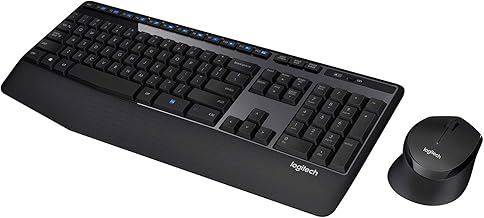
Logitech MK345 Wireless Keyboard and Mouse Combo with Palm Rest, 2.4 GHz USB Receiver, Compatible with PC, Laptop, Black
Best For:
Users who prioritize wrist comfort and ergonomic support during long typing sessions—ideal for home offices and administrative work.
The Logitech MK345 prioritizes ergonomic comfort with an included palm rest and a contoured mouse designed for right-handed users. It’s a full-size keyboard with dependable membrane keys and a comfortable typing angle, intended for users who spend many hours at a desk and want to reduce wrist strain. The 2.4 GHz USB receiver provides a simple plug-and-play experience; no pairing apps or complicated setup is required. Compared with slim laptop keyboards or compact combos, the MK345’s palm rest and larger keycaps make it easier to type for extended periods without fatigue.
Practical benefits: This combo solves the common issue of wrist discomfort by adding a palm rest and a larger, ergonomically shaped mouse. It’s a solid choice for administrative staff, content creators, and students who use their setup for multi-hour sessions. While it doesn’t claim silent key technology, the keystrokes are generally soft and unobtrusive versus older, louder designs. The layout includes a numpad, directional arrows, and shortcut keys for quick access to media controls and system functions.
Real-life use cases: long editing sessions, data entry for small businesses, remote work setups where ergonomic comfort is a priority, and casual home computing where a comfortable mouse grip matters. The MK345 is also a popular replacement for older, worn office peripherals because it feels more modern without a steep price.
Buying considerations: If wrist support and comfort are top priorities, the MK345 is a sensible choice. It uses a straightforward USB receiver rather than Bluetooth or Unifying tech, so keep your dongle safe if you move the keyboard between machines. Some buyers who prefer ultra-compact designs or left-handed mice may find the mouse shape limiting.
Who should buy this: People with wrist strain concerns, heavy typists who want a soft key feel and palm support, and users who value comfort over compactness. Who may not need it: those who need ambidextrous mice or ultra-portable travel-friendly keyboards.
Check the latest price on Amazon.
Pros
- Comfortable palm rest reduces wrist strain
- Ergonomic mouse with a contoured grip
- Full-size layout with media shortcut keys
Cons
- Mouse is right-handed oriented (not ambidextrous)
- Uses a dedicated USB receiver—dongle can be lost if moved often
Check the latest price on Amazon.
Logitech MK335 Quiet Wireless Keyboard and Mouse Combo – Black/Silver Keyboard and Mouse Combo Wireless, Ambidextrous

Best For:
Households, classrooms, and shared workstations that need a quiet, universal mouse and a dependable full-sized keyboard.
The Logitech MK335 is a balanced, quiet combo designed for everyday productivity with an ambidextrous mouse for universal comfort. It’s marketed as a quiet wireless option and offers a familiar, full-size layout with function keys and a comfortable key profile. The mouse’s symmetrical design makes it friendly for left- and right-handed users, and the keyboard’s straightforward build emphasizes ease of use over flashy extras.
Practical benefits: MK335 is for people who want a dependable, low-noise combo for multi-purpose use—office spreadsheets, home browsing, streaming controls, and light creative work. The ambidextrous mouse is a notable advantage for households with multiple users or shared devices. Compared with ultra-slim or low-profile keyboards, the MK335 keeps a more traditional key height, which some typists find more comfortable for accuracy and speed.
Real-life use cases: family computer stations where several people may use the same setup, classrooms or libraries where quieter keys reduce distractions, and small offices needing a low-maintenance keyboard for general admin tasks. Because it pairs easily with a 2.4 GHz receiver, it’s plug-and-play friendly for older laptops and desktops without Bluetooth.
Buying considerations: Choose the MK335 if you want a fuss-free, quiet combo with an ambidextrous mouse and a full layout. If you need advanced features like programmable keys, multi-device Bluetooth, or premium materials, you’ll want a higher-tier product. Users who prefer ultra-quiet ‘silent’ marketing claims should compare noise levels against products with dedicated SilentTouch branding.
Who should buy this: Families, classrooms, and multi-user environments that need a simple, quiet, and ambidextrous option. Who may not need it: left-handed users who want a dedicated ergonomic mouse or power users who need macro functions and high-precision mice.
Check the latest price on Amazon.
Pros
- Ambidextrous mouse suits left- and right-handed users
- Quiet typing suitable for shared spaces
- Simple plug-and-play setup with reliable wireless
Cons
- Not feature-rich for power users
- Traditional key height may not appeal to fans of low-profile keys
Check the latest price on Amazon.
Logitech MK235 Wireless Keyboard and Mouse Combo for Windows, 2.4 GHz Wireless Unifying USB Receiver, 15 FN Keys, Long Battery Life, Compatible with PC, Laptop

Best For:
Value buyers and students needing a compact, reliable combo with media hotkeys and long battery life.
The Logitech MK235 is a compact and budget-friendly combo that keeps essentials in focus: reliable wireless connection, practical FN shortcuts, and long battery life. Its compatibility with Windows PCs and laptops makes it a useful replacement for older peripherals, especially in environments that need a no-nonsense keyboard and a petite mouse. The keyboard includes 15 FN keys for media control, screen brightness, and other quick actions that improve productivity without adding complexity.
Practical benefits: MK235 is designed for buyers who want dependable everyday performance at a lower cost. It solves the problem of replacing multiple worn peripherals with an affordable, backed-by-Logitech kit. Compared to larger, feature-heavy combos, the MK235 is lighter and takes less desk space while still offering essential hotkeys and a comfortable typing layout.
Real-life use cases: small home offices with limited desk space, students using a laptop with an external keyboard for long writing sessions, and workplaces that buy in bulk for staff needing reliable, easy-to-manage peripherals. The long battery life makes it convenient for setups where changing batteries is a hassle.
Buying considerations: If you’re after advanced ergonomics, mechanical switches, or multi-device Bluetooth pairing, the MK235 won’t meet those needs. However, for straightforward typing, casual browsing, and media control, it checks the core boxes at a good value. Some users report that the mouse is very basic—adequate for office tasks but not for precision work.
Who should buy this: Budget-conscious buyers who want a dependable, compact combo for everyday computing. Who may not need it: gamers, heavy creative professionals, or anyone who needs programmable macros or higher-end mice.
Check the latest price on Amazon.
Pros
- Affordable and reliable for everyday tasks
- 15 FN keys provide useful shortcuts
- Compact footprint saves desk space
Cons
- Basic mouse lacks advanced tracking features
- Not suitable for multi-device Bluetooth setups
Check the latest price on Amazon.
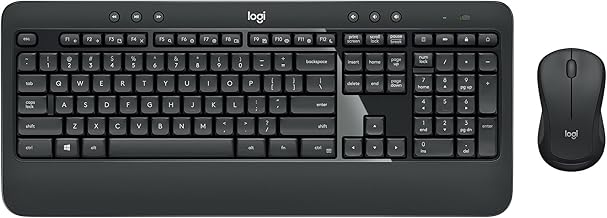
Logitech MK540 Advanced Wireless Keyboard and Mouse Combo for Windows, 2.4 GHz Unifying USB-Receiver, Multimedia Hotkeys, 3-Year Battery Life, for PC, Laptop
Best For:
Professionals and heavy typists who want a durable, full-size combo with multimedia keys and long battery life.
The Logitech MK540 Advanced is aimed at users who want a higher-quality, longer-lasting combo for serious productivity. It emphasizes durability, comfortable sculpted keys, and a full-size layout that includes multimedia hotkeys for quick control of audio and media. The Unifying USB receiver is a convenience for users who may already have other Logitech Unifying devices since multiple peripherals can share a single dongle. The standout spec is the multi-year battery life that reduces maintenance and supports a more permanent desktop setup.
Practical benefits: This kit solves common productivity pain points: keyboard comfort over long workdays, consistent wireless connectivity, and minimal maintenance thanks to extended battery life. Compared with cheaper combos, the MK540 tends to offer a sturdier feel, more pronounced key contours for typing accuracy, and a mouse that’s built for daily office use rather than occasional clicks.
Real-life use cases: knowledge workers, accountants, writers, and anyone who spends full workdays at a desk and values a robust, no-fuss setup. The multimedia keys make it easy to manage conference calls, music playlists, and video without reaching for the mouse. The Unifying receiver is especially useful in multi-peripheral environments.
Buying considerations: If you value longevity and a slightly more premium typing feel, the MK540 is a sensible investment. It’s not aimed at gamers or users who need programmable macro keys, but for office productivity its balance of ergonomics, hotkeys, and battery life is compelling. Note that the keyboard footprint is larger than compact models and the mouse design is standard—comfortable but not specialized.
Who should buy this: Professionals and heavy typists who want a durable, comfortable combo with long battery life and multimedia controls. Who may not need it: those prioritizing ultra-compact travel keyboards or gaming-specific peripherals.
Check the latest price on Amazon.
Pros
- Sturdy build and sculpted keys for comfortable typing
- Unifying receiver supports multiple Logitech devices
- Extended battery life reduces maintenance
Cons
- Larger footprint may not suit small desks
- Mouse is functional but not specialized for gaming
Check the latest price on Amazon.
Final Verdict
Choosing the right wireless keyboard and mouse combo comes down to your priorities. If silence and a full numeric keypad matter most, the MK295 offers quiet keys and a complete layout. For wrist comfort and palm support, the MK345’s integrated rest is a practical step up. The MK335 gives you a quiet, ambidextrous option suited to shared environments. Budget-conscious shoppers who need dependable essentials will appreciate the compact MK235, while professionals who want durability and long battery life should consider the MK540 Advanced.
Across these Logitech kits you’ll find common strengths: reliable wireless connectivity, straightforward setup with 2.4 GHz or Unifying receivers, and designs targeted at everyday productivity rather than gaming extremes. When comparing these models, match the keyboard layout and mouse shape to your daily tasks—numpads for spreadsheets, palm rests for long sessions, and ambidextrous mice for shared use.
If you’re still unsure, start by prioritizing one feature (silence, ergonomics, portability, or battery life) and pick the model that best aligns with that need. Each product here is a well-rated, practical choice for general computing tasks.
As an Amazon Associate, I earn from qualifying purchases. Check the latest price on Amazon.
Conclusion
These Top Wireless Keyboard and Mouse Combos picks are trending now and offer great value and variety. Check the links above for latest prices and reviews.
As an Amazon Associate, I earn from qualifying purchases.
Tags:
wireless keyboard mouse combo, Logitech keyboard mouse, quiet keyboard combo, best keyboard and mouse 2026, wireless office peripherals, compact keyboard combo, ergonomic keyboard mouse
