Best Waterproof Desk Mats for Keyboard & Mouse
As an Amazon Associate, I earn from qualifying purchases. This article may contain affiliate links, which means we may receive a commission at no extra cost to you.
If your desk often becomes a cluttered battlefield of coffee cups, cables, and mismatched mousepads, a waterproof desk mat that covers the keyboard and mouse area can transform your workspace. In this guide I walk through five popular full-desk mats that blend protection, comfort, and extra functionality like wireless charging and RGB lighting. Whether you’re gaming, working from home, or rebuilding a clean office setup, these mats are designed to keep liquids at bay, stabilize your mouse, and give a polished look to your desk.
Before diving into individual picks, note that this article links to Amazon products. The recommendations are based on product specifications, feature comparisons, and common user feedback patterns — not personal hands-on testing. Read the buying guide for tips on sizing, materials, and features you should prioritize.
Buying Guide
Choosing the right desk mat for keyboard and mouse use comes down to size, surface material, base grip, and extras. Size: Full-desk mats run from wide 31–48 inches to massive 48×17 inches. Measure your keyboard, mouse, and laptop area; leave a few inches for ergonomic wrist movement. Surface material: Cloth/nylon offers a smooth glide for mice and a softer feel for wrists, while PU leather looks sleek and wipes clean faster. Waterproof vs water-resistant: Waterproof laminates and PU leather repel spills immediately; cloth mats with waterproof backing protect the desk but may absorb small spills faster if not wiped promptly. Base grip: A good non-slip rubber base prevents sliding during long gaming or typing sessions; cheap mats can bunch up or slide on laminate desks. Extras: Wireless charging pads built into the mat are convenient for Qi-compatible phones; RGB lighting adds flair for gamers. Foldable phone holders built into the mat simplify video calls. If you frequently travel with a mat, look for flexible edges and a roll-up design.
Common trade-offs: Cloth surfaces are better for precise mouse control and comfort, PU leather wins for cleanability and style, and mats with electronics (charging/RGB) require a power source and may add weight. Consider how you clean the mat, whether your mouse sensor prefers cloth or hard surfaces, and whether extra features justify a slightly higher price. Below are five well-reviewed options across sizes and styles with practical pros, cons, and real-life use cases.
Wireless Charging Mouse Pad with Foldable Phone Holder, 31.5"x15.8" Large Desk Mat for Laptop/Keyboard, Waterproof Ultra-Smooth Surface, Non-Slip Base, Black

Best For:
Remote workers, students, and casual gamers who want a tidy desk with integrated wireless charging and a phone stand.
This 31.5" x 15.8" desk mat aims to be an all-in-one workspace upgrade: a full surface for your keyboard and mouse, a built-in wireless charging pad, and a foldable phone holder for hands-free viewing. The ultra-smooth waterproof top layer is described as easy to glide across for optical sensors while still feeling comfortable for wrist resting. A non-slip rubber base anchors the mat to your desk so keystrokes and fast mouse movements don’t shift it around. The foldable phone holder is a thoughtful addition for video calls and quick reference while working.
Who this is for: This mat is a strong fit for remote workers who want a tidier desk with the convenience of a Qi charger, or casual gamers who like a large mouse surface but don’t need the extra thickness or RGB of gaming pads. Students juggling a laptop and a phone on a compact desk will appreciate the built-in phone stand and the waterproof surface that protects against accidental coffee spills.
Real-life usage scenarios: Imagine setting up a laptop on the left side and using the mat as a keyboard surface, with your phone propped on the foldable stand for a Zoom call while it charges wirelessly. For streamers or multi-monitor users, the mat provides a smooth area for sweeping mouse movements during gameplay or editing sessions. The waterproof surface makes cleanup quick after an accidental drink spill — you simply wipe the mat down rather than disassembling accessories.
How it compares: Against plain cloth XXL pads, this option gives the extra convenience of integrated wireless charging and a phone holder. Compared to high-end RGB gaming mats, it forgoes lighting effects and very thick padding but adds practical desk organization features at a lower complexity.
Buying considerations and observations: If your phone doesn’t support Qi charging you’ll still use the mat for surface protection, so check compatibility. Because it includes electronics for charging, the mat requires a power source nearby, and the charging area is best for phones placed in the center of the pad’s charging coil. Customers commonly highlight the convenience of charging and the tidy look, while some note that charging speed can vary with phone cases.
Best for: Home office users, students, and casual gamers who want a clean desk and wireless charging without flashy features.
Pros: ["Built-in Qi wireless charging","Foldable phone holder for hands-free use","Waterproof, easy-to-clean surface","Large 31.5\" x 15.8\" coverage","Non-slip rubber base keeps mat in place"]
Cons: ["Charging performance depends on phone case and placement","Lacks RGB or gaming-specific features"]
Pros
- Built-in Qi wireless charging
- Foldable phone holder for hands-free use
- Waterproof, easy-to-clean surface
- Large 31.5" x 15.8" coverage
- Non-slip rubber base keeps mat in place
Cons
- Charging performance depends on phone case and placement
- Lacks RGB or gaming-specific features
Check the latest price on Amazon.
TopMade Mouse Pad with 15W Fast Wireless Charging, 31.5"x15.75" XXL Large Gaming Waterproof Desk Pad with Ultra-Smooth Surface, Non-Slip Base, Computer Desk Mat for MacBook, PC, Laptop, Black

Best For:
Gamers and professionals wanting 15W fast wireless charging plus an extra-large, stable surface for precision work or play.
TopMade’s 31.5" x 15.75" desk mat takes a gamer-friendly approach while staying office-appropriate. The mat integrates a 15W fast wireless charging pad rated for Qi-enabled phones, set into an ultra-smooth waterproof surface designed for consistent mouse tracking. The XXL footprint leaves room for a full-sized keyboard and wide mouse travel space, which gamers and creative professionals both need. The non-slip base is intended to prevent movement during intense sessions, and the edges are stitched or sealed to avoid fraying over time.
Who this is for: This mat is aimed at anyone who wants a high-utility desk surface with fast wireless charging — particularly gamers who need a wide, reliable surface for sweeping mouse motions and professionals who want a clean and functional workspace. The combination of a fast charger and a smooth tracking pad makes it ideal for people who switch between work and play without swapping peripherals.
Real-life usage scenarios: For a graphic designer using a laptop on one side, the XXL mat provides a steady, wide area for precise cursor work while the phone charges near the upper corner. A competitive gamer will appreciate uninterrupted mouse movement across the roomy surface and a non-slip base that stays put during intense sessions. If you often join calls while referencing a mobile device, placing the phone near the charger keeps it powered and within sight.
Why consider it over alternatives: Compared with smaller charging mats or standard cloth desk pads, the TopMade option merges fast charging with a large surface and waterproof protection. It’s more functional than a bare PU leather blotter and more feature-rich than a plain XXL cloth pad. However, tech-included mats are heavier and need a cable; if you prefer simplicity or portability, a roll-up cloth pad without electronics may be better.
Practical observations: Users frequently note that wireless charging requires accurate alignment and that thick phone cases can reduce power transfer. The waterproof top makes spills easy to address, but if you prefer the tactile feel of soft cloth for mouse control, compare sensor performance for your mouse model.
Best for: Gamers and professionals who want fast wireless charging built into a large, stable mat.
Pros: ["15W fast wireless charging","XXL surface for keyboard and mouse","Waterproof, easy to wipe clean","Non-slip rubber base","Durable stitched/sealed edges"]
Cons: ["Requires power supply and alignment for charging","Heavier than simple roll-up pads"]
Pros
- 15W fast wireless charging
- XXL surface for keyboard and mouse
- Waterproof, easy to wipe clean
- Non-slip rubber base
- Durable stitched/sealed edges
Cons
- Requires power supply and alignment for charging
- Heavier than simple roll-up pads
Check the latest price on Amazon.
Mouse Pad with Wireless Charging, Large Desk Mat RGB Gaming Mousepad, 10 Light Colors LED Gaming Pad Keyboard Pad with Ultra-Smooth Surface & Non-Slip Rubber Base, Waterproof Full Desk Mouse Pad

Best For:
Gamers, streamers, and users who want an aesthetic desk setup with RGB lighting and built-in wireless charging.
If you prefer a desk mat that doubles as a visual centerpiece, this large RGB gaming desk pad combines wireless charging and colorful LED lighting with a waterproof top and an ultra-smooth mouse surface. The RGB functionality offers customizable lighting effects (10 colors or modes depending on the model) to set the mood for gaming or a creative workspace. The mat’s non-slip rubber base keeps it anchored during fast mouse swipes, and the surface is optimized for accuracy with both optical and laser sensors.
Who this is for: This pick is aimed primarily at gamers and streamers who want both performance and aesthetics. If you live-stream or simply enjoy a dynamic desktop look, the LED lighting adds personality. It’s also useful for people who need a large mouse surface and wireless charging while maintaining a tidy, spill-resistant workstation.
Real-life usage scenarios: A streamer could use the RGB pad to match on-screen overlays during broadcasts while keeping their phone charged and in view. A casual gamer might set the LEDs to a calming color for long sessions and rely on the waterproof surface to protect against accidents. For a home office that doubles as a gaming rig, the mat provides mouse precision for work and a flashy backdrop for downtime.
Why it stands out: Compared with plain desk pads, the RGB variant is an all-in-one solution for style and function. It outshines basic PU leather blotters in terms of tracking performance and beats simple cloth pads when you want lighting and charging built-in. On the downside, lighting and charging electronics add complexity: you’ll need a nearby USB power source, and long-term durability depends on how the LED strip and wiring are protected.
Practical observations: Users often praise the visual impact and the improved mouse tracking over hard desks, but some report that RGB lighting and the charging coil can add a slight bump under thin wrists. If you prefer minimalist desks, the LEDs may be more than you need.
Best for: Gamers, streamers, and users who want an eye-catching yet functional desk mat with wireless charging and RGB lighting.
Pros: ["Customizable RGB lighting","Integrated wireless charging","Ultra-smooth surface for mouse accuracy","Waterproof top layer","Non-slip rubber base"]
Cons: ["Requires constant power for lighting and charging","RGB/charging add complexity and potential points of failure"]
Pros
- Customizable RGB lighting
- Integrated wireless charging
- Ultra-smooth surface for mouse accuracy
- Waterproof top layer
- Non-slip rubber base
Cons
- Requires constant power for lighting and charging
- RGB/charging add complexity and potential points of failure
Check the latest price on Amazon.
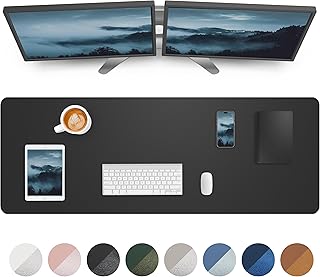
Large Desk pad mat,Mouse Pad,Office Desk Mat, Non-Slip PU Leather Desk Blotter,Large Desk pad,Waterproof Keyboard mat for Office/Home/Decor (Black,48" x 17")
Best For:
Professionals and home offices seeking a refined, easy-to-clean desk surface with near-full coverage.
This 48" x 17" PU leather desk blotter focuses on a premium, minimal look with heavy emphasis on protection and ease of cleaning. The larger footprint offers near-full-desk coverage for multi-monitor setups, dual keyboards, or a laptop plus keyboard layout. PU leather on top gives a smooth, professional finish that resists spills and wipes clean easily, while the non-slip backing helps keep the mat flat and secure on most surfaces.
Who this is for: Office professionals, executives, and anyone who prefers a refined, low-maintenance desk aesthetic will find this mat appealing. It’s particularly useful in executive desks, conference rooms, or home offices where a leather-like finish contributes to a neat, cohesive look. Because it lacks charging electronics or RGB bells and whistles, it’s also a simpler and lighter option for those who prefer a classic blotter.
Real-life usage scenarios: Use the mat under a full-sized keyboard and numeric keypad while keeping documents and a cup of coffee on the other side — spills bead up and wipe away without soaking the surface. A multitasking professional can place a laptop on one end and still have plenty of smooth space for mouse movement. For home office photo backdrops and video calls, a clean PU leather backdrop looks more professional than a bare desk.
Why it’s valuable: Compared with cloth XXL pads, PU leather offers superior resistance to stains and easier daily maintenance. It’s also quieter for pen and paper tasks and less prone to harboring dust or crumbs. If you are sensitive to mouse glide differences, note that some users find PU leather slightly different from cloth for tracking; high-DPI gaming may prefer cloth surfaces for minuscule sensor behavior.
Buying considerations: This mat’s size makes it heavier and less portable than roll-up cloth pads. If you need a soft surface for low-friction mouse movement, test your mouse sensor with PU leather or choose a hybrid option. For cleanability and style, PU leather is hard to beat.
Best for: Professionals and home offices wanting a refined, easy-to-clean desk surface with near-full-desk coverage.
Pros: ["Large 48\" x 17\" coverage","Premium PU leather finish","Waterproof and easy to wipe clean","Non-slip backing","Professional, minimalist look"]
Cons: ["Heavier and less portable than roll-up cloth pads","PU leather may feel different for some mouse sensors"]
Pros
- Large 48" x 17" coverage
- Premium PU leather finish
- Waterproof and easy to wipe clean
- Non-slip backing
- Professional, minimalist look
Cons
- Heavier and less portable than roll-up cloth pads
- PU leather may feel different for some mouse sensors
Check the latest price on Amazon.
Aothia Non-Slip Waterproof PU Leather Desk Pad Protector for Mouse, Writing Desk, Office, Home, Laptop Blotter, 23.6" x 13.7", Black

Best For:
Students, small-desk users, and anyone seeking a compact, stylish, waterproof blotter.
The Aothia PU leather desk pad is a compact, neat solution for smaller desks or for people who want a tidy writing area and mouse space without covering the whole desktop. At 23.6" x 13.7", it fits most laptop-and-mouse setups or serves as a dedicated blotter for writing and paperwork. The waterproof PU leather surface sheds liquids, and the non-slip backing keeps the pad in place during everyday tasks.
Who this is for: This pad is ideal for students, apartment dwellers, and minimalists who need a protective and attractive desk surface but don’t want an oversized mat. It’s also a good secondary mat for writing areas, craft stations, or as a laptop blotter that keeps surfaces safe from heat, spills, and scuffs.
Real-life usage scenarios: Place this pad under a laptop to protect a shared table from heat and spills, or use it as the primary mouse surface in a tiny workspace. For journaling and note-taking, the smooth PU leather offers a comfortable writing plane. If you work in a small home office where desk real estate is limited, this Aothia pad provides focused protection without swallowing the table.
How it compares: Compared with large cloth desk mats, the Aothia pad is much more portable and easier to maintain. It won’t give you expansive mouse travel, but for single-screen productivity or writing tasks it offers a clean, practical experience. If you frequently do wide mouse sweeps for gaming, consider a larger cloth or charging-enabled mat instead.
Practical observations: Buyers often praise the value and neat look of the pad; a few note that the smaller size limits flexibility for left-handed users who prefer more mouse space. The waterproof surface works well for quick spills but always dry thoroughly to preserve the backing.
Best for: Students, small-desk users, and anyone wanting a compact, stylish, waterproof blotter.
Pros: ["Compact 23.6\" x 13.7\" size","Waterproof PU leather surface","Non-slip backing keeps it secure","Easy to clean and maintain"]
Cons: ["Not suitable for wide mouse travel or dual-monitor setups","Smaller size may not fit all ergonomic preferences"]
Pros
- Compact 23.6" x 13.7" size
- Waterproof PU leather surface
- Non-slip backing keeps it secure
- Easy to clean and maintain
Cons
- Not suitable for wide mouse travel or dual-monitor setups
- Smaller size may not fit all ergonomic preferences
Check the latest price on Amazon.
Final Verdict
A waterproof desk mat that covers both keyboard and mouse areas can be a simple upgrade with big practical returns: it protects your desk from spills, provides a consistent surface for mouse tracking, and can add organizational features like wireless charging or a phone stand. For gamers and streamers who want flair, an RGB charging mat blends performance with aesthetics. Professionals and minimalists may prefer large PU leather blotters for an elegant, easy-to-clean finish. If portability and pure mouse performance matter most, a cloth roll-up pad remains a great alternative.
When choosing, match size to your desk, pick the surface material that complements your mouse sensor and comfort preferences, and weigh whether extras like wireless charging or RGB are worth the extra power needs and potential weight. All five products covered here solve common problems — spills, uneven surfaces, and clutter — but they target different priorities. Select the mat that aligns with your daily routine: charging convenience and phone integration, fast charging with large gaming space, RGB showmanship, refined PU leather styling, or a compact blotter for small desks.
Check the latest price on Amazon.
Conclusion
These Desk mat for keyboard and mouse with waterproof surface picks are trending now and offer great value and variety. Check the links above for latest prices and reviews.
As an Amazon Associate, I earn from qualifying purchases.
Tags:
desk mat, waterproof desk mat, XXL mouse pad, wireless charging desk mat, PU leather desk pad, RGB gaming mousepad, non-slip desk mat
