Best USB Hubs for Fast Photo File Transfers
As an Amazon Associate, I earn from qualifying purchases. This article may contain affiliate links, which means we may receive a commission at no extra cost to you.
If you shoot a lot of photos or video, moving large files from camera cards and external drives can be the slowest part of your workflow. A reliable USB hub can drastically reduce transfer times, let you connect multiple card readers or HDDs at once, and keep your laptop charging while you offload files. Whether you’re editing in the field or tethered in a studio, the right hub reduces friction and saves time.
As an Amazon Associate, I earn from qualifying purchases. This article may contain affiliate links, which means we may receive a commission at no extra cost to you.
This buyer’s guide and product breakdown looks at five hubs that photographers commonly choose — compact 4-port splitters, multi-port USB-C hubs with HDMI and PD, card-reader combos for mixed-format shooters, and a powered 9-port hub for busy studios. I researched product specs, real-user feedback, and typical photographer workflows to highlight which hubs solve common problems: slow transfers, lack of ports, inability to charge, and unsupported card formats. Below you’ll find practical buying considerations and detailed profiles for each recommended hub.
Buying Guide
Why a dedicated USB hub matters for photographers
Photographers move big files: RAW images, 4K video clips, and multi-gigabyte backups. The standard laptop port count hasn’t kept pace with accessories: card readers, multiple external drives, tethering cables, backup SSDs, and USB lights all compete for a single port. A USB hub expands connectivity and — when chosen correctly — speeds up transfers and centralizes power.
Key specs to prioritize
– USB version and bandwidth: USB 3.0 (5 Gbps) is a baseline for fast transfers; USB 3.1/3.2 and Type-C can reach higher throughput (up to 10 Gbps or more). For moving large image libraries, higher bandwidth saves real time. Keep in mind advertised aggregate bandwidth can be shared across ports.
– Powered vs bus-powered: If you plan to attach multiple spinning HDDs, SSD enclosures, or high-draw card readers, a powered hub with its own adapter prevents disconnects and throttling. Bus-powered hubs are lighter and fine for a couple of devices but can struggle when several devices draw current.
– Card reader support: If you use multiple card formats (SD, microSD, CompactFlash, CFast), choose a hub with an integrated multi-format reader or pair a hub with a dedicated card reader. Built-in readers simplify workflows and reduce adapters.
– Power delivery passthrough: For tethered shoots or editing on the go, a hub that supports PD (power delivery) lets you charge your laptop while using multiple peripherals — very handy during long editing sessions.
– Build and portability: Aluminum or metal housings help heat dissipation and durability; compact plastic hubs are great for travel. Cable length matters if you move between camera and laptop frequently.
Real-world buying considerations
– Shared bandwidth: Many hubs share bandwidth between ports and the card reader. If you’ll copy from several cards at once, expect each stream to be slower than a single dedicated port.
– Heat and throttling: Hubs with active pass-through or many ports can warm up. In hot environments, choose metal bodies with good ventilation.
– Compatibility: macOS and Windows handle hubs differently — ensure driver-free support for basic USB mass storage devices. Also verify any HDMI or display features work at your target resolution (4K@60Hz requires USB-C 3.1/3.2 alt-mode support).
Who needs which hub
– Travel and run-and-gun shooters: Choose a compact, light hub with at least two USB 3.0 ports and an SD card reader.
– Studio and multi-device workflows: A powered 7–9 port hub with dedicated charging ports and stable power is best.
– Hybrid creatives who edit on an external monitor: A USB-C hub with HDMI 4K@60Hz and PD helps maintain a clean desktop.
Use this guide to match the hubs below to the way you actually work. Each product section includes practical use cases, pros and cons, and who will benefit most.
Acer USB Hub 4 Ports, Multiple USB 3.0 Hub, USBA Splitter for Laptop with Type C Power Port, Extender for A Port Laptop, PC, Desktop and More (2ft)

Best For:
Photographers who want a compact, bus-powered 4-port USB 3.0 hub for quick on-location file transfers and light multi-device use.
The Acer 4-port USB 3.0 hub is a straightforward, no-frills way to expand a laptop’s USB capacity without adding bulk. With four USB-A 3.0 ports and a Type-C power port for passthrough charging, it targets photographers who need quick access to multiple USB devices — think card readers, a backup HDD, and a wireless dongle — while keeping a single cable connection to your laptop. The 2-foot cable length gives a bit of reach without excess slack, and USB 3.0 bandwidth (up to 5 Gbps per theoretical port) is adequate for moving RAW files and editing from a single external SSD.
This hub’s strength is simplicity: it’s bus-powered for portability, which makes it ideal when you’re on location and want fewer cables and no power brick. It’s a good match for photographers who routinely move files off a single SD card or attach one or two external devices. However, if you routinely connect multiple spinning drives or multi-card readers simultaneously, bus power can become a limiting factor. Real user feedback often notes reliable plug-and-play operation and solid transfer speeds for one or two devices, but occasional power warnings when many peripherals are connected.
Practical uses: attach an SD card reader and an external SSD to copy today’s shoot, plug in a wireless keyboard for quick metadata edits, or connect a backup drive for overnight offloading. Because it includes a Type-C power port, you can at least add passthrough power if your workflow requires it — but verify whether the hub supports full PD levels for your laptop model.
Who should buy this hub: travel and event photographers who prioritize compact, lightweight gear and usually handle a couple of attached drives at once. Who may not need it: studio shooters who rely on several powered drives or need native multi-format card reading; they’ll be better served by a powered hub or a multi-format reader.
Pros: portable and lightweight; four USB 3.0 ports for common peripherals; Type-C power port adds flexibility. Cons: bus-powered limits when multiple high-draw devices are attached; no built-in card reader or HDMI output. Check the latest price on Amazon.
Pros
- Compact, travel-friendly design
- Four USB 3.0 ports for fast single-device transfers
- Type-C power port for added flexibility
Cons
- Bus-powered — not ideal for multiple high-draw devices
- No integrated card reader or video output
Check the latest price on Amazon.
Anker USB C Hub, 7in1 Multi-Port USB Adapter for Laptop/Mac, 4K@60Hz USB C to HDMI Splitter, 85W Max PD, 2 USB 3.0 & 1 USBC Data Ports, SD/TF Card Reader, for Type C Devices (Charger Not Included)

Best For:
Hybrid and studio photographers who edit on a laptop, use an external 4K display, and need PD passthrough plus card reading in one compact unit.
Anker’s 7-in-1 USB-C hub is a versatile option for photographers who edit on a laptop and occasionally connect to an external monitor. The key features that make it attractive for imaging work are the 4K@60Hz HDMI output (useful for color-critical editing on a larger display), an 85W power delivery passthrough to keep a laptop charged during heavy editing sessions, two USB-A 3.0 ports and a USB-C data port for fast file transfers, and an SD/TF card reader for direct card downloads. Anker’s reputation for solid build quality and stable connectivity adds confidence for those moving large batches of RAW files.
This hub covers a lot of use cases: tethered shooting to a MacBook while previewing on a 4K display, offloading SD and microSD cards during travel, and powering external SSDs while charging the laptop. The inclusion of both USB-A and USB-C ports makes it friendly for mixed-ecosystem workflows (older card readers + modern USB-C SSDs). In practice, photographers report that transfers from a single card to an external SSD are fast and consistent, and the HDMI port reliably supports 4K monitors at 60Hz when your laptop supports DisplayPort Alt Mode over USB-C.
Limitations to be aware of: the hub is compact but somewhat warm under sustained heavy use; if you run multiple drives and stream video to an external display at the same time, the hub’s thermal behavior can factor into sustained transfer speeds. Also, to get full 85W PD, you’ll need a capable charger connected to the hub’s PD input (charger not included).
Who should buy it: photographers who want an all-in-one travel hub for editing on a laptop with an external monitor, card reading, and PD passthrough. Who may not need it: users who already have a full-size powered docking station in the studio or those who use only USB-A devices and prefer separate dedicated card readers.
Pros: 4K@60Hz HDMI for external displays; 85W PD passthrough; integrated SD/TF card reader and multiple fast USB ports. Cons: can run warm under heavy use; requires a separate charger for full PD. Check the latest price on Amazon.
Pros
- HDMI 4K@60Hz for external displays
- 85W power delivery passthrough
- Built-in SD and TF card reader plus multiple fast USB ports
Cons
- Can run warm during sustained heavy use
- Full PD requires a capable external charger (not included)
Check the latest price on Amazon.
Kingwin USB HUB Adapter w/ Memory Card Reader Writer & USB 3.0 HUB Combo – Supports High Speed SD MS Micro M2 CF Card Reader For Macbook, Laptop, Desktop – Includes USB Cable 5 Gbps Speed, Black

Best For:
Photographers who work with multiple memory card formats (SD, microSD, CF, MS) and want a single, reliable reader with USB 3.0 hub functionality.
The Kingwin USB hub stands out because it combines a 3.0 hub with a multi-format memory card reader that covers SD, microSD, MS, M2, and CompactFlash formats. For photographers who work with a mix of card types — especially those who still shoot on DSLRs using CF cards or niche formats — this hub removes the need for several different readers. With USB 3.0 (5 Gbps) throughput, the hub supports fast transfers from most modern cards, and the included cable makes setup quick.
This unit is a pragmatic choice for wedding photographers, photojournalists, and hybrid shooters who carry several card types or who sometimes need to ingest older media. In practical workflows, the Kingwin hub allows you to slot multiple cards sequentially during an ingest session and copy files directly to a laptop or an attached SSD. Users often praise the straightforward reliability and the convenience of not juggling separate adapters.
Limitations: while the card reader supports many formats, you won’t get laptop charging or video-output features here — it’s focused on storage and card flexibility. It is bus-powered, so attaching many hard drives at once could exceed available power. Also, CompactFlash transfers depend on the CF card and reader speed; older CF cards will not reach modern SSD speeds.
Who should buy it: photographers who need multi-format card reading in a single, portable device — especially beneficial for mixed-gear professionals and those who occasionally handle legacy cards. Who may not need it: photographers who exclusively use SD cards or who need HDMI/PD passthrough; those users might prefer a simpler SD-only reader or a full-featured USB-C hub.
Pros: multi-format card support (including CF); USB 3.0 speeds; simple plug-and-play operation. Cons: bus-powered limits with multiple drives; no charging or video-out features. Check the latest price on Amazon.
Pros
- Supports a wide range of card formats including CF
- USB 3.0 speeds for faster transfers
- Eliminates the need for multiple separate card readers
Cons
- Bus-powered — may not handle several powered drives simultaneously
- No PD passthrough or video output
Check the latest price on Amazon.
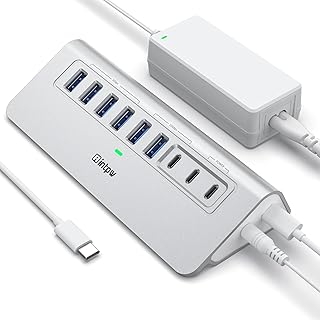
Powered USB Hub 10Gbps, intpw 9-Port USB 3.2 Hub, USB C Hub with USB A/USB C 3.2, 4 USB 3.0, 2 PD 45W Charging Ports, 65W Power Adapter and 3.3FT Cable, Aluminum USB Hub for Laptop, iPhone 17/16/15,PC
Best For:
Studio photographers and professionals who need many ports, stable powered connections for multiple drives, and higher sustained throughput during mass backups.
For studio photographers, retouchers, and anyone managing multiple drives at once, the intpw 9-port powered hub is built to handle heavier workloads. With multiple USB-A and USB-C 3.2 ports offering up to 10Gbps (depending on port and device), two PD charging ports rated at 45W, and a substantial 65W power adapter included, this hub is designed for sustained throughput and reliability. The aluminum chassis helps with heat dissipation, and the included 3.3 ft cable gives flexible placement on a desk.
This hub is a true studio workhorse: plug several backup drives, a card reader, and a tethered camera simultaneously without worrying about bus power limits. The dedicated PD charging ports are handy for keeping a phone or tablet topped up during long editing sessions while the main laptop is charged separately. Real-world users looking to maintain steady transfers report fewer disconnects with a powered hub of this class than with simple bus-powered splitters.
Considerations: a powered hub is heavier and less portable than bus-powered options, so it’s best kept in a studio bag or on a desk. The 10Gbps claim is a per-port peak in many designs, and real aggregate throughput can be lower when multiple devices are active. Also, while the included power brick solves power constraints, it adds another item to manage if you travel frequently.
Who should buy it: studio photographers, content creators, and backup-focused pros who routinely attach several high-draw devices (spinning HDDs, multiple SSDs, card readers) simultaneously. Who may not need it: casual shooters or travel photographers who prefer a light, bus-powered hub.
Pros: high port count with powered stability; fast USB 3.2 connections; included 65W adapter and PD ports. Cons: bulkier and less travel-friendly; aggregate throughput shared across ports. Check the latest price on Amazon.
Pros
- Nine ports with powered support for multiple drives
- USB 3.2/10Gbps-capable ports
- Includes 65W adapter and PD charging ports
Cons
- Bulky and less suited to frequent travel
- Aggregate bandwidth shared across ports
Check the latest price on Amazon.
USB 3.0 Hub, 4 Port USB Hub Splitter,Portable USB Adapter Mini Multiport Expander for Desktop, Laptop, Gaming Console, Flash Drive, HDD, Printer, PC, Keyboards (C-4 Port USB Hub)

Best For:
Travel and event photographers who need a very compact, inexpensive way to add multiple USB-A ports for card readers and small SSDs.
This compact 4-port USB 3.0 hub is a budget-friendly, travel-minded option that keeps things simple: four USB-A 3.0 ports in a small footprint, lightweight design, and plug-and-play operation. For photographers who want a no-nonsense way to connect a card reader, portable SSD, and USB dongles without adding weight to a camera bag, this mini hub covers the essentials.
In real-world scenarios it works well for quick offloads: pair it with a small SD card reader and a USB-C-to-A cable for your SSD and you have an ultra-portable ingest station. Users appreciate that it doesn’t require external power for a couple of devices and that it’s inexpensive to replace if lost in a travel bag. The downside is obvious — no PD passthrough, no card reader built-in, and limited power for multiple spinning drives.
This hub is best for on-the-go shooters who need extra USB-A ports and don’t plan to connect several power-hungry drives simultaneously. It compares to full-featured USB-C hubs by being far simpler and lighter; if you need video, PD, or card-reading features, you’ll want a more capable hub. But for basic file transfers, keyboard/mouse connections, and small SSD backups, it’s efficient and affordable.
Who should buy it: traveling photographers who want a compact, budget-friendly way to add USB-A ports for card readers and SSDs. Who may not need it: photographers who require PD passthrough, HDMI output, or multi-format card reading.
Pros: very compact and lightweight; easy plug-and-play; affordable. Cons: no PD or video output; limited for multiple high-draw devices. Check the latest price on Amazon.
Pros
- Ultra-compact and travel-friendly
- Simple plug-and-play operation
- Affordable backup solution
Cons
- No PD passthrough or video output
- Not suitable for multiple powered drives
Check the latest price on Amazon.
Final Verdict
Choosing the right USB hub for fast photo transfers comes down to matching the hub’s capabilities to your workflow. For travel and event photographers, compact bus-powered hubs or small 4-port splitters (Acer or the small 4-port model) balance portability and enough bandwidth for everyday transfers. If you edit on an external display and want laptop charging while you work, the Anker 7-in-1 brings HDMI 4K@60Hz and 85W PD passthrough in a single compact package. Photographers who juggle multiple card formats should strongly consider the Kingwin multi-format reader for its CF and SD support, while studio-based pros with many drives will benefit most from the powered 9-port intpw hub that handles multiple HDDs reliably. Ultimately, consider how many drives you attach simultaneously, whether you need laptop charging or display output, and if you want built-in card reading support. Match those needs to the pros and cons outlined above, and you’ll drastically reduce ingest time and simplify your editing setup. Check the latest price on Amazon.
Conclusion
These USB hub for photographers transferring files quickly picks are trending now and offer great value and variety. Check the links above for latest prices and reviews.
As an Amazon Associate, I earn from qualifying purchases.
Tags:
USB hub for photographers, USB 3.0 hub, USB C hub, photo file transfer, card reader hub, powered USB hub, portable USB hub
