Best USB Hubs for Creators — Connect Multiple Hard Drives
As an Amazon Associate, I earn from qualifying purchases. This article may contain affiliate links, which means we may receive a commission at no extra cost to you.
As an Amazon Associate, I earn from qualifying purchases. This article may contain affiliate links, which means we may receive a commission at no extra cost to you.
If you create video, photo, or audio content, you already know how quickly drives multiply. Between camera cards, desktop HDD archives and portable SSDs, juggling connections can interrupt a smooth editing workflow. This guide helps creators who need reliable ways to connect multiple hard drives to a single computer — whether you’re chaining archival HDDs for batch backups, fitting an editing rig with fast SSDs, or cloning drives for delivery. I researched product specs, real user experiences and common studio setups to surface practical hubs and docking stations that reduce clutter, improve throughput, and keep your files accessible.
You’ll find full-size docking stations that accept bare SATA drives, compact USB-C hub combos that add card readers and extra ports, and budget-friendly 4-port splitters for simple peripheral expansion. Each product section explains who benefits most, realistic use cases, notable features, and practical pros and cons to help you choose the right tool for your workflow. Whether you run a MacBook Pro with limited ports or a desktop editing PC that needs a fast duplicator, this guide focuses on what matters: reliable connections, sensible power delivery, and clear trade-offs between speed and price.
Buying Guide
Why this matters: Creators move large files. Video editors, photographers and podcasters depend on sustained transfer rates and stable connections. When a drive disconnects mid-transfer, projects stall and time is lost. Picking the right hub or dock reduces friction: hot-swap convenience, simultaneous access to several drives, and—when needed—hardware cloning with a dedicated duplicator mode.
Key features to consider
1) Interface and bandwidth: USB 3.0/3.1 Gen 1 (5 Gbps) is common and fine for many SSDs, but if you routinely move multi-gigabyte files from NVMe-level speed drives consider USB 3.2/Thunderbolt alternatives. Docks that expose SATA are ideal for using 2.5" and 3.5" drives directly; a docking station typically offers better throughput for spinning disks than a simple hub.
2) Power and drive support: 3.5" desktop drives need more power than 2.5" laptop HDDs or most SSDs. Look for external power supplies with sufficient amps and clear specs (often labeled 12V/2A or higher). If you plan to run two 3.5" drives simultaneously, confirm the unit explicitly supports dual-bay drives and larger capacities (20TB+ support appears on newer docks).
3) Hot-swap and cloning: Hot-swap capability saves time in media workflows. A hardware duplicator/cloner mode is useful when creating backups or replicating drives quickly without a PC. However, cloning speeds are subject to the dock’s internal controller, so expect full-disk clones to take hours for very large drives.
4) Port variety: Multiport USB-C hubs that add card readers, Ethernet and HDMI can eliminate separate dongles on a MacBook. If you only need more USB-A ports, a simple powered 4-port hub may suffice. Compare ports to your current setup: if you need card transfer, choose hubs with SD/TF slots.
5) Build and heat management: Spinning drives generate heat. Metal enclosures and ventilated plastics help; avoid compact enclosures that trap heat when running multiple drives for long backups.
Practical trade-offs
– Docking stations with bare-drive bays (SABRENT style) prioritize convenience and speed for direct SATA drives, and they’re better where swapping drives is frequent. They’re larger and need a power brick.
– USB-C multiport hubs (7-in-1 style) give the best all-in-one convenience for laptop creators who also need cards, displays and networking, but they usually handle 2.5" drives better than dual 3.5" arrays.
– Simple 4-port USB hubs are the cheapest route to more ports, but they won’t provide SATA-level performance or drive-specific features like cloning.
Who should prioritize which features?
– Freelance video editors who archive raw footage: dual-bay SATA docks with strong power supplies and high-capacity support.
– Photographers who swap SD cards and use a laptop: USB-C hubs with SD/TF readers and extra USB ports.
– Streamers or podcasters who need simple peripheral expansion: a compact powered USB 3.0 hub.
Buying considerations and red flags
– Check the drive capacity support and whether the manufacturer lists compatibility with 3.5" drives and 20TB+ models.
– Confirm the included cable types (USB-A vs USB-C) and whether an adapter is required for your machine.
– Look for a powered hub if you plan to run high-power devices like multiple 3.5" drives; passive hubs often underdeliver.
– Beware of tiny “unpowered” hubs advertised as drive-ready—many users report instability under heavy transfer loads.
A well-chosen hub or dock saves time, reduces cable clutter, and protects your workflow. Below I break down five options that serve different creator needs, from raw dual-bay docks to compact multiport USB-C hubs.
SABRENT USB 3.0 to SATA I/II/III Dual Bay External Hard Drive Docking Station for 2.5 or 3.5in HDD, SSD with Hard Drive Duplicator/Cloner Function [20+TB Support] (EC-HD2B)
![SABRENT USB 3.0 to SATA I/II/III Dual Bay External Hard Drive Docking Station for 2.5 or 3.5in HDD, SSD with Hard Drive Duplicator/Cloner Function [20+TB Support] (EC-HD2B)](https://m.media-amazon.com/images/I/7150qSDkkzL._AC_UY218_.jpg)
Best For:
Video editors, photographers, and creators who need hot-swap access to multiple SATA drives and occasional hardware cloning without a PC.
If you need a straightforward, studio-ready solution for working with multiple SATA drives, the SABRENT EC-HD2B dual-bay docking station is designed with creators in mind. This dock accepts both 2.5" and 3.5" HDDs and SSDs, provides USB 3.0 connectivity to your host machine, and adds a hardware duplicator/cloner mode for quick drive-to-drive copying without a computer. It’s a common choice among editors who archive project footage or photographers who rotate large-capacity drives for backup.
Main benefits are immediate: hot-swap access to bare drives for fast data transfers, a powered design that supports large 3.5" desktop drives, and the convenience of cloning when you need an identical copy without installing software. The dock supports large-capacity disks (manufacturer pages and user reports commonly note 16TB–20TB+ compatibility), making it suitable for modern multi-terabyte archives.
Real-life usage scenarios include: quickly copying camera archives to separate drives after a shoot, migrating OS or project disks via the duplicator function, and using one drive as a working volume while keeping an offline backup drive on standby and hot-swapping as needed. In a small studio, this dock can replace a drawer of external enclosures and speed up the process of importing footage to an editing workstation.
Compared to standard USB hubs, the SABRENT dock exposes SATA speeds more consistently because it’s designed specifically for drives rather than generic peripherals. That means fewer mid-transfer dropouts and better sustained write/read performance for spinning drives. It’s bulkier than bus-powered hubs and requires its external power brick, which is an important trade-off for full-sized 3.5" support.
Who should buy it: video editors and photographers who frequently swap multiple SATA drives and need a reliable, powered dock with cloning. Who may not need it: casual users who only require extra USB ports or those who use exclusively NVMe external enclosures.
Pros: reliable dual-bay access, hardware cloning without PC, supports 3.5" and large-capacity drives.
Cons: requires external power and is larger on the desk, cloning can take hours for very large disks.
Check the latest price on Amazon.
Pros
- Dual-bay SATA docking for 2.5" and 3.5" drives
- Hardware duplicator/cloner mode for standalone cloning
- Supports large-capacity drives (20TB+ compatibility reported)
Cons
- Requires external power and takes more desk space
- Cloning large drives can be time-consuming
Check the latest price on Amazon.
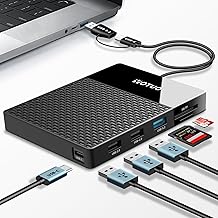
YOTUO Portable 500GB Docking Station External Hard Drive, Multiport USB-C Hub + HDD 7-in-1, USB 3.0, SD/TF Card, Multi-Functional HDD for Windows, Mac, Android, TV, Phone, Laptop, Desktop, PC
Best For:
Traveling photographers and laptop-based creators who need SD/TF readers, multiple USB ports, and compact portability.
The YOTUO 7-in-1 USB-C docking station aims to be an all-in-one travel and laptop companion for creators who balance portability with port needs. Rather than accepting bare SATA drives, this compact hub blends a multiport USB-C bridge with a small-form external drive bay concept geared toward common mobile workflows. It typically includes USB 3.0 ports, SD and microSD card readers, and an option for an external drive or SSD enclosure — making it a good fit for photographers or content creators who work on-the-go.
The main benefits are convenience and versatility. For a creator editing on a MacBook or thin laptop, the YOTUO hub reduces the number of separate dongles: plug in a camera card, a USB drive, and your external SSD simultaneously. The hub’s USB-C connection also helps maintain a clean cable arrangement and often supports a range of host devices including Windows PCs, Macs, Android phones and some smart TVs.
Real-world use cases include importing SD cards from a DSLR while simultaneously backing up to an attached SSD and connecting a mouse or audio interface for a compact setup. Photographers returning from a photoshoot can use the hub to import footage on a laptop, spare the laptop’s limited ports, and move files to a portable SSD without carrying multiple adapters.
Compared to a bare SATA dock, the YOTUO hub sacrifices direct 3.5" drive support and raw SATA throughput in favor of multi-function convenience. It’s best where portability, card-reading and multiple peripheral ports are priorities and where most storage will be USB-powered SSDs or small 2.5" drives.
Who should buy it: traveling photographers, content creators using laptops, and anyone who needs SD card slots plus a handful of extra ports in a compact unit. Who may not need it: studio editors who rely on multiple 3.5" desktop drives or require maximum SATA throughput.
Pros: compact 7-in-1 design, SD/TF card slots and multiple USB ports, good for laptop workflows.
Cons: not designed for full-size 3.5" drives, may not match raw dock throughput.
Check the latest price on Amazon.
Pros
- All-in-one 7-in-1 USB-C hub with card readers
- Compact and portable for travel workflows
- Compatible with laptops, phones, and some TVs
Cons
- Not intended for 3.5" desktop drives
- Sustained SATA-level performance is lower than dedicated docks
Check the latest price on Amazon.
Acer USB Hub 4 Ports, Multiple USB 3.0 Hub, USBA Splitter for Laptop with Type C Power Port, Extender for A Port Laptop, PC, Desktop and More (2ft)

Best For:
Streamers, podcasters, and creators needing reliable USB-A expansion for peripherals and smaller external drives.
The Acer 4-port USB 3.0 hub is a straightforward solution for creators who simply need more USB-A ports and a reliable, branded accessory. It’s compact, bus-powered in many configurations, and often includes a Type-C power port for devices that require additional power. This kind of hub is a go-to for streamers or podcasters who need to connect peripherals like audio interfaces, external drives, mixers and capture devices.
Its primary benefits are simplicity and consistency: you get four high-speed USB 3.0 ports that work well with flash drives, smaller USB-powered SSDs, and most peripherals. If you’re working with a laptop that lacks full-sized USB-A ports, this hub removes the constant plug juggling. The presence of a Type-C power passthrough (depending on model) can be handy to keep your laptop charged while using multiple devices.
Common real-life scenarios include attaching a bus-powered external SSD for project files while also running a USB audio interface and a hardware controller, or connecting a pair of backup drives for nightly archiving sessions. For creators with stable power needs and smaller drives, a hub like this is less cumbersome than a full docking station.
Compared with high-end docks, the Acer hub won’t provide SATA docking features or dedicated drive cloning. It’s a practical middle ground between single-port dongles and more elaborate hubs: lower cost, less complexity, and straightforward USB-A expansion.
Who should buy it: streamers, podcasters, and creators who need reliable USB-A expansion for peripherals and small drives. Who may not need it: users who want bare-drive SATA bays or cloning features.
Pros: compact, reliable USB 3.0 performance and branded quality. Cons: limited if you need SATA docks or multi-drive cloning capabilities.
Check the latest price on Amazon.
Pros
- Compact and reliable 4-port USB 3.0 expansion
- Useful Type-C power passthrough on supported models
- Good balance of performance and price for peripherals
Cons
- Not a substitute for SATA docking or cloning
- May be bus-powered and limited with high-draw devices
Check the latest price on Amazon.
USB 3.0 Hub, VIENON 4-Port USB Hub USB Splitter USB Expander for Laptop, Xbox, Flash Drive, HDD, Console, Printer, Camera,Keyborad, Mouse(Not for Charging)

Best For:
Budget-conscious creators and traveling artists who need extra USB-A ports for peripherals and small external drives.
The VIENON 4-port USB 3.0 hub is a budget-friendly and portable option to add multiple USB-A ports for creators who need to expand their desktop or laptop I/O without breaking the bank. It’s a practical choice for connecting flash drives, USB audio dongles, MIDI controllers and small bus-powered SSDs. While it’s explicitly not a charger, it’s useful for data transfers and for keeping multiple peripherals handy during a session.
The key benefits are affordability and portability. Small crews on location or creators working in café-style setups appreciate the low footprint and the immediate expansion of host connectivity. For photographers who offload multiple mini-drives or for musicians patching in USB controllers, the VIENON hub is a no-nonsense way to keep gear connected.
Typical scenarios include connecting multiple USB-based instruments during a recording session, linking a compact external SSD for scratch storage, or attaching an external drive for batch transfer while using a laptop’s internal storage for editing. As with most compact hubs, large 3.5" drives that require significant power are not suitable unless the hub is used with a powered adapter.
Compared with docks that expose SATA, this splitter does not provide the same throughput guarantees or drive-specific features, but it’s far more portable and far cheaper. Users who want to stay light on the go or need a simple desktop expansion will find it meets most everyday needs.
Who should buy it: creators on a budget, traveling artists, or anyone who needs more USB-A ports for peripherals and small external drives. Who may not need it: studio engineers or editors who rely on full-sized SATA arrays or need hardware cloning.
Pros: low cost, ultra-portable, easy to use. Cons: not suitable for power-hungry 3.5" drives and lacks advanced features.
Check the latest price on Amazon.
Pros
- Very affordable and portable
- Adds four extra USB-A ports for peripherals
- Simple plug-and-play functionality
Cons
- Not for charging or powering 3.5" desktop drives
- Lacks advanced drive features like cloning or SATA bays
Check the latest price on Amazon.
【Upgrade】 USB C/USB Hub, BERLAT Aluminum 7 in 1 USB C & USB Hub with USB 3.0, USB 2.0 Ports for PC/Laptops/MacBook Pro/Air/iMac/iPad and More Devices

Best For:
Designers, photographers, and laptop-based creators who want a durable aluminum hub with mixed ports and passthrough charging.
The BERLAT 7-in-1 USB-C hub is an aluminum-bodied multiport accessory that aims to fit neatly into modern creator toolkits. With a mix of USB 3.0 and USB 2.0 ports, plus a USB-C passthrough, this kind of hub gives you the flexibility to connect legacy gear and faster peripherals at once. The metal shell helps with heat dissipation, which is helpful if you run multiple drives or card readers during long transfers.
Key benefits include a balanced selection of ports for everyday studio tasks and a compact, attractive build. The USB-C passthrough is useful for keeping a laptop charged while you run peripherals, and the inclusion of both USB 3.0 and USB 2.0 ports makes it easy to leave lower-speed devices connected without occupying a faster port.
Common use cases: a wedding photographer tethering a camera and card reader while running an external SSD for scratch files; a content creator plugging in an audio interface, a MIDI controller, and a backup drive simultaneously; or a designer who needs both legacy input devices and modern storage devices connected at once. The aluminum body also blends well on a desk and tends to feel more durable than generic plastic hubs.
Compared to simple plastic splitters, the BERLAT hub stands out for build quality and port variety. Compared to full SATA docks, it doesn’t offer bare-drive access or cloning, but it does offer a compact, heat-managing option for laptop-heavy workflows.
Who should buy it: creators who want a well-built, compact hub with varied ports and pass-through charging for daily use. Who may not need it: users who require direct SATA drive bays or professional-level cloning features.
Pros: durable aluminum build, mixed-port selection, USB-C passthrough. Cons: lacks bare-drive SATA docking and may not support high-draw 3.5" drives.
Check the latest price on Amazon.
Pros
- Aluminum housing for better heat dissipation and durability
- Mixed USB 3.0 and 2.0 ports plus USB-C passthrough
- Good for laptop workflows with legacy and modern devices
Cons
- Not a substitute for SATA docking or hardware cloning
- May not power multiple 3.5" drives
Check the latest price on Amazon.
Final Verdict
Choosing the right hub or dock for connecting multiple hard drives depends on your typical workload. If you swap full-sized SATA drives frequently and need cloning or high-capacity support, a dual-bay docking station like the SABRENT EC-HD2B is a practical studio workhorse. If you’re a traveling photographer or a laptop-based editor who values card readers and compact convenience, the YOTUO 7-in-1 or BERLAT aluminum hub keeps your workflow mobile and tidy. For everyday peripheral expansion without the need for bare-drive access, the Acer and VIENON 4-port hubs offer reliable, low-friction USB expansion at different price points.
Think about the drives you use (2.5" vs 3.5"), whether you need an external power supply, and whether features like hardware cloning or SD card slots are must-haves. Heat management, cable types and explicit capacity support are practical buying considerations that frequently decide the difference between a smooth workflow and an intermittent headache.
If you’re upgrading from a single-port dongle or trying to consolidate multiple adapters, any of these options can streamline your setup — just match the unit to the scale of your storage demands. If you work mainly with multi-terabyte spinning drives, prioritize a powered SATA dock. If your world revolves around a laptop, prioritize USB-C hubs with card readers and passthrough charging.
Hopefully this guide helps you narrow the choice. Check product specs against your current drives and machine ports, and pick the hub that supports the workflows you run every day.
Conclusion
These USB hub for creators connecting multiple hard drives picks are trending now and offer great value and variety. Check the links above for latest prices and reviews.
As an Amazon Associate, I earn from qualifying purchases.
Tags:
usb hub for creators, hard drive docking station, usb-c hub for photographers, dual bay hard drive dock, portable usb hub, sata dock for editors, multiport usb-c hub
