Best USB Desk Fans for Small Offices
As an Amazon Associate, I earn from qualifying purchases. This article may contain affiliate links, which means we may receive a commission at no extra cost to you.
Working in a cramped office or a shared workspace can leave you battling poor airflow and rising temperatures—especially when building HVAC is inconsistent or windows are out of reach. A compact USB desk fan is often the most practical solution: small, energy-efficient, and easy to position where you need a breeze most. This guide walks through five well-reviewed USB desk fans that are built for small offices, dorm desks, and home workstations.
Before diving into the picks, a quick note on the links below: As an Amazon Associate, I earn from qualifying purchases. This helps support ongoing research and keeps recommendations up to date.
In the sections that follow you’ll find clear comparisons of performance, noise, power options, and real-world usage suggestions. Each product entry explains who will benefit most, common use cases, and practical buying considerations so you can choose the right fan for your setup.
Buying Guide
How to choose a USB desk fan for a small office
Airflow and speed control: The most important metric is how much air the fan moves at each speed setting. Look for fans that list multiple speeds (3–100 speeds for advanced models) or a digital display for precise control. If you work close to the fan, lower speeds often provide comfortable circulation without a strong direct blast.
Noise level: Small offices need quiet operation. Many modern USB fans include brushless motors or “quiet” modes. If you take calls or need concentration, prioritize models that advertise low-decibel operation or have a whisper-quiet mode.
Power options: USB-powered fans are convenient because they run from laptop ports, USB hubs, or wall adapters. Rechargeable fans add portability and can be useful if you move between meeting rooms or work from coffee shops. Consider battery life and charge times if portability matters.
Adjustability and footprint: Fans with tilt, rotation (90–360°), or swivel heads let you direct airflow across your workspace or toward a colleague. Measure your desk space: some compact 5.5-inch fans fit neatly on narrow shelves, while others with a broader base need more surface area.
Build and safety: Metal grills and sturdy bases reduce wobble. If you have pets or kids around, look for tighter grills or bladeless designs. Also check for certifications or safety cutoffs on rechargeable batteries.
Extras: Digital displays, timers, oscillation, and remote control are nice-to-have but may increase cost or complexity. For most small-office users, a small, reliable fan with 3–10 speed settings, quiet operation, and adjustable tilt is ideal.
Who shouldn’t buy a USB desk fan? If your primary problem is heating an entire room or you need industrial-level circulation, a small USB fan won’t replace a full-size tower or HVAC solution. Also, if you need silent white noise for sleep, dedicated sound machines may be a better pick.
With those criteria in mind, the following five models offer different balances of power, quiet operation, portability, and price to suit a range of small-office needs.
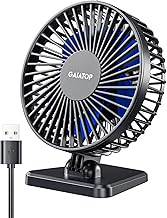
Gaiatop USB Desk Fan, 3 Speeds Strong Airflow, 5.5 Inch Portable 90° Rotate Quiet Cooling, Small Personal Table Fans for Bedroom Home Office Travel Black

Best For:
People with limited desk space who want a quiet, three-speed USB fan for targeted cooling near a laptop or monitor.
If you want a no-nonsense compact fan for a tight desk setup, this 5.5-inch Gaiatop USB Desk Fan balances size and airflow well. It’s designed to be small enough for narrow monitors and laptop trays while offering three distinct speed settings, so you can dial in a gentle circulation or a stronger breeze on warmer afternoons. The 90° tilt adds practical directional control without taking up much space, and the overall footprint works on crowded desks, shared cubicle walls, and bedside tables.
Many buyers say this model performs above expectations for its size—stronger than typical clip-on minis but quieter than cheap inline fans. The three-speed dial is intuitive and reliable, which is useful when you need a quick adjustment during conference calls or long focus sessions. Its quiet motor keeps background hum low on lower settings, and it doesn’t produce the harsh whine some ultra-cheap fans create.
Real-life use cases: This fan is an excellent choice for laptop users who need targeted cooling while working from home, remote workers in shared office spaces that lack good airflow, and students in dorm rooms where privacy and small desks are the norm. It’s also a straightforward option for light travel—plug it into a power bank or laptop on long flights or road trips.
Why it’s valuable: Compared to standard alternatives like larger table fans or noisy clip-ons, this Gaiatop model gives focused airflow with minimal vibration and a compact profile. The 90° tilt is particularly helpful when you want to direct air under a monitor or toward your keyboard without moving the entire unit.
Who should buy: Choose this fan if you want compact portability, dependable three-speed control, and quiet daytime use. Who might skip it: If you need wider oscillation or a rechargeable battery for portability between rooms, a larger or rechargeable model may be a better fit.
Buying considerations: Check that your USB source can supply sufficient power—many laptops and power banks do fine, but older USB ports can be underpowered. Also note that the smaller blade diameter means airflow is directional rather than room-wide.
Check the latest price on Amazon.
Pros
- Compact 5.5-inch footprint fits small desks
- Three clear speed settings for adaptable airflow
- 90° tilt for directional cooling
Cons
- Not rechargeable—requires a USB power source
- Smaller diameter limits room-wide circulation
Check the latest price on Amazon.
Gaiatop USB Desk Fan, Small But Powerful, Personal Portable Quiet 3 Speeds, Adjustable Mini Table Desktop fan for Cooling Home Office Car Summer Travel Gifts Blue
Best For:
Mobile workers, students, and commuters who need a small, attractive fan that still offers strong airflow.
This Gaiatop mini table fan blends portability with a surprisingly strong output for its size. The manufacturer markets it as “small but powerful,” and many users report that it moves more air than other mini fans in the same price and size range. With three speed options and an adjustable head, it’s designed for personal cooling at desks, bedside tables, or in vehicles when paired with a 5V USB adapter.
What stands out is the balance of airflow versus noise. On low and medium speeds the motor stays relatively quiet—ideal for focused work or conference calls—while the highest setting delivers noticeable air movement for quick cooling. The fan’s build feels sturdier than typical disposable plastic minis; that adds confidence for daily use and travel. The blue finish makes it a friendlier visual option on casual desks or dorm rooms.
Real-world scenarios: This fan is handy for commuters who spend long hours in parked cars during summer months, people sharing hot co-working spaces who need a personal air source, and remote workers who rotate between home and café setups. It’s also good for bedside use when you want gentle circulation without a loud motor.
Why consider it: Compared to standard alternatives like cheap USB clip-ons or tiny battery-only fans, this model offers a steadier airflow and a more solid feel. It aims to bridge the gap between ultra-compact novelty fans and larger, louder desk fans that dominate desktop space.
Who should buy: Ideal for buyers who want a portable, attractive fan that can be tucked into backpacks or cup holders and still produce meaningful airflow. Who should look elsewhere: If you need variable micro-adjustments beyond three speeds or a rechargeable option for long unplugged use, consider higher-end rechargeable models.
Buying tips: Use a powered USB port or wall adapter for consistent performance. If planning to use in a car, place it on a stable surface or use a non-slip pad to reduce vibration.
Check the latest price on Amazon.
Pros
- Solid airflow for its compact size
- Relatively quiet at low and medium speeds
- Portable and visually appealing design
Cons
- Limited to three speeds—less precise control
- Not ideal for whole-room circulation
Check the latest price on Amazon.
KIMMOO Rechargeable USB Desk Fan, Quiet Table Fan with Turbo Airflow, 100 Speeds, Digital Display, 90° Rotating, Small Battery Desktop Fans for Bedroom Home Office Travel, Black

Best For:
Users who want rechargeable convenience, precise speed control, and a quiet fan for shared workspaces.
For those who want more granular control and the convenience of rechargeable power, the KIMMOO Rechargeable USB Desk Fan is a feature-rich choice. It advertises up to 100 speed settings via a digital display, which might sound like overkill—but in practice this allows precise adjustments from a near-silent breeze up to a turbo mode for rapid cooling. The rechargeable battery removes the need to remain tethered to a laptop or wall outlet, making it ideal for people who move around during the day.
The digital display and touch controls feel modern and are useful if you prefer exact speed levels rather than broad low/medium/high options. The 90° rotation provides targeted directionality that’s helpful in cubicles where you want airflow under a monitor or toward your face while minimizing disturbance to neighbors. KIMMOO emphasizes quiet operation, and reviewers typically report that sound levels are acceptable for office calls on low-to-medium speeds.
Use cases: Freelancers who split time between client sites, workers in shared offices who need personal cooling without disturbing others, and anyone who values precise fan control will find this model compelling. It’s also great for gamers who want a quiet background breeze during long sessions or for bedside use when variable fan intensity helps with sleep.
Why it’s valuable: Compared to basic USB fans, the KIMMOO delivers flexibility: rechargeable operation, a wide speed range, and a digital readout for repeatable settings. If you value fine-grained airflow control and portability, this model hits those marks.
Who should buy: Recommended for tech-forward buyers who appreciate digital controls, rechargeable convenience, and quieter operation at low settings. Who might skip it: If you prefer a simpler analog dial or want the lowest possible price, a basic three-speed model could be preferable.
Buying considerations: Verify listed battery life at your typical speed setting—turbo modes drain faster. If you frequently use the highest speeds, keep a charger nearby.
Check the latest price on Amazon.
Pros
- Rechargeable—portable without being tethered
- Very granular speed control with digital display
- Quiet operation on lower settings
Cons
- Complex interface may be unnecessary for some
- High-speed modes will reduce battery life quickly
Check the latest price on Amazon.
USB Desk Fan for Bedroom: 100 Speeds Digital Display Quiet Table Fan with Turbo Airflow, 120° Rotating Small Rechargeable Battery Desktop Fans for Bedroom Home Office (Purple)

Best For:
People wanting a rechargeable fan with wide oscillation for sharing airflow across small desks or for a lighter room-wide breeze.
This purple, feature-packed USB desk fan pairs a rechargeable battery and a digital control panel with a wider oscillation range—advertised at 120°—which is handy if you want to move air across a broader desk surface or share circulation with a nearby coworker. The 100-speed system and turbo mode provide a wide performance envelope: whisper-quiet settings for background comfort and stronger bursts when you need immediate cooling.
Aesthetically, the purple finish gives this fan a playful edge that suits creative desks, dorm rooms, and modern home offices. The 120° rotating head differentiates it from the standard 90° tilt fans and is particularly useful for distributing airflow across dual-monitor setups or between two adjacent workstations. The rechargeable battery means you can position the fan away from cables, and its compact base minimizes desk crowding.
Practical uses: Ideal for creatives who like a pop of color on their desks, people who share a small conference table and want centralized cooling, and hybrid workers who move from desk to couch and back. The broader rotation also makes it a good choice if you want to circulate air gently through a small room rather than provide a focused blast.
Why it’s valuable: Compared with fixed small fans or narrow-oscillation models, the wider 120° rotation and rechargeable flexibility make this fan more versatile for multi-position cooling. The digital controls let you fine-tune output without guesswork.
Who should buy: Buy this if you want rechargeable portability, color options, and a wider rotation to distribute airflow across a small area. Who may not need it: If you only require a single-direction fan for personal use, a simpler, smaller fan could suffice.
Buying considerations: Consider battery longevity at the speeds you plan to use and whether the brighter color matches your workspace. Also check the stability of the base if you place it near the edge of a desk.
Check the latest price on Amazon.
Pros
- 120° rotation distributes air across a wider area
- Rechargeable with digital speed control
- Attractive color option for creative desks
Cons
- Battery life varies with high-speed use
- Base may need a stable surface to avoid tipping
Check the latest price on Amazon.
Gaiatop Desk Fan, 5-Inch Portable Electric Table Desktop Air Circulator Fans, Small but Powerful with 3 Speed 360° Adjustable Tilt for Cooling Home Dorm Office Bedroom Bathroom Kitchen, Black

Best For:
Anyone needing a flexible, small air circulator with full tilt for tricky desk layouts and targeted cooling.
This Gaiatop 5-inch electric table fan is pitched as a small but powerful air circulator with a 360° adjustable tilt, which makes it extremely flexible for tight or unusual desk arrangements. The ability to tilt fully around lets you target airflow under shelves, behind monitors, or toward open windows for cross-ventilation. With three speed settings, it keeps control simple while providing enough range for most personal cooling needs.
The model leans toward practicality: a durable base, compact size, and a motor tuned for modest noise levels. It performs well when used to augment weak HVAC in small offices or when you need targeted airflow around equipment that generates heat—think external hard drives, charging hubs, or cramped networking gear. Users who’ve switched from cheaper fans often report a more stable base and less humming at comparable settings.
Use-case scenarios: This fan is useful for home office workers who position monitors and accessories in constrained spaces, small business owners who want a discrete yet effective desk fan, and students in dorms who juggle shared room layouts. Because the tilt is fully adjustable, it’s also handy in bathrooms or small kitchens where you might need temporary airflow after cooking or showering.
Why it’s valuable: Compared to static or clip-only mini fans, the 360° adjustability offers more placement freedom, and its small size means it won’t dominate your workspace. It’s a practical middle ground between ultra-compact portability and larger, noisier desk fans.
Who should buy: Choose this if you need flexible directional control and a compact footprint for varied mounting positions. Who might skip it: If rechargeable battery life or advanced digital controls are priorities, opt for a feature-rich rechargeable model instead.
Buying considerations: Check that the tilt mechanism is robust and that the base is stable on textured desks. If pairing with a laptop, ensure your USB port supplies adequate power for peak performance.
Check the latest price on Amazon.
Pros
- 360° adjustable tilt for flexible placement
- Small footprint with effective airflow
- Simple three-speed control
Cons
- Not rechargeable—requires continuous USB power
- May be too directional for full-room cooling
Check the latest price on Amazon.
Final Verdict
Which USB desk fan is right for you depends on how you work and where you plan to use it. If you want the simplest solution for tight desks and predictable performance, the Gaiatop 5.5-inch three-speed model is a reliable, quiet choice. For a more portable yet still powerful compact fan, the blue Gaiatop variant balances design with good airflow. If rechargeable convenience and precise control matter, the KIMMOO model with a digital display and 100-speed range is a standout—especially for hybrid workers who unplug frequently. The purple rechargeable fan with 120° rotation is your best bet if you want wider oscillation for shared desks, while the 360°-tilt Gaiatop offers unmatched placement flexibility in oddly arranged workspaces.
Ultimately, pick the fan that matches your priorities: simplicity and low price, portability and battery power, granular speed options, or adjustable coverage. None of these models replaces full-room HVAC, but each provides an affordable, energy-efficient way to improve personal comfort and airflow at your desk. If you’re still unsure, start with a compact three-speed model to test how much directional airflow helps your workspace, then upgrade to a rechargeable or digital model if you need more flexibility.
Check the latest price on Amazon.
Conclusion
These USB desk fan for improving airflow in small offices picks are trending now and offer great value and variety. Check the links above for latest prices and reviews.
As an Amazon Associate, I earn from qualifying purchases.
Tags:
USB desk fan, portable fan, small office cooling, rechargeable desk fan, quiet USB fan, personal air circulator, desk fan review
