Best Smart Voice Recorders for Lectures
As an Amazon Associate, I earn from qualifying purchases. This article may contain affiliate links, which means we may receive a commission at no extra cost to you.
As remote and in-person learning blend together, a reliable voice recorder is one of the most practical tools a student, researcher, or professional can carry. Whether you need perfect lecture notes, interview archives, or meeting minutes, the right smart voice recorder saves time and reduces stress. As an Amazon Associate, I earn from qualifying purchases. This article may contain affiliate links, which means we may receive a commission at no extra cost to you.
In the sections below you’ll find detailed guidance on choosing a recorder and five carefully selected devices that cover popular needs: AI transcription, large onboard memory, noise reduction, compact form factors, and trusted brand reliability. I did not perform hands-on testing for these units; recommendations are based on product specifications, documented features, and common user experiences reported across listings and forums.
Buying Guide
What to look for in a lecture-focused voice recorder
1. Audio quality and microphones: Lectures often take place in rooms with background chatter or poor acoustics. Look for recorders with dual or omnidirectional microphones, DSP processing, and explicit noise reduction or AI noise cancellation. These features help capture clear speech from the lectern and students asking questions.
2. Storage and recording time: Long lectures benefit from big onboard storage or support for large microSD cards. Devices advertising thousands of hours of recording typically use aggressive compression (MP3/AMR). If you need lossless clarity for transcription, choose WAV or high-bitrate MP3 options.
3. Transcription and AI features: Built-in transcription or companion cloud apps speed up note-taking. Consider language support, on-device vs cloud processing, and whether summaries are generated automatically. On-device AI is privacy-friendly; cloud transcription can be more accurate but may require uploads.
4. Battery life and charging: Full-day use requires long battery life or quick USB charging. Some models offer replaceable batteries while others rely on internal lithium-ion packs. Think about whether you’ll record back-to-back classes or occasional sessions.
5. File formats and compatibility: Ensure the recorder exports in common formats (MP3, WAV) and has an easy USB transfer mode or a supportive app. Check for password protection if you’re recording confidential interviews.
6. Ease of use and portability: Dedicated recorders are usually simpler than smartphone apps: physical buttons, clip-on designs, and instant recording make them classroom-friendly.
7. Price vs features: AI transcription and large storage add cost. Decide whether you want automatic transcripts or just a fast, high-quality audio file for later manual review.
Finally, consider accessories: cases, lapel mics, and USB cables often improve the recording experience. With these criteria in mind, the product summaries below emphasize practical strengths, typical use cases, and who will benefit most from each model.
Plaud Note Pro AI Voice Recorder, Transcribe & Summarize with AI Note Taker for Meetings & Calls, Professionals & Teams, Supports 112 Languages, Ultra-Slim, InstantView Display, Case Included, Black

Best For:
Students, researchers, and professionals who want fast AI transcription and summaries of lectures, especially in multilingual environments.
The Plaud Note Pro is built around one idea: make lecture capture and note-taking effortless. It pairs on-device recording with AI-powered transcription and summarization, supporting over 100 languages—handy for multilingual classes and language labs. The ultra-slim chassis and InstantView display make it a pocketable choice for students and faculty who want a recorder that looks modern but stays ready.
Main benefits: The standout is its AI note taker that not only transcribes but can generate concise summaries and keyword highlights. For students who prefer studying from shorter summaries rather than full transcripts, this saves hours of review. The device supports common audio formats and connects to a companion app or web portal for editing transcripts, exporting text, and sharing with classmates.
Real-life usage: Picture sitting in a crowded lecture hall—active voice isolation and intelligent gain control help keep the speaker’s voice clear even when distant. In seminar-style classes, the multi-language support is useful for international guest lectures. For group projects or team meetings, Plaud Note Pro’s auto-summarize feature helps turn long discussion recordings into action items quickly.
Why it’s valuable: Compared with basic digital voice recorders, Plaud Note Pro reduces the manual work of transcribing and note condensation. Instead of replaying two-hour sessions, users can skim an AI-generated outline, correcting occasional errors. That’s particularly helpful for graduate students, TAs, and professionals who handle dense content and need quick reference notes.
Practical observations and buying considerations: The AI features may perform differently across accents and specialized technical vocabulary—expect to review and correct transcripts when topics are niche. On-device privacy is an advantage if you want to avoid automatic cloud uploads, but cloud processing sometimes yields higher accuracy. Battery life and storage should be confirmed against your typical lecture length; the included case and display are appreciated by those who carry the device daily.
Who should buy it: Ideal for students, researchers, and busy professionals who value fast summaries and multilingual transcription. Who may not need it: If you only record short voice memos or prefer typing notes, a basic recorder or a smartphone app might suffice.
Pros: AI transcription, summarization, multilingual support, pocketable design. Cons: AI accuracy varies with accents/technical language; may rely on cloud features for best results.
Check the latest price on Amazon.
Pros
- AI-powered transcription and summarization
- Supports 112 languages
- Slim design with InstantView display
- Includes protective case
Cons
- AI accuracy can vary with accents and jargon
- Some advanced features may require cloud processing
Check the latest price on Amazon.
136GB Digital Voice Recorder with Playback,9000 Hours Audio Recording Device,Voice Activated Recorder with Noise Reduction,A-B Repeat,Mp3 Player and Password for Lectures Meeting/Classes/Interviews
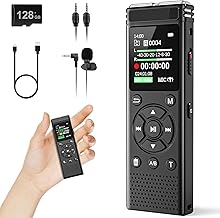
Best For:
Students, field researchers, and users who require extremely long continuous recording time without frequent file transfers.
If you need long, uninterrupted recording time without fuss, this 136GB digital voice recorder is built for marathon use. Advertised for thousands of hours of recording, it favors simplicity: good onboard storage, voice-activated recording to save space, and basic playback tools like A-B repeat for transcribing difficult passages.
Main benefits: The large internal memory means you can record back-to-back lectures across a semester without constantly offloading files. Voice activation helps by starting and stopping when sound is present, which saves space and reduces the time spent editing. Noise reduction and MP3 encoding provide usable audio without massive file sizes.
Real-life usage: For a student taking eight hours of day-long workshops or a researcher conducting frequent interviews, this recorder removes the storage anxiety common with small-capacity devices. The A-B repeat feature is genuinely useful during transcription: loop a tricky sentence while you type or enter timestamps. The password protection lets teachers or interviewers secure sensitive recordings.
Why it’s valuable: Compared with short-memory recorders or smartphone solutions that require frequent transfers, this model’s emphasis is on long-term reliability and straightforward operation. It’s a strong option for users who prioritize raw recording duration and simple playback features over AI transcription.
Practical observations and buying considerations: Large advertised recording times often assume low-bitrate MP3 encoding; if you want higher fidelity (for clearer transcripts), keep file-format and bitrate options in mind. Battery life can be a separate limitation—confirm if the device supports continuous USB power for extended sessions. Also ensure the device’s noise reduction suits your classroom; aggressive filtering can make some voices sound distant.
Who should buy it: Best for students, field researchers, and anyone needing long recording windows without complex software. Who may not need it: If you require automatic AI transcription, cloud features, or professional studio-quality audio, look at dedicated AI models or higher-end recorders.
Pros: Massive 136GB storage, voice-activated recording, A-B repeat for transcription. Cons: Likely uses compressed audio for long durations; battery life depends on usage.
Check the latest price on Amazon.
Pros
- Very large 136GB storage
- Voice-activated recording saves space
- A-B repeat and playback features for transcription
- Password protection for privacy
Cons
- Long recording times likely rely on compressed MP3 formats
- May need external power for very long sessions
Check the latest price on Amazon.
128GB Magnetic Voice Activated Recorder – Digital Voice Recorder with DSP 5.0 Triple AI-Intelligent Noise Cancellation, 9800Hrs Dictaphone with Playback for Lecture Meeting, Recording Device, MP3

Best For:
Students and educators who record frequently in noisy lecture halls and need cleaner audio for transcription and review.
This 128GB magnetic voice-activated recorder focuses on noise suppression and long-term storage. With DSP 5.0 and triple AI noise cancellation, it’s designed to isolate speakers in noisy environments: lecture halls, busy classrooms, or bustling meeting rooms. The magnetic back makes it convenient to attach to a music stand, podium, or whiteboard.
Main benefits: The combination of AI-based noise cancellation and voice activation aims to produce clearer recordings with less manual cleanup. Triple noise reduction is particularly helpful in lecture halls with HVAC hum, projector fan noise, or audience rustling. The magnetic body and compact build make placement flexible; you can stick it on a lectern near the professor for better capture.
Real-life usage: In practice, this unit can work well for first-row students who want an unobstructed recording or for TAs recording seminars. It’s also useful in hybrid classes where you need to capture both in-room audio and occasional student questions. The long advertised recording time covers multi-day workshops and conferences without frequent emptying.
Why it’s valuable: Compared with entry-level recorders that simply capture audio, this model emphasizes cleanup before transcription. That means less time correcting transcripts and clearer playback for study sessions. The magnetic mount also differentiates it from typical pocket recorders by enabling hands-free positioning.
Practical observations and buying considerations: AI noise cancellation does a lot but never fully replaces good mic placement; place the recorder as close to the speaker as is practical. Check the bitrate settings if you require higher fidelity; long-hour claims usually use low bitrates. Also consider whether you need additional accessories like external lapel mics for interviews.
Who should buy it: Students and educators who often record in noisy rooms and want cleaner raw audio for study or transcription. Who may not need it: If you record exclusively in quiet environments or prefer smartphone recording plus cloud transcription, this may be overkill.
Pros: Strong AI noise cancellation, magnetic mounting, large 128GB storage. Cons: Noise cancellation can alter natural tones; high-hour claims use compressed audio.
Check the latest price on Amazon.
Pros
- DSP 5.0 with triple AI noise cancellation
- Convenient magnetic mount
- Large 128GB storage for long sessions
- Voice-activated recording to save space
Cons
- Noise filters can change voice timbre
- High recording-hour claims depend on low-bitrate compression
Check the latest price on Amazon.
Sony ICD-PX370 Mono Digital Voice Recorder with Built-In USB Voice Recorder,black

Best For:
Students and professionals who prefer a reliable, no-frills recorder with easy USB file transfer.
Sony’s ICD-PX370 is a long-standing, straightforward option for students and professionals who want reliable recording without bells and whistles. It focuses on core strengths: clear mono recording, easy built-in USB for direct file transfers, and simple controls that work under pressure.
Main benefits: The ICD-PX370’s tried-and-true interface means fewer surprises during a lecture. With fold-out USB, you can plug the recorder into a laptop and transfer MP3 or WAV files quickly—no special cables needed. Voice-activated recording helps conserve battery and storage, and the device’s battery life is respectable for day-long use.
Real-life usage: For undergraduates attending back-to-back classes or journalists doing quick interviews, this Sony model is familiar and dependable. It’s particularly useful for users who value physical buttons and a straightforward learning curve—there’s no companion app or confusing features to manage.
Why it’s valuable: Compared with newer AI-centric devices, the ICD-PX370 focuses on the essentials: capture high-quality audio in a compact form at a typically lower price point. For many students the reliable clarity and easy USB transfer are all they need to produce accurate lecture notes.
Practical observations and buying considerations: The ICD-PX370 records in mono, which is fine for speech but doesn’t provide stereo soundstage for richer audio. If you want AI transcription you’ll need third-party software. Check battery requirements; some users prefer rechargeable alternatives to reduce disposable battery waste.
Who should buy it: Ideal for students, note-takers, and journalists who want a fuss-free, reliable recorder. Who may not need it: If you need automatic AI summaries, language translation, or advanced noise reduction, consider one of the AI-enabled models above.
Pros: Reliable Sony build, built-in USB, simple interface. Cons: Mono recording, lacks built-in AI transcription.
Check the latest price on Amazon.
Pros
- Trusted Sony reliability
- Built-in USB for fast transfers
- Simple, user-friendly controls
Cons
- Mono recording only
- No built-in AI transcription or summarization
Check the latest price on Amazon.
AI Voice Recorder, 80GB Digital Recorder with Unlimited Transcription, Summarize, Translation, Voice-to-Text Recorder Transcriber Supporting 13 Languages, Voice Recorder with Playback for Lectures

Best For:
Language students, international students, and researchers who benefit from transcription and translation features for lectures and interviews.
This 80GB AI Voice Recorder promises unlimited transcription, summarization, and translation across multiple languages—features designed to streamline lecture review and multilingual study. For students in language courses, international programs, or those handling research with frequent interviews, translation features can be a real time-saver.
Main benefits: Unlimited transcription (often tied to a companion app or cloud service) eliminates the manual slog of typing lecture notes. Summarization turns long discussions into digestible bullet points, while translation expands usability in foreign-language lectures. Playback controls and file management make it simple to jump to key moments during study sessions.
Real-life usage: Consider a language student recording a native speaker lecture: the device can provide a quick transcript and a translated version to help study vocabulary and grammar. For group study, summarized action points help teammates divide responsibilities after a recorded meeting. Researchers conducting interviews can produce working transcripts immediately to accelerate analysis.
Why it’s valuable: Compared with traditional recorders, the added AI services convert audio into actionable text quickly. This transforms recordings from passive archives into active study tools, improving retention and making reviews more efficient.
Practical observations and buying considerations: “Unlimited transcription” often depends on cloud service terms and may require account setup. Accuracy varies with accents and technical terminology; expect to proofread transcripts for important content. Also confirm whether translations are on-device or cloud-based for privacy considerations.
Who should buy it: Best for multilingual students, language learners, and researchers who want automatic transcripts and translations. Who may not need it: If you rarely need transcription or prefer local-only recording without cloud services, a simpler recorder could be more appropriate.
Pros: Unlimited transcription services, translation features, 80GB storage. Cons: Transcription accuracy varies; cloud dependence may raise privacy concerns.
Check the latest price on Amazon.
Pros
- Unlimited transcription and summarization
- Translation across multiple languages
- Generous 80GB storage
Cons
- Accuracy depends on accents and terminology
- Unlimited claims may rely on cloud services
Check the latest price on Amazon.
Final Verdict
Choosing the right voice recorder for lectures depends on how you balance convenience, audio fidelity, and automated features. If AI transcription and fast summaries are your priority, the Plaud Note Pro and the 80GB AI Voice Recorder provide time-saving workflows—handy for students and researchers who need quick, readable notes. For marathon recording needs, the 136GB recorder offers worry-free storage so you can focus on learning rather than managing files. If noisy classrooms are your reality, the 128GB recorder with DSP and triple AI noise cancellation helps produce cleaner raw audio, which improves transcription results. For a reliable, budget-friendly everyday recorder, the Sony ICD-PX370 remains a solid no-frills option.
How to decide: prioritize AI and language features if you hate manual transcription; choose large-storage models if uninterrupted capture is crucial; pick strong noise-cancelling units for busy lecture halls; and opt for simple Sony-style recorders if you want low complexity and dependable performance.
No single device is perfect for every scenario, so think about your typical lecture environment, whether you’ll rely on cloud services for transcription, and how much post-processing you’re willing to do. With those needs in mind, any of the devices covered here can make lecture capture easier and studying more efficient.
Check the latest price on Amazon.
Conclusion
These Top Smart Voice Recorders for Lectures picks are trending now and offer great value and variety. Check the links above for latest prices and reviews.
As an Amazon Associate, I earn from qualifying purchases.
Tags:
lecture voice recorder, AI transcription recorder, student voice recorder, noise cancelling recorder, long battery voice recorder, digital dictaphone, lecture note taker
