Best Smart Reusable Notebooks
As an Amazon Associate, I earn from qualifying purchases. This article may contain affiliate links, which means we may receive a commission at no extra cost to you.
If you write, plan, sketch, or juggle ideas across meetings and classes, a smart reusable notebook can dramatically reduce paper waste while keeping your notes organized. This guide compares the leading Rocketbook models that combine erasable pages with cloud syncing so you can capture ideas quickly and file them away digitally. Below you’ll find clear use cases, what each model does differently, and realistic pros and cons based on common user experiences and product specs. As an Amazon Associate, I earn from qualifying purchases. This article may contain affiliate links, which means we may receive a commission at no extra cost to you. Read on if you want to cut down on paper clutter, sync notes to your favorite apps, and keep a tactile pen-and-paper experience without the environmental cost.
Buying Guide
Why choose a smart reusable notebook? These hybrid tools bridge analog note-taking and digital organization. Most use a special erasable surface paired with friction-erasable pens; after writing you scan pages with an app that detects page regions and sends PDFs or images to cloud services like Google Drive, Dropbox, Evernote, or email. Key factors to consider when choosing a model: page format (lined, dotted, grid), size and portability, app stability and OCR capability, number of unique templates (planners/calendars), and how aggressively pages can be erased without ghosting.
Page layout matters. If you sketch diagrams, dot-grid or blank pages give more flexibility; if you take meeting notes, lined pages help maintain readable lists. Size affects use: letter size (8.5×11) is great for students, designers, and office use; pocket or executive sizes suit quick lists and on-the-go capture. If you want dated planners built-in, pick a model with calendar templates instead of creating your own each week.
Consider the pen system. Rocketbook notebooks work best with Pilot FriXion pens, which erase cleanly with friction. If you prefer fountain or gel pens, these notebooks are not compatible. Cloud workflows are only as good as the app experience—look for reliable scanning, easy folder routing, and multiple destination support. Battery-free scanning through your phone camera is common, but some models add dot-matrix coding to improve automatic cropping and recognition.
Maintenance and longevity: these notebooks last for many months to years depending on frequency of use and how well you erase pages. Avoid contact with heat when handling FriXion ink; accidental heat can erase or alter writing. If you rely on archival permanence, remember cloud backups are essential because the physical pages are meant to be erasable.
Who should buy: students, professionals, creatives, and anyone wanting to reduce paper waste while keeping organized digital records. Who may not need one: those who prefer permanent paper archives, people who use non-erasable ink, or those who need highly detailed archival handwriting for legal records. With that background, here are five top Rocketbook choices and how they stack up in real-world use.
Rocketbook Core Reusable Smart Notebook, Lined Pages For School, Work and Creative Projects, Letter Size 8.5×11, Gray – Premium

Best For:
Students, professionals and writers who need full-size lined pages and robust cloud syncing.
The Rocketbook Core with lined pages is a straightforward, no-frills entry in the reusable notebook category designed for those who take a lot of linear notes: lectures, meeting minutes, and to-do lists. The 8.5×11 letter size gives you full-page room for extended notes and diagrams, and the lined ruling helps keep handwriting neat for better scan results. Rocketbook’s app integration shines here—the familiar flow of writing with a Pilot FriXion pen and scanning with your phone to automatically route pages to cloud folders makes bookkeeping and study organization painless. Unlike regular notebooks, Core pages are made for repeated use: a damp cloth erases the FriXion ink cleanly so you can reuse the same pages for months or longer.
Who is it for? Students attending college classes, office professionals who take long-form notes, and writers who draft and revise by hand will get the most value from the Rocketbook Core lined edition. It compares favorably to disposable legal pads by offering long-term sustainability and superior digital organization. Compared to plain reusable notebooks, the lined pages make this model better suited to taking meeting notes or transcribing lecture content where neatness speeds scanning accuracy.
Real-life usage: Picture a grad student attending three lectures in a day: with the Core, they can take detailed notes, tag pages using the bottom icon system, and scan to separate cloud folders for each class in seconds between sessions. In a workplace, project managers can jot meeting action items, mark them with a destination in the app, and have those items appear in a shared team folder for instant follow-up. For creatives who sketch and write, the lines can keep annotations readable without fighting for layout.
Practical observations and buying considerations: The Core requires FriXion pens to erase cleanly and avoid ghosting. If you often need permanent records, make sure to scan before erasing. The letter size is heavier to carry than pocket alternatives, so commuters should consider the weight. Durability is good but keep the cover protected—corner wear can occur with heavy daily use. The Rocketbook app has evolved over time; on some phones, auto-cropping can misfire in low light, so learning a quick manual crop step helps reliability.
Why it’s valuable: The Rocketbook Core reduces paper waste while keeping the familiar pen-on-paper sensation most note-takers prefer. It streamlines analog-to-digital capture and is ideal for anyone who needs readable linear notes and dependable cloud backup without constantly buying spiral notebooks.
Check the latest price on Amazon.
Pros
- Large letter-size pages ideal for long notes
- Lined layout improves legibility and scan accuracy
- Reusable pages reduce paper waste
Cons
- Requires Pilot FriXion pens for clean erasing
- Heavier to carry than pocket-size options
Check the latest price on Amazon.
Rocketbook Core Reusable Smart Notebook, Dot Grid Pages For School, Work and Creative Projects, Letter Size 8.5×11, Black – Premium

Best For:
Designers, creative professionals, and bullet-journalers who want flexible dot-grid pages in full letter size.
The Rocketbook Core dot grid version is the flexible alternative for people who switch between writing, sketching, and structured diagrams. The subtle dot grid allows you to draw straight diagrams, build layouts, and write clean lists without the visual dominance of full lines. At letter size, it offers ample space for mind maps, wireframes, and long-form planning. The app-driven workflow remains the same: write with a compatible erasable pen, scan with the Rocketbook app, and send pages automatically to the cloud destinations you select.
Who is it for? Designers, product managers, architects, and students in visual disciplines will appreciate the dot grid format. It’s also excellent for bullet journaling and habit-tracking because dots serve as unobtrusive guides. Compared with the lined Core, the dot grid notebook feels more versatile—less restrictive for diagrams and more forgiving when you want to mix writing with sketches.
Real-life usage: Imagine a UX designer sketching a user flow in a brainstorming session, then marking the page to send directly to the team’s Slack or Google Drive. Or a researcher who alternates between structured notes and quick graphs during data collection will find the dot grid keeps elements aligned without clutter. If you use templates for weekly planning, the dot grid helps you draw clean boxes and trackers without rulers or templates.
Practical observations and buying considerations: The dots are light, but if you prefer completely blank pages for heavy sketching, the dot grid might still feel constraining. Like all Rocketbook Core notebooks, it needs Pilot FriXion pens to erase cleanly; non-erasable inks will permanently mark the pages. The letter format is ideal for desktop use but less convenient for slipping into a small bag—consider the Rocketbook Mini for pocket portability.
Why it’s valuable: It combines the tactile freedom of paper with digital backup and reusability, making it a strong choice for creative professionals and planners who need flexible page layouts and reliable cloud workflows.
Check the latest price on Amazon.
Pros
- Versatile dot-grid layout for writing and sketching
- Large page surface for layouts and diagrams
- Same dependable cloud syncing as other Rocketbook models
Cons
- Not ideal for heavy, detailed sketching that needs blank pages
- Needs specific erasable pens for proper erasure
Check the latest price on Amazon.
Rocketbook Fusion Reusable Undated Productivity Planner, Letter Size 8.5×11, Gray – Goals, Monthly and Weekly Calendar, Daily To-do List, Lined and Dotted Notes Pages

Best For:
Planners, entrepreneurs and busy professionals who want built-in calendar and task templates in a reusable format.
The Rocketbook Fusion stands out as a hybrid planner and notebook, combining reusable pages with a variety of templates to help you manage time, goals, and tasks. Its undated monthly and weekly layouts, daily to-do lists, habit trackers, and mixed lined/dotted notes pages make it a solid single source for planning and reference. Because it’s undated, you won’t waste pages during slow seasons; just erase and reuse. The Fusion’s letter size gives you room for comprehensive weekly spreads alongside space for meeting notes or project brainstorming.
Who is it for? This model is aimed at planners and professionals who want structured productivity tools but prefer writing by hand. Project leads, entrepreneurs, teachers, and busy parents who juggle recurring schedules and task lists will appreciate having calendar and notes templates in one reusable book. Compared to standard paper planners, Fusion saves money and reduces waste while offering familiar layouts that transfer digitally with the Rocketbook app.
Real-life usage: Use the Fusion as a weekly command center—map out priorities on Monday, jot action steps during meetings, and use habit-tracking boxes to monitor routines like exercise or study. At month-end, scan and archive completed pages to a cloud folder for historical tracking before wiping the pages for the next cycle. Freelancers can use the Fusion for client schedules, to-dos, invoicing notes, and quick sketches without carrying multiple notebooks.
Practical observations and buying considerations: Fusion’s templates are a big plus, but that structure might be less appealing if you prefer free-form note taking. The undated format requires manual placement of dates, which some users like for flexibility but others might find a small friction point. Be mindful that the erasable ink system still needs compatible pens, and heat or friction can sometimes remove marks unintentionally if you leave pages near heat sources.
Why it’s valuable: Rocketbook Fusion reduces the number of physical planners people buy each year while offering a robust set of templates that suit productivity-minded users who want both analog planning and reliable digital records.
Check the latest price on Amazon.
Pros
- Includes multiple planner templates for calendars and habit tracking
- Undated pages eliminate wasted months
- Letter size with mixed page types for versatile use
Cons
- Template structure may feel restrictive to free-form note takers
- Requires compatible erasable pens for full reuse
Check the latest price on Amazon.
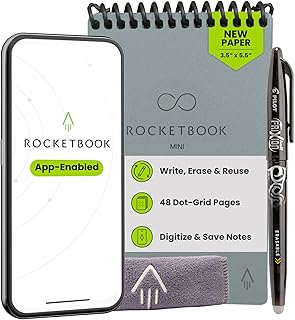
Rocketbook Mini Reusable Smart Notepad, Pocket Size Notebook 3.5×5.5, Gray – Dotted Pages, App-Connected, Erasable, Ideal for On-The-Go List Taking & Quick Notes Anywhere
Best For:
On-the-go note takers, travelers, and anyone who needs a pocket-sized reusable notebook for quick lists and reminders.
The Rocketbook Mini is all about portability. At roughly 3.5×5.5 inches, this pocket-sized dotted notebook is designed for quick capture: grocery lists, impromptu ideas, appointment notes, and quick sketches. The dotted pages provide enough guidance to write neatly while staying unobtrusive for simple diagrams. Because it’s small, it’s perfect for slipping into a jacket pocket, a phone case, or a small purse—places where a full letter-size notebook simply won’t fit.
Who is it for? If you’re someone who takes frequent short notes on the go—journalers, shoppers, sales reps, delivery drivers, and people who maintain running lists—the Mini is a natural fit. It’s also a great companion for travelers who want to record quick trip notes or itineraries without hauling a larger notebook. Compared to the letter-size Rocketbook models, the Mini trades writing real estate for convenience and portability.
Real-life usage: Keep the Mini in your back pocket during errands to jot down items as they come to mind, or use it in meetings to capture action items that you scan immediately and send to a shared folder. A freelance photographer could use it to record shoot notes and client preferences in the field, while a parent might keep it handy for capturing schedules and reminders without relying on phone notes.
Practical observations and buying considerations: Smaller pages mean more frequent scans if you take extensive notes. The Mini’s dotted format is versatile but may feel cramped for long-form writing. As with other Rocketbook products, use Pilot FriXion pens for eraseability and avoid non-erasable inks. The compact size also makes precise scanning slightly tougher—good lighting and steady hands improve automatic cropping and recognition.
Why it’s valuable: The Rocketbook Mini condenses the Rocketbook experience into a pocketable tool, enabling analog capture wherever you are while still fitting into cloud-based workflows for organization and sharing.
Check the latest price on Amazon.
Pros
- Highly portable and pocket-friendly
- Dotted pages provide flexible guides for notes and sketches
- App connectivity for quick cloud backups
Cons
- Limited page area for long notes
- Smaller size can make scanning slightly more challenging
Check the latest price on Amazon.
Rocketbook Flip Reusable Smart Notepad, Top Bound Spiral Notebook Lined and Dotted Pages Executive Size 6×8.8, Premium, Navy Blue (Pack of 1)

Best For:
Professionals who prefer a top-bound pad, interviewers, and anyone wanting a compact executive-sized reusable notebook.
The Rocketbook Flip is an executive-style, top-bound smart notepad that balances portability with a more comfortable writing posture. At approximately 6×8.8 inches and bound along the top, it opens flat for left- or right-handed users and feels familiar to people who prefer top-bound notebooks or legal pads. It mixes lined and dotted pages, giving an efficient layout for meeting notes, call logs, and quick sketches without the bulk of a letter-size book.
Who is it for? Business professionals, executives, and anyone who prefers a top-bound pad for quick notes will find the Flip particularly convenient. It’s also a good fit for interviewers and call center staff who frequently flip pages and want a compact pad that feels natural to use. Compared with side-bound spirals, the top-bound format reduces smudging and works well when you need to write on a flat surface while passing pages back and forth.
Real-life usage: Use the Flip during back-to-back client calls to capture call summaries and action items, then scan pages into project folders at midday or end-of-day. Field technicians can attach the Flip to a clipboard for a stable note-taking surface while keeping the pad compact enough for a tool bag. Designers who like quick wireframes will enjoy the dotted sections for rough layout sketches.
Practical observations and buying considerations: The Flip’s size is a compromise—more portable than letter-size but offering more space than the Mini. The top-bound style may not suit everyone, especially those accustomed to side-bound notebooks. Like other Rocketbook products, always scan your pages before erasing and use compatible erasable pens. The spiral can be prone to bending if packed loosely in a bag over time; a protective sleeve helps keep the pad in good shape.
Why it’s valuable: The Flip gives a practical, professional-feeling option for people who need quick note capture with the convenience of reusability and cloud backup, without carrying a full-sized notebook.
Check the latest price on Amazon.
Pros
- Top-bound design ideal for quick note flipping
- Mix of lined and dotted pages for flexibility
- Compact executive size balances portability and space
Cons
- Spiral binding can bend if not protected
- Top-bound format may be unfamiliar to some users
Check the latest price on Amazon.
Final Verdict
Smart reusable notebooks from Rocketbook cover a range of needs: the Core lined edition for long-form note-takers, the Core dot-grid for creative and visual workflows, the Fusion for structured planning, the Mini for pocket portability, and the Flip for executive-style note capture. Each model trades off between page area, portability, and template structure, so the right choice depends on how you work: choose letter size for heavy note volume and portability-focused options for everyday carry. Remember these notebooks are designed to be part of a cloud workflow—scan early, back up often, and use compatible erasable pens. If you want an eco-friendly replacement for disposable notebooks while keeping the tactile joy of writing by hand, a Rocketbook is a practical, well-integrated choice. Check your workflow needs against the features above and pick the model that best matches how you capture, archive, and share information.
Conclusion
These Best Smart Reusable Notebooks picks are trending now and offer great value and variety. Check the links above for latest prices and reviews.
As an Amazon Associate, I earn from qualifying purchases.
Tags:
reusable notebooks, smart notebook, Rocketbook, digital notes, erasable notebook, bullet journal, planner
