Best Smart Notebooks for College Students
As an Amazon Associate, I earn from qualifying purchases. This article may contain affiliate links, which means we may receive a commission at no extra cost to you.
As a college student, staying organized without drowning in paper is a constant balancing act. If you’re curious about smart notebooks—reusable, cloud-friendly notebooks that bridge handwritten notes with digital organization—you’re in the right place. As an Amazon Associate, I earn from qualifying purchases. This article may contain affiliate links, which means we may receive a commission at no extra cost to you.
This long-form guide walks through five practical smart notebook options that students actually choose for classes, labs, group projects, and long study sessions. I researched product specs, common user feedback, and practical classroom use-cases to highlight what matters: portability, page format (lined vs dot grid), cloud integration, erasing and reusability, and how each notebook fits different study styles.
Buying Guide
How to choose a smart notebook for college
1) Reusability and writing system: Most smart notebooks (like the Rocketbook models covered here) are designed for use with erasable gel pens—Pilot FriXion is the most commonly recommended. Pages wipe clean with a damp cloth or microwave-erase process depending on the model. If you need a true paper feel and permanent archival, consider standard paper notebooks; smart notebooks trade permanence for reusability and cloud convenience.
2) Page layout and size: Choose lined pages for lecture notes and essays, dot grid for diagrams or STEM problem-solving, and smaller executive sizes for pocket notes. Letter (8.5×11) is best for printing and enlarged sketches; executive sizes work well inside backpacks and planners.
3) Cloud and scanning features: A key advantage is automatic scanning and uploading. Look for notebooks with a reliable companion app that sends scans directly to Google Drive, Dropbox, OneDrive, Evernote, or email. Shortcut symbols (to pre-set destinations) speed up sorting notes from multiple classes.
4) Binding and durability: Wire-O binding lies flat for note-taking on a desk; stitched or glued bindings can be sleeker. If you carry your notebook to labs or the library every day, a reinforced cover protects pages from spills and knocks.
5) Environmental and long-term cost: Reusable notebooks reduce paper waste and cut recurring purchase costs over semesters. However, consider replacement accessories (microfiber cloths, replacement pens) and whether you prefer physical archives versus digital storage.
When comparing smart notebooks with tablet note apps (like GoodNotes or Notability), the main trade-offs are tactile handwriting and battery-free use for paper-like notebooks versus pressure sensitivity, layers, and multimedia on tablets. For many students, a smart notebook offers the middle ground: analog writing with automatic digitization.
Buying considerations: check page counts, whether the notebook supports dot grid or lined pages, the companion app’s reliability, and what pens are recommended. If the idea of erasing notes doesn’t appeal, stick with archival paper notebooks or scan pages manually.
Below are detailed profiles of five popular smart notebook options that are well-suited for college use, with realistic use cases, pros and cons, and who should buy each.
Rocketbook Core Reusable Smart Notebook, Lined Pages For School, Work and Creative Projects, Letter Size 8.5×11, Black – Premium

Best For:
Students who prefer full-page, lined lecture notes and want straightforward cloud archiving for courses and essays.
The Rocketbook Core (letter, lined) is designed for students who take a lot of linear lecture notes and want an easy route to cloud storage. The lined 8.5×11 format mirrors standard college paper, giving ample room for full-page lecture captures, formula derivations, and reading summaries. The Rocketbook Core uses specialty erasable pages that pair with erasable gel pens (commonly Pilot FriXion). After writing, the Rocketbook app scans pages using edge detection and auto-enhancement to create clean PDFs or images, then routes them to pre-set cloud destinations via smart shortcuts.
Practical benefits include substantial page real estate for detailed notes, the ability to consolidate class notes into cloud folders by course, and a reusable workflow that cuts down on paper purchases over semesters. Because the pages are optimized for scanning, text usually appears crisper in scans than with a generic notebook and smartphone camera. Students juggling multiple classes will appreciate the combination of letter-size legibility and digital organization.
Real-life use cases: record full lecture notes and upload directly to a Google Drive folder for each course; scan and email lab procedures to teammates after a group session; use the lined pages for chapter summaries during study sessions. Many students pair the Rocketbook Core with a set of Pilot FriXion pens and a small microfiber cloth that fits inside the cover for quick erasing between classes.
Why it’s valuable: Letter size is the closest analog to standard printer paper, so if you frequently print or photocopy notes, this Rocketbook keeps layout familiar. It’s also helpful for professors who prefer full-page assignments and sketches. Compared with regular paper notebooks, the Rocketbook reduces long-term waste and keeps an organized digital backup of your notes without extra scanning apps or manual file management.
Who should buy: students enrolled in lecture-heavy courses, humanities majors who write long-form notes, or anyone who wants full-page digitization without sacrificing handwriting comfort. Who may not need it: students who prefer permanent ink archives or those who use tablets and styluses for layered note-taking.
Practical observations: the Rocketbook app’s crop and contrast algorithms are generally reliable, but consistent lighting and flat page placement improve scans. Keep a spare microfiber cloth and replaceable erasable pens on hand; notes are not permanent once erased. As with most reusable notebooks, the long-term value depends on consistent cloud backup for archival.
Check the latest price on Amazon.
Pros
- Large 8.5×11 lined pages for detailed notes
- Reliable Rocketbook app scanning and cloud shortcuts
- Reusable pages reduce paper waste
Cons
- Requires erasable pens (not standard ballpoints)
- Not for students needing permanent paper archives
See full details and buy on Amazon — Check the latest price on Amazon.
Blue Sky Smart Notes Professional Notebook, Wire-O Binding, 8.5" x 11", Black (14713)

Best For:
Students who prefer traditional paper notebooks with wire-O binding that lays flat and want a dependable, no-tech solution.
The Blue Sky Smart Notes Professional Notebook is a traditional wire-O bound notebook built for college students who like a familiar paper feel but want a neat, professional layout. While it’s not a reusable smart notebook in the Rocketbook sense, its "Smart Notes" name reflects a thoughtful design—durable cover, wire-O binding that lays flat for easy handwriting, and an 8.5" x 11" page size that matches standard lecture handouts. For students who want tidy, legible notebooks for class and work, Blue Sky offers a no-frills, dependable solution.
Practical benefits of this style include the binding that opens fully so you can use every inch of the page without the spine getting in the way—a helpful feature during intensive note-taking. The notebook works well with a range of pens and highlighters, and it pairs naturally with scanning workflows: students can photograph pages with a smartphone scanning app to create PDFs for cloud storage. Compared with reusable smart notebooks, the Blue Sky option is often less expensive up front and requires no special pens or erasing routines.
Real-life use cases: use the Blue Sky notebook for course notes that you want to keep as permanent paper records; annotate readings and handouts alongside your notes; staple or tuck graded work inside the back cover for review. Its flat-lay binding also makes it a favorite on cramped library desks or shared study tables where space is limited.
Why it’s valuable: this notebook is for students who value a classic paper experience but still want to integrate digital backups on their own terms. If you prefer to keep printed archives, annotate with physical highlighters, or avoid the small learning curve of erasable pens and companion apps, the Blue Sky hits a practical sweet spot.
Who should buy: students who want a durable, no-tech notebook with professional styling and a binding that lays flat. Who may not need it: users seeking an integrated digital workflow with automatic cloud uploads and reusable pages.
Practical observations: because it’s straightforward paper, scanning quality depends on your smartphone app and lighting. If reducing paper waste is a priority, a reusable smart notebook may be a better fit. If immediate permanence (no accidental erasure) and compatibility with any pen are priorities, the Blue Sky is a strong choice.
Check the latest price on Amazon.
Pros
- Wire-O binding lies flat for comfortable writing
- Standard 8.5×11 size matches course handouts
- No special pens or erasing required
Cons
- Doesn’t offer reusable or automatic cloud upload features
- Takes physical storage space over time
Check product details and buy on Amazon — Check the latest price on Amazon.
Rocketbook Core Reusable Smart Notebook, Lined Pages For School, Work and Creative Projects, Letter Size 8.5×11, Gray – Premium

Best For:
Students wanting a neutral-colored Rocketbook with letter-sized lined pages for organized, reusable lecture and study notes.
This Rocketbook Core in gray brings the same letter-size benefits as the black edition but with a lighter cover color and the same lined, erase-and-rescan workflow. The lined pages are ideal for students who write dense notes, prepare outlines, or draft essays and want an easy digitization method without manual scanning. Pairing with the Rocketbook app allows quick uploads to designated folders—useful for organizing notes by course, semester, or project.
The gray cover is a minor aesthetic difference but can help visually distinguish between multiple notebooks if you keep more than one for different subjects. Functionally, you get the standard Rocketbook advantages: crisp scans through the app, reusable pages that clean with a damp cloth, and compatibility with erasable Pilot FriXion pens. Many students appreciate that the Rocketbook’s page templates are optimized for clean digital conversion, producing readable PDFs that are easier to annotate and search on a computer.
Real-life use cases: keep one gray Rocketbook for lab notes and another for lecture notes to separate practical work from theoretical study; after a study session, route scanned pages directly to a shared team folder for group projects; use the lined layout to create study outlines, then consolidate them into a single PDF for exam review.
Why it’s valuable: the gray Rocketbook Core is particularly helpful for students who want color-coding between notebooks without sacrificing page size or scan quality. Compared to typical paper notebooks, the Core’s reusability and cloud-first workflow can streamline how you archive and retrieve notes across semesters.
Who should buy: students who prefer a neutral cover and want multiple Rocketbooks for different classes, or those who frequently share notes digitally. Who may not need it: students satisfied with one permanent paper notebook per subject or those who use tablet-based note apps.
Practical observations: keep note-capture consistent—mark shortcuts in the notebook to speed uploads to the right folders. Over time, the convenience of reusing pages typically offsets the need to buy stacks of new notebooks each semester.
Check the latest price on Amazon.
Pros
- Same letter-size scan quality and app support as other Rocketbook Cores
- Neutral gray helps color-code notebooks by subject
- Reusable pages and cloud upload shortcuts
Cons
- Requires erasable pens and occasional cleaning
- Not ideal for those who want permanent paper archives
View on Amazon and purchase — Check the latest price on Amazon.
Rocketbook Core Reusable Smart Notebook, Lined Pages For School, Work and Creative Projects, Executive Size 6×8.8, Blue – Premium

Best For:
Students who prioritize portability and want a compact, reusable notebook for quick notes and shared uploads.
The Rocketbook Core Executive size (6 x 8.8) in blue is built for portability. This smaller format is ideal for students who move between classes, want to slip a notebook into a small bag or folder, or prefer a compact note-taking surface for quick meeting notes and to-do lists. The page size is comfortable for short-form notes, concept sketches, and study lists, and still supports Rocketbook’s cloud uploading features.
Executive Rocketbooks shine for students who combine in-class note-taking with on-the-go study habits. The smaller footprint makes it easy to keep within reach during labs, group meetings, or office hours conversations. Because the Executive size is more compact, some users prefer dot grid or half-page layouts for diagrams, but the lined executive still performs well for concise lecture summaries and flashcard-style entries.
Real-life use cases: carry the executive Rocketbook to daily lectures where you only need to capture key points; use it for meeting notes during group projects; keep a dedicated executive notebook for internship logs or research notes that you want to digitize and share quickly. Its portability also makes it popular for students who work part-time and need to jot down tasks between shifts.
Why it’s valuable: compared with the letter-size Rocketbook, the executive variant trades page real estate for convenience. If you value portability and quick, frequent uploads over long-form writing space, this size keeps your note-taking light and efficient. It still offers the erasable page benefits and Rocketbook’s scanning reliability, so your notes stay organized even when you’re moving fast between commitments.
Who should buy: commuters, students with tight backpacks, or anyone who prefers shorter, more frequent notes rather than full-page essays. Who may not need it: students in lecture-heavy courses that require long-form writing or detailed diagrams.
Practical observations: because pages are smaller, handwriting size matters—use clear, medium-sized letters for best scan recognition. Keep a small microfiber cloth in a pocket or folder for quick erasing.
Check the latest price on Amazon.
Pros
- Compact size fits small bags and backpacks
- Same app integration and reusable pages as larger Rocketbook models
- Good for quick study notes and meeting minutes
Cons
- Less page space for long-form writing
- Smaller pages can be cramped for detailed diagrams
Buy the executive Rocketbook on Amazon — Check the latest price on Amazon.
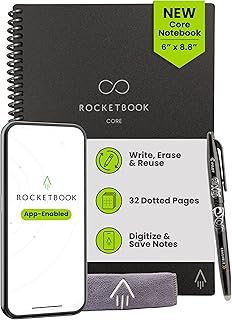
Rocketbook Core Reusable Smart Notebook, Dot Grid Pages For School, Work and Creative Projects, Executive Size 6×8.8, Black – Premium
Best For:
STEM and design students who need flexible dot-grid layouts in a portable, reusable notebook.
The Rocketbook Core Executive dot grid combines the compact executive size with a dot grid layout that’s ideal for STEM majors, designers, or students who frequently draw diagrams and concept sketches. Dot grids provide flexible guides for charts, tables, and freeform layouts without the visual dominance of lined paper. Like other Rocketbook Cores, the dot grid pages are reusable and designed to scan cleanly via the Rocketbook app, which can route notes to cloud services for easy organization.
Practical benefits of a dot grid executive include clearer sketches, neater hand-drawn graphs, and versatile layouts for both math problems and creative work. The dot grid is a popular choice for students who switch between text and diagrams within the same page—for instance, solving problem sets one column while writing theory notes in another. The compact size keeps the notebook lightweight for commuters and students who prefer minimal carry.
Real-life use cases: use the dot grid executive for lab notebooks where you need to draw quick apparatus diagrams and jot procedural notes; sketch flowcharts for computer science classes and immediately upload them to a project folder; create compact study sheets that combine equations, diagrams, and brief text summaries on a single page.
Why it’s valuable: dot grid pages hit a balance between structure and freedom, making this Rocketbook ideal for STEM and art students who need both precise marks and flexibility. Compared with standard lined Rocketbooks, the dot grid supports cleaner technical drawings and modular layouts.
Who should buy: engineering, math, computer science, and design students who want a portable notebook with flexible page structure. Who may not need it: students who only write long-form text and prefer fully lined paper.
Practical observations: dot grids improve the composition of technical diagrams but still require tidy handwriting for best scan legibility. Keep erasable pens and a cloth handy; grouping related pages by using the app’s shortcut symbols saves time when organizing class materials.
Check the latest price on Amazon.
Pros
- Dot grid supports diagrams, equations, and mixed layouts
- Portable executive size for commuting students
- Reusable pages with Rocketbook app integration
Cons
- Smaller pages limit long-form writing
- Dot grid may be unnecessary for strictly essay-focused courses
Find it on Amazon and purchase — Check the latest price on Amazon.
Final Verdict
Smart notebooks offer a compelling middle ground between traditional paper and fully digital note-taking. For college students, they reduce paper clutter, make sharing and organizing notes simpler, and lower long-term stationery costs when used consistently. The five options covered here represent common student needs: full-page letter Rocketbooks for detailed lecture capture, executive sizes for portability, dot grid for STEM and design use, and the Blue Sky wirebound notebook for students who prefer a classic paper-first approach.
Choose the Rocketbook Core letter if you need full-page legibility and frequent cloud uploads; pick the gray Rocketbook Core for color-coding and the executive sizes if you value portability. The dot grid executive is the best pick for technical diagrams and mixed layouts, while the Blue Sky caters to students who want a professional, no-tech paper notebook that lays flat and pairs easily with a manual scanning routine.
Before buying, consider your note formats (long-form vs diagrams), whether you’re comfortable with erasable pens, and how you plan to archive notes for exams and future reference. If you want the tactile feel of handwriting plus simplified digital backups without investing in a tablet, a smart notebook is an efficient, eco-friendlier option.
If you’re ready to reduce paper clutter and streamline how you study, one of these smart notebooks could be the right fit. Check the latest price on Amazon.
Conclusion
These Smart Notebooks for College Students picks are trending now and offer great value and variety. Check the links above for latest prices and reviews.
As an Amazon Associate, I earn from qualifying purchases.
Tags:
smart notebook, Rocketbook, college notebooks, reusable notebooks, dot grid notebook, executive notebook, letter size notebook
