Best Smart Home Devices for Beginners — Easy Starter Picks
As an Amazon Associate, I earn from qualifying purchases. This article may contain affiliate links, which means we may receive a commission at no extra cost to you.
As an Amazon Associate, I earn from qualifying purchases. This article may contain affiliate links, which means we may receive a commission at no extra cost to you.
If you’re just starting your smart home journey, the choices can feel overwhelming. From voice assistants to smart plugs and compact smart displays, the right beginner setup should focus on simplicity, reliability, and clear value. This guide highlights easy-to-install, widely compatible devices that require minimal technical knowledge—devices that help you automate everyday tasks, improve convenience, and give you confidence to expand later. Below you’ll find practical explanations, real-life scenarios, and buying considerations to help you pick the right gear without getting lost in jargon.
Buying Guide
What to look for when buying your first smart home device:
1) Ecosystem and Voice Assistant Compatibility: Decide early which ecosystem you prefer (Alexa, Google Assistant, Apple HomeKit) because devices integrate more smoothly within a single ecosystem. For beginners, Alexa-compatible devices often offer the widest selection and easiest voice setup.
2) Hub vs. No-Hub Devices: Many entry-level devices (Wi‑Fi smart plugs, Wi‑Fi speakers/displays) don’t need a separate hub, which reduces complexity and cost. If you plan to deploy many devices or Zigbee/Z‑Wave sensors, consider whether a hub will be necessary later.
3) App Experience and Reliability: Read up on the mobile app—setup should be straightforward, OTA updates reliable, and automations easy to create. A confusing app experience can make a simple device feel unusable.
4) Security and Certifications: Look for UL/ETL or FCC certifications and strong password/2FA options on the companion account. Secure devices protect your network and privacy.
5) Features vs. Use Cases: Match features to actual needs. Smart plugs are perfect for lamps and fans, while an Echo Show or Echo Spot is better for alarms, video calls, and quick visual info. Consider dimming, energy monitoring, audio quality, and routines.
6) Wi‑Fi Band and Range: Many affordable devices use 2.4GHz Wi‑Fi only—ensure your router supports it and has coverage where you’ll place the device.
7) Expandability and Price: Starting small is wise—pick 2–4 core devices and expand. Balance cost with long-term reliability; extremely cheap alternatives can mean flaky connections and shorter lifespans.
Who should buy now: renters, busy households, and tech-curious users who want low-friction automation. Who may wait: users seeking fully local control, advanced home security professionals, or those committed to a single non-compatible ecosystem.
Kasa Smart Plug HS103P4, Smart Home Wi-Fi Outlet Works with Alexa, Echo, Google Home & IFTTT, No Hub Required, Remote Control, 15 Amp, UL Certified, 4-Pack, White

Best For:
Beginners who want an affordable, reliable smart plug pack to automate lamps and small appliances without a hub.
The Kasa Smart Plug HS103P4 is a no-fuss entry point into home automation for anyone who wants to control lamps, small appliances, or holiday lights without rewiring or hubs. This 4-pack of compact Wi‑Fi plugs works with Alexa, Google Assistant and IFTTT, letting you set schedules, create scenes and turn devices on or off from your phone. The Kasa app is known for approachable setup—scan the quick start guide, connect to 2.4 GHz Wi‑Fi, and you’re typically ready to automate within minutes.
Why it’s practical: these plugs support a 15A rating, making them suitable for most household loads such as table lamps, fans, and coffee makers. Because they’re UL certified, buyers who prioritize safety won’t have to dig through technical specs to confirm basic protections. Compared with unbranded smart plugs, Kasa tends to strike a balance between reliability and price, with an app that supports timers, countdowns, and grouping multiple plugs for one-touch control.
Real-life usage: plug one into a bedside outlet to schedule a lamp to turn on at sunrise and off at bedtime; place another behind an entertainment unit to cut power to peripherals after sleep; use a timer during vacations to simulate presence. The 4-pack gives you immediate coverage in a living room and bedroom without buying extras.
Buyer considerations: these plugs use 2.4GHz Wi‑Fi only—check router compatibility and signal strength in the rooms you’ll use them. They also require a manufacturer account for cloud control, which is common but worth noting for privacy-conscious users. If you need energy monitoring or smart home hub compatibility (Zigbee/Z‑Wave), look at higher-tier alternatives.
Who should buy: renters, new smart-home adopters, and anyone wanting a low-cost way to automate lamps and appliances. Who might skip: advanced users wanting local-only control or integrated energy analytics.
Check the latest price on Amazon.
Pros
- Easy setup with Kasa app and voice assistant compatibility
- UL certified and 15A rating for common household devices
- Four plugs in one pack provide immediate coverage
Cons
- 2.4GHz Wi‑Fi only—needs compatible router and decent signal
- No built-in energy monitoring for power tracking
Check the latest price on Amazon.
Amazon Smart Plug, Works with Alexa, Simple Setup, Endless Possibilities

Best For:
Alexa users who want the simplest, most integrated smart plug experience without third-party apps.
If you’re building an Echo-centric smart home, the Amazon Smart Plug is one of the easiest ways to add automation without wrestling with third-party apps. Setup is purposefully streamlined: open the Alexa app, plug the device in, and follow on-screen prompts. The plug appears as a native Alexa device, which makes it straightforward to include in Routines and voice control—say “Alexa, turn off the lamp” and it obeys.
What it solves: the Amazon Smart Plug removes friction for non-technical users who want voice control and scheduled automation. Unlike some smart plugs that require their own apps and cloud accounts, this plug integrates directly into Alexa’s ecosystem which many beginners already use for music or timers. For landlords or renters who can’t modify wiring, a smart plug is a quick retrofit to bring automation to lamps, fans, or holiday lights.
Real-world scenarios: use one on a living room lamp to create a wake-up routine that turns lights on slowly with news briefing; schedule a fan to switch off after an hour in the bedroom; group multiple Amazon Smart Plugs to shut down entertainment devices at bedtime. Because it’s designed for native Alexa use, management is consistent across your Echo devices and routines.
Limitations: the plug currently requires an Alexa account and cloud connectivity for most features—if you prefer local-only solutions or don’t want to use Alexa, a more platform-agnostic plug may be a better fit. Also, it’s typically sold as a single unit rather than a multi-pack, so factor that into cost planning.
Who should buy: Alexa users who want the simplest setup and native integrations. Who may not need it: users devoted to Google Assistant, HomeKit, or those who want local-only control.
Check the latest price on Amazon.
Pros
- Seamless Alexa integration and very simple setup
- Works natively with Alexa Routines
- Compact and reliable for basic automation
Cons
- Requires Alexa ecosystem and cloud connectivity
- Often sold individually, not in multi-packs
Check the latest price on Amazon.
Amazon Echo Spot (newest model), Great for nightstands, offices and kitchens, Smart alarm clock, Designed for Alexa+, Glacier White

Best For:
Users who want a compact smart display/alarm clock with Alexa for nightstands, kitchens, or desks.
The Amazon Echo Spot blends compact design with Alexa’s voice assistant and a small display optimized for bedside tables, desks, and kitchen counters. While its form factor is smaller than larger Echo Show models, the Spot focuses on time, alarms, quick visuals like weather or calendar previews, and hands-free voice control. Beginners appreciate its gentle learning curve: plug it in, connect to Wi‑Fi, and use the Alexa app to complete a short guided setup.
Functional benefits: the Echo Spot is ideal for anyone who wants more than a speaker—video feeds from compatible cameras, visual timers, recipe steps in the kitchen, and a glanceable screen for incoming calls or messages. For people who wake up to routines, you can program a morning routine that turns on smart plugs, reads headlines, and starts a news briefing all from the Spot. In apartments or smaller rooms where space matters, the Spot provides smart display functions without the footprint of a tablet or larger smart display.
Use-case examples: place the Echo Spot on a nightstand to serve as your alarm clock with a custom wake routine; set one in the kitchen to display recipe steps and set timers while you cook; keep one on a home office desk for quick video check-ins and calendar alerts. Its compact screen is also useful for quick security camera checks when paired with compatible cameras.
Comparisons and considerations: compared with the Echo Show 5, the Spot is often chosen for tighter spaces and slightly different visual layout, though the Show 5 has a larger screen and stronger bass for music. Privacy-conscious buyers should note the Spot includes mic and camera controls and a physical camera shutter on many models.
Who should buy: users seeking a small, multi-purpose smart display for bedrooms, kitchens, or desks. Who might skip: those who need a bigger screen or stronger audio for media-heavy rooms.
Check the latest price on Amazon.
Pros
- Compact footprint ideal for small spaces
- Good for routines, alarms, and quick visual info
- Built-in camera and display for video checks
Cons
- Smaller screen and weaker bass compared with larger Echo Shows
- Depends on Alexa ecosystem for full functionality
Check the latest price on Amazon.
Govee Smart Plug, WiFi Plugs Work with Alexa & Google Assistant, Smart Outlet with Timer & Group Controller, WiFi Outlet for Home, No Hub Required, ETL & FCC Certified, 2.4G WiFi Only, 4 Pack

Best For:
Buyers who want an affordable multi-pack to deploy smart plugs across several rooms quickly.
Govee’s 4-pack smart plugs are a beginner-friendly option for those who want a multiroom rollout without fuss. They connect directly to your 2.4GHz Wi‑Fi and integrate with Alexa and Google Assistant for voice commands. The Govee Home app supports timers, countdowns, schedules, and group control so you can manage several plugs together—useful when converting a living space to smarter lighting or staging lights while on vacation.
Practical benefits: Govee positions these plugs as budget-conscious but feature-rich: group control, scheduling, and compatibility with voice assistants let you build sensible automations. ETL and FCC certifications provide a basic assurance of electrical and regulatory compliance, and the 4-pack supplies multiple rooms right away—handy for living rooms, bedside lamps, or holiday decorations.
Real-life scenarios: set a schedule for a living room lamp to simulate presence while you’re away, or group hallway and entryway lights so a single command lights the path when you arrive home. The timer feature is useful in kitchens for appliances or in children’s rooms to automatically shut off night lights. Because these plugs are compact, they generally won’t block adjacent outlets.
Comparisons and buyer notes: compared to single-brand options like the Amazon Smart Plug (which integrates tightly with Alexa), Govee offers cross-assistant support and a multi-pack advantage, but you’ll use the Govee app for initial setup. They lack advanced features like per-device energy monitoring found in higher-tier models. Also, these plugs are 2.4 GHz only, which is common but important to verify on your router.
Who should buy: budget-minded beginners, or anyone who wants to outfit multiple rooms quickly. Who may not need it: users who require detailed energy usage data or local-only control.
Check the latest price on Amazon.
Pros
- Four-pack provides immediate multi-room coverage
- Works with Alexa and Google Assistant
- ETL and FCC certified for safety
Cons
- No energy monitoring or advanced analytics
- 2.4GHz Wi‑Fi only—verify router compatibility
Check the latest price on Amazon.
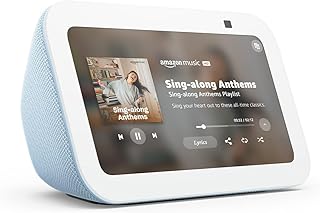
Amazon Echo Show 5 (newest model), Smart display, Designed for Alexa+, 2x the bass and clearer sound, Cloud Blue
Best For:
Users who want a compact smart display for kitchens, bedrooms, or small offices with improved audio and Alexa integration.
The Echo Show 5 is a compact smart display that balances screen size, sound, and affordability—making it a compelling choice for beginners who want a more visual Alexa experience. With a 5.5-inch touchscreen, improved bass and clearer audio compared to older small Echo devices, and native Alexa integration, the Show 5 handles routines, video calls, recipes, entertainment, and smart-home control on one device. Setup is typical Amazon simplicity: power, Wi‑Fi, and a few in-app choices.
Why it’s useful: the Show 5’s display turns voice commands into visual feedback—weather charts, step-by-step recipe instructions, security camera streams, and quick access to timers. The upgraded audio makes it more pleasant for podcasts and music in a bedroom or kitchen, and the device integrates deeply with Alexa Routines for hands-off automation. As part of a beginner setup, it serves as a command center and a welcome screen for smart devices around the house.
Use cases: use the Show 5 in the kitchen to follow recipes and set timers without touching a phone; place one on your nightstand to run a personalized morning routine that includes turning on smart plugs and briefing you on the day; use it in a small home office for video conferencing and calendar reminders. The camera and mic have privacy controls including a built-in shutter and mic/camera toggle.
Considerations and comparisons: compared with the Echo Spot, the Show 5 offers a larger screen and stronger audio—better for media and visual interactions. If you need a large family-room display, consider bigger Echo Show models, but for most bedrooms and kitchens the Show 5 hits a sweet spot.
Who should buy: buyers wanting a compact smart display with good audio for daily tasks and visual smart-home control. Who might not need it: those who prefer purely audio devices or a large-screen experience.
Check the latest price on Amazon.
Pros
- Larger screen and improved bass for a small device
- Great for recipes, routines, and quick camera checks
- Strong Alexa integration and privacy controls
Cons
- Not as powerful as larger Echo Show models for family-room use
- Relies on cloud services and Alexa account
Check the latest price on Amazon.
Final Verdict
Starting a smart home doesn’t require expert wiring or big budgets—selecting a few, well-supported devices can unlock practical automation and convenience immediately. For most beginners, a mix of smart plugs and one compact Alexa-enabled display or speaker is a strong first step: smart plugs (Kasa, Govee, Amazon Smart Plug) give instant automation for lights and appliances, while an Echo Spot or Echo Show 5 provides voice control, routines, and a visual hub. Prioritize ecosystem choice, app reliability, and Wi‑Fi compatibility. If you primarily use Alexa, the Amazon Smart Plug and Echo Show models offer the smoothest integration; if you want a multi-pack to outfit several rooms, Kasa and Govee are attractive. Take it slow—install a couple of devices, learn the app and routines, then expand. Happy automating, and remember to check device requirements and Wi‑Fi coverage before buying.
Conclusion
These Best Smart Home Devices for Beginners picks are trending now and offer great value and variety. Check the links above for latest prices and reviews.
As an Amazon Associate, I earn from qualifying purchases.
Tags:
smart home devices, smart plugs, Alexa beginner guide, smart display, home automation, Kasa smart plug, Echo Show 5, Govee smart plug
