Best Portable Webcams for Remote Interviews & Meetings
As an Amazon Associate, I earn from qualifying purchases. This article may contain affiliate links, which means we may receive a commission at no extra cost to you.
As an Amazon Associate, I earn from qualifying purchases. This article may contain affiliate links, which means we may receive a commission at no extra cost to you.
Remote interviews and professional video calls have moved from occasional to routine, and having the right portable webcam makes the difference between a polished presence and a pixelated distraction. Whether you run interviews on the go, host client-facing meetings from a co-working space, or simply want better image and audio than a built-in laptop camera, this guide focuses on webcams that are easy to carry, quick to set up, and reliable across platforms like Zoom, Microsoft Teams, Skype and Google Meet.
I selected a small range of versatile, highly reviewed webcams covering 4K zoom-capability, AI noise canceling, adjustable fields of view, and built-in privacy features. The goal: help you match features to your actual needs—interview clarity, background control, small-meeting audio pickup, or a balance of all three—without overpaying for studio gear you won’t use.
Buying Guide
Why portability matters: a portable webcam should be compact, require minimal setup (ideally plug-and-play USB), and mount securely on laptops or tripods. Portability also includes useful software features that replace a full studio: auto low-light correction, adjustable field-of-view, and simple privacy covers.
Key features to evaluate:
– Resolution and zoom: 1080p is the baseline for professional interviews; 2K or 4K cameras give extra detail and cropping room. Optical zoom is rare in portable webcams—most offer digital zoom, which is helpful but can increase noise.
– Microphones and noise handling: Two stereo mics are useful for natural-sounding audio; AI-based noise reduction is increasingly common and effective at removing background hums in shared spaces.
– Field of view (FOV): Narrow FOVs (60–75°) are great for head-and-shoulders framing; wider FOVs (90°+) capture group calls or more of your workspace. Look for adjustable FOV if you switch contexts.
– Low-light performance: Sensors like Sony STARVIS or good low-light correction software avoid washed-out faces under office lighting or evening interviews.
– Mounting and privacy: A firm clip and tripod thread expand placement options. A physical privacy shutter is a small but meaningful feature for peace of mind.
– Compatibility: Confirm official support for your OS and conferencing apps. Most modern webcams are plug-and-play, but manufacturer software can add useful controls.
Real buying considerations:
– Trade-offs between resolution and bandwidth: 4K looks great but requires stronger internet and more CPU. For most interviews, 1080p at a stable frame rate is preferable.
– Microphone vs. headset: Built-in mics are fine for solo interviews in quiet spaces; if you’re in noisy environments, pair the camera with a headset or dedicated mic.
– Use case-driven choice: If you travel constantly, prioritize compactness and fast setup. If you frequently moderate panels, favor wider FOV and better audio pickup.
This guide presents five solid portable webcams that span those trade-offs and real-world use cases, so you can pick the best fit for your remote interview workflow.
Zoom Certified, NexiGo N950P 4K Zoomable Webcam with Remote Control, Sony_Starvis Sensor, 5X Digital Zoom, Pro Web Camera with Dual Stereo Mics, for Zoom Skype Teams Twitch

Best For:
Users who prioritize image detail and framing—remote interviewers, streamers, and content creators wanting 4K capture and on-the-fly zoom control.
If you need a portable webcam that leans into image control, the NexiGo N950P is a compelling option. It targets professionals doing recorded interviews, panel moderation, or live streaming where framing and detail matter. With a 4K sensor and a 5x digital zoom controlled via the included remote, this camera gives you the flexibility to crop or zoom in on the fly without standing up or re-positioning the device. Note that the zoom is digital — good for framing and emphasis, not a substitute for optical zoom — but in well-lit conditions the extra pixels provide a noticeably crisper picture than many 1080p webcams.
Sony STARVIS-style low-light sensitivity is promoted on this model, which helps preserve color and facial detail under office fluorescent lighting or softer evening lamps. Dual stereo microphones capture a wider audio field than a single mic, and built-in noise suppression helps reduce ambient hum from air conditioners or distant traffic. The camera ships with a privacy cover and a tripod thread, so you can clip it to a laptop or mount it on a small stand for more stable shots.
What it solves: this webcam is ideal when you need better image quality and adjustable framing for interviews recorded or streamed remotely. It’s also useful for content creators who occasionally produce higher-resolution videos without carrying dedicated camera gear. Compared with basic 1080p plugs, the NexiGo’s strong sensor and software sharpening make a measurable difference in clarity.
Who should buy it: remote interviewers, freelance journalists, podcasters who occasionally stream video, and managers conducting recorded onboarding or training. Its remote and zoom controls are particularly helpful when you want hands-free adjustments.
Who may skip it: if you frequently work in very low-bandwidth environments or need an always-on, ultra-simple webcam for quick team calls, a 1080p camera with a lighter bandwidth footprint may be more efficient.
Practical observations: reviewers often praise the ease of setup and the visible improvement over built-in laptop cameras; some note that performance drops in dim rooms if you push digital zoom hard. For best results, pair it with good lighting and stable bandwidth.
Check the latest price on Amazon.
Pros
- 4K sensor for higher detail
- 5x digital zoom with remote control
- Sony STARVIS-style low-light performance
- Dual stereo mics and noise suppression
- Tripod thread and privacy cover
Cons
- Digital zoom can introduce noise at high magnification
- Larger file/bandwidth footprint than 1080p alternatives
Check the latest price on Amazon.
EMEET 1080P Webcam with Microphone, C960 Web Camera, 2 Mics Streaming Webcam, 90°FOV Computer Camera, Plug and Play USB Web Cam for Online Calling/Conferencing, Zoom/Teams/Facetime/YouTube, Laptop/PC

Best For:
Budget-minded professionals and educators who want reliable 1080p quality and easy plug-and-play setup for interviews and meetings.
The EMEET C960 is a straightforward plug-and-play 1080p webcam that focuses on delivering reliable performance for everyday remote interviews and meetings. With a 90° field of view it strikes a practical balance: wide enough to include a bit of your background or a co-interviewee, but not so wide that your workspace looks distorted. Built-in dual microphones help pick up natural audio for a single speaker in a quiet home office or small meeting room.
Where this camera shines is simplicity. There’s no steep learning curve and no heavy software required — you connect via USB, choose the camera in your conferencing app, and you’re ready. For HR professionals running back-to-back candidate interviews, consultants hopping between client calls, or educators holding office hours, the EMEET’s reliable picture and easy mounting make it a sensible companion.
What it solves: it upgrades anyone still relying on a laptop webcam to a full 1080p experience without unnecessary extras. The balanced FOV helps maintain a professional composition for most head-and-shoulders shots, and the stereo mics reduce the need to fish for an external microphone in quiet settings.
Who should buy it: budget-conscious remote workers, educators, and small business owners who want a no-fuss upgrade from built-in cameras. It’s also a good travel companion for interviewers who need a consistent setup at temporary locations.
Who may skip it: power users who need advanced features like adjustable FOV, AI noise cancellation, or higher-than-1080p resolution for cropping and recording.
Practical observations: users often note steady video performance and easy clip-on mounting; a few report wanting stronger low-light correction for evening calls. Overall, it’s a dependable everyday webcam at a modest spec level.
Check the latest price on Amazon.
Pros
- True 1080p video at a practical FOV
- Plug-and-play simplicity
- Dual microphones for clearer voice pickup
- Compact clip for laptops
Cons
- Limited advanced features like AI noise canceling or adjustable FOV
- Low-light performance is adequate but not exceptional
Check the latest price on Amazon.
Logitech Brio 101 Full HD 1080p Webcam for Meetings, Streaming, Desktop, Laptop, PC – Built-in Mic, Shutter, Works with Zoom, Microsoft Teams, Nintendo Switch 2’s new GameChat Mode, USB-A,-Black

Best For:
Teams and professionals who need a reliable, easy-to-manage 1080p webcam with privacy features for interviews and meetings.
Logitech’s Brio line has been a go-to for professionals, and the Brio 101 continues that reputation with dependable Full HD 1080p capture, integrated microphone, and a familiar, rugged design. It focuses on delivering consistent, predictable performance during interviews and meetings where reliability matters more than high-resolution spectacle.
One practical advantage of Logitech webcams is broad compatibility and polished drivers. Brio 101 pairs easily with major conferencing platforms and operating systems, and its built-in privacy shutter addresses security-conscious users who want an immediate physical cover. The camera’s single-mic setup is tuned for voice clarity, and the compact form factor makes it a straightforward upgrade to any laptop or desktop.
What it solves: the Brio 101 replaces inconsistent laptop webcams with a business-grade alternative that’s simple to deploy across teams. IT managers and HR departments that distribute a standard webcam for remote hiring will appreciate the Brio’s consistent performance and minimal setup troubleshooting.
Who should buy it: teams standardizing their remote interview toolkit, recruiters, and professionals who value brand reliability and ease of use. Its familiar Logitech software ecosystem is helpful for administrators managing multiple units.
Who may skip it: content creators who want higher-than-1080p capture, or remote workers who need advanced audio capabilities—this model prioritizes straightforward video and privacy rather than studio features.
Practical observations: user feedback often highlights stable connectivity and the comfort of a physical shutter; some users mention a wish for better low-light handling compared with higher-end models. For standard interview setups under decent lighting, Brio 101 is a worry-free choice.
Check the latest price on Amazon.
Pros
- Trusted brand reliability and compatibility
- Built-in privacy shutter
- Simple setup and stable performance
- Compact, professional design
Cons
- 1080p only—no 2K/4K option in this model
- Audio and low-light features are basic compared to premium models
Check the latest price on Amazon.
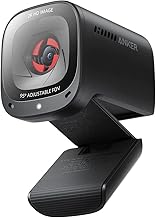
Anker PowerConf C200 2K Webcam for PC/Laptop/Mac, Computer Camera, Low-Light Correction, AI-Noise Canceling Mics, Adjustable Field of View, Built-in Privacy Cover, Stereo Mics, for Meeting
Best For:
Hybrid professionals and recruiters who need better-than-1080p video and strong AI noise cancellation for interviews in shared or noisy spaces.
Anker’s PowerConf C200 strikes a strong balance between image quality and intelligent audio processing, making it one of the most feature-packed portable webcams for interviews and client meetings. It records at up to 2K resolution, giving you extra clarity and headroom for minor cropping during post-production or when dialing into virtual backgrounds. The hardware is complemented by low-light correction and an adjustable field-of-view, so you can switch between a tighter headshot for interviews and a wider setting for team conversations.
Where the C200 really stands out is audio: AI-driven noise cancellation helps reduce keyboard clicks, distant chatter, or HVAC noise, allowing interviewers and candidates to focus on conversation rather than ambient distractions. The stereo mics also provide natural depth, which is useful when two people share a frame in the same small room.
What it solves: this camera is a solid all-rounder for mobile professionals who need sharper video than 1080p, plus reliable noise suppression when conducting interviews from shared coworking spaces or cafes. Its adjustable FOV and bundled privacy cover add versatile placement options and security.
Who should buy it: consultants, recruiters, and hybrid workers who frequently conduct interviews in variable lighting and noise environments and who want the extra resolution for polished recordings.
Who may skip it: users with extremely constrained bandwidth or those who prefer the highest possible resolution (4K); while 2K is a great middle ground, it still requires a decent internet connection.
Practical observations: customer reports praise the C200’s real-world noise reduction and overall video clarity; some note that the software controls are helpful for quick adjustments. For many, it replaces a two-device setup (camera + separate mic) with one compact unit.
Check the latest price on Amazon.
Pros
- 2K resolution for extra clarity
- AI noise cancelling stereo mics
- Adjustable field of view and low-light correction
- Privacy cover and easy mounting
Cons
- Higher bandwidth needs than 1080p
- Advanced features require occasional software adjustments
Check the latest price on Amazon.
Acer 1080p Webcam USB Plug and Play Webcam for PC with Noise Cancellation Microphones Computer Camera for Desktop Streaming Gaming Online Meeting Wide Angle Privacy Cover A-to-C Adapter Easy Setup

Best For:
Traveling professionals and small teams who want a simple, wide-angle 1080p webcam with noise cancellation and broad compatibility.
Acer’s 1080p USB webcam is a pragmatic choice for professionals who want a dependable picture and solid audio without a lot of extras. It includes noise cancellation microphones to help reduce background buzz, a privacy cover, and a wide-angle view that’s useful when you occasionally need to include a second person or a bit more of your surroundings.
As a plug-and-play device, it’s easy to hand out to staff or pack in a travel bag for interviews at client sites. The inclusion of an A-to-C adapter makes it compatible with a wider range of modern laptops and dongle-free setups. For team leads, educators, or sales reps who travel and need a consistent look across platforms, this Acer webcam keeps things simple and predictable.
What it solves: it removes the variability of built-in laptop cameras and provides consistent 1080p quality and noise-mitigated audio for interview situations. Its wide-angle setting also doubles as a flexible tool for quick group check-ins or product demonstrations.
Who should buy it: traveling professionals, small teams that need a standardized webcam, and anyone who wants basic wide-angle coverage with noise cancellation in one affordable package.
Who may skip it: users seeking higher resolution (2K/4K), professional streamers, or those who require advanced AI audio features.
Practical observations: buyers commonly appreciate the easy setup and reliable performance for regular meetings; a few mention that the wide-angle can be too roomy if you prefer tight headshot framing, so plan to adjust placement accordingly.
Check the latest price on Amazon.
Pros
- Noise cancellation microphones
- Wide-angle lens for flexible framing
- Plug-and-play with A-to-C adapter
- Privacy cover included
Cons
- 1080p only—no 2K/4K
- Wide-angle may be too broad for tight headshots
Check the latest price on Amazon.
Final Verdict
Choosing the right portable webcam for remote interviews boils down to matching features with your actual working conditions. If you want the sharpest image and frequent framing control, the NexiGo N950P’s 4K sensor and remote zoom are persuasive. For a straightforward, dependable upgrade from a built-in camera, the EMEET C960 and Acer 1080p models give reliable 1080p quality with easy setup and noise-reducing mics. If you need a balance of smart audio and a bit more resolution without jumping to 4K, the Anker PowerConf C200 offers excellent AI noise cancellation and 2K capture. Finally, organizations that prioritize standardization and simple deployment will appreciate the Logitech Brio 101’s brand reliability and privacy shutter.
Consider your most frequent interview scenarios: quiet private offices favor 1080p simplicity; noisy co-working spaces or cafés benefit from AI noise cancellation; and recorded sessions or producer workflows can justify 2K or 4K. Pair your webcam choice with basic lighting (a small ring light or desk lamp) and stable internet, and you’ll dramatically improve interview quality without a full studio setup.
If you’re still unsure, think about whether you prioritize image detail, audio clarity, or ease of deployment—then pick the camera that matches that need. Any of the five options here will upgrade your remote interview presence beyond a built-in laptop camera, and each serves a slightly different use-case. Ready to upgrade your remote interview kit? Check the latest price on Amazon.
Conclusion
These Portable webcam for remote interviews and meetings picks are trending now and offer great value and variety. Check the links above for latest prices and reviews.
As an Amazon Associate, I earn from qualifying purchases.
Tags:
portable webcam, remote interview camera, webcam for meetings, best webcams 2026, 2K webcam, 1080p webcam, AI noise canceling webcam
