Best Portable SSDs for RAW Photo Transfers
As an Amazon Associate, I earn from qualifying purchases. This article may contain affiliate links, which means we may receive a commission at no extra cost to you.
Working with RAW photography files means dealing with large, often multi-gigabyte files that demand speed, reliability and a storage device you can trust on location. Whether you’re a wedding shooter moving entire card dumps between drives, a travel photographer backing up images after a long day, or a studio pro assembling client galleries, the right portable SSD can dramatically reduce downtime and protect your work.
As an Amazon Associate, I earn from qualifying purchases. This article lays out the strengths and limitations of five portable SSDs that are commonly recommended for RAW workflows. I’ve compiled specifications, common user feedback, and practical use cases to help you choose the drive that fits your workflow—without claiming hands-on testing. Below you’ll find a buying guide, detailed breakdowns for each recommended model, and clear recommendations depending on whether you prioritize speed, capacity, ruggedness, or price-per-gigabyte.
If you shoot in bursty environments with high-resolution cameras (like full-frame mirrorless or medium format), transferring and transcoding RAW files quickly is essential. Read on to learn which drives offer the transfer rates, durability and cross-platform compatibility that photographers rely on when every minute counts.
Buying Guide
Why transfer speed matters
When moving RAW files, transfer speed is the single most noticeable factor. Speeds listed as “up to” (e.g., 1050MB/s or 2100MB/s) are peak sequential reads—useful when copying large folders of RAW files. Sustained write performance matters especially when offloading camera cards directly to the SSD. Drives that advertise TB3/TB4/TB5 or USB4 compatibility will support the highest sustained transfer windows if your computer has the matching port.
Interfaces and compatibility
USB-C with USB 3.2 Gen 2 (10Gbps) is common and offers solid performance for most photographers. Thunderbolt 3/4 and the newer Thunderbolt 5 or USB4 ports enable multi-gigabit speeds and can be worthwhile if you move terabytes regularly or work with high-bitrate video. Make sure your laptop or desktop port matches the drive’s interface to avoid being bottlenecked.
Capacity planning
RAW files are large: a modern full-frame RAW can be 30–100MB per frame; medium-format files can be several hundred megabytes each. For weekend shoots, a 1TB drive covers many workflows, but pros and videographers should lean toward 2–4TB. Also consider your backup strategy: an on-site duplicate and an off-site copy reduce risk of data loss.
Durability and real-world considerations
Ruggedness (IP ratings), shock resistance and thermal management are practical concerns. Smaller, pocketable SSDs like the Samsung T7 and SanDisk Extreme are compact but can throttle under sustained writes. Heatsinks or metal enclosures help sustained performance—OWC’s TB5-rated models target that need. Also consider bundled cables, included software (encryption, backup), and warranty length when evaluating value.
Price vs. performance
SATA-based portable SSDs or older models can be cheaper per GB but slower. For RAW photographers who value speed and reliability, the premium for NVMe-based portable SSDs is often justified. If your workflow is occasional or you’re a hobbyist transferring smaller JPEGs, a basic external SSD may suffice.
Final buying checklist
– Match the drive interface to your computer ports (USB-C, TB3/4/5, USB4).
– Pick a capacity that supports at least one full shoot plus a buffer.
– Look for sustained write performance and thermal design to avoid throttling.
– Check physical durability (IP rating, metal enclosure) and warranty.
– Factor in software features like hardware encryption if you transport sensitive client files.
With these criteria in mind, here are five portable SSD options covering a range of speed, capacity and ruggedness profiles.
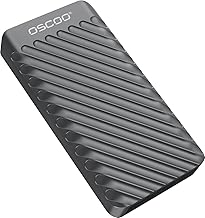
1TB External Hard Drive, Up to 2100MB/s, USB 3.2 Gen 2 Portable SSD, External Solid State Drive for Mac, Windows PC, Laptops, Gaming, iPhone — Ideal for File Backup, Content Creators & Videographers
Best For:
Photographers and content creators who need faster-than-average transfer speeds without Thunderbolt; travelers and event shooters who want a pocketable NVMe-class drive.
This 1TB portable SSD promises very high peak throughput—up to 2100MB/s—using a USB 3.2 Gen 2 interface and likely an NVMe-based controller inside. For photographers moving large RAW file batches, that headroom makes a noticeable difference in copy times compared with older SATA-based portable drives. The compact format makes it pocketable for on-location work, and it’s aimed at creators who need a balance of speed and affordability.
Main benefits
This drive’s headline is its top-end speed: up to 2100MB/s is above typical consumer NVMe external SSDs, reducing the time to copy full card dumps. That’s especially helpful when you’re backing up multiple memory cards between sessions or delivering high-resolution RAW archives to editors. The USB 3.2 Gen 2 interface ensures broad compatibility across modern laptops and desktops, and the drive’s compact size is convenient for travel.
Real-life usage examples
If you’re a wedding photographer arriving at a venue with several card swaps, offloading three to five 64GB cards quickly is critical—this drive’s transfer rates can cut that process down from tens of minutes to a much shorter window. Studio shooters who batch process RAW libraries will appreciate faster imports into Lightroom or Capture One. The drive is also useful as a fast scratch drive for editing tethered or for short-term caching.
Why this drive is valuable
Compared with standard portable SSDs capped around 1000–1050MB/s, this model’s higher peak rates reduce friction during busy shoots. It’s a middle ground between compact consumer SSDs and purpose-built Thunderbolt units: you get near-NVMe speeds without needing Thunderbolt-equipped machines. That said, real-world sustained speeds depend on your host port and whether the drive has thermal management to avoid throttling during extended writes.
Who should buy it (and who shouldn’t)
Buy this if you’re a hybrid shooter who needs faster-than-average transfer times without committing to Thunderbolt storage. It’s a good fit for event photographers, traveling portrait shooters and content creators who prioritize speed and portability. If you require consistent ultra-high throughput for multi-stream 8K video, a Thunderbolt 3/4/5 SSD with a dedicated cooling design may be a better fit. Also, if your workflow is mainly small JPEGs and occasional transfers, a simpler, cheaper SSD could be adequate.
Practical observations and buying considerations
Check the cable and port on your computer—using a USB-C to USB-C cable that supports the drive’s max spec matters. Also verify claims about sustained writes and any included warranty terms. Look for user reports about heat and throttling under long transfers; shorter shoots rarely expose thermal limits.
Check the latest price on Amazon.
Pros
- Higher-than-average peak transfer rates (up to 2100MB/s)
- Compact and portable design
- Good balance of speed and affordability for many photo workflows
Cons
- May throttle on sustained multi-gigabyte writes without good thermal design
- Performance depends on host port—won’t reach top speeds on older USB ports
Check the latest price on Amazon.
OWC 4TB Envoy Ultra Thunderbolt 5 Portable SSD Enclosure External Drive, Ultra Fast with TB5 Transfer Rates Over 6000MB/s, TB3, TB4 and USB4 Compatible, Works with Mac and PC

Best For:
Professional photographers, retouchers and videographers who have Thunderbolt 4/5 or USB4 hosts and need the fastest sustained portable NVMe performance.
The OWC Envoy Ultra with Thunderbolt 5 compatibility targets professionals who demand the fastest possible portable NVMe performance. With TB5 transfer rates advertised over 6000MB/s (when paired with a TB5 host and the right NVMe module), this enclosure and drive combination is aimed at studio pros, high-end retouchers, and video photographers handling large RAW and video files.
Main benefits
The Envoy Ultra’s standout benefit is raw bandwidth. When connected to a Thunderbolt 5 or compatible USB4/Thunderbolt host, it can saturate extremely high throughput for both reads and writes, making it ideal for large batch transfers, real-time playback of high-resolution media, and multi-user content environments. The enclosure’s design favors sustained performance with better thermal handling, which reduces throttling during extended backups.
Real-life usage examples
If you’re a commercial photographer or a hybrid shooter capturing high-resolution RAW and high-bitrate video, the OWC Envoy can reduce time spent copying client libraries between sessions and storage. In a studio where multiple creatives need to pull huge photo libraries or proxies, the high sustained write/read throughput enables smoother collaboration. Video editors requiring real-time playback of 6K/8K footage will find the drive’s performance advantageous.
Why this drive is valuable
Compared to standard USB-C NVMe portable SSDs, a Thunderbolt 5-capable device like the OWC Envoy reaches far higher sustained speeds and usually includes better cooling. This makes it a long-term investment for professionals whose workflows are limited by storage I/O. The trade-off is cost and the requirement for a matching high-speed host port to realize the full benefits.
Who should buy it (and who shouldn’t)
This is for pros and power users with Thunderbolt 4/5 or USB4 systems who need the fastest portable storage available. If you work with multi-terabyte projects daily or need real-time playback of high-resolution video, the Envoy is an excellent choice. Skip it if you only transfer occasional RAW shoots or if your laptop lacks Thunderbolt/USB4 support—its speeds will be limited on older ports and won’t justify the premium.
Practical observations and buying considerations
Confirm your laptop’s port capabilities before buying: Thunderbolt 5 is required to push the highest rates. Consider whether you’ll need an NVMe module or if the enclosure is sold with a pre-installed drive. Also factor in enclosure build quality and warranty, since this class of device is an investment for long-term heavy use.
Check the latest price on Amazon.
Pros
- Extremely high sustained throughput on TB5/USB4 hosts
- Designed for thermal management to reduce throttling
- Large capacity options like 4TB suitable for pro workflows
Cons
- Requires a Thunderbolt/USB4 host to realize full performance
- Higher price point aimed at professionals
Check the latest price on Amazon.
SANDISK 1TB Extreme Portable SSD (Old Model) – Up to 1050MB/s, USB-C, USB 3.2 Gen 2, IP65 Water and Dust Resistance, Updated Firmware – External Solid State Drive – SDSSDE61-1T00-G25

Best For:
Outdoor, travel and event photographers who need a rugged, portable SSD with reliable NVMe performance and broad compatibility.
SanDisk’s Extreme Portable SSD has been a long-time favorite among photographers for its mix of portability, ruggedness and reliable performance. With peak speeds up to 1050MB/s and an IP65 rating for water and dust resistance, it’s tailored for outdoor shooters who need to protect assets in unpredictable conditions.
Main benefits
The SanDisk Extreme Portable balances fast NVMe-class performance with a compact, durable shell. Its IP65 rating gives confidence when shooting outdoors in dusty environments or light rain. The drive is small enough to slip into a camera bag or pocket, and its consistent performance in bursts makes it a practical offload drive for one- or two-card sessions.
Real-life usage examples
Landscape and adventure photographers benefit from the Extreme’s rugged build—offloading cards on a windy mountaintop or a dusty trail won’t feel risky. Wedding and event shooters will value the portability and consistent speeds for quick card dumps between sets. Because it doesn’t require a Thunderbolt connection, it works well with a wide range of laptops and even some mobile devices via adapters.
Why this drive is valuable
Compared with cheaper, non-rugged SSDs, the SanDisk Extreme adds a layer of protection that matters outside the studio. Its 1050MB/s peak makes it faster than older SATA-based portable drives while remaining affordable and compatible. It’s often a practical middle ground: faster and more resilient than entry-level SSDs, but less costly than Thunderbolt-class storage.
Who should buy it (and who shouldn’t)
Choose the SanDisk Extreme if you’re an outdoor photographer, travel shooter, or event pro who needs ruggedness plus solid performance. It’s ideal for those who prioritize portability and environmental protection. If you’re moving terabytes daily or need the absolute fastest sustained writes for high-bitrate video workflows, a Thunderbolt unit with superior thermal handling would be more appropriate.
Practical observations and buying considerations
Be mindful that peak speeds are host-dependent and that under long sustained writes some models can throttle. Check whether the bundle includes the right cables and, if you’ll connect to phones or tablets, whether an appropriate adapter is needed. Warranty coverage and firmware updates are worth checking before purchase.
Check the latest price on Amazon.
Pros
- IP65-rated ruggedness for dust and water resistance
- Solid NVMe speeds up to 1050MB/s
- Compact and travel-friendly
Cons
- Can throttle under prolonged sustained writes
- Not as fast as Thunderbolt-class SSDs for professional video workflows
Check the latest price on Amazon.
Samsung T7 Portable SSD, 1TB External Solid State Drive, Speeds Up to 1,050MB/s, USB 3.2 Gen 2, Reliable Storage for Gaming, Students, Professionals, MU-PC1T0T/AM, Gray

Best For:
Photographers seeking a reliable, secure and compact NVMe drive with solid firmware support—good for studio and travel use.
The Samsung T7 has been a go-to for many creators because it blends reliable performance, strong brand firmware support, and a compact aluminum body. With up to 1050MB/s transfer speeds and support for hardware encryption via bundled software, the T7 is useful both for performance and for secure transport of client files.
Main benefits
Samsung’s T7 delivers consistent NVMe-level read/write performance for most photographic workflows while also offering features like AES 256-bit hardware encryption for those who need to secure client data. Its metal chassis helps with heat dissipation compared to some rubberized enclosures, and Samsung’s software ecosystem is a plus for less technical users.
Real-life usage examples
Portrait studios moving edited RAW exports between editing machines, photographers traveling internationally who must secure client photos, and students who need a reliable external drive for backups will all find the T7 a solid pick. The drive integrates easily into Windows, macOS and many mobile workflows via adapters, making it a versatile tool for hybrid setups.
Why this drive is valuable
Relative to cheap external SSDs, the Samsung T7’s brand reliability, firmware updates and encryption support make it stand out. It offers steady performance without needing Thunderbolt ports, and its metal housing helps manage heat better than some plastic alternatives—helpful during extended imports.
Who should buy it (and who shouldn’t)
The T7 is a strong choice for photographers who want dependable daily performance, hardware encryption, and a compact metal build. It’s well-suited to prosumers, traveling shooters, and anyone prioritizing a balanced feature set. If your workflow requires multi-gigabit sustained throughput for video editing, a Thunderbolt solution is still preferable.
Practical observations and buying considerations
Look for package contents (cables and adapters) and confirm the encryption tools supported on your OS. While many photographers report consistent real-world speeds close to the spec, heavy continuous writes can still push the drive into thermal management territory. Warranty and Samsung’s software support are helpful when managing sensitive client libraries.
Check the latest price on Amazon.
Pros
- Reliable performance with Samsung firmware support
- AES 256-bit hardware encryption option
- Metal chassis helps with thermal dissipation
Cons
- Not as fast as Thunderbolt-class portable SSDs
- Sustained heavy writes can still lead to thermal throttling
Check the latest price on Amazon.
Lexar ES3 1TB External SSD, USB 3.2 Gen2 Portable SSD, PSSD Up to 1050MB/s Read, 1000MB/s Write, External Solid State Drive Compatible with iPhone 16/15 Series/Mac/PS5/XBOX/Laptop/PC, Silver

Best For:
Photographers and content creators who want reliable near-1GB/s performance and broad device compatibility at a reasonable cost.
The Lexar ES3 is positioned as an affordable high-performance portable SSD with practical compatibility claims—up to around 1050MB/s read and 1000MB/s write—making it a sensible choice for photographers looking for consistent NVMe speeds without a premium price. Marketing often highlights compatibility with mobile devices (including newer iPhone models) when used with appropriate adapters.
Main benefits
What stands out is the ES3’s combination of solid read/write figures and broad device compatibility. With near-1GB/s transfer speeds, it’s fast enough for most RAW workflows and smaller video projects. The drive’s silver aluminum finish helps with heat dissipation and gives it a premium feel while staying lighter on the budget than top-tier Thunderbolt options.
Real-life usage examples
Event and portrait photographers who routinely offload card data at the end of sessions will find the Lexar ES3 cuts transfer time significantly versus older USB 3.0 drives. Its advertised compatibility with phones and consoles also makes it a handy backup solution for creatives who work across devices—useful if you need to pull image files to a tablet for quick selects or client previews on the go.
Why this drive is valuable
This model competes well against other 1GB/s-class portable SSDs by delivering steady performance and a reasonable price-to-performance ratio. For photographers who aren’t ready to invest in Thunderbolt gear, the Lexar ES3 provides near-NVMe speeds with a practical, travel-ready build.
Who should buy it (and who shouldn’t)
Consider the Lexar ES3 if you want a reliable 1TB NVMe-class portable drive for everyday RAW transfers and occasional video tasks without paying a professional premium. It’s less suitable for pros who need multi-stream 4K/8K editing from the drive itself or enterprises that demand the highest sustained throughput.
Practical observations and buying considerations
As with similar drives, cable quality and the host port determine real-world throughput. Check user reports for thermal behavior during long transfers and confirm when adapters are needed for mobile devices. Warranty length and bundled software for backups/encryption are worth reviewing.
Check the latest price on Amazon.
Pros
- Strong read/write performance near 1GB/s
- Good device compatibility when using correct adapters
- Solid aluminum build for heat management
Cons
- Not intended for extreme sustained multi-stream video editing
- Real-world speeds can depend on host ports and cable quality
Check the latest price on Amazon.
Final Verdict
Choosing the right portable SSD for RAW photography depends on how you balance speed, capacity, durability and budget. For most photographers, a 1TB NVMe-class drive with sustained performance around 1GB/s offers the best mix of portability and speed—enough to offload multiple cards quickly and support day-to-day editing workflows. If you work primarily outdoors or travel frequently, rugged drives with IP ratings provide peace of mind. For studio pros or creators handling very large multi-terabyte projects and high-bitrate video, investing in Thunderbolt/USB4 storage with advanced thermal handling (like the OWC Envoy Ultra) will save time in the long run.
Summary recommendations:
– Best value for everyday RAW transfers: Samsung T7 or Lexar ES3 — they deliver reliable NVMe performance, compact builds and software support without the premium cost.
– Best for rugged outdoor work: SanDisk Extreme Portable — IP65 protection and a travel-ready design make it ideal for landscape and adventure shooters.
– Best for high-end pro workflows: OWC Envoy Ultra (Thunderbolt 5) — if you have a compatible host and need multi-gig sustained throughput, this reduces bottlenecks for large transfers and real-time media playback.
– Best hybrid speed/portability: the 1TB USB 3.2 Gen 2 drive (up to 2100MB/s) included above — it offers higher-than-average speeds for photographers who don’t have Thunderbolt but need faster transfers than legacy USB drives.
Before buying, verify your computer’s ports, decide on the capacity that fits your shoot style, and consider backup workflows—having two copies of your RAW files (on-site and off-site) remains the best protection against data loss. Prioritize sustained write performance and thermal design if you routinely move multi-gigabyte transfers, and choose rugged options if your work frequently leaves controlled studio environments.
Check the latest price on Amazon.
Conclusion
These Portable SSD for transferring RAW photography files picks are trending now and offer great value and variety. Check the links above for latest prices and reviews.
As an Amazon Associate, I earn from qualifying purchases.
Tags:
portable ssd, raw file transfer, photography storage, external ssd, nvme portable drive, thunderbolt storage, san disk extreme
