Best Portable Monitors for Creators — Coffee Shop Workflow
As an Amazon Associate, I earn from qualifying purchases. This article may contain affiliate links, which means we may receive a commission at no extra cost to you.
Working from a coffee shop demands gear that’s light, reliable and fast to set up. A portable monitor transforms a cramped table into a functional dual-screen workspace — letting you edit video, manage spreadsheets, or keep reference material in view without rearranging your life. Whether you tether to a MacBook, a Surface, or even a PS5 for a quick demo, the right external display changes how productive a short work session can be.
As an Amazon Associate, I earn from qualifying purchases. This article may contain affiliate links, which means we may receive a commission at no extra cost to you.
This guide highlights five portable monitors that frequently come up in creator conversations and product specs: options range from an extra-large 18.5-inch travel screen to compact 15–16-inch USB-C panels. Below you’ll find detailed descriptions, real-life usage scenarios, who each screen suits best, and practical pros and cons to help you pick the right companion for coffee shop workdays.
Buying Guide
Why choose a portable monitor for cafe-style work?
Portable monitors give you more on-screen real estate without committing to a desktop setup. For creators — writers, editors, graphic designers, streamers, and video editors — a second screen lets you keep tools, timelines, chats, or references visible while you work on the main laptop. The portability factor lets you move between home, coffee shops, and client meetings without lugging a full docking setup.
Key factors to evaluate
1) Size and weight: Coffee-shop tables are tight. Monitors between 15 and 16 inches strike a balance between readable workspace and portability; larger 18+ inch units offer more space but weigh more and need a wider table. If you’re often mobile, prioritize lighter builds (under ~2.2–3.3 pounds for 15–16" screens) and slim bezels.
2) Resolution and color accuracy: Creators editing photos or video should prioritize at least Full HD (1920×1080). For sharper detail and text clarity, 2.5K options offer a noticeable improvement. Look for sRGB coverage percentages (100% or around 110% sRGB is excellent for accurate color). IPS panels typically deliver wider viewing angles and better color consistency than TN panels.
3) Connectivity: USB-C with DisplayPort Alt Mode is the most convenient for modern laptops — it can carry video and power in one cable. HDMI input is still useful for legacy laptops and gaming consoles (PS5 or Xbox). If you plan to tether phones, ensure your phone supports USB-C video output. Check whether the monitor requires external power or if it can be bus-powered.
4) Refresh rate and latency: For video editing and workplace tasks 60Hz is fine; creators who game on the side should consider 120Hz or higher for smoother motion. Lower input lag matters if you plan to use the monitor with a game console during downtime.
5) Stand and mounting options: Built-in kickstands, magnetic folio cases, or included ergonomic stands can make setup easier on café tables. VESA compatibility is a bonus if you want to attach a portable arm at a dedicated workspace.
6) Speakers and extras: Built-in speakers are convenient for quick client reviews or casual music, but don’t expect studio-level sound. HDR support, anti-glare surfaces, and included protective covers are useful features when commuting.
Practical buying considerations
– Battery vs. bus-powered: If your laptop can supply power over USB-C, a bus-powered monitor reduces cords. If not, you’ll need an external power source — a minor hassle in a café.
– Case and protection: Choose monitors with a protective folio or smart cover to avoid dings when sliding the screen into a bag.
– Compatibility: Double-check cable types and whether you’ll need adapters (USB-C to USB-A, mini-HDMI, etc.).
– Price vs. feature balance: Higher refresh rates, bigger panels, and better color fidelity raise cost. Prioritize what you’ll use most — color accuracy for creators, refresh rate for gamers, and thin/light for frequent travel.
Comparison mindset
Many portable monitors look similar at a glance, but small differences change the daily experience: built-in kickstands versus separate stands, 2.5K vs Full HD for readability, or a VESA hole for longer-term desk setups. Think about the coffee-shop scenario — will you be standing with a laptop on a bar, or tucked into a two-top table? That context guides your choice.
Below are five recommended models that balance portability, performance, and real-world practicality for creators who work on the go.
VisionOwl Portable Monitor for Laptop, IPS USB-C HDMI Travel Second Monitor for MacBook Pro Air, PC, PS5, Xbox, Portable Second Screen, Built-in Kickstand, Speakers, VESA Mountable, 18.5 Inch

Best For:
Creators who prioritize screen real estate — video editors, designers, and anyone juggling several windows who can handle a slightly larger and heavier travel screen.
If you want a large portable workspace without hauling a full monitor, this 18.5-inch VisionOwl panel gives creators more room for timelines, reference windows, and palettes. It’s noticeably larger than the typical 15–16-inch travel screens, which makes it useful for multi-window workflows in coffee shops where you can secure a wider table.
The IPS panel provides consistent viewing angles so colors stay reliable when you’re sharing the screen with a collaborator across the table. USB-C support makes it convenient for a single-cable connection to many modern laptops; an HDMI input adds gaming and console compatibility for on-the-go demos or downtime. The built-in kickstand simplifies setup — you don’t need to carry a separate folio — and the VESA mount option lets you convert it into a desk monitor if you settle into a home office.
How this behaves in real life: creators who’ve chosen larger portable monitors often highlight the value of seeing timelines and reference material side-by-side without squinting. The 18.5" size feels closer to a standard desktop display, which reduces scrolling and window switching. Because it’s larger, it’s heavier than compact travel screens and needs a stable surface. In a busy cafe that means choosing a larger table or tucking your bag underneath for stability.
Who this is best for: video editors, photo retouchers, and multitasking creators who value screen real estate above absolute pocket-size portability. It’s also a sensible choice for console users who want a temporarily portable display for PS5/Xbox on trips.
What to watch for: the trade-off for the larger panel is extra weight and footprint. If you’re regularly moving between tight tables, a 15–16" screen will be easier to manage. Also confirm that your laptop can comfortably power the screen via USB-C, or be prepared to carry a lightweight power adapter.
Pros: Offers desktop-like workspace, USB-C and HDMI flexibility, VESA option for desk use, IPS viewing angles.
Cons: Larger and heavier than smaller travel monitors, needs more table space.
Check the latest price on Amazon.
Pros
- Large 18.5-inch workspace reduces scrolling and window switching
- USB-C and HDMI inputs for laptop and console flexibility
- VESA mountable for future desk use
Cons
- Heavier and less pocketable than 15–16 inch options
- Requires a stable, larger table in cafes
Check the latest price on Amazon.
cocopar Portable Monitor 16 Inch 2.5K QHD 120Hz 110% sRGB Travel Monitor with Speaker HDMI USB-C Second Screen for Laptop MacBook Surface PC Xbox PS4/5, VESA Mountable, with Kickstand

Best For:
Creators who want sharper detail and smoother motion — photo editors, colorists, and multitaskers who balance editing with light gaming.
The cocopar 16" strikes a sweet spot for creators who want crisp detail and snappy motion. The 2.5K QHD resolution shows noticeably more detail than a standard Full HD panel, which is helpful when you’re editing photos, reading fine text, or color-grading footage. A higher 120Hz refresh rate brings noticeably smoother motion for light gaming or timeline scrubbing — useful for creators who switch between editing and occasional gaming sessions during breaks.
Color fidelity at around 110% sRGB suggests it’s a better fit for color-aware tasks compared with common mid-range monitors. USB-C connectivity supports simple single-cable setups for many modern laptops, and HDMI keeps it compatible with consoles. The built-in speakers are decent for quick playback when you don’t have headphones handy. A built-in kickstand helps fast setup on café tables, and VESA compatibility allows a neat transition to a home desk when you’re not on the move.
Real-world scenarios: imagine editing a social clip on a MacBook and dragging the timeline to the 16" cocopar while keeping your script or chat on the laptop’s display. The extra resolution reduces the amount you need to zoom in, so you spend less time toggling panels. Creators report that the screen’s sharpness and color coverage feel premium compared to budget 1080p options.
Who this is best for: photo and video creators who value higher resolution and color coverage in a compact travel form, plus anyone who wants the versatility of a responsive 120Hz panel without moving to a full gaming monitor.
What to watch for: higher resolution and refresh rate can draw more power; verify whether your laptop’s USB-C port can both drive and charge or if you’ll need a power adapter for longer sessions. Also, 2.5K scaling on some OS setups can require minor interface adjustments for text size.
Pros: 2.5K sharpness, 120Hz smoothness, strong sRGB coverage, USB-C and HDMI.
Cons: More power-hungry than 1080p models, may need scaling tweaks on some systems.
Check the latest price on Amazon.
Pros
- Clear 2.5K resolution for detailed editing
- 120Hz refresh rate for smooth motion
- 110% sRGB coverage for better color fidelity
Cons
- Higher power draw than 1080p options
- May require display scaling adjustments on some OS setups
Check the latest price on Amazon.
ASUS ZenScreen 15.6” Portable Monitor for Laptop (MB169CK) – Dual USB-C, Mini-HDMI, Plug & Play External Screen for Travel Dual Setup, Full HD, IPS, Anti-Glare Surface, 360° Kickstand, 3yr Warranty

Best For:
Professionals seeking a durable, reliable 15.6" travel monitor — ideal for writers, developers, and creators who prefer a well-rounded, plug-and-play experience.
The ASUS ZenScreen series has been a go-to for people who need a reliable, well-engineered travel display. This 15.6" MB169CK model is built around portability and practical features: dual USB-C for convenient single-cable connections, a mini-HDMI input for broader device compatibility, and an anti-glare IPS panel that improves screen visibility under mixed café lighting.
ASUS focuses on polish and durability: the 360° kickstand is flexible and helps when you need to switch between landscape and portrait orientations for coding, long documents, or social media mockups. The Full HD resolution keeps the file sizes and scaling simple while offering a responsive and readable second screen for day-to-day creative work. ASUS’s 3-year warranty is a notable comfort for road warriors who rely on gear daily.
In practical use: this ZenScreen is the kind of dependable unit you pull out, connect, and forget about. It’s not the flashiest spec sheet, but it covers the essentials extremely well. Creative professionals who spend long hours in cafes appreciate the anti-glare coating and the robust build — there’s less worry about fingerprints and reflections that can be a distraction while color-critical work is underway.
Who this is best for: writers, web designers, and creators who want a trusted, no-nonsense travel monitor with reliable connectivity and a comfortable viewing surface. The versatility in orientation makes it useful for coding sessions, long-form writing, or referencing portrait-oriented design work.
What to watch for: if you want higher-than-Full HD detail or a high refresh rate, look to other options. This model favors durability and compatibility over cutting-edge specs.
Pros: Dual USB-C, anti-glare IPS surface, compact and durable with a trusted warranty.
Cons: Full HD only — less sharp than 2.5K alternatives, not focused on high refresh rates.
Check the latest price on Amazon.
Pros
- Dual USB-C and mini-HDMI for easy connectivity
- Anti-glare IPS panel improves café visibility
- 360° kickstand and 3-year warranty
Cons
- Only Full HD resolution
- Not designed for high-refresh gaming
Check the latest price on Amazon.
MNN Portable Monitor 15.6inch FHD 1080P 60Hz USB C HDMI Gaming Ultra-Slim IPS Display w/Smart Cover & Speakers,HDR Plug&Play, External Monitor for Laptop PC Phone Mac (15.6” 1080P)

Best For:
Budget-conscious creators, students, and freelancers who need a reliable 1080p second screen for editing, writing, and presentations.
The MNN 15.6" portable monitor is a practical, budget-friendly choice for creators who want a straightforward second screen for editing, coding, and presentations. The 1080p IPS panel provides acceptable color reproduction and wide viewing angles for group feedback sessions in a coffee shop. A smart cover that doubles as a stand keeps the setup compact and protects the screen during transit.
Built-in speakers and HDR support add convenience for quick review sessions, and dual inputs (USB-C plus HDMI) maintain compatibility across laptops, phones that support video out, and consoles. The 60Hz refresh rate is perfectly suitable for productivity tasks and light video editing. For creators just starting to build a mobile toolkit, this model gives most of the core features without stretching the budget.
How it fits real-world workflows: creators on a budget often pair this monitor with a lightweight laptop and a small dock or single USB-C cable. The smart cover stand makes it fast to set up at a café table for a two-hour focused session. While it won’t replace a color-calibrated studio monitor, it’s a solid option for editing drafts, organizing assets, or keeping reference windows open while you work.
Who this is best for: students, freelance writers, content creators, and anyone who needs an affordable portable monitor for everyday productivity tasks.
What to watch for: it won’t deliver the same color accuracy or sharpness as higher-end 2.5K or color-accurate models. If color-critical work is a core requirement, consider an upgraded option with higher sRGB coverage.
Pros: Affordable, compact, 1080p IPS, smart cover included.
Cons: Not ideal for color-critical editing, 60Hz only.
Check the latest price on Amazon.
Pros
- Affordable and compact
- Smart cover protects the screen and doubles as a stand
- USB-C and HDMI inputs for broad compatibility
Cons
- Limited color accuracy for professional color work
- Standard 60Hz refresh rate
Check the latest price on Amazon.
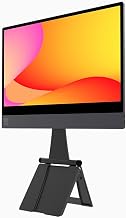
espresso Displays 15 + Ergonomic Magnetic Stand+ | Ultra-Thin 1080p Premium Portable Monitor with USB-C Connectivity, Ergonomic Setup for Work, Travel, and Multi-Device Compatibility
Best For:
Writers, long-session editors, and professionals who prioritize ergonomic comfort and a minimalist travel setup.
The espresso Displays 15+ targets creators who care as much about ergonomics as screen quality. Its ultra-thin profile and the Magnetic Stand+ system aim to create a cleaner, more comfortable laptop-plus-monitor posture — ideal for longer café sessions where neck and wrist comfort matter.
With a 1080p IPS panel, USB-C connectivity, and a premium-feeling build, this screen fits into a minimalist travel kit. The Magnetic Stand+ is designed to hold the display at an ergonomic angle without bulky folios or complex assemblies. Creators who spend hours writing, editing, or conducting client calls often prefer a monitor that improves posture — this can reduce fatigue during multi-hour sessions.
Real-life usage: picture a freelance editor setting up at a coffee shop with a MacBook and the espresso 15+ magnetically attached to a foldaway stand that positions the monitor at eye level. That kind of setup reduces neck strain and keeps the workspace tidy. The compact nature still allows it to slip into a messenger bag or briefcase for daily commuting.
Who this is best for: writers, editors, and professionals who spend extended periods working away from a desk and value ergonomic posture and an elegant, minimal aesthetic.
What to watch for: while ergonomics are the selling point, the panel is a standard 1080p IPS — good for productivity, but not necessarily the top pick for color-critical photo or video work. Also, magnetic stands are convenient but require careful handling when packing to avoid wear on the attachment surfaces.
Pros: Ergonomic Magnetic Stand+, ultra-thin design, USB-C convenience.
Cons: Standard 1080p panel may not satisfy color-critical creators, magnetic attachments need careful handling.
Check the latest price on Amazon.
Pros
- Magnetic Stand+ improves posture and desk ergonomics
- Ultra-thin, premium build for frequent commuters
- USB-C connectivity for a simple single-cable setup
Cons
- 1080p panel not ideal for critical color work
- Magnetic attachments require care when transporting
Check the latest price on Amazon.
Final Verdict
Choosing the right portable monitor for coffee-shop workdays comes down to a balance of screen size, resolution, connectivity, and comfort. If you need the maximum workspace and don’t mind the extra weight, the VisionOwl 18.5" gives you a near-desktop experience on the road. For creators seeking sharper detail and smoother motion in a compact form, the cocopar 16" 2.5K with 120Hz is an excellent mid-size pick. If you want a proven, dependable travel monitor with solid anti-glare performance and a long warranty, the ASUS ZenScreen is a reliable daily driver. Budget-conscious buyers will find the MNN 15.6" a practical every-day companion that covers the essentials, while the espresso Displays 15+ is the best option for those who place ergonomics and a refined travel setup at the top of the list.
When deciding, think about your primary use: color-critical editing pushes you toward higher color coverage and higher resolution; gaming tips you toward higher refresh rates; and long café sessions favor ergonomic stands and anti-glare surfaces. Don’t forget to check compatibility with your laptop’s USB-C port and whether you’ll need additional cables or a power adapter.
All five monitors reviewed here are solid choices depending on your priorities. If you’re still unsure, the ASUS ZenScreen is a safe all-around option, while the cocopar 16" is a forward-looking pick for creators who want higher resolution and smoother motion. Whichever you pick, adding a portable monitor to your kit will make coffee-shop workdays measurably more productive.
Check the latest price on Amazon.
Conclusion
These Portable monitors creators use during coffee shop workdays picks are trending now and offer great value and variety. Check the links above for latest prices and reviews.
As an Amazon Associate, I earn from qualifying purchases.
Tags:
portable monitor, travel monitor, USB-C monitor, portable second screen, monitors for creators, coffee shop work setup, best portable monitors
