Best Portable Monitors for Coffee Shop Work
As an Amazon Associate, I earn from qualifying purchases. This article may contain affiliate links, which means we may receive a commission at no extra cost to you.
As an Amazon Associate, I earn from qualifying purchases. This article may contain affiliate links, which means we may receive a commission at no extra cost to you.
Working from coffee shops means balancing comfort, connection, and mobility. A portable monitor can transform a cramped laptop screen into a productive dual-display workspace without adding the weight and bulk of a full desktop setup. This guide focuses on lightweight 14–16 inch FHD monitors that plug into your laptop, MacBook, phone, or gaming device via USB-C or HDMI. I’ll walk through practical benefits, what to watch for when buying, and several highly rated models suited to café work.
Why these monitors matter: they give you extra vertical space for spreadsheets, reference documents, web development, or creative work while being thin enough to slip into a backpack. You’ll learn which models prioritize battery-friendly USB-C power delivery, anti-glare performance, built-in stands or covers, and reliable speakers—practical features for coffee shop lighting and ambient noise. Throughout, recommendations are based on product specifications, customer feedback trends, and real-world use cases rather than personal hands-on testing.
Buying Guide
Key factors to consider before buying a portable monitor for coffee shop use:
Size and weight: 15.6-inch models offer familiar FHD workspace without being too large; 14-inch units are lighter and easier to balance near a small coffee table. Aim for under 2.2 lbs if you commute often.
Resolution and panel: Prioritize 1080p IPS panels for sharp text and wide viewing angles. IPS is better than TN for color and off-axis viewing—useful when you’re slightly angled or sharing the screen.
Connectivity and power: USB-C with DisplayPort Alt Mode is the most convenient—single-cable video + power if your laptop supports PD. HDMI is helpful for gaming consoles or older laptops. Check if the monitor needs external power or supports bus-power via USB-C.
Brightness and anti-glare: Coffee shops can be bright or have overhead lights. Look for good brightness (300 nits or more is ideal) and a matte or anti-reflective coating to reduce reflections.
Built-in stand/cover and case: A solid smart cover or kickstand makes café setups stable on uneven tables. Protective cases are essential if you toss the monitor in a bag.
Audio and ports: Built-in speakers are handy for calls, but expect limited bass. Headphone jacks, micro-HDMI, and USB hubs add flexibility.
Compatibility: Confirm macOS, Windows, Chrome OS, Android, and console compatibility. Some macOS users must enable DisplayPort over USB-C or use a lightweight adapter.
Durability and warranty: Look for metal edges or reinforced hinge areas and check warranty lengths. Customer feedback often highlights hinge longevity and screen uniformity.
Practical tips: Bring a short USB-C to USB-C cable, an HDMI cable, and a small power bank with PD if your laptop or monitor needs extra power. For long editing or color-sensitive work, consider higher color-gamut models; otherwise, prioritize portability and battery convenience.
Comparison to alternatives: Tablets can act as second screens via apps but usually require more setup and have smaller screen areas. A full external monitor is bulkier but offers larger panels and higher brightness. Portable monitors strike a middle ground for café workers who need a dedicated second screen without the load of a desktop display.
Who should buy: Remote professionals, developers, designers, students, and digital nomads who want a true second display on the go. Who may not need one: those who rarely use more than a single app at a time or who mainly consume media rather than produce it.
MNN Portable Monitor 15.6inch FHD 1080P USB C HDMI Gaming Ultra-Slim IPS Display w/Smart Cover & Speakers,HDR Plug&Play, External Monitor for Laptop PC Phone Mac (15.6” 1080P)

Best For:
Remote professionals, students, and casual creators who want a lightweight, plug-and-play second screen for cafés and travel.
The MNN 15.6" FHD portable monitor aims squarely at mobile professionals who want a no-fuss second display for coffee shop work. With a 1080p IPS panel, USB-C and HDMI inputs, and a slim profile, it’s designed to plug into laptops, phones, and consoles without hogging your backpack space. The screen’s HDR support and built-in stereo speakers are useful extras for casual media playback and video calls; they won’t replace studio speakers but are perfectly fine for background audio during a remote meeting.
In a café setting the MNN stands out for its smart cover—this doubles as a protective sleeve and an adjustable stand so you can set an ergonomic viewing angle on small tables. The IPS panel provides wide viewing angles, which helps when you’re sharing your screen or working at an angle on a crowded table. HDR enhances contrast for movies and photos, and the 1080p resolution keeps text crisp for long sessions of editing or writing.
Connectivity is flexible: USB-C allows for single-cable setups with compatible laptops, while HDMI opens the door to gaming consoles or older laptops. If you regularly connect to a phone or tablet, confirm your device supports DisplayPort Alt Mode; otherwise, the included HDMI option keeps you covered. Customers often note that the brightness is adequate for indoor cafés but may struggle in direct sunlight, so position yourself away from strong window glare.
Practical considerations seen in customer feedback include cable management—bringing a short USB-C cable and a slim HDMI cable reduces table clutter—and the usefulness of the smart cover for protecting the screen when stowed. The build feels lightweight and travel-friendly; expect a thin profile that slips into most sleeves.
Who should buy this MNN monitor? Remote workers, students, and traveling creatives who need an affordable, portable second display with simple setup and a protective smart cover. Who may not need it: color-critical designers who demand higher color accuracy and pro-level color gamut, or users who need very high brightness for outdoor use.
Pros
- Lightweight and slim design
- USB-C and HDMI flexibility
- Protective smart cover and built-in speakers
Cons
- Brightness can be limited in direct sunlight
- Not for color-critical professional editing
Check the latest price on Amazon.
KYY Portable Monitor 15.6inch 1080P FHD USB-C, HDMI Computer Display HDR IPS Gaming Monitor w/Premium Smart Cover & Screen Protector, Speakers, for Laptop PC MAC Phone PS4 Xbox Switch

Best For:
Students, casual gamers, and remote workers seeking a travel-ready monitor with protective accessories.
The KYY 15.6" portable monitor blends a familiar laptop-sized screen with travel-friendly conveniences aimed at productivity and gaming. It features a full HD IPS panel, USB-C and HDMI inputs, and a premium smart cover plus a screen protector in the box—things that matter when you’re frequently opening and closing a monitor on café tables. HDR support and built-in speakers are included for richer visuals and clearer conference calls.
For coffee shop work, the KYY monitor’s strengths are its durable cover and straightforward connectivity. The included screen protector helps keep smudges and light scratches at bay during transport, while the smart cover doubles as a kickstand that provides stable angles on uneven tables. The IPS panel maintains legible text at different viewing angles, so you can pass someone a document or angle the screen without losing clarity.
Users who need a simple setup will appreciate the plug-and-play nature—USB-C connection offers video and power (when supported), while HDMI expands compatibility to gaming consoles or older machines. The monitor’s speakers are serviceable for video calls, though most people still prefer headphones in noisy cafés. Brightness is typically sufficient for indoor use, though you’ll want to avoid peak sunlight directly on the display.
Comparing KYY to standard alternatives: against a tablet used as a second screen, the KYY gives you a full 15.6" workspace with fewer app dependencies. Compared with larger desktop monitors, it sacrifices brightness and color depth for portability. Customer reports often praise its build-for-travel accessories and consistent performance for document editing, spreadsheets, and remote collaboration.
Who should buy the KYY monitor? Mobile workers, casual gamers, and students who value a ready-to-go package with protective accessories. Who may not need it: professionals requiring pro-grade color accuracy or photographers working in bright outdoor conditions.
Pros
- Includes screen protector and smart cover
- Good plug-and-play compatibility
- Serviceable built-in speakers
Cons
- Speakers are basic in noisy environments
- Not ideal for outdoor bright sunlight
Check the latest price on Amazon.
Laptop Screen Extender 1.87lbs Ultra-Portable & Ultra Slim, 14.2" FHD 1080P Dual Portable Monitor for 14"-17.3" Laptop, Plug & Play Travel Monitor Extender Compatible with Wins/Mac/Chrome/Android

Best For:
Commuters and digital nomads who need the lightest possible secondary monitor for cramped café or travel setups.
If ultra-lightweight portability is your top priority for coffee shop work, the 14.2" Laptop Screen Extender can be a strong contender. At approximately 1.87 lbs and a slim profile designed to attach to 14"–17.3" laptops, this external monitor focuses on minimal bulk without sacrificing a full 1080p workspace. The plug-and-play approach makes it convenient for quick setup: slide it beside your laptop, connect via USB-C or the supported cable options, and you’ve effectively gained a dual-display setup that’s easy to carry.
This model is particularly suited to commuters and digital nomads who frequently balance a laptop bag and a few essentials. The smaller 14.2" footprint is less intrusive on small café tables, and the lighter weight reduces shoulder strain during transit. Customers who’ve opted for this extender often mention its usefulness for side-by-side document comparison, coding on one screen and documentation on the other, or monitoring chat and email during meetings.
Its slim build makes trade-offs: the smaller screen gives less vertical space than a 15.6" monitor, and while 1080p keeps things sharp, creative professionals may feel constrained compared to larger, color-accurate displays. Brightness and speakers are usually adequate for indoor use but are not designed for heavy media consumption or outdoor work in bright sunlight.
Practical use cases include writers who keep research on one screen and the draft on the other, spreadsheet-heavy users who need extra columns visible, and programmers who like an uncluttered dual-view. The design works well with lap desks or small café tables because it’s easy to orient next to your laptop without requiring much surface area.
Who should buy this extender? Frequent commuters and those who prioritize light carry weight and minimal footprint. Who may not need it: people wanting a larger cinematic workspace or professionals requiring high-end color or brightness.
Pros
- Extremely lightweight and slim
- Fits next to 14"–17.3" laptops
- Good for tight tables and travel
Cons
- Smaller screen area than 15.6" models
- Not for color-critical or outdoor-bright workflows
Check the latest price on Amazon.
UFYQL Portable Monitor 15.6-inch FHD 1080P Ultra-Slim Travel External Monitor HDR IPS Gaming Display with Kickstand &Speakers USB-C HDMI Plug&Play,for Laptop PC Phone PS4/5 Xbox Switch

Best For:
Hybrid users who want a portable second screen that’s equally suitable for work and casual media on the go.
The UFYQL 15.6" portable monitor targets users who want a balance between productivity and casual entertainment while on the move. With a 1080p IPS panel, HDMI and USB-C inputs, HDR support, built-in speakers, and an integrated kickstand, it’s built for quick café deployments and flexible viewing angles. The ultra-slim chassis and plug-and-play compatibility make it straightforward to connect to a MacBook, Windows laptop, phone, or console.
In everyday coffee shop scenarios, the UFYQL’s kickstand gives you a stable base on uneven tables and allows quick angle changes to reduce glare. HDR helps images and videos pop a bit more than standard FHD displays, which is a nice perk when you switch between work and media consumption. The speakers are fine for voice calls and background audio, though you’ll likely prefer headphones in loud cafés.
Customers often highlight the monitor’s portability and ease of setup—connect a single USB-C cable to stream both power and display if your device supports it. The HDR and IPS combination makes it a better choice than basic portable panels if you occasionally do photo review or video playback, although it’s not a substitute for a color-calibrated studio monitor.
Compared with bulkier desktop monitors, the UFYQL sacrifices extreme brightness and professional color accuracy for weight and convenience. Compared with tablets running second-screen apps, it gives a true physical display without extra software or network-based lag.
Who should buy the UFYQL? People who split time between productivity and casual media, like freelance editors who sometimes preview clips, remote workers who stream video after work, or students who want a readable second screen for study sessions. Who may not need it: strict color professionals or those who work primarily outdoors in direct sunlight.
Pros
- Integrated kickstand for stability
- Good balance of HDR and IPS for visuals
- Simple USB-C/HDMI plug-and-play
Cons
- Not color-accurate for professional grading
- Speakers limited in noisy environments
Check the latest price on Amazon.
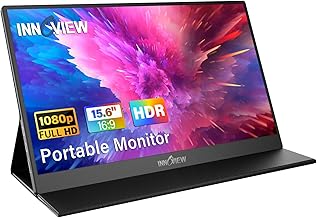
InnoView Portable Monitor, 15.6 Inch FHD 1080P HDMI USB C Second External Monitor for Laptop, Desktop, MacBook, Phones, Tablet, PS5/4, Xbox, Switch, Built-in Speaker with Protective Case
Best For:
Freelancers and remote workers looking for a dependable, travel-ready second screen with a protective case.
InnoView’s 15.6" FHD portable monitor is a veteran in the travel monitor category and has a reputation for reliable performance among mobile professionals. With USB-C and HDMI inputs, a protective case that doubles as a stand, and built-in speakers, it’s a well-rounded choice for those who frequently work outside of the office. Reviews and product specs suggest consistent panel quality, sensible accessory inclusion, and solid customer satisfaction for work-and-travel scenarios.
For coffee shop setups, the InnoView model offers a dependable balance of brightness, color reproduction, and stability. The protective case is a practical bonus—many users note the convenience of a case that protects during transit and converts to a stable stand on small tables. The IPS panel keeps text crisp and legible from various angles, which is helpful when elbow-to-elbow with other patrons.
This monitor’s strengths lie in steady performance and broad compatibility. It works with a wide range of devices—MacBooks, Windows laptops, phones with DisplayPort Alt Mode, and consoles. The in-built speakers are adequate for meetings and casual listening, though they’re not a substitute for quality headphones. Brightness levels perform well in typical indoor lighting, but like most portable monitors, expect some difficulty in direct outdoor sunlight.
Compared to lesser-known budget options, InnoView is often praised for better fit-and-finish and longer-term reliability based on customer feedback. That said, pro-level color graders and print designers may prefer a larger, color-calibrated desktop monitor. For everyday productivity, split-screen work, and remote meetings in cafés, it’s consistently recommended.
Who should buy the InnoView monitor? Frequent travelers, freelancers, and remote workers who want a reliable, easy-to-pack second screen with a protective case. Who may not need it: desktop-only professionals seeking the highest brightness or studio-level color accuracy.
Pros
- Protected by a case that converts to a stand
- Solid IPS display and reliable build quality
- Wide compatibility with devices
Cons
- Speakers are serviceable but not studio quality
- Limited brightness in direct sunlight
Check the latest price on Amazon.
Final Verdict
Portable monitors are one of the most practical upgrades for anyone who spends time working in coffee shops, shared workspaces, or traveling between meetings. They offer a meaningful productivity boost: more screen real estate for multitasking, easier document comparison, and a more comfortable posture when you raise your laptop to eye level.
Choose the smaller 14.2" extender if the absolute lightest carry weight and smallest footprint are your priorities. Opt for a 15.6" model if you value a larger workspace for spreadsheets, side-by-side documents, or light creative work. Look for USB-C with power delivery when you want single-cable convenience and bring a small power bank if your laptop or monitor needs extra juice.
Across the models highlighted, you get a balance of portability, useful accessories like smart covers or protective cases, and the connectivity options needed for coffee shop setups. If your work demands professional color accuracy or very high brightness for outdoor use, consider a larger studio monitor or a calibrated desktop solution instead. Otherwise, any of the recommended units will significantly improve productivity and make café work more comfortable and effective.
If you’re ready to upgrade your coffee shop setup, pick the model that best matches your balance of screen size, weight, and connector preferences—and don’t forget a short USB-C cable and a slim HDMI cable for tidy setups.
Conclusion
These Portable monitor for working from coffee shops picks are trending now and offer great value and variety. Check the links above for latest prices and reviews.
As an Amazon Associate, I earn from qualifying purchases.
Tags:
portable monitor, coffee shop setup, USB-C monitor, 15.6 inch portable display, travel monitor, second screen laptop, FHD portable monitor
